
kubernetes-subpath用法(把文件挂载在已存在的目录下,不覆盖原目录)
以ngxin的配置文件为例子:
nginx-deployment.yaml :

apiVersion: v1

kind: ConfigMap

metadata:

name: nginx-cm

data:

nginx.conf: |

user nginx;

worker_processes 4;

worker_rlimit_nofile 48127;

error_log /var/log/nginx/error.log warn;

pid /var/run/nginx.pid;

events {

multi_accept on;

worker_connections 16384;

use epoll;

}

http {

include /etc/nginx/mime.types;

default_type application/octet-stream;

log_format main '$remote_addr - $remote_user [$time_local] "$request" '

'$status $body_bytes_sent "$http_referer" '

'"$http_user_agent" "$http_x_forwarded_for"';

access_log /var/log/nginx/access.log main;

sendfile on;

#tcp_nopush on;

keepalive_timeout 65;

#gzip on;

#include /etc/nginx/conf.d/*.conf;

server {

listen 80;

server_name localhost;

location / {

root /usr/share/nginx/html;

index index.html index.htm;

}

error_page 500 502 503 504 /50x.html;

location = /50x.html {

root /usr/share/nginx/html;

}

location /nginx_status {

#allow 127.0.0.1;

#deny all;

access_log off;

stub_status on;

}

}

}

---

apiVersion: extensions/v1beta1

kind: Deployment

metadata:

name: nginx

spec:

replicas: 1

template:

metadata:

labels:

app: nginx

spec:

nodeSelector:

kubernetes.io/hostname: 192.168.5.86

containers:

- name: nginx

image: nginx:latest

imagePullPolicy: IfNotPresent

volumeMounts:

- mountPath: /etc/nginx/nginx.conf

name: nginx-config

subPath: etc/nginx/nginx.conf

ports:

- containerPort: 80

volumes:

- name: nginx-config

configMap:

name: nginx-cm

items:

- key: nginx.conf

path: etc/nginx/nginx.conf
创建pod:
kubectl create -f ./nginx-deployment.yaml
查看nginx的目录的旧文件是否还在:
$ kubectl exec -it nginx-6b76cd9c54-fb2q8 -- ls /etc/nginx/

conf.d		koi-utf  mime.types  nginx.conf   uwsgi_params

fastcgi_params	koi-win  modules     scgi_params  win-utf
查看nginx.conf是否被更新了:
$ kubectl exec -it nginx-6b76cd9c54-fb2q8 -- cat /etc/nginx/nginx.conf

user nginx;

worker_processes 4;

worker_rlimit_nofile 48127;

error_log /var/log/nginx/error.log warn;

pid /var/run/nginx.pid;

events {

multi_accept on;

worker_connections 16384;

use epoll;

}

http {

include /etc/nginx/mime.types;

default_type application/octet-stream;

log_format main '$remote_addr - $remote_user [$time_local] "$request" '

'$status $body_bytes_sent "$http_referer" '

'"$http_user_agent" "$http_x_forwarded_for"';

access_log /var/log/nginx/access.log main;

sendfile on;

#tcp_nopush on;

keepalive_timeout 65;

#gzip on;

#include /etc/nginx/conf.d/*.conf;

server {

listen 80;

server_name localhost;

location / {

root /usr/share/nginx/html;

index index.html index.htm;

}

error_page 500 502 503 504 /50x.html;

location = /50x.html {

root /usr/share/nginx/html;

}

location /nginx_status {

#allow 127.0.0.1;

#deny all;

access_log off;

stub_status on;

}

}

}
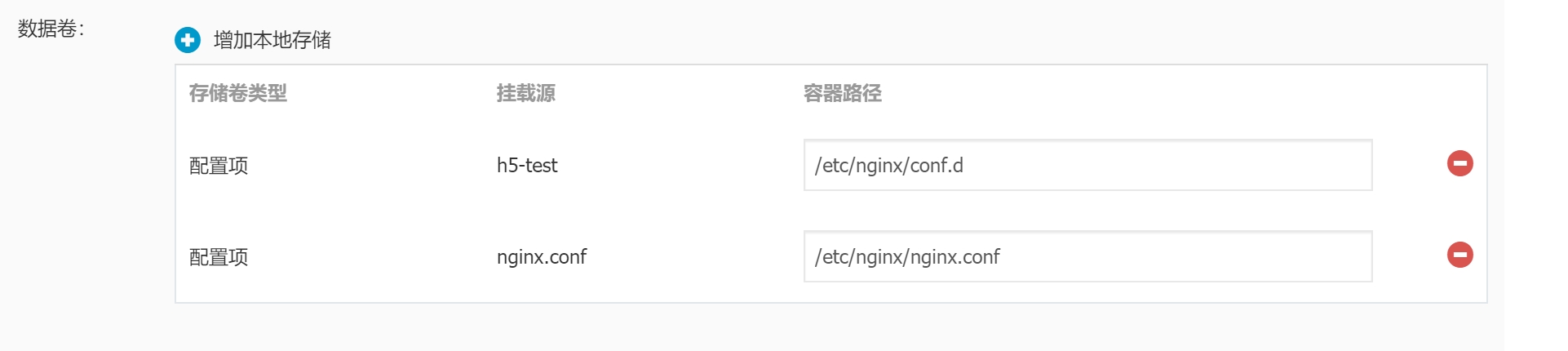
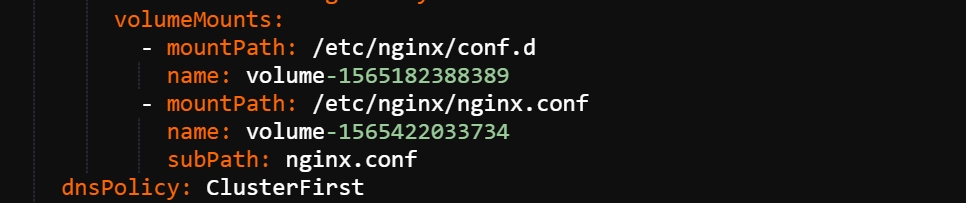
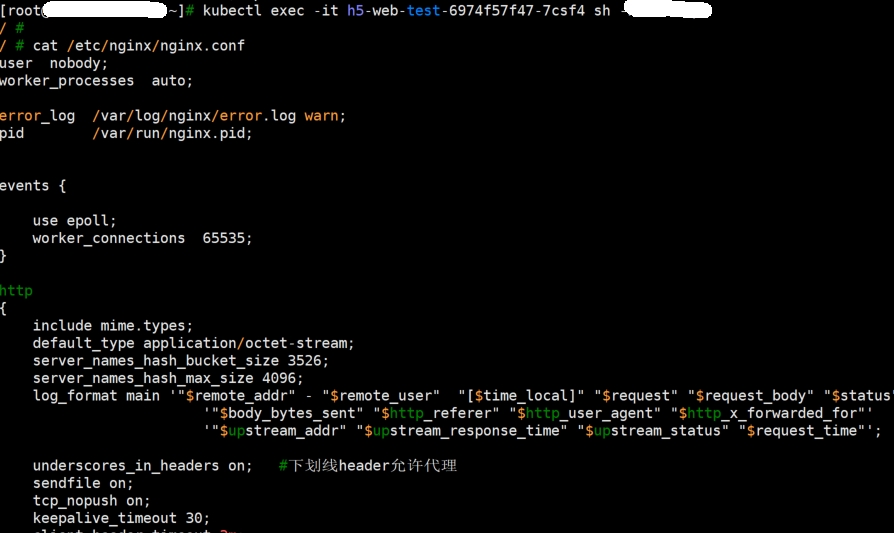
实例配置:
kubernetes-subpath用法(把文件挂载在已存在的目录下,不覆盖原目录)的更多相关文章
- linux下cp覆盖原so文件时引起的段错误原因确定
原创作品,转载请注明出处http://www.cnblogs.com/leo0000/p/5694416.html 最近因为一个很有意思的段错误学习了一些新的东西. 当时现象是这样的,程序正在运行,系 ...
- uboot各种目录下的文件作用
uboot下载地址:http://ftp.denx.de/pub/u-boot/ 1.目录分布 2.目录结构变化: u-boot-2010.03及以前版本├── api ...
- uboot——详解各目录下的文件作用
uboot下载地址:http://ftp.denx.de/pub/u-boot/ 1.目录分布 2.目录结构变化: u-boot-2010.03及以前版本 ├── api ...
- Qt编译目录下exe文件执行报错问题的解决办法
使用Qt5.9.3+vs2017环境,编译项目生成Debug目录,运行其中的exe文件,出现以下错误(qt creator调试状态下或出安装包后是可以运行的): 经过查阅资料,发现是我重新配置Qt开发 ...
- QT工程构建目录下,将生成的中间文件和可执行文件分离
在QT工程中,当我们选择了构建目录后,编译生成程序后,总会发现在debug目录下会有混淆着各类文件,如下图 很多时候,我们又仅仅只需要可执行文件或者自定义的动态链接库.如下图 当然,如果不觉得麻烦,有 ...
- Linux文件挂载命令mount
在linux系统中硬盘.u盘.光驱等其他设备都需要挂载后才能正常使用.下面是对挂载命令mount使用方法的一些总结. 文件挂载命令mountmount [-t 文件系统类型][-L卷标名][-o特殊选 ...
- [置顶]
kubernetes创建资源yaml文件例子--pod
kubernetes创建pod的yaml文件,参数说明 apiVersion: v1 #指定api版本,此值必须在kubectl apiversion中 kind: Pod #指定创建资源的角色/类型 ...
- [CentOS7] 挂载iso镜像文件到/media目录下
声明:本文主要总结自:鸟哥的Linux私房菜-第七章.Linux 磁碟與檔案系統管理,如有侵权,请通知博主 首先,设置虚拟机让它加载iso镜像文件到CD/DVD设备中,这个设备对应于Linux下的/d ...
- Linux不同机器文件挂载
由于此前发布项目应用时,需要对两台文件服务器进行文件挂载,所以才实际第一次接触到这个名词,但由于一直以来自己没有真正的去操作过,只是停留在一些理论层次,所以今天记录一下这个实现过程,以备后用. 使用设 ...
随机推荐
- danci1
oddball 英 ['ɒdbɔːl] 美 adj. 古怪的:奇怪的 n. 古怪:古怪的人 rather than 英 美 而不是:宁可…也不愿 grasp 英 [grɑːsp] 美 [ɡræsp] ...
- Linux——查询服务器公网IP
前言 服务器查看IP,十分简单,但是如何查看公网IP呢? 步骤 网站:http://www.cip.cc/ 命令行查询(详细): UNIX/Linux: #curl cip.cc Windows: & ...
- linux中添加自定义命令
centos下设置alias别名,比较简单,例如: vim /root/.bashrc addalias rm='rm -i' Linux alias设置指令的别名命令详解 功能说明:设置指令的别名. ...
- vue组件通信方式(多种方案)
一.Props传递数据 components |-Grandson1.vue //孙子1 |-Grandson2.vue //孙子2 |-Parent.vue //父亲 |-Grandson1.vue ...
- apache commons-configuration包读取配置文件
1.pom依赖添加 <!-- 配置文件读取 --> <dependency> <groupId>commons-configuration</groupId& ...
- c++实用语法
数组的快捷初始化 int inq[110] memset(inq, 0, sizeof(inq)); string到char数组的转换: string str ("Please split ...
- robot framework的使用方法
1.后台代码: 目录结构: 测试代码:Arithmetic.py 2.开始编写用例 直接在eclipse上新建一个txt文件即可,或者是通过ride编写用例. (1).首先在eclipse上新建目录T ...
- 事件类型(onchange)
<!DOCTYPE html> <html lang="en"> <head> <meta charset="UTF-8&quo ...
- file 的类型 input
上传你选择的文件和相关信息.在 HTML 文档中 <input type="file"> 标签每出现一次,一个 FileUpload 对象就会被创建.该元素包含一个文本 ...
- MySQL 分库分表 dble简单使用
一.运行环境 Host Name IP DB Mod data0 172.16.100.170 mysql data1 172.16.100.171 mysql data2 172.16.10 ...