
osg::Texture2D 贴纹理
#ifdef _WIN32

#include <Windows.h>

#endif // _WIN32

#include<iostream>

#include <osgViewer/Viewer>

#include <osgViewer/ViewerEventHandlers>

#include <osgViewer/CompositeViewer>

#include <osgDB/ReadFile>

#include <osg/Geode>

#include <osg/Node>

#include <osg/Geometry>

#include <osg/GraphicsContext>

#include <osg/ShapeDrawable>

#include <osg/Material>

#include <osg/Image>

#include <osg/Texture2D>

#include <osg/TexEnv>

#include <osg/TexGen>

#include <osg/NodeVisitor>

#include <osg/MatrixTransform>

#include <osg/PositionAttitudeTransform>

#include <osg/AnimationPath>

#include <osg/Matrixd>

#include <osg/PagedLOD>

#include <osg/Camera>

#include <osgText/Text>

#include <osgGA/TrackballManipulator>

#include <osgGA/GUIEventHandler>

#include <osgGA/CameraManipulator>

#include <osgGA/StandardManipulator>

#include <osgGA/OrbitManipulator>

#include <osgGA/TrackballManipulator>

#include <osgUtil/IntersectionVisitor>

#include <osgUtil/LineSegmentIntersector>

osg::Camera* createTextHUD()

{

    osg::ref_ptr<osg::Geode> geode1 = new osg::Geode;

    osg::ref_ptr<osgText::Text> text1 = new osgText::Text;

    osg::ref_ptr<osg::Camera> camera1 = new osg::Camera;

    osg::ref_ptr<osg::Geometry> geometry1 = new osg::Geometry;

    camera1->setViewMatrix(osg::Matrix::identity());

    camera1->setRenderOrder(osg::Camera::POST_RENDER);

    camera1->setClearMask(GL_DEPTH_BUFFER_BIT);

    camera1->setAllowEventFocus(false);

    camera1->setReferenceFrame(osg::Transform::ABSOLUTE_RF);

    camera1->setProjectionMatrixAsOrtho2D(-, , -, );

    text1->setFont("Fonts/simhei.ttf");

    text1->setCharacterSize();

    text1->setText(L"OSG 中文字体");

    text1->setPosition(osg::Vec3(0.0,0.0,0.0));

    //压入顶点

    osg::Vec3Array *vecArray = new osg::Vec3Array;

    vecArray->push_back(osg::Vec3(0.0,0.0,0.0));

    vecArray->push_back(osg::Vec3(200.0, 0.0, 0.0));

    vecArray->push_back(osg::Vec3(200.0, 100.0, 0.0));

    vecArray->push_back(osg::Vec3(0.0, 100.0, 0.0));

    geometry1->setVertexArray(vecArray);

    //法线

    osg::Vec3Array *vecNorm = new osg::Vec3Array;

    vecNorm->push_back(osg::Vec3(0.0,0.0,1.0));

    geometry1->setNormalArray(vecNorm);

    geometry1->setNormalBinding(osg::Geometry::BIND_OVERALL);

    //设置纹理

    osg::Vec2Array *vec2Coord = new osg::Vec2Array;

    vec2Coord->push_back(osg::Vec2(0.0,0.0));

    vec2Coord->push_back(osg::Vec2(1.0, 0.0));

    vec2Coord->push_back(osg::Vec2(1.0, 1.0));

    vec2Coord->push_back(osg::Vec2(0.0, 1.0));

    geometry1->setTexCoordArray(,vec2Coord);

    osg::DrawArrays *drawArrays1 = new osg::DrawArrays(osg::PrimitiveSet::QUADS, , );

    //geometry1->setPrimitiveSet(0,drawArrays1);

    geometry1->addPrimitiveSet(drawArrays1);

    //贴纹理

    osg::ref_ptr<osg::Image> image1 = osgDB::readImageFile("D:\\image_1\\20190325092002-save.jpg");

    osg::Texture2D *texture2d1 = new osg::Texture2D;

    texture2d1->setImage(image1);

    geometry1->getOrCreateStateSet()->setTextureAttributeAndModes(, texture2d1, osg::StateAttribute::ON);

    //关闭灯光

    geometry1->getOrCreateStateSet()->setMode(GL_LIGHTING, osg::StateAttribute::OFF);

    geode1->getOrCreateStateSet()->setMode(GL_LIGHTING,osg::StateAttribute::OFF);

    geode1->addDrawable(geometry1);

    geode1->addDrawable(text1);

    camera1->addChild(geode1.get());

    return camera1.release();

}

int main()

{

    osg::ref_ptr<osgViewer::Viewer> viewer1 = new osgViewer::Viewer;

    osg::ref_ptr<osg::Group> group1 = new osg::Group;

    //osg::ref_ptr<osg::Node> node1 = osgDB::readNodeFile("D:\\参考手册\\BIM\\osg\\build20190628.osgb");

    osg::ref_ptr<osg::Node> node2 = osgDB::readNodeFile("D:\\参考手册\\BIM\\osg\\build1.osgb");

    group1->addChild(node2.get());

    group1->addChild(createTextHUD());

    viewer1->setSceneData(group1.get());

    viewer1->setUpViewInWindow(,,,,);

    viewer1->run();

}
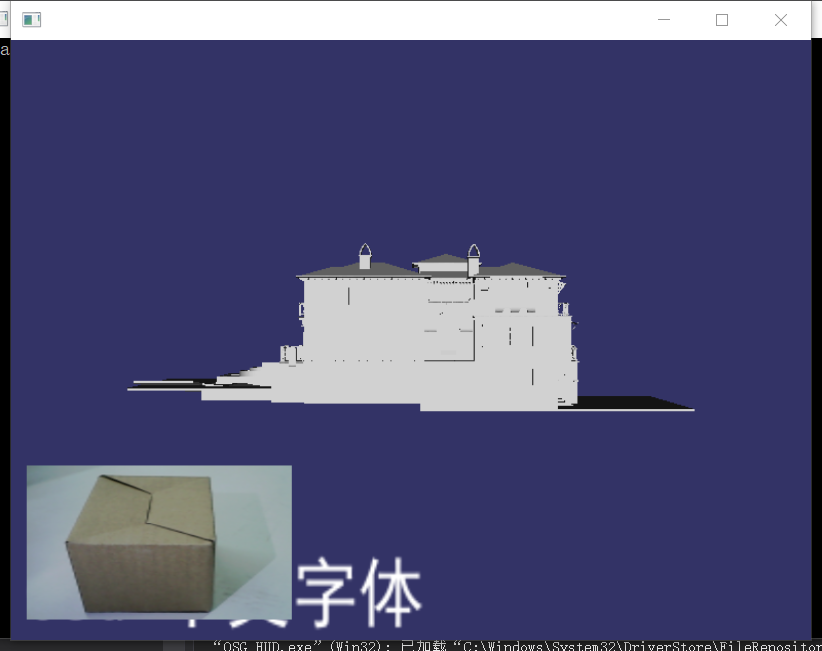
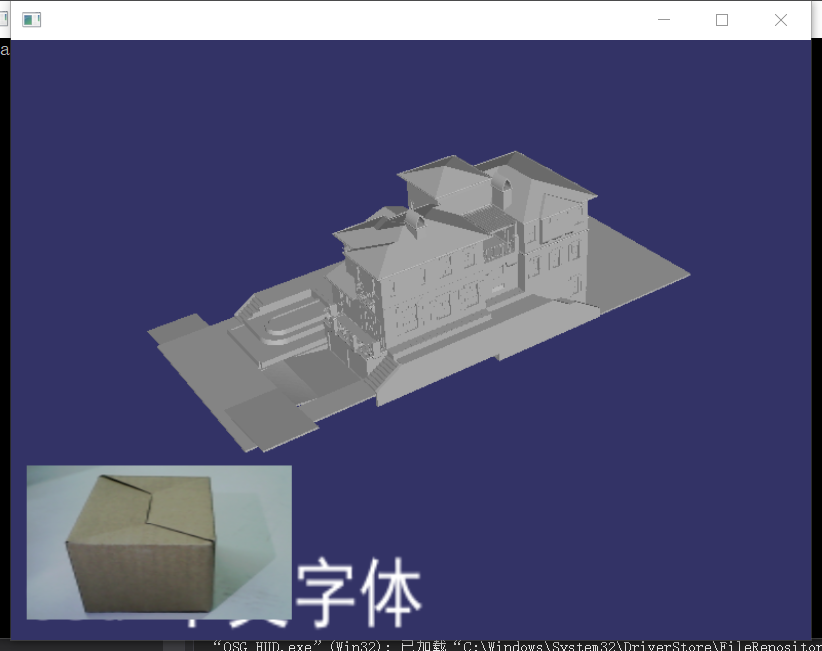
osg::Texture2D 贴纹理的更多相关文章
- osg gdal加载tif数据文件
osg加载.tif地形数据文件 #ifdef _WIN32 #include <Windows.h> #endif // _WIN32 #include <iostream> ...
- osg模型部分节点旋转
osg::ref_ptr<osg::Geode> CreateBox() { osg::ref_ptr<osg::Geode> geode = new osg::Geode; ...
- osg添加纹理示例
转自http://www.cnblogs.com/ylwn817/articles/1976851.html #include <osgDB/ReadFile>#include <o ...
- osg使用shader动态修改纹理坐标
#include <osg/Node> #include <osg/Geometry> #include <osg/Notify> #include <osg ...
- OSG学习:计算纹理坐标
在很多时候,直接指定纹理坐标是非常不方便的,如曲面纹理坐标,只有少数的曲面(如圆锥.圆柱等)可以在不产生扭曲的情况下映射到平面上,其他的曲面在映射到表面时都会产生一定程度的扭曲.一般而言,曲面表面的曲 ...
- OSG绘制金字塔geode+动态纹理坐标
osg::Node* createPyramidModel() { // create the root node which will hold the model. osg::Group* roo ...
- 基于osg的python三维程序开发(三)------几何形体及纹理
def createScene(): geode = osg.Geode() pointsGeom = osg.Geometry() vertices = osg.Vec3Array() vertic ...
- osg纯手工画球+贴纹理
手动计算球面顶点的坐标,纹理坐标,来画球并贴纹理 其中createSphereGeom()函数的的二个参数为18,意思是在经纬度上每10度设一个点,因为经度一共是180度,180/18=10,相当于横 ...
- OSG快速生成一个带有纹理的四边形Geometry
可以使用Geometry头文件中的 Geometry* createTexturedQuadGeometry osg::ref_ptr<osg::Texture2D> texture = ...
随机推荐
- 在STM32F746G-DISCO开发板上使用Nabto + FreeRTOS的演示热泵应用
当使用STM32 ARM Cortex-M微控制器时,ST的免费嵌入式软件STM32Cube提供了所有必要的驱动程序和中间件组件,以减少初始的开发工作.在上述提到的中间件组件中,其中一个是非常受欢迎的 ...
- G1混合式GC与三色标记算法详解【纯理论】
继续基于上一次https://www.cnblogs.com/webor2006/p/11146273.html的理论进一步了解G1. G1收集概览: G1算法将堆划分为若干个区域(Region),它 ...
- SQL进阶17-变量的声明/使用(输出)--全局变量/会话变量--用户变量/局部变量
/*进阶17 变量 系统变量: 全局变量: 会话变量: 自定义变量: 用户变量: 局部变量: */ /* #一: 系统变量 #说明: 变量由系统提供,不是用户定义的,属于服务器层面 #使用的语法 #1 ...
- 【PAT-一道看着很难的水题】L2-023. 图着色问题
水题!没其他想说的,还以为可以搞点高大上的搜索呢!十五分钟,暴力两重循环就OK了! 代码如下: #include<iostream> #include<stdio.h> #in ...
- Multiple inheritance in Go
原文:http://golangtutorials.blogspot.com/2011/06/multiple-inheritance-in-go.html --------------------- ...
- region特征
一: 查看阈值之后的region特征,可以通过特征检测来看,在工具栏上 region特征分三部分: 1.基础特征: region面积,中心,宽高,左上角及右下角坐标,长半轴短半轴椭圆方向,洞数及其面积 ...
- tomcat 处理HTTP请求
一.Tomcat是什么?Tomcat是一个Web应用服务器,同时也是一个Servlet/JSP容器.Tomcat作为Servlet容器,负责处理客户端请求,把请求传送给Servlet,并将Servle ...
- 线程(C++11)
不同平台.框架.语言所使用的线程函数不同.对于初学者选择一种适合自己的,用熟用透即可. Windows中,CreateThread() Linux中,pthread_create() MFC框架中,A ...
- link cut tree 洞穴勘测
/*[bzoj2049][Sdoi2008]Cave 洞穴勘测 2014年7月30日1,06923Description 辉辉热衷于洞穴勘测.某天,他按照地图来到了一片被标记为JSZX的洞穴群地区 . ...
- NCNN使用总结
目录 NCNN简介 NCNN注意事项 NCNN使用心得 小技巧 小想法 NCNN简介 ncnn 是一个为手机端极致优化的高性能神经网络前向计算框架.ncnn 从设计之初深刻考虑手机端的部署和使用.无第 ...