
webservice的cxf和spring整合发布
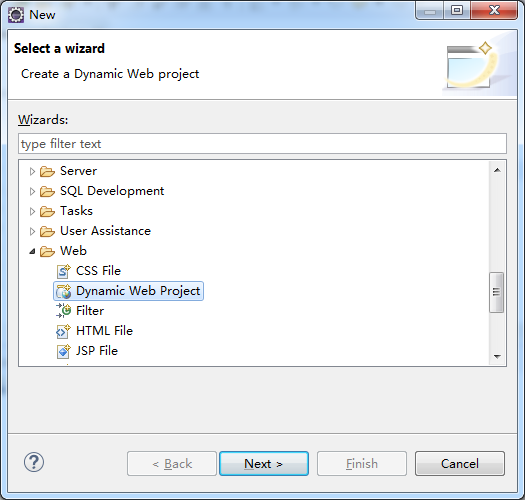
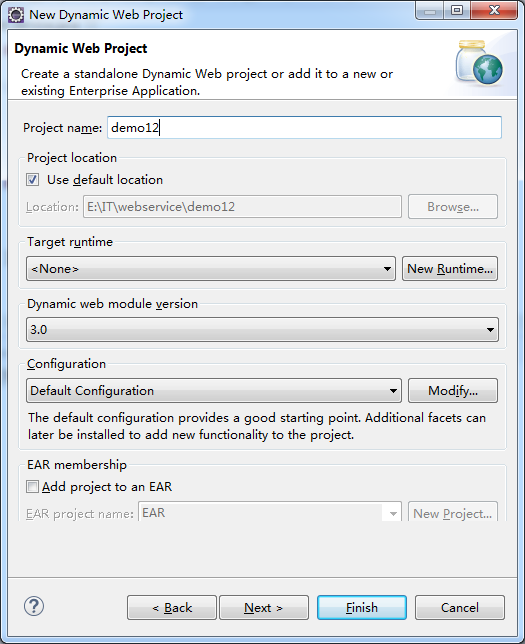
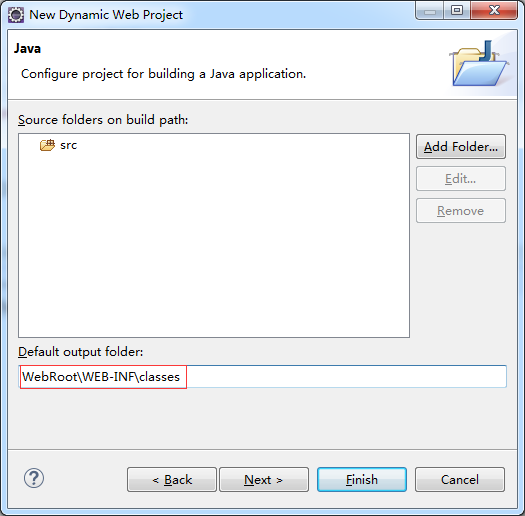
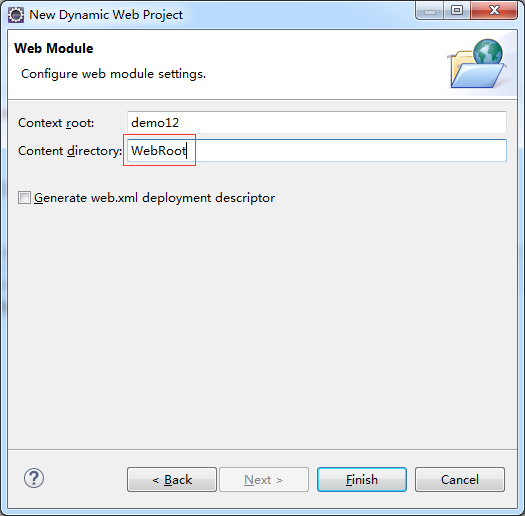
1、新建一个web项目
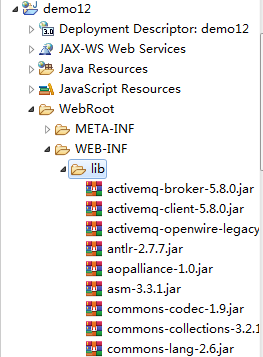
2、导入cxf相应的jar包,并部署到项目中
3、服务接口
 package com.xiaostudy;

 /**

  * @desc 服务器接口

  * @author xiaostudy

  *

  */

 public interface Test_service {

     public String getNumber(String number);

 }
4、服务接口实现类
 package com.xiaostudy;

 import javax.jws.WebService;

 import javax.xml.ws.BindingType;

 import javax.xml.ws.soap.SOAPBinding;

 /**

  * @desc 服务器接口实现类

  * @author xiaostudy

  *

  */

 @WebService

 @BindingType(SOAPBinding.SOAP12HTTP_BINDING)//SOAP1.2声明

 public class Test_serviceImpl implements Test_service {

     /**

      * @desc 处理客户端的数据,并返回数据

      * @param number 参数

      * @return String 返回数据类型

      */

     @Override

     public String getNumber(String number) {

         System.out.println("我服务器端执行了。。。。");

         return number+"_xiaostudy";

     }

 }
5、编写applicationContext.xml
 <?xml version="1.0" encoding="utf-8"?>

 <beans xmlns="http://www.springframework.org/schema/beans"

     xmlns:xsi="http://www.w3.org/2001/XMLSchema-instance" xmlns:jaxws="http://cxf.apache.org/jaxws"

     xmlns:jaxrs="http://cxf.apache.org/jaxrs" xmlns:cxf="http://cxf.apache.org/core"

     xsi:schemaLocation="http://www.springframework.org/schema/beans

                             http://www.springframework.org/schema/beans/spring-beans.xsd

                             http://cxf.apache.org/jaxrs http://cxf.apache.org/schemas/jaxrs.xsd

                             http://cxf.apache.org/jaxws http://cxf.apache.org/schemas/jaxws.xsd

                             http://cxf.apache.org/core http://cxf.apache.org/schemas/core.xsd">

     <!-- <jaxws:server发布SOAP协议的服务 ,对JaxWsServerFactoryBean类封装-->

     <jaxws:server address="/number" serviceClass="com.xiaostudy.Test_serviceImpl">

         <jaxws:serviceBean>

             <ref bean="test_serviceImpl"/>

         </jaxws:serviceBean>

         <!-- 配置拦截器 -->

         <jaxws:inInterceptors>

             <ref bean="inInterceptor"/>

         </jaxws:inInterceptors>

         <jaxws:outInterceptors>

             <ref bean="outInterceptor"/>

         </jaxws:outInterceptors>

     </jaxws:server>

     <!-- 配置服务实现类 -->

     <bean name="test_serviceImpl" class="com.xiaostudy.Test_serviceImpl"/>

     <!-- 配置拦截器的bean -->

     <bean name="inInterceptor" class="org.apache.cxf.interceptor.LoggingInInterceptor"/>

     <bean name="outInterceptor" class="org.apache.cxf.interceptor.LoggingOutInterceptor"/>

 </beans>
6、编写web.xml
 <?xml version="1.0" encoding="UTF-8"?>

 <web-app xmlns:xsi="http://www.w3.org/2001/XMLSchema-instance"

          xmlns="http://java.sun.com/xml/ns/javaee"

          xsi:schemaLocation="http://java.sun.com/xml/ns/javaee http://java.sun.com/xml/ns/javaee/web-app_3_0.xsd" id="WebApp_ID" version="3.0">

     <display-name>ws_2_cxf_spring_server</display-name>

     <!-- 设置spring的环境 -->

     <context-param>

         <!--contextConfigLocation是不能修改的  -->

         <param-name>contextConfigLocation</param-name>

         <param-value>classpath:applicationContext.xml</param-value>

     </context-param>

     <listener>

         <listener-class>org.springframework.web.context.ContextLoaderListener</listener-class>

     </listener>

     <!-- 配置CXF的Servlet -->

     <servlet>

         <servlet-name>CXF</servlet-name>

         <servlet-class>org.apache.cxf.transport.servlet.CXFServlet</servlet-class>

     </servlet>

     <servlet-mapping>

         <servlet-name>CXF</servlet-name>

         <url-pattern>/ws/*</url-pattern>

     </servlet-mapping>

     <welcome-file-list>

         <welcome-file>index.html</welcome-file>

         <welcome-file>index.htm</welcome-file>

         <welcome-file>index.jsp</welcome-file>

         <welcome-file>default.html</welcome-file>

         <welcome-file>default.htm</welcome-file>

         <welcome-file>default.jsp</welcome-file>

     </welcome-file-list>

 </web-app>
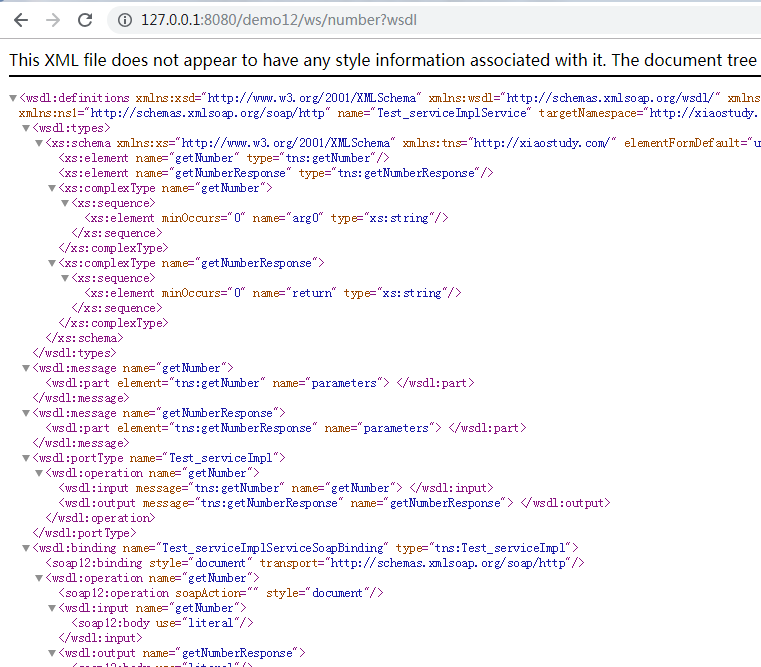
7、Tomcat服务开启
webservice的cxf和spring整合发布的更多相关文章
- 【WebService】WebService之CXF和Spring整合(六)
前面介绍了WebService与CXF的使用,项目中我们经常用到Spring,这里介绍CXF与Spring整合 步骤 1.创建一个Maven Web项目,可以参照:[Maven]Eclipse 使用M ...
- webservice的cxf和spring整合客户端开发
1.新建一个java项目 2.导入cxf相关的jar包,并部署到项目中 3.用命令生成客户端使用说明文档 wsdl2java -p com.xiaostudy -d . http://127.0.0. ...
- Java WebService 教程系列之 Spring 整合 CXF
Java WebService 教程系列之 Spring 整合 CXF 一.引入 jar 包 <dependency> <groupId>org.apache.cxf</ ...
- 13_CXF和Spring整合发布服务
[服务端] 第一步:建立一个Web项目 第二步:填充CXF jar包 第三步:创建接口及服务类 [工程截图(对比之前的WebService_CXF_Server00)] [applicationCon ...
- 浅谈WebService之JAX-RS与spring整合
背景:首先谈一下webservice: 1.Web service是一个平台独立的,低耦合的,自包含的.基于可编程的web的应用程序, 可使用开放的XML(标准通用标记语言下的一个子集)标准来描述.发 ...
- CXF和spring整合遇到的问题:No bean named 'cxf' is defined
今天在做ws和spring整合的时候,很不幸的遇到了这个问题,百度了好久,竟然没人遇到这个问题,后来谷歌了一下,都是遇到这个问题的了...在看到一篇文章中提到了cxf.xml,所以我果断的打开这个配置 ...
- WebService学习之旅(三)JAX-WS与Spring整合发布WebService
Spring本身就提供了对JAX-WS的支持,有兴趣的读者可以研究下Spring的Spring-WS项目,项目地址: http://docs.spring.io/spring-ws/sites/1.5 ...
- (七)CXF之与spring整合发布web服务
一.需求分析 用spring发布服务 二.案例 2.1 引入maven依赖 <dependencies> <!-- 添加Spring支持 --> <dependency& ...
- cxf和spring结合,发布restFull风格的服务
rest(Representational State Transfer):表现层状态转化,它是一种风格,用于资源定位,例如:http://ip:port/user/student/001 和资源操作 ...
随机推荐
- java中的 final 关键字 修饰引用时的问题
final使得被修饰的变量”不变”,但是由于对象型变量的本质是“引用”,使得“不变”也有了两种含义:引用本身的不变,和引用指向的对象不变. 引用本身的不变: final StringBuffer a= ...
- Ignite缓存管理初体验
Ignite缓存管理初体验:ignite服务端配置,大家可以用参考官方进行配置(或者使用默认配置也可以). 本文中的ignite使用版本是1.7,与spring结合使用.maven依赖配置 ignit ...
- php微信支付回调验证
//字典排序拼接字符串 function getWxPaySignature($arr){ ksort($arr); $str = ''; foreach ($arr as $k=>$a){ $ ...
- mac下python环境pip报错[SSL: TLSV1_ALERT_PROTOCOL_VERSION] tlsv1 alert protocol version (_ssl.c:590) 的解决方法
1.mac下python环境pip报错: issuserdeMacBook-Pro:~ issuser$ pip install pyinstallerCollecting pyinstaller ...
- matplotlib中的legend()—显示图例
源自 matplotlib中的legend()——用于显示图例 -- 博客园 http://www.cnblogs.com/yinheyi/p/6792120.html legend()的一个用法: ...
- 不受路径限制的 HALCON开发环境, 并且初始化两个Picture控件;
知识储备: http://bbs.csdn.net/topics/391829463 关于 添加第三方库的方式 http://www.ihalcon.com/read-3730.html VS ...
- yii2引入js和css
assets/AppAsset.php public $css = [ 'css/site.css', 'css/font/css/font-awesome.min.css', 'css/doc.cs ...
- Ajax 报错 500 (Internal Server Error)
==========error======={"readyState":4,"responseText":"<html><head& ...
- Jenkins的权限控制和Rundeck的远程认证
1.权限控制的基本设置 1.1选择基于角色权限的分配策略 1.2 配置全局权限和项目权限 具体的权限对应关系见下表: Overall(全局) Credentials(凭证) Slave(节点) Job ...
- hdu5716
地址: 题目: 带可选字符的多字符串匹配 Time Limit: 2000/1000 MS (Java/Others) Memory Limit: 65536/65536 K (Java/Oth ...