
Vue2.5开发去哪儿网App 城市列表开发之 兄弟组件间联动及列表性能优化
一, 兄弟组件间联动
1. 点击城市字母,左侧对应显示
给遍历的 字母 添加一个点击事件:
Alphabet.vue
@click="handleLetterClick"
    handleLetterClick (e) {
    //获取对应的字母

      this.$emit('change', e.target.innerHTML)

    }
在 父组件City.vue 中,监听
<city-alphabet :cities="cities" @change="handleLetterChange"></city-alphabet>
    handleLetterChange (letter) {

      this.letter = letter

    }
然后转发给子CityList组件:
<city-list :letter="letter"></city-list>
CityList组件,监听:
添加 ref属性

<div class="area" v-for="(city,key) in cities" :key="key" :ref="key">

        <div class="title border-topbottom">{{key}}</div>

        <div class="item-list">

          <div class="item border-bottom" v-for="c in city" :key="c.id">{{c.name}}</div>

        </div>

</div>
 props: ['letter'],

  watch: {

    letter () {

      if (this.letter) {

        const element = this.$refs[this.letter][0]
        // better-scrool方法,滚动区自动滚动到元素上

         this.scroll.scrollToElement(element)

      }

    }
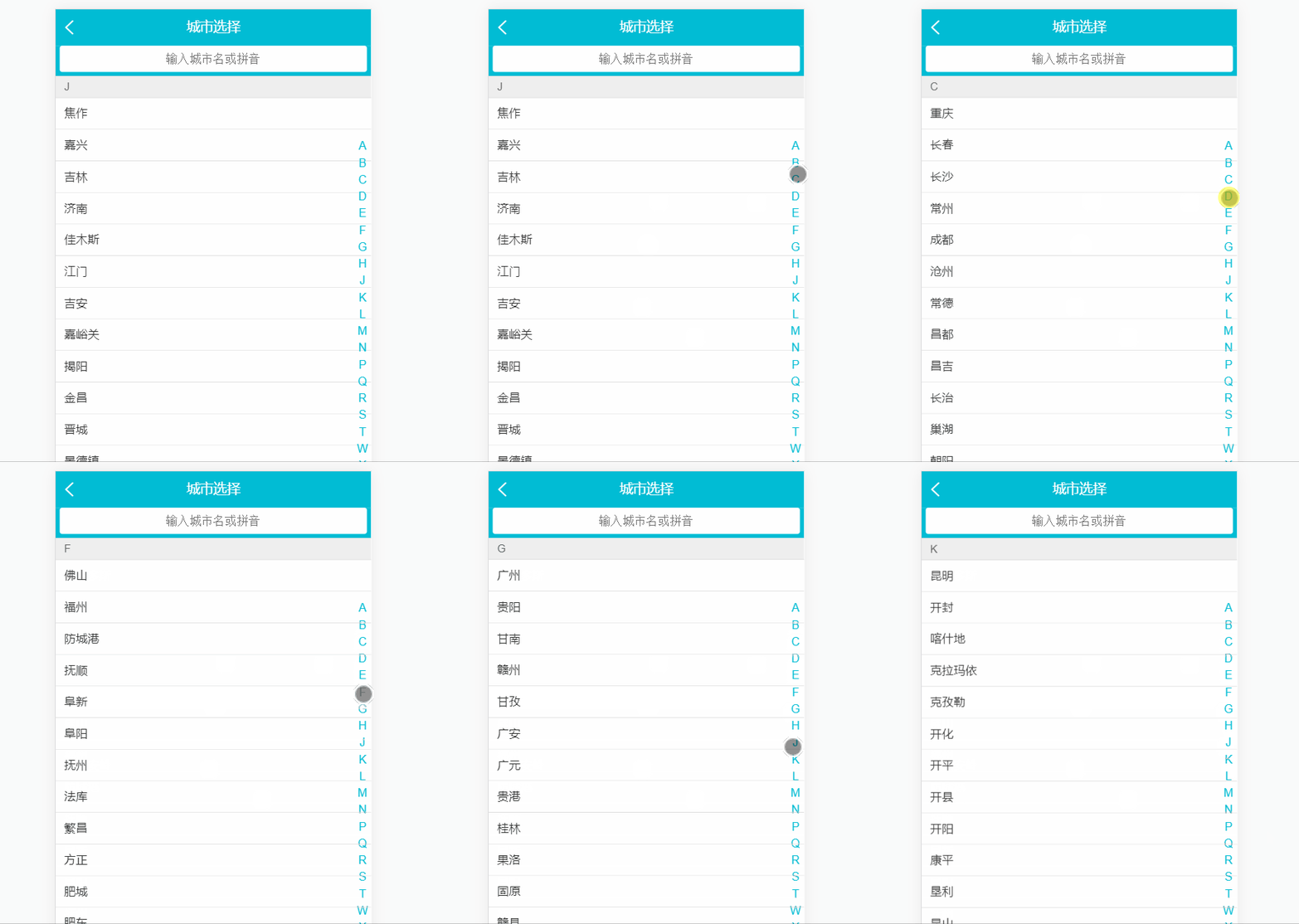
2. 拖动城市字母表,左侧城市对应滚动
给Alphabet.vue 字母列表绑定事件:
<ul class="list">
  <li class="item" v-for="item in letters" :key="item"
      @click="handleLetterClick"
      @touchstart="handleTouchStart"
      @touchmove="handleTouchMove"
      @touchend="handleTouchEnd"
      :ref = 'item'
  >{{item}}
  </li>
</ul>
事件说明:
touchstart : 触摸开始(手指放在触摸屏上)
touchmove : 拖动(手指在触摸屏上移动)
touchend : 触摸结束(手指从触摸屏上移开)
当前第几个字母 = (触摸处浏览器页面的垂直坐标 - A 字母距离搜索栏底部的距离) / 每个字母的高度
  methods: {

      handleTouchStart () {
      //滑动开始

      this.touchStatus = true

    },

    handleTouchMove (e) {

      if (this.touchStatus) {

        // A 字母距离搜索栏底部的距离

        const startY = this.$refs['A'][0].offsetTop
      // 79 为:顶部搜索栏 的高度

        const touchY = e.touches[0].clientY - 79

        const index = Math.floor(touchY - startY) / 20

        if (index >= 0 && index < this.letters.length) {

          this.$emit('change', this.letters[index])

        }

      }

    },

    handleTouchEnd () {
     // 滑动结束

      this.touchStatus = false

    }

  }
<template>

  <div>

    <ul class="list">

      <li class="item" v-for="item in letters" :key="item"

          @click="handleLetterClick"

          @touchstart="handleTouchStart"

          @touchmove="handleTouchMove"

          @touchend="handleTouchEnd"

          :ref = 'item'

      >{{item}}

      </li>

    </ul>

  </div>

</template>

<script>

export default {

  name: 'CityAlphabet',

  props: ['cities'],

  data () {

    return {

      touchStatus: false

    }

  },

  computed: {

    letters () {

      const letters = []

      for (let i in this.cities) {

        letters.push(i)

      }

      return letters

    }

  },

  methods: {

    handleLetterClick (e) {

      this.$emit('change', e.target.innerHTML)

    },

    handleTouchStart () {

      this.touchStatus = true

    },

    handleTouchMove (e) {

      if (this.touchStatus) {

        // A 字母距离搜索栏底部的距离

        const startY = this.$refs['A'][0].offsetTop

        const touchY = e.touches[0].clientY - 79

        const index = Math.floor(touchY - startY) / 20

        if (index >= 0 && index < this.letters.length) {

          this.$emit('change', this.letters[index])

        }

      }

    },

    handleTouchEnd () {

      this.touchStatus = false

    }

  }

}

</script>

<style lang="stylus" scoped>

  @import "~styles/varibles.styl"

  .list

    position absolute

    right 0

    top 1.58rem

    bottom 0

    display flex

    width .4rem

    flex-direction column

    justify-content center

    .item

      text-align center

      line-height .4rem

      color $bgColor

</style>
Alphabet.vue

二,列表切换性能优化
1. 滚动的优化
滚动重复执行运算:
this.$refs['A'][0].offsetTop
在 data 中定义 变量
  data () {

    return {

      startY: 0

    }

  }
添加生命周期钩子 updated:
  updated () {

    this.startY = this.$refs['A'][0].offsetTop

  }
     handleTouchMove (e) {

      if (this.touchStatus) {

        const touchY = e.touches[0].clientY - 79

        const index = Math.floor(touchY - this.startY) / 20

        if (index >= 0 && index < this.letters.length) {

          this.$emit('change', this.letters[index])

        }

      }

    }
2. 节流限制 函数 handleTouchMove() 执行的频率
data中 定义 timer: null
  data () {

    return {

      touchStatus: false,

      startY: 0,

      timer: null

    }
函数的改动:
    handleTouchMove (e) {

      if (this.touchStatus) {

        if (this.timer) {

          clearTimeout(this.time)

        }

        this.timer = setTimeout(() => {

          const touchY = e.touches[0].clientY - 79

          const index = Math.floor(touchY - this.startY) / 20

          if (index >= 0 && index < this.letters.length) {

            this.$emit('change', this.letters[index])

          }

        }, 16)

      }

    }
项目地址:https://github.com/1417766861/Vue2.5-App/tree/master/Travel
Vue2.5开发去哪儿网App 城市列表开发之 兄弟组件间联动及列表性能优化的更多相关文章
- Vue2.5开发去哪儿网App 城市列表开发之 Vuex实现数据共享及高级使用
一,数据共享 1. 安装: npm install vuex --save 2. 在src目录下 新建state文件夹,新建index.js文件 3. 创建一个 store import Vue f ...
- Vue2.5开发去哪儿网App 城市列表开发
一,城市选择页面路由配置 ...
- Vue2.5开发去哪儿网App 详情页面开发
一,banner 图的设计 1. 新建detail的路由 import Detail from '@/pages/detail/Detail' ...... { path: '/detail', na ...
- Vue2.5 开发去哪儿网App
Vue2.5开发去哪儿网App 技术栈和主要框架
- Vue2.5开发去哪儿网App 从零基础入门到实战项目
第1章 课程介绍本章主要介绍课程的知识大纲,学习前提,讲授方式及预期收获. 1-1 课程简介 试看第2章 Vue 起步本章将快速讲解部分 Vue 基础语法,通过 TodoList 功能的编写,在熟悉基 ...
- Vue2.5开发去哪儿网App 第四章笔记 下
1.解决非父子组件之间的传值问题 非父子组件传值(Bus/总线/发布订阅模式/观察者模式) 给 Vue类上挂在一个属性,然后创建vue实例时,实例就拥有了这个属性 Vue.prototype.bus ...
- Vue2.5开发去哪儿网App 第四章笔记 上
一 . 组件细节知识点 1. 解决组件在h5中编码规范 例如 : table , ul , ol 等等 <table> <tbody> <row></r ...
- Vue2.5开发去哪儿网App 第二章笔记
Vue完成 TodoList 1.默认方式 <!DOCTYPE html> <html lang="en"> <head> <meta ...
- Vue2.5开发去哪儿网App 首页开发
主页划 5 个组件,即 header icon swiper recommend weekend 一. header区域开发 1. 安装 stylus npm install stylus --s ...
随机推荐
- jquery checkbox反复调用attr('checked', true/false)只有第一次生效 Jquery 中 $('obj').attr('checked',true)失效的几种解决方案
1.$('obj').prop('checked',true) 2. $(':checkbox').each(function(){ this.checked=true; }) 为什么:attr为失效 ...
- centos7 配置ip
1. 切换到root用户下: su root 2.进入network-scripts目录: cd /etc/sysconfig/network-scripts/ 3.该目录下一般第一个文件是主文件,我 ...
- php检测服务器是否可用 不可用发动钉钉消息
<?php set_time_limit(0); //ping一个IP地址,能不能通 function ping($ip) { $ip_port = explode(':', $ip); // ...
- 02:PostgreSQL Character Sets
在利用postGIS导入shapefile文件到postgresql数据库的时候,老是提示字符串的问题,或者是乱码,试了好几种都不行,于是度娘之.... 使用默认的UTF8,提示信息是:建议使用LAT ...
- 未找到导入的项目“C:\Program Files\MSBuild\Microsoft\Silverlight\v5.0\Microsoft.Silverlight.CSharp.targets”。
问题描述: 原先创建的Silverlight程序,后来系统重装了,再打开Silverlight程序时提示:C:\Users\yzg\Desktop\ocr\TJSilverlight\TJSilver ...
- C/C++ %s %d %u 基本概念与用法
%d 十进制有符号整数 %u 十进制无符号整数 %f 浮点数 %s 字符串 %c 单个字符 %p 指针的值 %e 指数形式的浮点数 %x, %X 无符号以十六进制表示的整数 %0 无符号以八进制表示的 ...
- 软工网络15团队作业4——Alpha阶段敏捷冲刺(一)
第 1 篇 Scrum 冲刺: 各个成员在 Alpha 阶段认领的任务 成员 任务 预期任务量/小时 曾艺佳 学习模块:单词及其释义 单词发音 例句学习 添加笔记 ...
- 6.form表单四种提交方式
一.使用jquery的ajax方式提交: 二.使用easyui的form组件内置的submit方法提交: 三.先定义表单,然后使用submit方法提交: 四.先定义表单,然后按下enter键时提交:
- hdu 4941 map的使用
http://acm.hdu.edu.cn/showproblem.php?pid=4941 给定N,M和K,表示在一个N*M的棋盘上有K个棋子,给出K个棋子的位置和值,然后是Q次操作,对应的是: 1 ...
- [auto-download-app] 如何使用 javascript 实现 app 自动下载
// 在访客跳转进入的页面中,执行下面使用下面 invoke function (function(){ var str_downloadUrl = "<!--{$apkUrl}--& ...