
AngularJS路由系列(6)-- UI-Router的嵌套State
本系列探寻AngularJS的路由机制,在WebStorm下开发。本篇主要涉及UI-Route的嵌套State。
假设一个主视图上有两个部分视图,部分视图1和部分视图2,主视图对应着一个state,两个部分视图分别对应state1和state2,那state与state1和state2形成了嵌套关系。
AngularJS路由系列包括:
1、AngularJS路由系列(1)--基本路由配置
2、AngularJS路由系列(2)--刷新、查看路由,路由事件和URL格式,获取路由参数,路由的Resolve
3、AngularJS路由系列(3)-- UI-Router初体验
4、AngularJS路由系列(4)-- UI-Router的$state服务、路由事件、获取路由参数
5、AngularJS路由系列(5)-- UI-Router的路由约束、Resolve属性、路由附加数据、路由进入退出事件
6、AngularJS路由系列(6)-- UI-Router的嵌套State
文件结构
- index.html
- app.js
- partial-about.html
- partial-home.html
- partial-home-list.html
- table-data.html // 可复用的表格
● index.html
angular.js

angular-ui-router.min.js

app.js

<body ng-app="routerApp">

    <a ui-sref="#">AngularUI Router</a>

    <a ui-sref="home">Home</a>

    <a ui-sref="about">About</a>

    <!--第一级路由-->

    <div ui-view></div>

</body>
● app.js
var routerApp = angular.module('routerApp',['ui.router']);

routerApp.config(function($stateProvider, $uilRouterProvider){

   $urlRouterProvider.otherwise('/home') ;

   $stateProvider

        .state('home',{

            url: '/home',

            templateUrl:'partial-home.html'

        })

        .state('about',{

        })

});
● partial-home.html
The Homey Page
This page demonstrates nested vies.

● partial-home.html,添加2个按钮
The Homey Page

This page demonstrates nested vies.

<a ui-sref=".list">List</a>

<a ui-sref=".paragraph">Paragraph</a>

<!--第二级路由,嵌套在第一级路由中-->

<div ui-view></div>
● app.js,添加嵌套State
$urlRouterProvider.otherwise('/home') ;

$stateProvider

    .state('home', {

        url: '/home',

        templateUrl: 'partial-home.html'

    })

    // home.list符合惯例

    .state('home.list', {

        url: '/list',

        templateUrl: 'partial-home-list.html',

        controller: function($scope) {

            $scope.dogs = ['Bernese', 'Husky', 'Goldendoodle'];

        }

    })

    // home.paragraph符合惯例

    .state('home.paragraph', {

        url: '/paragraph',

        template: 'I could sure use a drink right now.'

    })
● partial-home-list.html
<ul>

    <li ng-repeat="dog in dogs">{{ dog }}</li>

</ul>

● partial-about.html
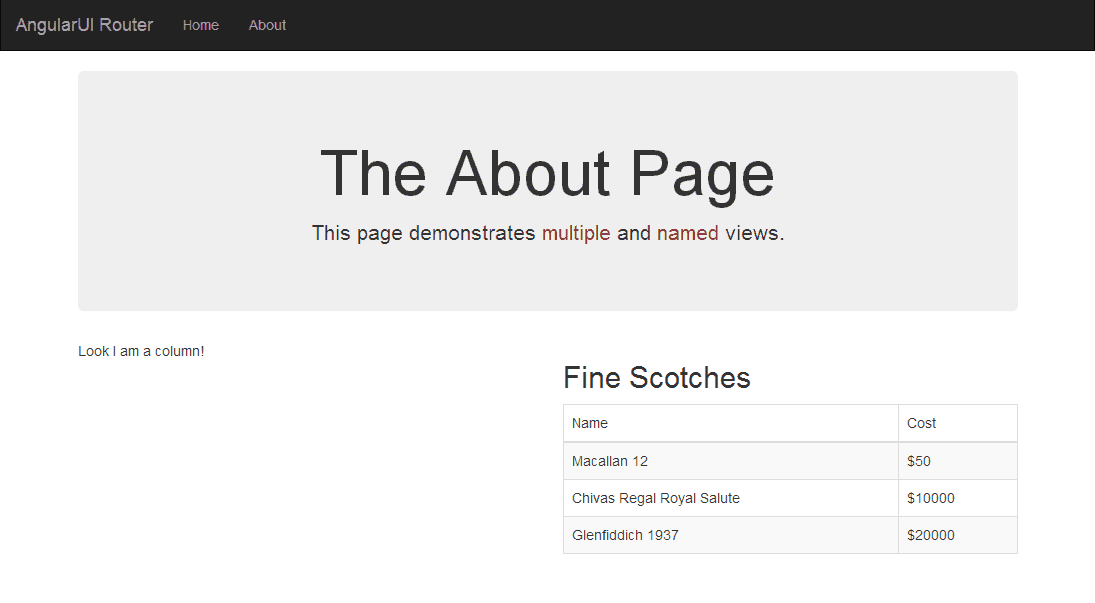
The About Page

his page demonstrates multiple and named views

<!--第二级路由,嵌套在第一级路由中,但有各自的名称-->

<div ui-view="columnOne"></div>

<div ui-view="columnTwo"></div>
● app.js,添加嵌套state,一个state有多个ng-view
$urlRouterProvider.otherwise('/home') ;

$stateProvider

    .state('home', {

        url: '/home',

        templateUrl: 'partial-home.html'

    })

    // home.list符合惯例

    .state('home.list', {

        url: '/list',

        templateUrl: 'partial-home-list.html',

        controller: function($scope) {

            $scope.dogs = ['Bernese', 'Husky', 'Goldendoodle'];

        }

    })

    // home.paragraph符合惯例

    .state('home.paragraph', {

        url: '/paragraph',

        template: 'I could sure use a drink right now.'

    })

    .state('about', {

            url: '/about',

            views: { //是指ng-view

                // 模板

                '': { templateUrl: 'partial-about.html' },

                // 名称为columnOne的ng-view,viewName@stateName

                'columnOne@about': { template: 'Look I am a column!' },

                // 名称为columnTow的ng-view,viewName@stateName

                'columnTwo@about': {

                    templateUrl: 'table-data.html',

                    controller: 'SecondController'

                }

            }

        });

    routerApp.controller('SecondController', function($scope) {

        $scope.message = 'test';

        $scope.products = [

            {

                name: 'Macallan 12',

                price: 50

            },

            {

                name: 'Chivas Regal Royal Salute',

                price: 10000

            },

            {

                name: 'Glenfiddich 1937',

                price: 20000

            }

        ];

    });
● table-data.html
<h2>Fine Scotches</h2>

<table class="table table-hover table-striped table-bordered">

    <thead>

        <tr>

            <td>Name</td>

            <td>Cost</td>

        </tr>

    </thead>

    <tbody>

        <tr ng-repeat="product in products">

            <td>{{ product.name }}</td>

            <td>${{ product.price }}</td>

        </tr>

    </tbody>

</table>
AngularJS路由系列,结束☺
AngularJS路由系列(6)-- UI-Router的嵌套State的更多相关文章
- AngularJS路由系列(5)-- UI-Router的路由约束、Resolve属性、路由附加数据、路由进入退出事件
本系列探寻AngularJS的路由机制,在WebStorm下开发.主要包括: ● UI-Router约束路由参数● UI-Router的Resolve属性● UI-Router给路由附加数据● UI- ...
- AngularJS路由系列(4)-- UI-Router的$state服务、路由事件、获取路由参数
本系列探寻AngularJS的路由机制,在WebStorm下开发.主要包括: ● UI-Router的$state服务● UI-Router的路由事件● UI-Router获取路由参数 Angular ...
- AngularJS路由系列(3)-- UI-Router初体验
本系列探寻AngularJS的路由机制,在WebStorm下开发. AngularJS路由系列包括: 1.AngularJS路由系列(1)--基本路由配置2.AngularJS路由系列(2)--刷新. ...
- AngularJS路由系列(2)--刷新、查看路由,路由事件和URL格式,获取路由参数,路由的Resolve
本系列探寻AngularJS的路由机制,在WebStorm下开发.主要包括: ● 刷新路由● 查看当前路由以及所有路由● 路由触发事件● 获取路由参数 ● 路由的resolve属性● 路由URL格式 ...
- AngularJS路由系列(1)--基本路由配置
本系列探寻AngularJS的路由机制,在WebStorm下开发.主要包括: ● 路由的Big Picture ● $routeProvider配置路由 ● 使用template属性 ● 使用temp ...
- AngularJS 使用 UI Router 实现表单向导
Today we will be using AngularJS and the great UI Router and the Angular ngAnimate module to create ...
- [转]AngularJS 使用 UI Router 实现表单向导
本文转自:http://www.oschina.net/translate/angularjs-multi-step-form-using-ui-router 今天我们将使用AngularJs和伟大的 ...
- ngRoute 和 ui.router 的使用方法和区别
在单页面应用中要把各个分散的视图给组织起来是通过路由机制来实现的.本文主要对 AngularJS 原生的 ngRoute 路由模块和第三方路由模块 ui.router 的用法进行简单介绍,并做一个对比 ...
- 【原创】ui.router源码解析
Angular系列文章之angular路由 路由(route),几乎所有的MVC(VM)框架都应该具有的特性,因为它是前端构建单页面应用(SPA)必不可少的组成部分. 那么,对于angular而言,它 ...
随机推荐
- urb传输的代码分析【转】
转自:http://blog.csdn.net/zkami/article/details/2503829 urb传输的代码分析 如需引用,请注明出处blog.csdn.net/zkami 作者Zhe ...
- SPListItem.UpdateOverwriteVersion()真的不会创建新版本吗?
根据msdn文档, SPListItem.UpdateOverwriteVersion(): Updates the item without creating another version of ...
- JavaScript:document.execCommand()的用法
document.execCommand()的用法小记 一.语法 execCommand方法是执行一个对当前文档,当前选择或者给出范围的命令.处理Html数据时常用. 如下格式:document.ex ...
- unit测试出现异常:Exception in thread "main" java.lang.NoSuchMethodError: org.junit.platform.commons.util
在进行单元测试时,测试出现异常 Exception in thread "main" java.lang.NoSuchMethodError: org.junit.platform ...
- 移动端console.log()调试
在微信或app进行开发的时候,没法直接查看console.log的输出内容,调试起来简直太痛苦了. 1.笨笨的方法 fiddler抓请求:追加dom节点,显示调试信息. var div =docume ...
- csu 1930 roads(DFS)
Description Once upon a time there was a strange kingdom, the kingdom had n cities which were connec ...
- Vue 动态组件渲染问题分析
fire 读在最前面: 1.本文适用于有一定基础的vue开发者,需要了解基本的vue渲染流程 2.本文知识点涉及vue构造器以及选项策略合并.<component> 渲染逻辑 问题描述: ...
- 如何写django中form的测试用例
可简可繁, 可插库,可字符, 要测试valid,也要测试invalid, 可用csrf,也可用context. 放一个全面的, 实践中,找一个最优的组合就好. class NewTopicTests( ...
- 这可能是最全的禁用win10自动更新了
https://jingyan.baidu.com/article/647f0115e5dbbf7f2148a834.html 本电脑系统版本:Windows 10 专业版 1607 本电脑问题:某天 ...
- centos 监控进程,并自动重启
编辑Crontab crontab -e 按i进行编辑 */ * * * * /root/monitor.sh # 每分钟运行一遍monitor.sh脚本 * * * /sbin/reboot # 每 ...