
Android基础控件单选按钮RadioButton和Checkbox复选按钮的使用
1、相关简介
RadioButton需要和RadioGroup结合使用,在RadioGroup设置布局方式!
Checkbox是单独使用,本文为了方便放在了RadioGroup中!
2、简单使用
方法说明:
final RadioGroup radioGroup = (RadioGroup)findViewById(R.id.radioGroup);

radioGroup.getChildCount() //获取子控件数量

RadioButton radioButton = (RadioButton)radioGroup.getChildAt(i); //获取子控件

radioButton.isChecked() //获取按钮选择状态

radioButton.getText() //获取按钮文本
xml布局文件
        <RadioGroup

            android:layout_width="wrap_content"

            android:layout_height="wrap_content"

            android:id="@+id/radioGroup"

            android:orientation="horizontal">

                <RadioButton

                    android:layout_width="wrap_content"

                    android:layout_height="wrap_content"

                    android:id="@+id/radio11"

                    android:text="男"

                    android:checked="true"/>

                <RadioButton

                    android:layout_width="wrap_content"

                    android:layout_height="wrap_content"

                    android:id="@+id/radio22"

                    android:text="女"/>

                <RadioButton

                    android:layout_width="wrap_content"

                    android:layout_height="wrap_content"

                    android:id="@+id/radio33"

                    android:text="太监"/>

        </RadioGroup>

        <Button

            android:layout_width="wrap_content"

            android:layout_height="wrap_content"

            android:id="@+id/radioBtn"

            android:text="提交"/>

        <RadioGroup

            android:layout_width="wrap_content"

            android:layout_height="wrap_content"

            android:id="@+id/boxGroup"

            android:orientation="vertical">

                <CheckBox

                    android:layout_width="wrap_content"

                    android:layout_height="wrap_content"

                    android:id="@+id/box11"

                    android:text="男"

                    />

                <CheckBox

                    android:layout_width="wrap_content"

                    android:layout_height="wrap_content"

                    android:id="@+id/box22"

                    android:text="女"/>

        </RadioGroup>

        <Button

            android:layout_width="wrap_content"

            android:layout_height="wrap_content"

            android:id="@+id/boxBtn"

            android:text="提交"/>
Java文件:
    protected void onCreate(Bundle savedInstanceState) {

        super.onCreate(savedInstanceState);

        setContentView(R.layout.activity_login);

        // Set up the login form.

        final RadioGroup radioGroup = (RadioGroup)findViewById(R.id.radioGroup);

//        方法一

//        radioGroup.setOnCheckedChangeListener(new RadioGroup.OnCheckedChangeListener() {

//            @Override

//            public void onCheckedChanged(RadioGroup radioGroup, int i) {

//                RadioButton radioButton = (RadioButton)findViewById(i);

//                Toast.makeText(getApplicationContext(),"你选择了"+radioButton.getText(),Toast.LENGTH_LONG).show();

//            }

//        });

//        方法二

        Button button = (Button)findViewById(R.id.radioBtn);

        button.setOnClickListener(new OnClickListener() {

            @Override

            public void onClick(View view) {

                for (int i = 0;i < radioGroup.getChildCount();i++){

                    RadioButton radioButton = (RadioButton)radioGroup.getChildAt(i);

                    if (radioButton.isChecked()){

                        Toast.makeText(getApplicationContext(),"你选择了"+radioButton.getText(),Toast.LENGTH_SHORT).show();

                    }

                }

            }

        });

        Button button1 = (Button)findViewById(R.id.boxBtn);

        final RadioGroup boxGroup = (RadioGroup)findViewById(R.id.boxGroup);

        button1.setOnClickListener(new OnClickListener() {

            @Override

            public void onClick(View view) {

                String choos = "";

                for (int i=0;i<boxGroup.getChildCount();i++){

                    CheckBox checkBox = (CheckBox)boxGroup.getChildAt(i);

                    if (checkBox.isChecked()){

                        choos +=checkBox.getText().toString();

                    }else {

                        if (choos.indexOf(checkBox.getText().toString())!=-1){

                            choos.substring(choos.indexOf(checkBox.getText().toString()));

                        }

                    }

                    if (i==boxGroup.getChildCount()-1){

                        Toast.makeText(getApplicationContext(),"选了"+choos,Toast.LENGTH_SHORT).show();

                    }

                }

            }

        });

    }

}
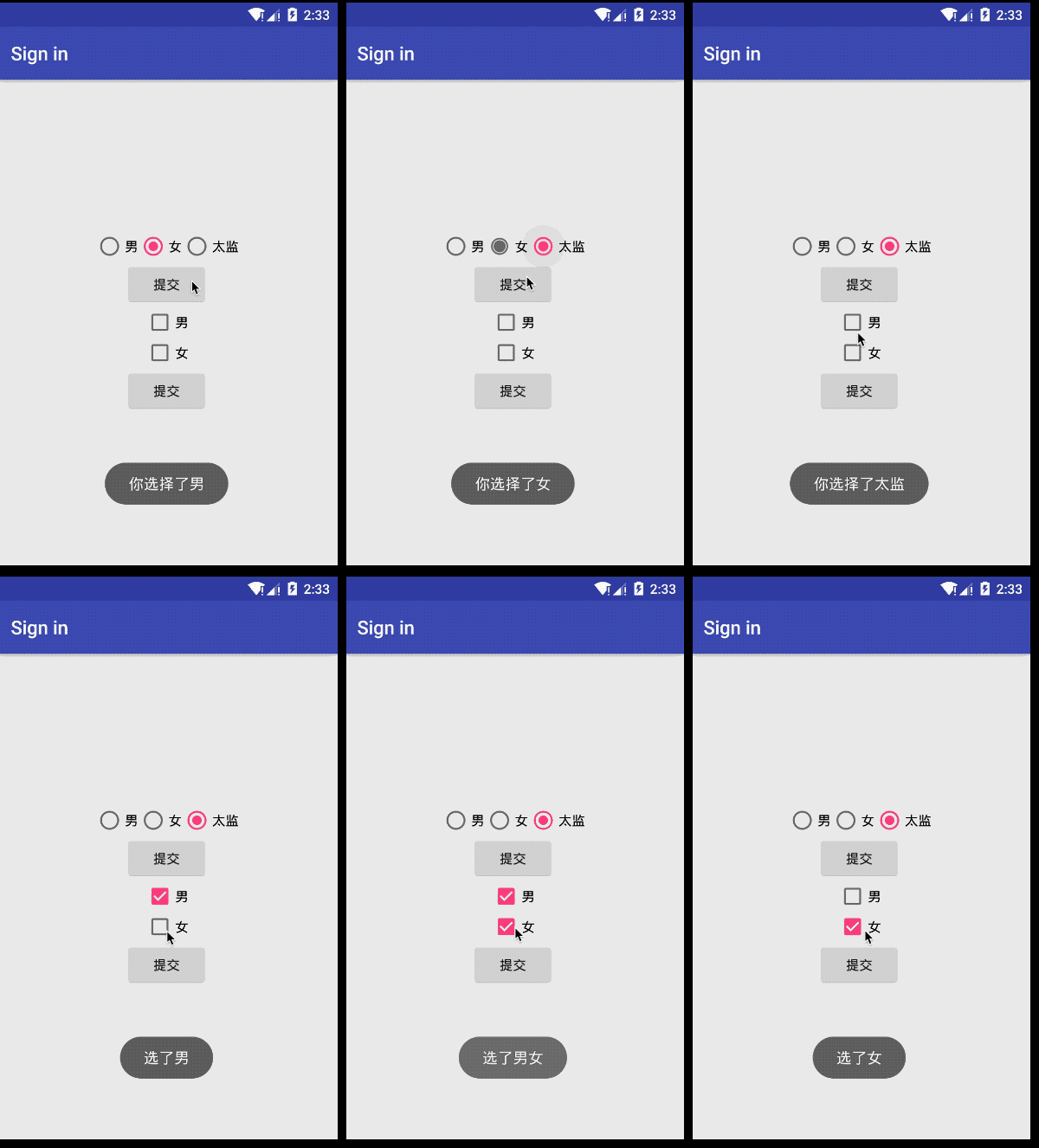
效果图
Android基础控件单选按钮RadioButton和Checkbox复选按钮的使用的更多相关文章
- Android基础控件ListView基础操作
1.简介 基于Android基础控件ListView和自定义BaseAdapter适配器情况下,对ListView的数据删除和添加操作: public boolean add(E e) {//添加数据 ...
- android基础控件的使用
控件在屏幕上位置的确定 通常情况下控件在屏幕上确定至少要连接两条线(一条水平,一条垂直) 如下图连接了四条线 辅助线 辅助线的调出: 水平辅助线:进入activity.xml的设计模式之后如下图 为了 ...
- android 基础控件(EditView、SeekBar等)的属性及使用方法
android提供了大量的UI控件,本文将介绍TextView.ImageView.Button.EditView.ProgressBar.SeekBar.ScrollView.WebView ...
- 矩阵, 矩阵 , Android基础控件之ImageView
天下文章大家抄,以下所有内容,有来自copy,有来自查询,亦有自己的总结(目的是总结出自己的东西),所以说原创,不合适,说是转载也不恰当,所以我称之为笔记,可惜没有此分类选项,姑且不要脸一点,选择为原 ...
- android基本控件学习-----RadioButton&CheckBox
RadioButton(单选框)和CheckBox(复选框)讲解: 一.基本用法和事件处理 (1)RadioButton单选框,就是只能选择其中的一个,我们在使用的时候需要将RadioButton放到 ...
- android 基础控件 EditText
EditText 简介: EditText 控件继承 TextView ,它有TextView的所有属性和方法,并且自身是可编辑的: extends TextView java.lang.Object ...
- Android 基础控件 TextView
一TextView介绍: TextView是UI最基本的组件,使用TextView可以显示丰富的文本信息.设置添加TextView最常见的方法就是在xml中添加TextView元素,并指定属性.Tex ...
- Android基础控件TextClock和Chronometer的使用
1.简介 DigitalClock, TextClock,AnalogClock,Chronometer其中DigitalClock和AnalogClock废弃了! TextClock是在Androi ...
- Android基础控件ProgressBar进度条的使用
1.简介 ProgressBar继承与View类,直接子类有AbsSeekBar和ContentLoadingProgressBar, 其中AbsSeekBar的子类有SeekBar和RatingBa ...
随机推荐
- sklearn中pipeline的用法和FeatureUnion
一.pipeline的用法 pipeline可以用于把多个estimators级联成一个estimator,这么 做的原因是考虑了数据处理过程中一系列前后相继的固定流程,比如feature selec ...
- USACO 2003 Fall Orange Popular Cows /// tarjan缩点 oj22833
题目大意: n头牛,m个崇拜关系,并且崇拜具有传递性 如果a崇拜b,b崇拜c,则a崇拜c 求最后有几头牛被所有牛崇拜 强连通分量内任意两点都能互达 所以只要强联通分量内有一点是 那么其它点也都会是 按 ...
- markdown 表情包大法
前段时间偶然发现了markdown竟然可以插入表情,而且竟然如此的简单 表情包网站 (有可能是官网):点击跳转 这些东西真的是有点意思啊,容我举个栗子
- mysql查询小技巧
如果所传bookTypeName为空则执行select * from t_bookType(搜索框里未输入信息) 否则追加 and bookTypeName like '%"+bookTy ...
- caffe安装 总结
用的是matlab2018a,搞了一天 ubuntu 系统下的Caffe环境搭建 https://blog.csdn.net/hjimce/article/details/48781693 caffe ...
- MQTT--笔记
一.MQTT协议基本介绍 1.1.MQTT是什么? MQTT,全称为Message Queue Telemetry Transport.在1999年,由IBM的Andy Stanford-Clark和 ...
- 【JZOJ6378】小w与数字游戏(game)
description analysis 对于\(n\)很大,一眼看出来肯定有两个相等的数减出来是\(0\),答案肯定是\(0\) 其实只要\(n>7\),由于斐波那契数列,肯定能有几个数的和减 ...
- chrome的驱动安装
首先找到对应的chromedriver,百度搜索,http://npm.taobao.org/mirrors/chromedriver/ 将下载好的chrome驱动解压,放在/usr/loacl/bi ...
- Git中.gitignore忽略规则
# 此为注释 – 将被 Git 忽略 *.a # 忽略所有 .a 结尾的文件 !lib.a # 但 lib.a 除外 /TODO # 仅仅忽略项目根目录下的 TODO 文件,不包括 subdir/TO ...
- Linux课程---14、linux下lamp环境如何安装
Linux课程---14.linux下lamp环境如何安装 一.总结 一句话总结: 要按顺序安装,比如apache需要在php之前安装, 一.安装 gcc 编译器 二.卸载 rpm 安装的 http ...