
unity3d之相机跟随人物
一.第三人称视角 _1
先设置好相机与玩家之间的角度
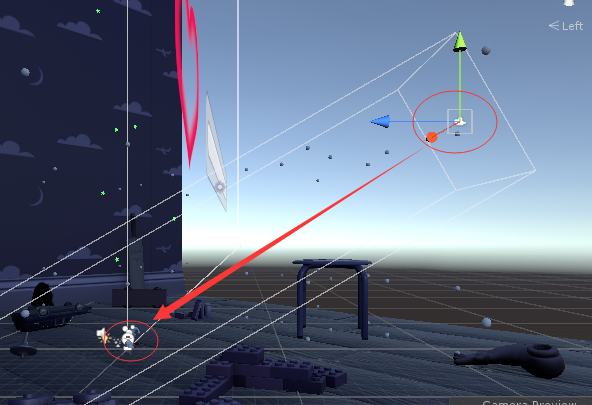
给相机添加代码
 using UnityEngine;

 using System.Collections;

 namespace CompleteProject

 {

     public class CameraFollow : MonoBehaviour

     {

         public Transform target;            // The position that that camera will be following.

         public float smoothing = 5f;        // The speed with which the camera will be following.

         Vector3 offset;                     // The initial offset from the target.

         void Start ()

         {

             // Calculate the initial offset.

             offset = transform.position - target.position;

         }

         void FixedUpdate ()

         {

             // Create a postion the camera is aiming for based on the offset from the target.

             Vector3 targetCamPos = target.position + offset;

             // Smoothly interpolate between the camera's current position and it's target position.

            //相机平滑的移动到目标位置,插值

             transform.position = Vector3.Lerp (transform.position, targetCamPos, smoothing * Time.deltaTime);

         }

     }

 }
二、第三人称视角_2,可自己根据游戏效果调节位置
在inspector面板修改mHeight与mDistance值即可
 using System.Collections;

 using System.Collections.Generic;

 using UnityEngine;

 public class FollowCamera : MonoBehaviour

 {

     public Transform mTarget; //相机的跟随目标

     public float mHeight=8f;

     public float mDistance=6f;

     public float interpolation = 20.0f;

     public Space space = Space.World;

     // Use this for initialization

     void Start ()

     {

     }

     // Update is called once per frame

     void LateUpdate ()

     {

         if (mTarget)

         {

             Vector3 dest = Vector3.zero;

             switch (space)

             {

                 case Space.World://以世界为中心

                     dest = mTarget.position + Vector3.up * mHeight - Vector3.forward * mDistance;

                     break;

                 case Space.Self://玩家为中心,一般用不到可省略switch

                     dest = mTarget.position + mTarget.up * mHeight - mTarget.forward * mDistance;

                     break;

                 default:

                     break;

             }

             transform.position = Vector3.Lerp(transform.position, dest, interpolation);

             transform.LookAt(mTarget.position);

         }

     }

 }
unity3d之相机跟随人物的更多相关文章
- unity相机跟随Player常用方式
固定跟随,无效果(意义不大) public class FollowPlayer : MonoBehaviour { public Transform Player; private Vector3 ...
- Unity3d学习 相机的跟随
最近在写关于相机跟随的逻辑,其实最早接触相机跟随是在Unity官网的一个叫Roll-a-ball tutorial上,其中简单的涉及了关于相机如何跟随物体的移动而移动,如下代码: using Unit ...
- unity3d简单的相机跟随及视野旋转缩放
1.实现相机跟随主角运动 一种简单的方法是把Camera直接拖到Player下面作为Player的子物体,另一种方法是取得Camera与Player的偏移向量,并据此设置Camera位置,便能实现简单 ...
- unity3D:游戏分解之角色移动和相机跟随
游戏中,我们经常会有这样的操作,点击场景中某个位置,角色自动移动到那个位置,同时角色一直是朝向那个位置移动的,而且相机也会一直跟着角色移动.有些游戏,鼠标滑动屏幕,相机就会围绕角色旋转. ...
- SurvivalShooter学习笔记(一.相机跟随)
1.场景碰撞已好,地板需建一Quad去掉渲染留下碰撞,设置layer为Floor:用于建立摄像机朝向地面的射线,确定鼠标停留点,确定主角需要的朝向. 2.设置摄像机跟随主角: 本例中摄像机设置为正交模 ...
- unity 常用的几种相机跟随
固定相机跟随 这种相机有一个参考对象,它会保持与该参考对象固定的位置,跟随改参考对象发生移动 using UnityEngine; using System.Collections; public c ...
- Unity中几种简单的相机跟随
#unity中相机追随 固定相机跟随,这种相机有一个参考对象,它会保持与该参考对象固定的位置,跟随改参考对象发生移动 using UnityEngine; using System.Collectio ...
- unity_实用小技巧(相机跟随两个主角移动)
在两人对战的游戏中,有时候我们希望能看清楚两玩家的状态,这时我们需要让相机跟随玩家,可是我们不能让相机只跟随一个玩家移动,这时我们可以取两玩家的中点作为相机的位置.方法如下: public Trans ...
- Unity相机跟随
固定相机跟随 这种相机有一个参考对象,它会保持与该参考对象固定的位置,跟随改参考对象发生移动 using UnityEngine; using System.Collections; public c ...
随机推荐
- PHP开发微信公众号(一)二维码的获取
要开发微信公众号,首先进行需要注册一个,然后认证.这就不用多说了. 当然如果没有,也可以去申请一个测试号来使用,地址:https://mp.weixin.qq.com/debug/cgi-bin/sa ...
- error C2955: “std::xx”: 使用 类 模板 需要 模板 参数列表
一般出现这个错误 最可能是一种情况 queue q;//这样写 这样写肯定错 [笑哭] queue<int> q; //正确的 我想静静了
- 01背包--hdu2639
hdu-2639 The title of this problem is familiar,isn't it?yeah,if you had took part in the "Rooki ...
- C++经典面试题汇总
1. 下面代码输出什么?为什么?(初始化列表) #include<iostream> using namespace std; class Test { int m_i; int m_j; ...
- PIE SDK与OpenCV结合说明文档
1.功能简介 OpenCV是基于BSD许可(开源)发行的跨平台计算机视觉库,可以运行在Linux.Windows.Android和Mac OS操作系统上.它轻量级而且高效——由一系列 C 函数和少量 ...
- 【Python 解决错误】selenium.common.exception.WebDriverException
近来准备写个脚本去搜索某端游的官网交易平台.因为也不懂高端的爬虫技术,决定用selenium去戳.这里采用的是chrome浏览器,链接网页时报错: File "C:\Python37\lib ...
- element-ui日期组件DatePicker选择日期范围赋值编辑问题
最近在项目中使用element-UI的日期范围组件时遇到一个问题,相信很多人也做过这种场景,一个录入页面也同时是编辑页面,编辑的时候就需要先赋值.但是我给date组件赋值后,确无法操作了,change ...
- 转 zabbix 用户建立和中文化
1. 1 登陆和配置用户 简介 本章你会学习如何登陆Zabbix,以及在Zabbix内建立一个系统用户. 登陆 这是Zabbix的“欢迎”界面.输入用户名 Admin 以及密码 zabbix 以作 ...
- kafka监控服务搭建
wget https://github.com/Morningstar/kafka-offset-monitor/releases/download/0.4.1/KafkaOffsetMonitor- ...
- 【数据服务中间件】一、HttpServlet
一.概念 Servlet的框架是由两个Java包组成:javax.servlet和javax.servlet.http GenericServlet和HttpServlet 3个方法代表了Servle ...