
python开发_tkinter_单选按钮
这篇blog主要是描述python中tkinter的单选按钮操作
下面是我做的demo
运行效果:
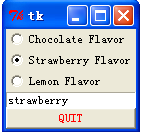
======================================
代码部分:
======================================
 from tkinter import *

 # This is a demo program that shows how to

 # create radio buttons and how to get other widgets to

 # share the information in a radio button.

 #

 # There are other ways of doing this too, but

 # the "variable" option of radiobuttons seems to be the easiest.

 #

 # note how each button has a value it sets the variable to as it gets hit.

 class Test(Frame):

     def printit(self):

         print("hi")

     def createWidgets(self):

         self.flavor = StringVar()

         self.flavor.set("chocolate")

         self.radioframe = Frame(self)

         self.radioframe.pack()

         # 'text' is the label

         # 'variable' is the name of the variable that all these radio buttons share

         # 'value' is the value this variable takes on when the radio button is selected

         # 'anchor' makes the text appear left justified (default is centered. ick)

         self.radioframe.choc = Radiobutton(

             self.radioframe, text="Chocolate Flavor",

             variable=self.flavor, value="chocolate",

             anchor=W)

         self.radioframe.choc.pack(fill=X)

         self.radioframe.straw = Radiobutton(

             self.radioframe, text="Strawberry Flavor",

             variable=self.flavor, value="strawberry",

             anchor=W)

         self.radioframe.straw.pack(fill=X)

         self.radioframe.lemon = Radiobutton(

             self.radioframe, text="Lemon Flavor",

             variable=self.flavor, value="lemon",

             anchor=W)

         self.radioframe.lemon.pack(fill=X)

         # this is a text entry that lets you type in the name of a flavor too.

         self.entry = Entry(self, textvariable=self.flavor)

         self.entry.pack(fill=X)

         self.QUIT = Button(self, text='QUIT', foreground='red',

                            command=self.quit)

         self.QUIT.pack(side=BOTTOM, fill=BOTH)

     def __init__(self, master=None):

         Frame.__init__(self, master)

         Pack.config(self)

         self.createWidgets()

 test = Test()

 test.mainloop()
========================================================
More reading,and english is important.
I'm Hongten
大哥哥大姐姐,觉得有用打赏点哦!多多少少没关系,一分也是对我的支持和鼓励。谢谢。
Hongten博客排名在100名以内。粉丝过千。
Hongten出品,必是精品。
E | hongtenzone@foxmail.com B | http://www.cnblogs.com/hongten
========================================================
python开发_tkinter_单选按钮的更多相关文章
- python开发_tkinter_小球完全弹性碰撞游戏
python开发_tkinter_小球完全弹性碰撞游戏 完成这个小球的完全弹性碰撞游戏灵感来自于: 下面是我花了一周下班时间所编写的一个小球完全弹性碰撞游戏: 游戏初始化状态: 最下面的游标和修改 ...
- python开发_tkinter_获取文本框内容_给文本框添加键盘输入事件
在之前的blog中有提到python的tkinter中的菜单操作 python开发_tkinter_窗口控件_自己制作的Python IDEL_博主推荐 python开发_tkinter_窗口控件_自 ...
- python开发_tkinter_获取单选菜单值
在之前的blog中有提到python的tkinter中的菜单操作 python开发_tkinter_窗口控件_自己制作的Python IDEL_博主推荐 python开发_tkinter_窗口控件_自 ...
- python开发_tkinter_多级子菜单
在之前的blog中有提到python的tkinter中的菜单操作 python开发_tkinter_窗口控件_自己制作的Python IDEL_博主推荐 python开发_tkinter_窗口控件_自 ...
- python开发_tkinter_单选菜单_不可用菜单操作
在之前的blog中有提到python的tkinter中的菜单操作 python开发_tkinter_窗口控件_自己制作的Python IDEL_博主推荐 python开发_tkinter_窗口控件_自 ...
- python开发_tkinter_复选菜单
在之前的blog中有提到python的tkinter中的菜单操作 python开发_tkinter_窗口控件_自己制作的Python IDEL_博主推荐 python开发_tkinter_窗口控件_自 ...
- python开发_tkinter_菜单选项中英文切换_菜单选项不可用操作_博主推荐
我使用的python版本为:3.3.2 如果你对python中tkinter模块的菜单操作不是很了解,你可以看看: python开发_tkinter_窗口控件_自己制作的Python IDEL_博主推 ...
- python开发_tkinter_窗口控件_自己制作的Python IDEL_博主推荐(二)
在上一篇blog:python开发_tkinter_窗口控件_自己制作的Python IDEL_博主推荐 中介绍了python中的tkinter的一些东西,你可能对tkinter有一定的了解了.这篇b ...
- python开发_tkinter_小球完全弹性碰撞游戏_源码下载
完成这个小球的完全弹性碰撞游戏灵感来自于: 下面是我花了一周下班时间所编写的一个小球完全弹性碰撞游戏: 游戏初始化状态: 最下面的游标和修改小球的移动速度 ====================== ...
随机推荐
- Testbench学习——$fopen/$display/$fclose
昨天在用Vivado写Testbench顶层时,为了以后便于数据的存储导出分析,需要用的文件数据记录的功能,于是,下面谈谈$fopen/$display/$fclose这三者的用法. $fopen—— ...
- 06 Frequently Asked Questions (FAQ) 常见问题解答 (常见问题)
Frequently Asked Questions (FAQ) Origins 起源 What is the purpose of the project? What is the history ...
- springboot配置fastjson后端往前端传输格式化
import org.springframework.boot.SpringApplication;import org.springframework.boot.autoconfigure.Spri ...
- java基础68 JavaScript城市联动框(网页知识)
1.城市联动框 <!doctype html> <html> <head> <meta charset="utf-8"> <t ...
- AdvStringGrid 复选框、goRowSelect
var I: Integer; begin do begin AdvStringGrid1.AddCheckBox(, I, True, True); AdvStringGrid1.Cells[,I] ...
- sql server 提取汉字/数字/字母的方法
sql server 提取汉字/数字/字母的方法 --提取数字 IF OBJECT_ID('DBO.GET_NUMBER2') IS NOT NULL DROP FUNCTION DBO.GET_NU ...
- SQL Case when 的使用方法 (转)
Case具有两种格式.简单Case函数和Case搜索函数. --简单Case函数 CASE sex WHEN '1' THEN '男' WHEN '2' THEN '女' ELSE '其他' END ...
- cross apply 和 outer apply
使用APPLY运算符可以实现查询操作的外部表表达式返回的每个调用表值函数.表值函数作为右输入,外部表表达式作为左输入. 通过对右输入求值来获得左输入每一行的计算结果,生成的行被组合起来作为最终输出.A ...
- Oracle 提示符
http://blog.csdn.net/wyzxg/article/details/5647905
- Linux学习笔记之一及虚拟机的安装
学习Linux基础入门 学习实验楼Linux基础入门--学习笔记系列博客 第一节 Linux系统简介 Linux就是一个操作系统,操作系统在计算机系统中包括系统调用和内核两层.在简单了解了Linux的 ...