
Unity 设计模式-简单工厂模式和其他好用的通用代码块
1.
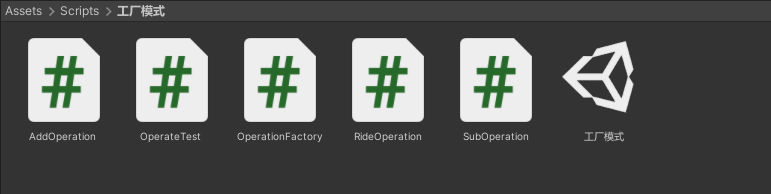
2.加法操作类
using System.Collections;

using System.Collections.Generic;

using UnityEngine;

//加法操作类

public class AddOperation : Operation

{

    //重写父类方法

    public override double GetResult()

    {

        double dReult = 0;

        dReult = m_dNumberA + m_dNumberB;

        return dReult;

    }

}
3.减法操作类
using System.Collections;

using System.Collections.Generic;

using UnityEngine;

//减法操作类

public class SubOperation : Operation

{

    //重写父类方法

    public override double GetResult()

    {

        double dReult = 0;

        dReult = m_dNumberA - m_dNumberB;

        return dReult;

    }

}
4.乘法操作类
using System.Collections;

using System.Collections.Generic;

using UnityEngine;

/// <summary>

/// 乘法操作类

/// </summary>

public class RideOperation : Operation

{

    public override double GetResult()

    {

        double dResult = 0;

        dResult = m_dNumberA * m_dNumberB;

        return dResult;

    }

}
5.公共类
using System.Collections;

using System.Collections.Generic;

using UnityEngine;

public class Operation

{

    public double m_dNumberA;

    public double m_dNumberB;

    //虚方法提供子类重写

    public virtual double GetResult()

    {

        double dResult = 0;

        return dResult;

    }

}

public class OperationFactory

{

   public Operation CreateOperate(string str)

    {

        Operation operation = null;

        switch (str)

        {

            case "+":

                operation = new AddOperation ();

                break;

            case "-":

                operation = new SubOperation();

                break;

            case "*":

                operation = new RideOperation();

                break;

            default:

                break;

        }

        return operation;

    }

}
6.使用
using System.Collections;

using System.Collections.Generic;

using UnityEngine;

public class OperateTest : MonoBehaviour

{

    // Start is called before the first frame update

    void Start()

    {

        OperationFactory factory = new OperationFactory();

        Operation operation = factory.CreateOperate("+");

        operation.m_dNumberA = 5;

        operation.m_dNumberB = 2;

        double addResult = operation.GetResult();

        Debug.Log("加:" + addResult);

        Operation Suboperation = factory.CreateOperate("-");

        Suboperation.m_dNumberA = 10;

        Suboperation.m_dNumberB = 2;

        double subResult = Suboperation.GetResult();

        Debug.Log("减:" + subResult);

        Operation Rideoperation = factory.CreateOperate("*");

        Rideoperation.m_dNumberA = 2;

        Rideoperation.m_dNumberB = 2;

        double rideResult = Rideoperation.GetResult();

        Debug.Log("乘:" + rideResult);

        //1+(1+2)+(1+2+3)+...+(1+2+3+...+10)之和

        int i = 1, j = 1, s = 0, s1 =0;

        while (j<=10)

        {

            while (i<=j)

            {

                s += i;

                i++;

            }

            s1 += s;

            j++;

        }

        Debug.Log(s1);

    }

}
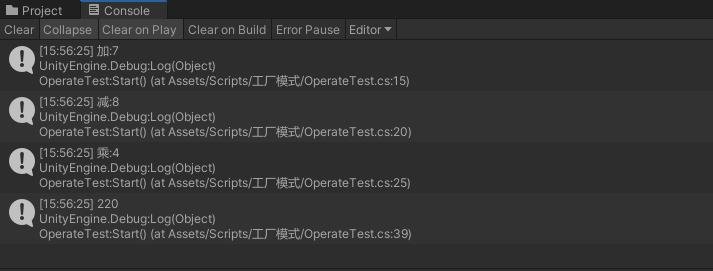
7.打印结果
8.好用的代码块
单例模式 代码如下
using System.Collections;

using System.Collections.Generic;

using UnityEngine;

/// <summary>

/// 单例模式基类模块的作用主要是——减少单例模式重复代码的书写

/// </summary>

/// <typeparam name="T"></typeparam>

public class BaseManager<T> where T :new ()

{

    private static T _instance;

    public static T GetInstance()

    {

        if (_instance ==null)

        {

            _instance = new T();

        }

        return _instance;

    }

}
8.1 怎么使用单例,新建脚本继承它就行了 需要新建Resources文件夹 放两个预制体测试 一个Cube一个Sphere 具体使用情况自行扩展即可


using System.Collections;

using System.Collections.Generic;

using UnityEngine;

public class CeShi2 : BaseManager <CeShi2>

{

    public int oko = 0;

}
怎么继承单例的
using System.Collections;

using System.Collections.Generic;

using UnityEngine;

public class CeShi3 : BaseManager <CeShi3>

{

    public bool bol = false;

}
怎么继承单例的
using System.Collections;

using System.Collections.Generic;

using UnityEngine;

public class CeShi1 : MonoBehaviour

{

    // Start is called before the first frame update

    void Start()

    {

        CeShi2.GetInstance().oko++;

        CeShi3.GetInstance().bol = true;

        Debug.Log(CeShi2.GetInstance().oko

             +"    " + CeShi3.GetInstance().bol);

    }

    // Update is called once per frame

    void Update()

    {

        if (Input.GetMouseButtonDown(0))

        {

            //向缓存池中拿东西

            PoolManager.GetInstance().GetObj("Cube");

        }

        if (Input.GetMouseButtonDown(1))

        {

            PoolManager.GetInstance().GetObj("Sphere");

        }

        Debug.Log(PoolManager.GetInstance().pool1Dic.Count);

    }

}
怎么使用单例的
8.2 缓存池模块 代码如下 怎么调用的在上面脚本Update里面点击鼠标调用的缓存池拿东西
using System.Collections;

using System.Collections.Generic;

using UnityEngine;

/// <summary>

/// 缓存池模块

/// </summary>

public class PoolManager : BaseManager <PoolManager>

{

    //这里是缓存池模块

    //创建字段存储容器

    public Dictionary<string, List<GameObject>> pool1Dic = new Dictionary<string, List<GameObject>>();

    private GameObject poolObj;

    //取得游戏物体

    public GameObject GetObj(string name)

    {

        GameObject obj = null;

        //ContainsKey判断是否包含指定的“键名”

        //.count 获得符合条件的个数

        if (pool1Dic.ContainsKey(name) && pool1Dic[name].Count > 0)

        {

            //取得List中的第一个

            obj = pool1Dic[name][0];

            //移除第零个(这样才能允许同时创建多个物体)

            //这样才是真正的“拿出来”

            pool1Dic[name].RemoveAt(0);

        }

        else

        {

            //缓存池中没有该物体,我们去目录中加载

            //外面传一个预设体的路径和名字,我内部就去加载它

            //Resources类允许你从指定的路径查找或访问资源(api)

            obj = GameObject.Instantiate(Resources.Load<GameObject>(name));

            //创建对象后,将对象的名字与池中名字相符

            obj.name = name;

        }

        //让物体显示出来

        obj.SetActive(true);

        obj.transform.parent = null;

        return obj;

    }

    //外界返还游戏物体

    public void PushObj(string name, GameObject obj)

    {

        if (poolObj == null)

        {

            poolObj = new GameObject("Pool");

        }

        //将这个物体设置父亲为空物体

        obj.transform.parent = poolObj.transform;

        //让物体失活

        obj.SetActive(false);

        //里面有记录这个键(有这个抽屉)

        if (pool1Dic.ContainsKey(name))

        {

            pool1Dic[name].Add (obj);

        }

        //未曾记录这个键(没有这个抽屉)

        else

        {

            pool1Dic.Add(name, new List<GameObject>() { obj });

        }

    }

}
缓存池代码
8.3 下面加一个缓存池返还东西 脚本直接挂在物体上即可
using System.Collections;

using System.Collections.Generic;

using UnityEngine;

/// <summary>

/// 挂到物体身上的

/// </summary>

public class DelPush : MonoBehaviour

{

    void OnEnable()

    {

        //unity自带的延迟方法 在time秒后,延迟调用方法methodName

        Invoke("Push", 1);

    }

    //放回去

    void Push()

    {

        PoolManager.GetInstance().PushObj(transform.name, this.gameObject);

    }

}
挂在物体上的代码
简单记录一下
Unity 设计模式-简单工厂模式和其他好用的通用代码块的更多相关文章
- C++设计模式——简单工厂模式
简单工厂模式(Simple Factory Pattern) 介绍:简单工厂模式不能说是一个设计模式,说它是一种编程习惯可能更恰当些.因为它至少不是Gof23种设计模式之一.但它在实际的编程中经常被用 ...
- 3. 星际争霸之php设计模式--简单工厂模式
题记==============================================================================本php设计模式专辑来源于博客(jymo ...
- 设计模式 — 简单工厂模式(staticFactory)
这篇博文介绍简单工厂模式,设计模式并不是固定的二十三种,不同的书介绍的可能有出入,这篇介绍的简单工厂模式在有些书上就忽略不介绍了.设计模式是一套被反复使用的.多数人知晓的.经过分类编目的.代码设计经验 ...
- Golang设计模式—简单工厂模式(Simple Factory Pattern)
Golang设计模式--简单工厂模式 背景 假设我们在做一款小型翻译软件,软件可以将德语.英语.日语都翻译成目标中文,并显示在前端. 思路 我们会有三个具体的语言翻译结构体,或许以后还有更多,但现在分 ...
- 深入浅出设计模式——简单工厂模式(Simple Factory)
介绍简单工厂模式不能说是一个设计模式,说它是一种编程习惯可能更恰当些.因为它至少不是Gof23种设计模式之一.但它在实际的编程中经常被用到,而且思想也非常简单,可以说是工厂方法模式的一个引导,所以我想 ...
- C#设计模式--简单工厂模式
简单工厂模式是属于创建型模式,但不属于23种GOF设计模式之一. 举一个例子:一个公司有不同的部门,客户根据需要打电话到不同的部门.客户相当于上端,不同部门相当于下端.不使用简单工厂模式来实现的例子如 ...
- 设计模式 | 简单工厂模式(static factory method)
按理说应该把书全都看完一遍,再开始写博客比较科学,会有比较全面的认识. 但是既然都决定要按规律更新博客了,只能看完一个设计模式写一篇了. 也算是逼自己思考了,不是看完就过,至少得把代码自己都敲一遍. ...
- Yii2设计模式——简单工厂模式
除了使用 new 操作符之外,还有更多的制造对象的方法.你将了解到实例化这个活动不应该总是公开进行,也会认识到初始化经常造成"耦合"问题. 应用举例 yii\db\mysql\Sc ...
- Yii2 设计模式——简单工厂模式
除了使用 new 操作符之外,还有更多的制造对象的方法.你将了解到实例化这个活动不应该总是公开进行,也会认识到初始化经常造成“耦合”问题. 应用举例 yii\db\mysql\Schema 中: // ...
- 在商城系统中使用设计模式----简单工厂模式之在springboot中使用简单工厂模式
1.前言: 不了解简单工厂模式请先移步:在商城中使用简单工厂.在这里主要是对springboot中使用简单工厂模式进行解析. 2.问题: 什么是简单工厂:它的实现方式是由一个工厂类根据传入的参数,动态 ...
随机推荐
- kafka在阿里云上的配置
只需要改server.properties listeners=PLAINTEXT:// 内网的ip地址和9092端口advertised.listeners=PLAINTEXT://外网的ip的地 ...
- git remote prune origin删除本地有但在远程库已经不存在的分支
先调用git remote show origin 该命令能够获取远端分支信息,你可以看到和本地和远端不同步的地方: 过时的就是和本地不同步的分支,本地已过时的表示你需要移除这个分支了. 这个时候你需 ...
- SQL server自动创建日历表。
做日报功能需要统计每个月的上班天数,节假日因为每年的日期都不一样,所以需要自己手动更新这些节假日 1:首先先自动创建一个日历表,选择开始年月日和结束的年月日 不要同时执行,先执行创建表之后CREATE ...
- 移动web_平面转换
平面转换 平面 平移 旋转 缩放 概念:使用transform属性实现元素的位移.旋转.缩放等效果 注意点:行内元素所有的平面转换是没有效果的 平面: 平面转换的平面指的是二维平面(2D)只有X和Y轴 ...
- VUE使用axios数据请求时报错 TypeError: Cannot set property 'xxxx' of undefined 的解决办法
正常定义全局变量: data:function (){ return{ currentOrders:[] } }, 使用Axios发送请求并获取后端数据时,如果在then中使用this.current ...
- 改变Jupyter notebook默认浏览器
1. prompt 输入命令"jupyter notebook --generate-config" 找到jupyter_notebook_config.py所在位置(可能在&qu ...
- params的使用
今天在写vue的JavaScript的时候有个地方需要传很多参数,自己写不出来,求助 我的博博 后拿到神奇代码: 神奇代码中有params,俺自作聪明,以为他是一个json的数据,所以自己改了个名字 ...
- Linux 文件编码操作enca[适用Mac]
查看文件编码: enca file.csv 修改文件编码 enca -x UTF-8 file.csv
- color-color diagram data
- 微信小程序级联选择器省市区选择器部分安卓手机兼容的问题:无法只选省份,必须选择到市
代码片段: 1 <view class="item"> 2 <view class="i-name"><text class=&q ...