
Spring+Quartz+Dom4j实现一个小项目
目录
1、项目背景
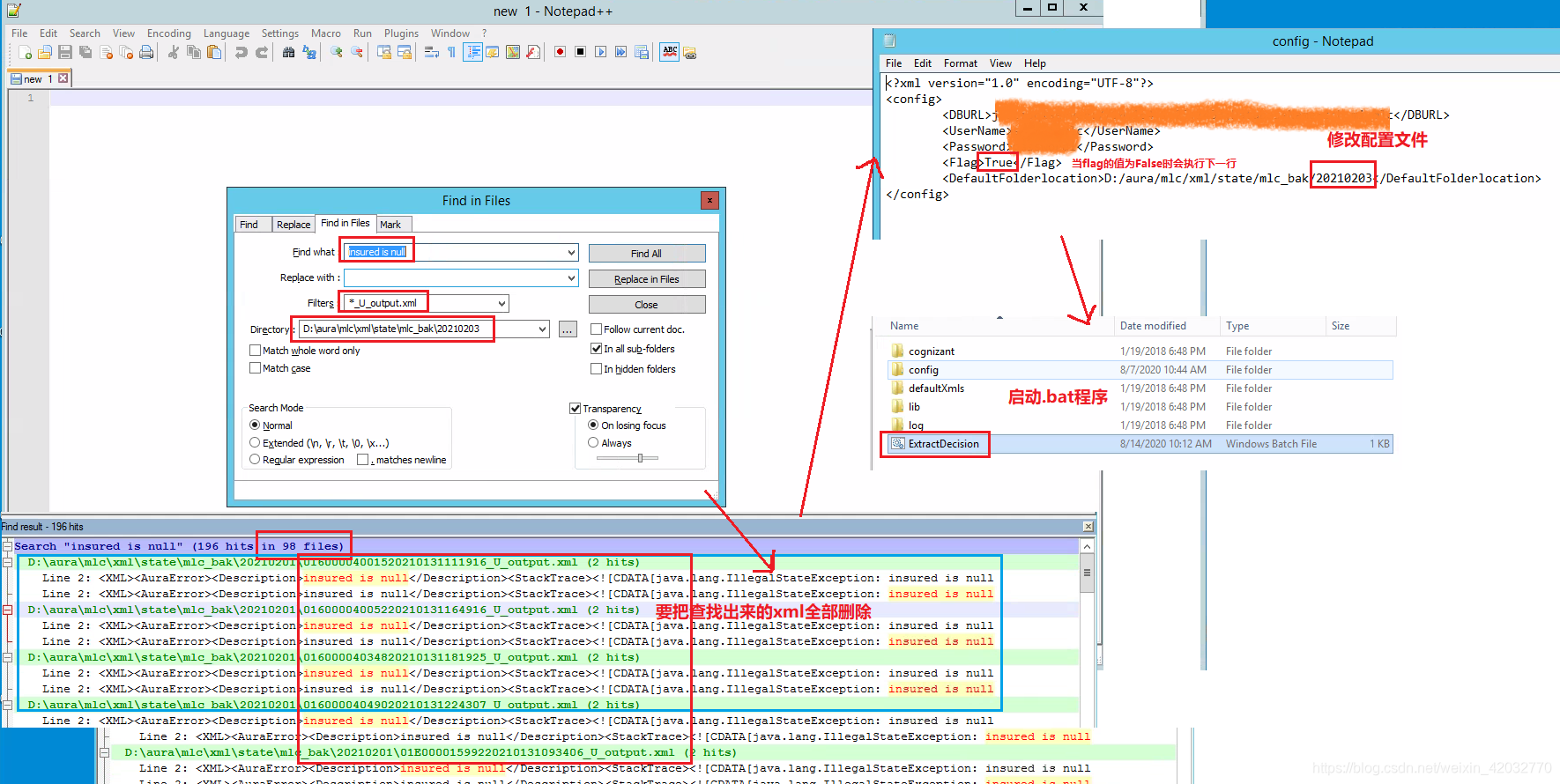
最近在工作中碰到了一个问题,一个叫aura的系统每天都会接收到许多xml,其中有些xml会包含错误信息,这些包含错误信息的xml如果不及时删除并重新导入正确的xml的话,会导致系统中的其他xml无法正常入库。由于每天如果人工处理的话工作量比较大,而且也影响aura系统的日常处理运行,因此开发了一个基于Spring+Quartz+Dom4j实现一个小程序,用来每天处理那些错误的xml,并启动相应的程序重新导入这些xml。
2、技术介绍
Spring:用来降低代码的耦合性,提高程序的执行效率
Quartz:设置定时任务,让程序每天跑一次
Dom4j:修改xml文件
3、实现代码
FileHelper.java
package Tools;

import java.io.*;

import java.util.ArrayList;

import java.util.List;

/**

 * @description:

 * @author: wu linchun

 * @time: 2021/1/31 17:28

 */

public class FileHelper {

    //读取文件中的内容

    public List<String> readFile(File file) throws IOException {

        BufferedReader reader = null;

        StringBuffer sbf = new StringBuffer();

        List<String> ssr = new ArrayList<String>();

        reader = new BufferedReader(new FileReader(file));

        String tempStr;

        while ((tempStr = reader.readLine()) != null) {

            ssr.add(tempStr);

        }

        reader.close();

        return ssr;

    }

}
FoldHelper.java
package Tools;

import java.io.File;

import java.util.ArrayList;

import java.util.List;

/**

 * @description:

 * @author: wu linchun

 * @time: 2021/1/31 19:17

 */

public class FoldHelper {

    /**

     * 获取某个文件夹里面的所有文件名

     * @param file

     * @return

     */

    public String[] readDirectory(File file) {

        //List<String> fileName_list=new ArrayList<String>();

        String[] fileName_arr = new String[file.list().length];

        if (file.isDirectory()) {

            fileName_arr = file.list();

        }

        return fileName_arr;

    }

}
ConfigHelper.java
package Tools;

import org.dom4j.*;

import org.dom4j.io.OutputFormat;

import org.dom4j.io.SAXReader;

import org.dom4j.io.XMLWriter;

import java.io.*;

import java.util.ArrayList;

import java.util.List;

/**

 * @description:

 * @author: wu linchun

 * @time: 2021/2/1 20:17

 */

public class ConfigHelper {

    private FileHelper fileHelper;

    public void setFileHelper(FileHelper fileHelper) {

        this.fileHelper = fileHelper;

    }

    /**

     * 修改xml中的指定节点的值

     *

     * @param url

     * @param flag

     * @param defaultFolderlocation

     * @throws DocumentException

     * @throws IOException

     */

    public void setConfig(String url, String flag, String defaultFolderlocation) throws DocumentException, IOException {

        SAXReader reader = new SAXReader();

        Document document = reader.read(new File(url));

        Element root = document.getRootElement();

        // 获取第一个节点

        Element flagNode = (Element) root.elements("Flag").get(0);

        Element defaultFolderlocationNode = (Element) root.elements("DefaultFolderlocation").get(0);

        // 设置<flag>节点的值

        flagNode.setText(flag);

        defaultFolderlocationNode.setText(defaultFolderlocation);

        // 格式化输出流,同时指定编码格式。也可以在FileOutputStream中指定。

        OutputFormat format = OutputFormat.createPrettyPrint();

        format.setEncoding("utf-8");

        XMLWriter writer = new XMLWriter(new FileOutputStream(url), format);

        writer.write(document);

        writer.close();

    }

}
Deal.java
package Tools;

import java.io.File;

import java.io.IOException;

import java.util.List;

/**

 * @description:

 * @author: wu linchun

 * @time: 2021/1/31 19:31

 */

public class Deal {

    private FileHelper fileHelper;

    private FoldHelper foldHelper;

    public void setFileHelper(FileHelper fileHelper) {

        this.fileHelper = fileHelper;

    }

    public void setDirectoryHelper(FoldHelper foldHelper) {

        this.foldHelper = foldHelper;

    }

    /**

     * 找出文件名以“_U_output.xml”结尾的,且xml内含有"insured is null"的xml并将其删除

     *

     * @param file

     * @throws IOException

     */

    public void deal_file(File file) throws IOException {

        String[] fileName_arr = foldHelper.readDirectory(file);

        for (String ss : fileName_arr) {

            if (ss.contains("_U_output.xml")) {

                String file_path = file.getAbsolutePath() + "\\" + ss;

                System.out.println(file_path);

                File target_file = new File(file_path);

                List<String> testList = fileHelper.readFile(target_file);

                if (fileHelper.readFile(target_file).get(1).contains(" insured is null")) {

                    target_file.delete();

                    System.out.println("delete" + " " + file_path);

                }

            }

        }

    }

}
MyJob.java
package MyJob;

import Tools.ConfigHelper;

import Tools.Deal;

import org.dom4j.DocumentException;

import org.quartz.Job;

import org.quartz.JobExecutionContext;

import org.quartz.JobExecutionException;

import org.springframework.context.support.ClassPathXmlApplicationContext;

import java.io.File;

import java.io.IOException;

import java.text.SimpleDateFormat;

import java.util.Date;

/**

 * @description: 设置定时任务要执行的工作

 * @author: wu linchun

 * @time: 2021/1/31 20:48

 */

public class MyJob implements Job {

    @Override

    public void execute(JobExecutionContext jobExecutionContext) throws JobExecutionException {

        ClassPathXmlApplicationContext applicationContext = new ClassPathXmlApplicationContext("bean.xml");

        Deal deal = (Deal) applicationContext.getBean("deal");

        ConfigHelper configHelper = (ConfigHelper) applicationContext.getBean("confighelper");

        SimpleDateFormat sdf = new SimpleDateFormat("yyyyMMdd");

        Date date = new Date();

        String fold = String.valueOf(sdf.format(date));

        File file = new File("D:\\aura\\mlc\\xml\\state\\mlc_bak\\" + fold);

        try {

            deal.deal_file(file);

        } catch (IOException e) {

            e.printStackTrace();

        }

        System.out.println(fold);

        //System.out.println("<Flag>修改为False");

        String url = "D:\\aura\\mlc_ExtractDecision\\config\\config.xml";

        //把<Flag>节点改为false,并修改要跑的文件夹

        try {

            configHelper.setConfig(url, "False", "D:/aura/mlc/xml/state/mlc_bak/" + fold);

        } catch (DocumentException e) {

            e.printStackTrace();

        } catch (IOException e) {

            e.printStackTrace();

        }

        System.out.println("<Flag>修改为False");

        System.out.println("<DefaultFolderlocation>文件夹修改为" + fold);

        //执行ExtractDecision.bat

        String cmd = "cmd /c start D:\\aura\\mlc_ExtractDecision\\ExtractDecision.bat";

        try {

            Runtime.getRuntime().exec("cmd  /c  start D:\\aura\\mlc_ExtractDecision\\ExtractDecision.bat");

        } catch (IOException e) {

            e.printStackTrace();

        }

        System.out.println("执行了ExtractDecision.bat");

        //把<Flag>节点改为True

        try {

            configHelper.setConfig(url, "True", "D:/aura/mlc/xml/state/mlc_bak/" + fold);

        } catch (DocumentException e) {

            e.printStackTrace();

        } catch (IOException e) {

            e.printStackTrace();

        }

        System.out.println("<Flag>修改为True");

    }

}
Run.java
import MyJob.MyJob;

import Tools.Deal;

import org.quartz.*;

import org.quartz.impl.StdSchedulerFactory;

import org.springframework.context.support.ClassPathXmlApplicationContext;

import java.io.File;

import java.io.IOException;

/**

 * @description: 启动类

 * @author: wu linchun

 * @time: 2021/1/31 19:07

 */

public class Run {

    public static void main(String[] args) throws IOException, SchedulerException {

        //1、调度器(Schedular),从工厂中获取调度实例(默认:实例化new StdSchedulerFactory();)

        Scheduler scheduler = StdSchedulerFactory.getDefaultScheduler();

        //2、任务实例(JobDetail)

        JobDetail jobDetail = JobBuilder.newJob(MyJob.class) //加载任务类,与HelloJob完成绑定,要求HelloJob实现Job接口

                .withIdentity("job1", "group1") //参数1:任务的名称(唯一实例);参数2:任务组的名称

                .build();

        //3、触发器(Trigger)

        Trigger trigger = TriggerBuilder.newTrigger()

                .withIdentity("trigger1", "group1") //参数1:触发器的名称(唯一实例);参数2:触发器组的名称

                .startNow() //马上启动触发器

                .withSchedule(SimpleScheduleBuilder.repeatSecondlyForever(15)) //这里的15为每15秒执行一次

                .build();

        //让调度器关联任务和触发器,保证按照触发器定义的条件执行任务

        scheduler.scheduleJob(jobDetail, trigger);

        //启动

        scheduler.start();

    }

}
pom.xml
<?xml version="1.0" encoding="UTF-8"?>

<project xmlns="http://maven.apache.org/POM/4.0.0"

         xmlns:xsi="http://www.w3.org/2001/XMLSchema-instance"

         xsi:schemaLocation="http://maven.apache.org/POM/4.0.0 http://maven.apache.org/xsd/maven-4.0.0.xsd">

    <modelVersion>4.0.0</modelVersion>

    <groupId>org.example</groupId>

    <artifactId>aura_monitor</artifactId>

    <version>1.0-SNAPSHOT</version>

    <packaging>jar</packaging>

    <dependencies>

        <dependency>

            <groupId>org.springframework</groupId>

            <artifactId>spring-context</artifactId>

            <version>5.0.2.RELEASE</version>

        </dependency>

        <dependency>

            <groupId>org.springframework</groupId>

            <artifactId>spring-test</artifactId>

            <version>5.0.2.RELEASE</version>

        </dependency>

        <dependency>

            <groupId>commons-dbutils</groupId>

            <artifactId>commons-dbutils</artifactId>

            <version>1.4</version>

        </dependency>

        <!--核心包-->

        <dependency>

            <groupId>org.quartz-scheduler</groupId>

            <artifactId>quartz</artifactId>

            <version>2.3.2</version>

        </dependency>

        <!--工具-->

        <dependency>

            <groupId>org.quartz-scheduler</groupId>

            <artifactId>quartz-jobs</artifactId>

            <version>2.3.2</version>

        </dependency>

        <dependency>

            <groupId>org.slf4j</groupId>

            <artifactId>slf4j-api</artifactId>

            <version>1.7.7</version>

            <scope>compile</scope>

        </dependency>

        <!-- https://mvnrepository.com/artifact/dom4j/dom4j -->

        <dependency>

            <groupId>dom4j</groupId>

            <artifactId>dom4j</artifactId>

            <version>1.6.1</version>

        </dependency>

    </dependencies>

    <build>

        <finalName>dscApp</finalName>

        <plugins>

            <plugin>

                <groupId>org.apache.maven.plugins</groupId>

                <artifactId>maven-compiler-plugin</artifactId>

                <configuration>

                    <source>1.8</source>

                    <target>1.8</target>

                </configuration>

            </plugin>

            <plugin>

                <!-- JAR Maven 管理-->

                <groupId>org.apache.maven.plugins</groupId>

                <artifactId>maven-jar-plugin</artifactId>

                <version>3.1.0</version>

                <configuration>

                    <archive>

                        <manifest>

                            <!-- 配置主程序 java -jar 默认Class -->

                            <addClasspath>true</addClasspath>

                            <classpathPrefix>lib/</classpathPrefix>

                            <!--Main程序入口-->

                            <mainClass>Run</mainClass>

                        </manifest>

                    </archive>

                </configuration>

            </plugin>

            <!-- maven 打包集成插件 -->

            <plugin>

                <artifactId>maven-assembly-plugin</artifactId>

                <executions>

                    <execution>

                        <phase>package</phase>

                        <goals>

                            <goal>single</goal>

                        </goals>

                    </execution>

                </executions>

                <configuration>

                    <descriptorRefs>

                        <!-- 将依赖一起打包到 JAR -->

                        <descriptorRef>jar-with-dependencies</descriptorRef>

                    </descriptorRefs>

                    <archive>

                        <manifest>

                            <!-- 配置主程序 java -jar 默认Class -->

                            <addClasspath>true</addClasspath>

                            <classpathPrefix>lib/</classpathPrefix>

                            <!--Main程序入口-->

                            <mainClass>Run</mainClass>

                        </manifest>

                    </archive>

                </configuration>

            </plugin>

        </plugins>

    </build>

</project>
bean.xml
<?xml version="1.0" encoding="UTF-8"?>

<beans xmlns="http://www.springframework.org/schema/beans"

       xmlns:xsi="http://www.w3.org/2001/XMLSchema-instance"

       xsi:schemaLocation="http://www.springframework.org/schema/beans http://www.springframework.org/schema/beans/spring-beans.xsd">

    <bean id="foldHelper" class="Tools.FoldHelper" scope="prototype"></bean>

    <bean id="fileHelper" class="Tools.FileHelper" scope="prototype"></bean>

    <bean id="deal" class="Tools.Deal" scope="prototype">

        <property name="directoryHelper" ref="foldHelper"></property>

        <property name="fileHelper" ref="fileHelper"></property>

    </bean>

    <bean id="confighelper" class="Tools.ConfigHelper" scope="prototype">

        <property name="fileHelper" ref="fileHelper"></property>

    </bean>

</beans>
4、程序演示
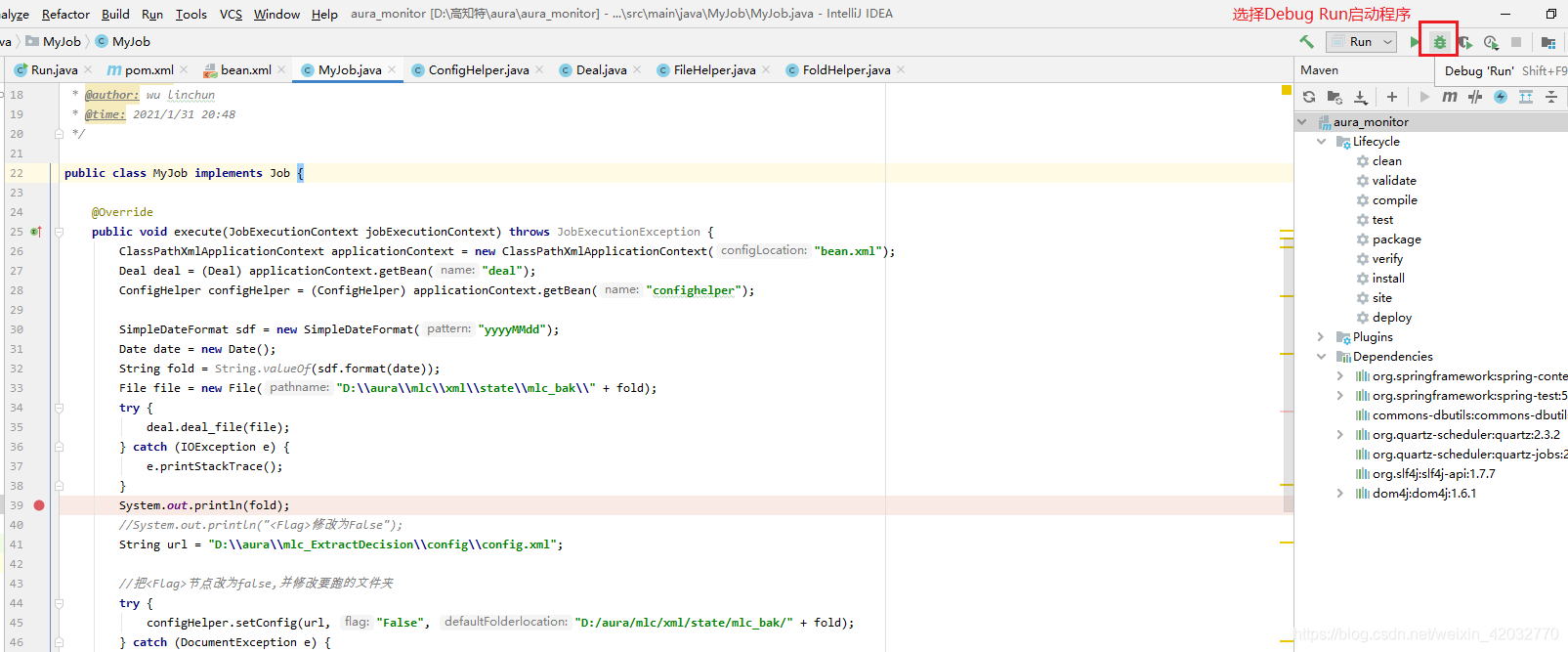
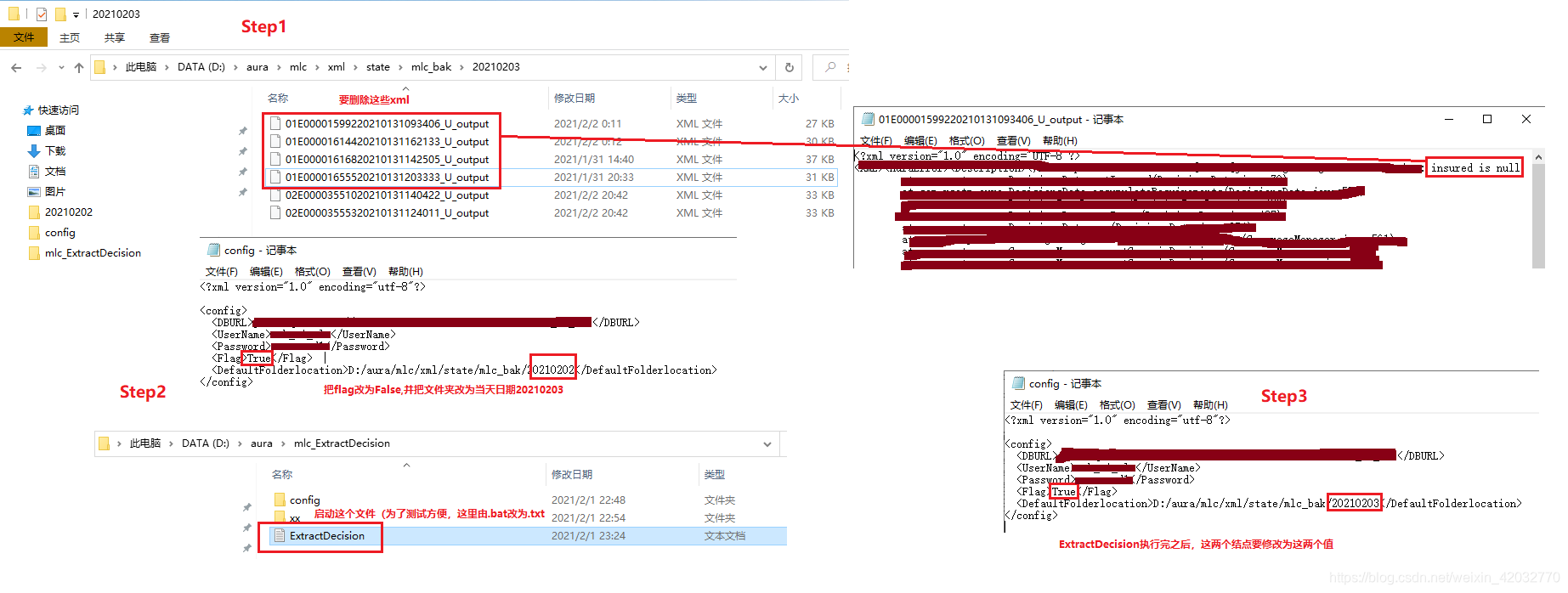
先在MyJob.java中打一个断点,方便一步一步演示程序
5、打成jar包
在pom.xml中添加打包
 <build>

        <finalName>dscApp</finalName>

        <plugins>

            <plugin>

                <groupId>org.apache.maven.plugins</groupId>

                <artifactId>maven-compiler-plugin</artifactId>

                <configuration>

                    <source>1.8</source>

                    <target>1.8</target>

                </configuration>

            </plugin>

            <plugin>

                <!-- JAR Maven 管理-->

                <groupId>org.apache.maven.plugins</groupId>

                <artifactId>maven-jar-plugin</artifactId>

                <version>3.1.0</version>

                <configuration>

                    <archive>

                        <manifest>

                            <!-- 配置主程序 java -jar 默认Class -->

                            <addClasspath>true</addClasspath>

                            <classpathPrefix>lib/</classpathPrefix>

                            <!--Main程序入口-->

                            <mainClass>Run</mainClass>

                        </manifest>

                    </archive>

                </configuration>

            </plugin>

            <!-- maven 打包集成插件 -->

            <plugin>

                <artifactId>maven-assembly-plugin</artifactId>

                <executions>

                    <execution>

                        <phase>package</phase>

                        <goals>

                            <goal>single</goal>

                        </goals>

                    </execution>

                </executions>

                <configuration>

                    <descriptorRefs>

                        <!-- 将依赖一起打包到 JAR -->

                        <descriptorRef>jar-with-dependencies</descriptorRef>

                    </descriptorRefs>

                    <archive>

                        <manifest>

                            <!-- 配置主程序 java -jar 默认Class -->

                            <addClasspath>true</addClasspath>

                            <classpathPrefix>lib/</classpathPrefix>

                            <!--Main程序入口-->

                            <mainClass>Run</mainClass>

                        </manifest>

                    </archive>

                </configuration>

            </plugin>

        </plugins>

    </build>
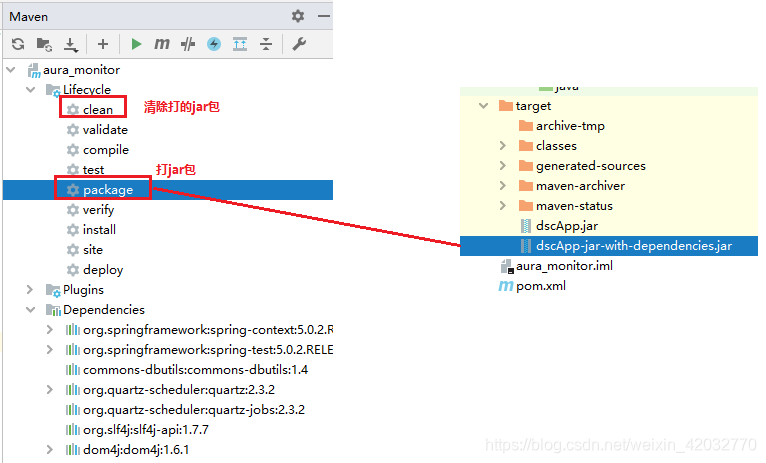
依赖(注意:因为是maven项目,所有相应导入的依赖也要一起打进jar包)
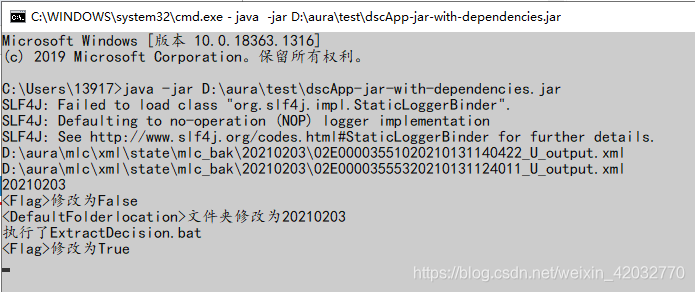
使用 java -jar 命令启动jar包
Spring+Quartz+Dom4j实现一个小项目的更多相关文章
- 用struts2标签如何从数据库获取数据并在查询页面显示。最近做一个小项目,需要用到struts2标签从数据库查询数据,并且用迭代器iterator标签在查询页面显示,可是一开始,怎么也获取不到数据,想了许久,最后发现,是自己少定义了一个变量,也就是var变量。
最近做一个小项目,需要用到struts2标签从数据库查询数据,并且用迭代器iterator标签在查询页面显示,可是一开始,怎么也获取不到数据,想了许久,最后发现,是自己少定义了一个变量,也就是var变 ...
- Spring MVC 学习笔记2 - 利用Spring Tool Suite创建一个web 项目
Spring MVC 学习笔记2 - 利用Spring Tool Suite创建一个web 项目 Spring Tool Suite 是一个带有全套的Spring相关支持功能的Eclipse插件包. ...
- 跟我一起用node-express搭建一个小项目(mongodb)[二]
我的小项目主要是会用到MongoDB. 呵呵,我也是现学现卖. 都说小公司十八般武艺样样稀疏,没有办法啊! 兵来兵挡,将来将挡!自己是个兵呢?还是一个将呢! 没有公司培养,就自己培养自己呗.差的远一点 ...
- 【源码项目+解析】C语言/C++开发,打造一个小项目扫雷小游戏!
一直说写个几百行的小项目,于是我写了一个控制台的扫雷,没有想到精简完了代码才200行左右,不过考虑到这是我精简过后的,浓缩才是精华嘛,我就发出来大家一起学习啦,看到程序跑起来能玩,感觉还是蛮有成就感的 ...
- spring boot的一个小项目小型进销存系统
项目所需的依赖: <dependency> <groupId>org.springframework.boot</groupId> <artifactId&g ...
- iOS 模仿一个小项目,总结一下里边的模块
ManoBoo: 参考链接:http://www.jianshu.com/p/fd4c46c31508 这个小的项目是参考ManoBoo的简书的,链接在上方,自己在仿做的过程中,也离不开Man ...
- Winform窗体用对象数组做一个小项目
首先我我们看一下需求:我们要做的是显示员工信息,实现项目经理给员工评分的功能! 首先项目经理是评分的人所以没有用,因为我们自己写,评分的就是我们自己.所以我们要做的是先在vs也就是我们的环境里建一个项 ...
- 基于Asp.net core + EF + Sqlite 5分钟快速上手一个小项目
虽然该方法不会用在实际开发中,但该过程对于初学者还是非常友好的,真应了麻雀虽小,五脏俱全这句话了.好了不多废话了,直接开始!! 1.建立一个名为test的Asp.net core web应用程序 这一 ...
- 麻雀虽小,五脏俱全。基于Asp.net core + Sqlite 5分钟快速上手一个小项目
虽然该方法不会用在实际开发中,但该过程对于初学者还是非常友好的,真应了麻雀虽小,五脏俱全这句话了.好了不多废话了,直接开始!! 1.建立一个名为test的Asp.net core web应用程序 这一 ...
随机推荐
- Docker | 制作tomcat镜像并部署项目
本文讲解如何制作自己的tomcat镜像,并使用tomcat部署项目 原料准备: tomcat.jdk安装包,dockerfile文件 步骤 1.准备压缩包 jdk-8u301-linux-x64.ta ...
- RAID5 IO处理之写请求代码详解
我们知道RAID5一个条带上的数据是由N个数据块和1个校验块组成,其校验块由N个数据块通过异或运算得出,这样才能在任意一个成员磁盘失效时通过其他N个成员磁盘恢复出用户写入的数据.这也就要求RAID5条 ...
- 5.ElasticSearch系列之文档的基本操作
1. 文档写入 # create document. 自动生成 _id POST users/_doc { "user" : "shenjian", " ...
- 已知数据库中存在表tb_book2,通过在图书信息界面填写书本的基本信息,然后提交后写入数据库中的表格中。需要对提交的信息进行修改,信息填入不能为空,为空则则有提示。
jsp结合SQLSERVER向数据库中的表添加图书信息. 已知数据库中存在表tb_book2,通过在图书信息界面填写书本的基本信息,然后提交后写入数据库中的表格中.需要对提交的信息进行修改,信息填入不 ...
- java程序员在交接别人的工作时如何保证顺利交接?
序言 各位好啊,我是会编程的蜗牛,作为java开发者,尤其是在职场混迹了多年的老手,肯定会遇到同事离职的情况,或者自己跳槽的情况,这些都免不了需要做好交接工作,不管是别人交接给我们,还是我们交接给别人 ...
- UEC 利用代理/委托写一个生命组件
首先基于ActorComponent创建一个组件 HealthComponent,将需要的变量与函数创建 #include "CoreMinimal.h" #include &qu ...
- Java函数式编程:二、高阶函数,闭包,函数组合以及柯里化
承接上文:Java函数式编程:一.函数式接口,lambda表达式和方法引用 这次来聊聊函数式编程中其他的几个比较重要的概念和技术,从而使得我们能更深刻的掌握Java中的函数式编程. 本篇博客主要聊聊以 ...
- C# Interlocked 类
[前言] 在日常开发工作中,我们经常要对变量进行操作,例如对一个int变量递增++.在单线程环境下是没有问题的,但是如果一个变量被多个线程操作,那就有可能出现结果和预期不一致的问题. 例如: stat ...
- 2022-11-07 Acwing每日一题
本系列所有题目均为Acwing课的内容,发表博客既是为了学习总结,加深自己的印象,同时也是为了以后回过头来看时,不会感叹虚度光阴罢了,因此如果出现错误,欢迎大家能够指出错误,我会认真改正的.同时也希望 ...
- XMind2022安装激活
1. 下载XMind2021并安装 2. 激活安装 2.1 找到需要替换文件的目录右击软件,打开文件所在的位置(默认路径:C:\Program Files\XMind),找到resources文件夹 ...