
maven项目bulid失败_No compiler is provided in this environment.
错误信息如下:
[ERROR] No compiler is provided in this environment. Perhaps you are running on a JRE rather than a JDK?

[INFO] 1 error

[INFO] -------------------------------------------------------------

[INFO] ------------------------------------------------------------------------

[INFO] BUILD FAILURE

[INFO] ------------------------------------------------------------------------

[INFO] Total time: 1.103 s

[INFO] Finished at: 2019-08-26T17:41:36+08:00

[INFO] ------------------------------------------------------------------------

[ERROR] Failed to execute goal org.apache.maven.plugins:maven-compiler-plugin:3.8.1:compile (default-compile) on project springmvc: Compilation failure

[ERROR] No compiler is provided in this environment. Perhaps you are running on a JRE rather than a JDK?

[ERROR] -> [Help 1]

[ERROR]

[ERROR] To see the full stack trace of the errors, re-run Maven with the -e switch.

[ERROR] Re-run Maven using the -X switch to enable full debug logging.

[ERROR]

[ERROR] For more information about the errors and possible solutions, please read the following articles:

[ERROR] [Help 1] http://cwiki.apache.org/confluence/display/MAVEN/MojoFailureException
前提:maven项目,tomcat 7,jdk1.8
根据错误信息提示:No compiler is provided in this environment. Perhaps you are running on a JRE rather than a JDK?这个环境中没有提供编译器。也许您运行的是JRE而不是JDK?

1:首先查看 Eclipse-->Window-->preferences-->Java-->Installed JREs
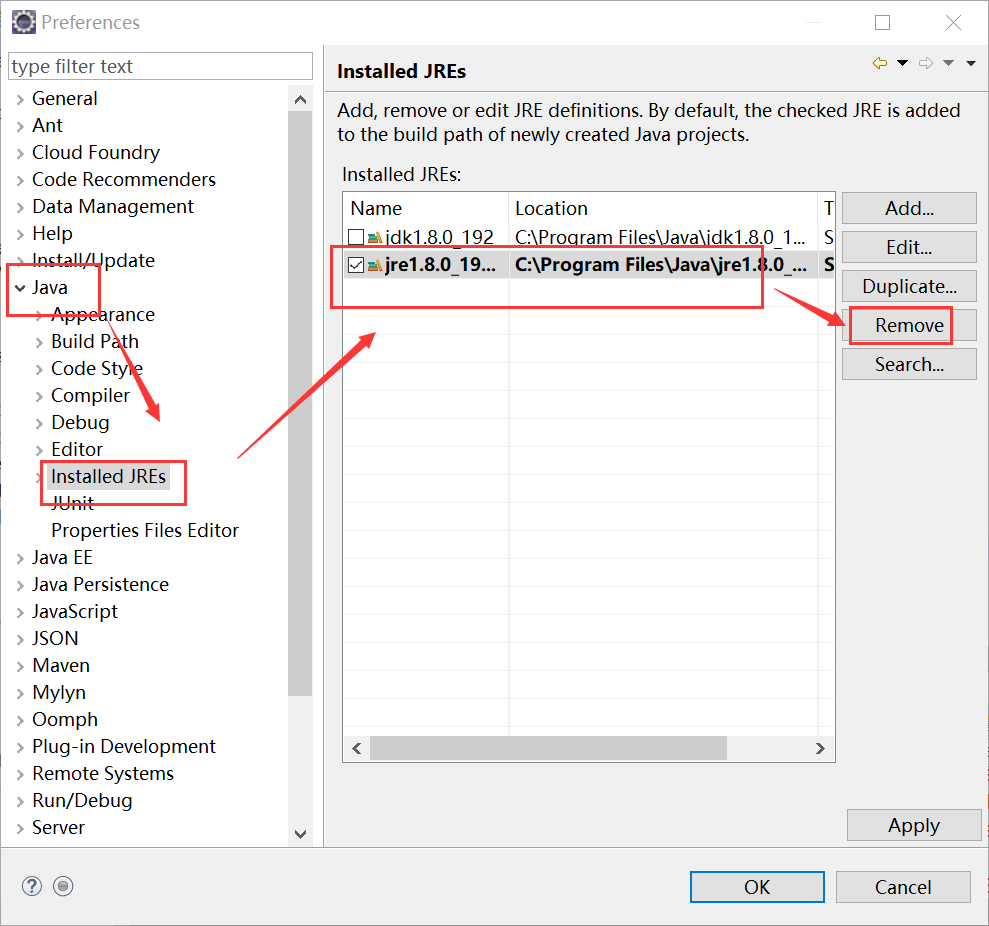
果然安装的是jre,而maven项目的运行需要一个和在setting.xml或者pom.xml指定的版本的jdk

我的是在setting.xml配置的jdk,版本是1.8,配置如下:
<profile>

    <id>jdk-1.8</id>

     <activation>

        <activeByDefault>true</activeByDefault>

        <jdk>1.8</jdk>

      </activation>

    <properties>

        <maven.compiler.source>1.8</maven.compiler.source>

        <maven.compiler.target>1.8</maven.compiler.target>

        <maven.compiler.compilerVersion>1.8</maven.compiler.compilerVersion>

    </properties>

</profile>
所以我们要配置一个指定版本的jdk,然后选中该jdk目录,同时为了防止出错,我把jre目录删除掉了
2:项目右键-->build path-->configure build path-->java Build Path-->接着图片操作3.如果你是在pom.xml设置的jdk,那你还需要:项目右键-->run as -->run configurations..--> jre -->execution environment选择刚刚配置的jdk-->run

update project 重新编译运行即可!
maven项目bulid失败_No compiler is provided in this environment.的更多相关文章
- maven打包错误:No compiler is provided in this environment. Perhaps you are running on a JRE rather than a JDK?
[INFO] Scanning for projects...[INFO] ...
- Maven错误:[ERROR] No compiler is provided in this environment. Perhaps you are running on a JRE rather than a JDK?的解决方法
错误: [ERROR] No compiler is provided in this environment. Perhaps you are running on a JRE rather tha ...
- maven install 报错 No compiler is provided in this environment. Perhaps you are running on a JRE rather than a JDK?
1.控制台打印信息 [INFO] Scanning for projects... [INFO] [INFO] ---------------------< org.cqupt.mauger:R ...
- maven启动报错No compiler is provided in this environment. Perhaps you are running on a JRE rather than a JDK?
[INFO] Scanning for projects... [WARNING] [WARNING] Some problems were encountered while building th ...
- maven打包时出现no compiler is provided in this environment
我是使用maven打jar包时出现的问题,与我问题不同的可以查看下面链接是否有棒状 http://blog.csdn.net/lslk9898/article/details/73836745 可以确 ...
- Maven构建项目出现No compiler is provided in this environment. Perhaps you are running on a JRE rather than a JDK?
No compiler is provided in this environment. Perhaps you are running on a JRE rather than a JDK? 你应该 ...
- 关于Maven项目build时出现No compiler is provided in this environment的处理
版权声明:本文为博主原创文章,未经博主允许不得转载. http://blog.csdn.net/lslk9898/article/details/73836745 近日有同事遇到在编译Maven项目时 ...
- 关于Maven项目build时出现No compiler is provided in this environment的处理(转)
本文转自https://blog.csdn.net/lslk9898/article/details/73836745 近日有同事遇到在编译Maven项目时出现[ERROR] No compiler ...
- 关于Maven项目install时出现No compiler is provided in this environment的处理
关于Maven项目build时出现No compiler is provided in this environment的处理 新配置的Eclipse环境,运行现有项目没问题,一日,从svn上检出了一 ...
随机推荐
- 前端H5中JS用FileReader对象读取blob对象二进制数据,文件传输
HTML5中的Blob对象只是二进制数据的容器,本身并不能操作二进制,故本篇将对其操作对象FileReader进行介绍. FileReader FileReader主要用于将文件内容读入内存,通过一系 ...
- 【Python】【demo实验24】【练习实例】【打印图样】
原题: 打印出如下图案(菱形): * *** ***** ******* ***** *** * 我的源码: #!/usr/bin/python # encoding=utf-8 # -*- codi ...
- [POI2011]ROT-Tree Rotations 题解
题面 这道题咋看都是无法从dp入手,那么就从数据结构入手!: 首先你要会权值线段树和线段树合并. 然后你要知道: 对于任意一个节点,交换左右子树对当前节点和前面的所有节点没有影响. 因为这是前序遍历: ...
- django 聚合统计查询
from django.shortcuts import renderfrom django.http import HttpResponsefrom django.db.models import ...
- 学习实践:使用模式,原则实现一个C++数据库访问类
一.概述 在我参与的多个项目中,大家使用libMySQL操作MySQL数据库,而且是源码即复用,在多个项目中有多套相同或相似的源码,这样的复用方式给开发带来了不变,而且libMySQL的使用比较麻烦, ...
- 怎样查看或修改html的绝对路径
查看用 Node.prototype.baseURI, 修改用 <base>; document.baseURI; // https://www.cnblogs.com/aisowe // ...
- unity 3D循环滚动效果
https://blog.csdn.net/qinyuanpei/article/details/52765356 https://blog.csdn.net/chongzi_daima/articl ...
- 【html】 iframe 和 frameset 的区别
一.两者的相同点和不同点 相同点: iframe 和frameset都是html布局的框架布局 不同点: iframe是一个内联框架,是在页面里生成内部框架 frameset定义一个框架集,包含多个子 ...
- JS基础_if注意问题
<!DOCTYPE html> <html> <head> <meta charset="utf-8" /> <title&g ...
- Android中如何判断内存卡是否存在
if (Environment.getExternalStorageState().equals(android.os.Environment.MEDIA_MOUNTED)) { /* 得到SD卡得路 ...