
Dynamics CRM邮件附件,你真的了解吗?
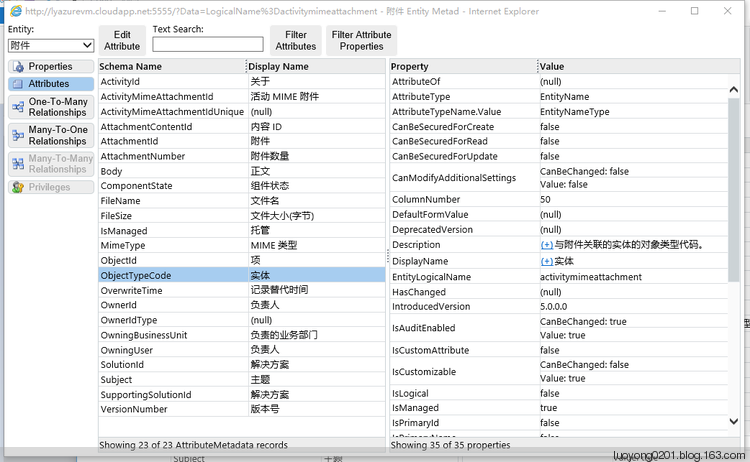
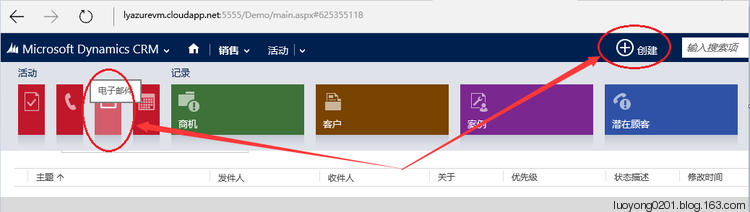
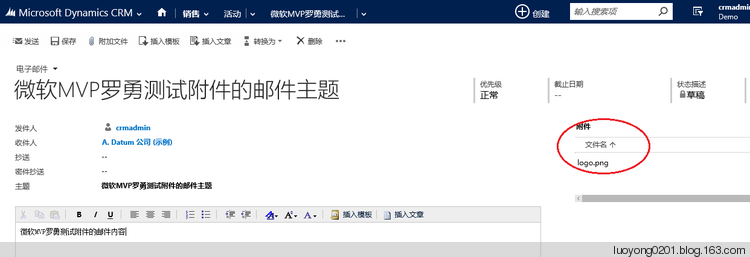
        static void Main(string[] args)

        {

            var service = GetOrganizationService();

            var fetchXML = string.Format(@"<fetch mapping='logical' output-format='xml-platform' version='1.0' distinct='false' no-lock='true' count='1'>

  <entity name='email'>

    <attribute name='subject' />

    <attribute name='regardingobjectid' />

    <attribute name='from' />

    <attribute name='to' />

    <attribute name='statuscode' />

    <attribute name='activityid' />

    <filter type='and'>

      <condition value='微软MVP罗勇测试附件的邮件主题' attribute='subject' operator='eq' />

    </filter>

  </entity>

</fetch>");

            EntityCollection ec = service.RetrieveMultiple(new FetchExpression(fetchXML));

            if (ec.Entities.Count == )

            {

                Console.WriteLine("邮件的ID是" + ec.Entities[].GetAttributeValue<Guid>("activityid") + "下面是附件信息:");

                QueryExpression query = new QueryExpression

                {

                    EntityName = "activitymimeattachment",

                    ColumnSet = new ColumnSet("filename","subject","filesize","mimetype","activityid","activitymimeattachmentid","body"),

                    Criteria =

                    {

                        FilterOperator = LogicalOperator.And,

                        Conditions =

                        {

                            new ConditionExpression

                            {

                                AttributeName = "objecttypecode",

                                Operator = ConditionOperator.Equal,

                                Values = {"email"}

                            },

                            new ConditionExpression

                            {

                                AttributeName = "objectid",

                                Operator = ConditionOperator.Equal,

                                Values = {ec.Entities[].GetAttributeValue<Guid>("activityid")}

                            }

                        }

                    }

                };

                var i = ;

                foreach (var entity in service.RetrieveMultiple(query).Entities)

                {

                    Console.WriteLine("第" + i + "个附件:");

                    Console.WriteLine("filename:" + entity.GetAttributeValue<string>("filename"));

                    Console.WriteLine("filesize:" + entity.GetAttributeValue<int>("filesize"));

                    Console.WriteLine("mimetype:" + entity.GetAttributeValue<string>("mimetype"));

                    Console.WriteLine("subject:" + entity.GetAttributeValue<string>("subject"));

                    Console.WriteLine("activityid:" + entity.GetAttributeValue<EntityReference>("activityid").Id);

                    Console.WriteLine("activitymimeattachmentid:" + entity.GetAttributeValue<Guid>("activitymimeattachmentid"));

                    Console.WriteLine("body:" + entity.GetAttributeValue<string>("body"));

                    Console.WriteLine("--------------------------------------------------");

i++;

                }

            }

            Console.WriteLine("程序运行完成!");

            Console.ReadKey();

        }
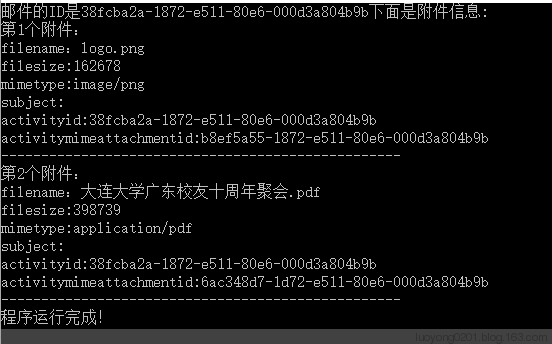
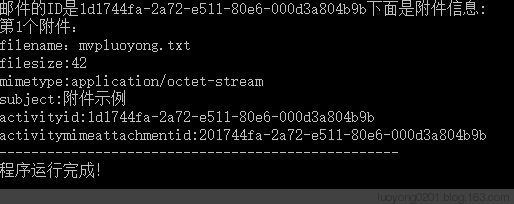
运行结果如下,可以得知filesize应该是以字节为单位的,附件的内容应该是以base64编码后存储等等信息:

       static void Main(string[] args)

        {

            var service = GetOrganizationService();

            var fetchXML = string.Format(@"<fetch mapping='logical' output-format='xml-platform' version='1.0' distinct='false' no-lock='true' count='1'>

  <entity name='email'>

    <attribute name='subject' />

    <attribute name='regardingobjectid' />

    <attribute name='from' />

    <attribute name='to' />

    <attribute name='statuscode' />

    <attribute name='activityid' />

    <filter type='and'>

      <condition value='微软MVP罗勇测试附件的邮件主题' attribute='subject' operator='eq' />

    </filter>

  </entity>

</fetch>");

            EntityCollection ec = service.RetrieveMultiple(new FetchExpression(fetchXML));

            if (ec.Entities.Count == )

            {

                Console.WriteLine("邮件的ID是" + ec.Entities[].GetAttributeValue<Guid>("activityid") + "下面是附件信息:");

                QueryExpression query = new QueryExpression

                {

                    EntityName = "activitymimeattachment",

                    ColumnSet = new ColumnSet("filename","subject","filesize","mimetype","activityid","activitymimeattachmentid"),

                    Criteria =

                    {

                        FilterOperator = LogicalOperator.And,

                        Conditions =

                        {

                            new ConditionExpression

                            {

                                AttributeName = "activityid",

                                Operator = ConditionOperator.Equal,

                                Values = {ec.Entities[].GetAttributeValue<Guid>("activityid")}

                            }

                        }

                    }

                };

                var i = ;

                foreach (var entity in service.RetrieveMultiple(query).Entities)

                {

                    Console.WriteLine("第" + i + "个附件:");

                    Console.WriteLine("filename:" + entity.GetAttributeValue<string>("filename"));

                    Console.WriteLine("filesize:" + entity.GetAttributeValue<int>("filesize"));

                    Console.WriteLine("mimetype:" + entity.GetAttributeValue<string>("mimetype"));

                    Console.WriteLine("subject:" + entity.GetAttributeValue<string>("subject"));

                    Console.WriteLine("activityid:" + entity.GetAttributeValue<EntityReference>("activityid").Id);

                    Console.WriteLine("activitymimeattachmentid:" + entity.GetAttributeValue<Guid>("activitymimeattachmentid"));

                    Console.WriteLine("--------------------------------------------------");

                    i++;

                }

            }

            Console.WriteLine("程序运行完成!");

            Console.ReadKey();

        }
        static void Main(string[] args)

        {

            var service = GetOrganizationService();

            WhoAmIRequest whoAmIRequest = new WhoAmIRequest();

            WhoAmIResponse whoAmIResponse = service.Execute(whoAmIRequest) as WhoAmIResponse;

            Entity fromEntity = new Entity("activityparty");

            fromEntity["partyid"] = new EntityReference("systemuser", whoAmIResponse.UserId);

            Entity toEntity = new Entity("activityparty");

            toEntity["partyid"] = new EntityReference("account", new Guid("858AB47F-494A-E511-80D2-000D3A802FAC"));

            Entity emailEntity = new Entity("email");

            emailEntity["to"] = new Entity[] { toEntity };

            emailEntity["from"] = new Entity[] { fromEntity };

            emailEntity["subject"] = "微软MVP罗勇测试邮件使用现有附件";

            emailEntity["description"] = "<a href='http://sugege.top'>素格格新疆特产店</a>";

            var emailId = service.Create(emailEntity);

            var activityMimeAttachment = new Entity("activitymimeattachment");

            activityMimeAttachment["objectid"] = new EntityReference("email",emailId);

            activityMimeAttachment["objecttypecode"] = "email";

            activityMimeAttachment["filename"] = "sugege.png";//不设置这个字段的值,附件不会显示文件名

            activityMimeAttachment["filesize"] = ;//设置了这个字段的值,附件也不会显示文件大小(字节),囧

            activityMimeAttachment["attachmentid"] = new Guid("b8ef5a55-1872-e511-80e6-000d3a804b9b");//该字段不能使用new EntityReference类型来赋值

            service.Create(activityMimeAttachment);

            Console.WriteLine("程序运行完成!");

            Console.ReadKey();

        }

但是我如果查询这个邮件的附件信息会发现有点儿不同,比如filesize为0,mimetype为空值,囧。

       static void Main(string[] args)

        {

            var service = GetOrganizationService();

            WhoAmIRequest whoAmIRequest = new WhoAmIRequest();

            WhoAmIResponse whoAmIResponse = service.Execute(whoAmIRequest) as WhoAmIResponse;

            Entity fromEntity = new Entity("activityparty");

            fromEntity["partyid"] = new EntityReference("systemuser", whoAmIResponse.UserId);

            Entity toEntity = new Entity("activityparty");

            toEntity["partyid"] = new EntityReference("account", new Guid("858AB47F-494A-E511-80D2-000D3A802FAC"));

            Entity emailEntity = new Entity("email");

            emailEntity["to"] = new Entity[] { toEntity };

            emailEntity["from"] = new Entity[] { fromEntity };

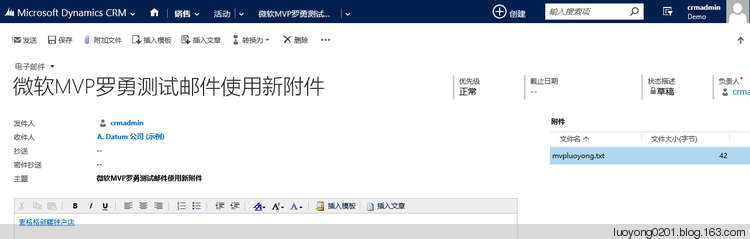
            emailEntity["subject"] = "微软MVP罗勇测试邮件使用新附件";

            emailEntity["description"] = "<a href='http://sugege.top'>素格格新疆特产店</a>";

            var emailId = service.Create(emailEntity);

            var activityMimeAttachment = new Entity("activitymimeattachment");

            activityMimeAttachment["objectid"] = new EntityReference("email", emailId);

            activityMimeAttachment["objecttypecode"] = "email";

            activityMimeAttachment["subject"] = "附件示例";

            activityMimeAttachment["filename"] = "mvpluoyong.txt";//不设置这个字段的值,附件不会显示文件名

            activityMimeAttachment["body"] = System.Convert.ToBase64String(new UTF8Encoding().GetBytes(@"微软MVP罗勇测试邮件使用新附件"));

            service.Create(activityMimeAttachment);

            Console.WriteLine("程序运行完成!");

            Console.ReadKey();

        }
Dynamics CRM邮件附件,你真的了解吗?的更多相关文章
- dynamics crm 365 附件上传图片并且显示。
参考了几篇博客做的: 新增websource文件(html): <!DOCTYPE html> <html> <head> <title>注释</ ...
- Dynamics CRM中的注释(Note)及RollupRequest消息初探
关注本人微信和易信公众号: 微软动态CRM专家罗勇 ,回复161或者20151015可方便获取本文,同时可以在第一时间得到我发布的最新的博文信息,follow me! 注释,这个实体的架构名称是Ann ...
- Dynamics CRM 2013开始推出的服务器端同步来配置邮件服务
我是微软Dynamics 365 & Power Platform方面的工程师罗勇,也是2015年7月到2018年6月连续三年Dynamics CRM/Business Solutions方面 ...
- 为Dynamics CRM的Office附件注释定制个无需下载即可在线查看的功能
关注本人微信和易信公众号: 微软动态CRM专家罗勇 ,回复164或者20151021可方便获取本文,同时可以在第一时间得到我发布的最新的博文信息,follow me! 上一篇博客:为Dynamics ...
- 为Dynamics CRM注释的图片附件做个预览功能
关注本人微信和易信公众号: 微软动态CRM专家罗勇 ,回复163或者20151017可方便获取本文,同时可以在第一时间得到我发布的最新的博文信息,follow me! Dynamics CRM中注释可 ...
- Dynamics CRM 2016 的新特性
新版本CRM (2016 with update 0.1) 发布已有几个月了,总结一下新特性,从几个方面来看: 1. 针对整合功能的新特性 (1) 增加了CRM App for Outlook. 这个 ...
- Dynamics CRM中的操作(action)是否是一个事务(transaction)?
关注本人微信和易信公众号: 微软动态CRM专家罗勇 ,回复168或者20151104可方便获取本文,同时可以在第一时间得到我发布的最新的博文信息,follow me! 以前的博文 微软Dynamics ...
- C# MailMessage Attachment 中文名附件发邮件-Firefox中文显示正常,网页打开邮件附件中文名乱码
一.故事 首先通过CDO.Message来获取邮件EML相关数据:邮件标题.邮件内容.邮件附件.发件人.收件人.CC主要就这么几个,其次通过MailMessage来组织邮件通过Python来发送邮件! ...
- Dynamics CRM模拟OAuth请求获得Token后在外部调用Web API
关注本人微信和易信公众号: 微软动态CRM专家罗勇 ,回复233或者20161104可方便获取本文,同时可以在第一间得到我发布的最新的博文信息,follow me!我的网站是 www.luoyong. ...
随机推荐
- Nginx配置实例-反向代理实现浏览器请求Nginx跳转到服务器某页面
场景 Ubuntu Server 16.04 LTS上怎样安装下载安装Nginx并启动: https://blog.csdn.net/BADAO_LIUMANG_QIZHI/article/detai ...
- 利用ExecuteMultipleRequest来批量导入数据,成功的成功失败的失败,并生成导入结果文件
我是微软Dynamics 365 & Power Platform方面的工程师罗勇,也是2015年7月到2018年6月连续三年Dynamics CRM/Business Solutions方面 ...
- 关于iOS引导页图层的相关属性类
关键字:CABasicAnimation 参考链接:https://blog.csdn.net/Dwarven/article/details/42492199 Layer.mask属性用法: htt ...
- Gitlab + Jenkins 的 CI 实践
0x00 事件 为了开发人员更高效的更新应用而采取的 CI 方式实践. 0x01 过程记录 1.Jenkins 设置 安装插件 Gitlab Hook Plugin Build Authorizati ...
- asp.net core web应用以服务的方式安装运行
目录 一.方案:使用Microsoft.Extensions.Hosting.WindowsServices实现: 一.方案:使用Microsoft.Extensions.Hosting.Window ...
- 【nagios监控】基于linux搭建nagios监控
nagios工作原理 nagios的功能是监控服务和主机,但是其自身并不包括这些功能,所有的监控.检测功能都是通过各种插件来完成的. 启动nagios后,它会周期性的自动调用插件去检测服务器状态,同时 ...
- angular cli 使用echarts
1.安装库 npm install typings echarts --global npm install ngx-echarts --save npm install @types/echarts ...
- JT/T 808-2013 道路运输车辆卫星定位系统北斗兼容车载终端通讯协议技术规范
文档下载地址:JT/T 808-2013 道路运输车辆卫星定位系统北斗兼容车载终端通讯协议技术规范
- Dynamics 365客户端编程示例:两个选项集字段的联动
我是微软Dynamics 365 & Power Platform方面的工程师罗勇,也是2015年7月到2018年6月连续三年Dynamics CRM/Business Solutions方面 ...
- 【转载】Vue.js 安装及其环境搭建
注:最近在学习Vue,以下是环境搭配方法: ****************************************************************************** ...