
为Dynamics CRM的Office附件注释定制个无需下载即可在线查看的功能
using System;

using System.Collections.Generic;

using System.Linq;

using System.Web;

using LuoYong.CRMOperation;

{

    /// <summary>

    /// Summary description for GetAnnotationDocument

    /// </summary>

    public class GetAnnotationDocument : IHttpHandler

    {

        public void ProcessRequest(HttpContext context)

        {

            try {

                string AnnotationId = context.Request.QueryString["AnnotationId"];

                CRMAnnotationMgr annotationMgr = new CRMAnnotationMgr();

                if (!string.IsNullOrEmpty(AnnotationId))

                {

                    var annotation = annotationMgr.GetAnnatationAttachementBody(new Guid(AnnotationId));

                    context.Response.ContentType = annotation.MimeType;

                    byte[] mybyte = Convert.FromBase64String(annotation.DocumentBody);

                    context.Response.BinaryWrite(mybyte);

                    context.Response.Flush();

                    context.Response.End();

                }

                else

                {

                    throw new Exception("AnnotationId没有提供!");

                }

            }

            catch (Exception ex)

            {

                context.Response.ContentType = "text/plain";

                context.Response.Write("Error." + ex.Message);

            }

        }

        public bool IsReusable

        {

            get

            {

                return false;

            }

        }

    }

}
<!DOCTYPE HTML>

<html>

 <head>

  <title>微软MVP罗勇测试注释</title>

        <style type="text/css">

            table {

                border:1px solid #666666;

                border-collapse:collapse;

            }

            table thead th {

                 padding: 8px;

                    border:1px solid #666666;

                 background-color: #dedede;

            }

            table tbody td {

                border: 1px solid  #666666;

             padding: 8px;

             background-color: #ffffff;

            }

            table thead tr th {

                font-family:Microsoft YaHei,SimSun,Tahoma,Arial;

                font-size:12px;

                font-weight:bold;

                color:#000000;

            }

            table tbody tr td {

                color:#444444;

                font-family:Microsoft YaHei,SimSun,Tahoma,Arial;

                font-size:12px;

            }

            .web_dialog_overlay

            {

               position: fixed;

               top: 0;

               right: 0;

               bottom: 0;

               left: 0;

               height: 100%;

               width: 100%;

               margin: 0;

               padding: 0;

               background: #000000;

               opacity: .15;

               filter: alpha(opacity=15);

               -moz-opacity: .15;

               z-index: 101;

               display: none;

            }

            .web_dialog

            {

               display: none;

               position: fixed;

               width: 400px;

               height: 450px;

               top: 50%;

               left: 50%;

               margin-left: -190px;

               margin-top: -100px;

               background-color: #ffffff;

               border: 1px solid #336699;

               padding: 0px;

               z-index: 102;

               font-family: Verdana;

               font-size: 10pt;

            }

            .web_dialog_title

            {

               border-bottom: solid 2px #336699;

               background-color: #336699;

               padding: 4px;

               color: White;

               font-weight:bold;

               height:20px;

               width:100%;

            }

            .align_right

            {

               text-align: right;

            }

        </style>

        <script type="text/javascript" src="../../ClientGlobalContext.js.aspx"></script>

        <script type="text/javascript" src="../common/jquery.min.js"></script>

        <script type="text/javascript" src="../common/XrmServiceToolkit.min.js"></script>

        <script type="text/javascript">

            Date.prototype.format = function (fmt) {

                var o = {

                    "M+": this.getMonth() + 1,//月份

                    "d+": this.getDate(),//日

                    "h+": this.getHours(),//小时

                    "m+": this.getMinutes(),//分

                    "s+": this.getSeconds()//秒

                };

                if (/(y+)/.test(fmt))

                    fmt = fmt.replace(RegExp.$1, (this.getFullYear() + "").substr(4 - RegExp.$1.length));

                for (var k in o)

                    if (new RegExp("(" + k + ")").test(fmt))

                        fmt = fmt.replace(RegExp.$1, (RegExp.$1.length == 1) ?

                                 (o[k]) : (("00" + o[k]).substr(("" + o[k]).length)));

                return fmt;

            }

            function ShowDialog(modal) {

                $("#overlay").show();

                $("#dialog").fadeIn(300);

                if (modal) {

                    $("#overlay").unbind("click");

                }

                else {

                    $("#overlay").click(function (e) {

                        HideDialog();

                    });

                }

            }

            function HideDialog() {

                $("#overlay").hide();

                $("#dialog").fadeOut(300);

            }

            function ShowAttachmentByNoteId(NoteId, MimeType) {

                if (MimeType.indexOf("image") > -1) {

                    XrmServiceToolkit.Rest.Retrieve(

                        NoteId,

                        "AnnotationSet",

                        "DocumentBody",

                        null,

                        function (result) {

                            var DocumentBody = result.DocumentBody;

                            var img = $("<img />");

                            img.attr("alt", "Embedded Image");

                            img.attr("src", "data:" + MimeType + ";base64," + DocumentBody);

                            img.appendTo($("#dialog"));

                            ShowDialog(true);

                        },

                        function (error) {

                            alert(error.message);

                        },

                        true

                    );

                }

                else if (MimeType.indexOf("officedocument.presentationml.presentation") > -1 || MimeType.indexOf("officedocument.spreadsheetml.sheet") > -1 || MimeType.indexOf("officedocument.wordprocessingml.document") > -1) {//office文档

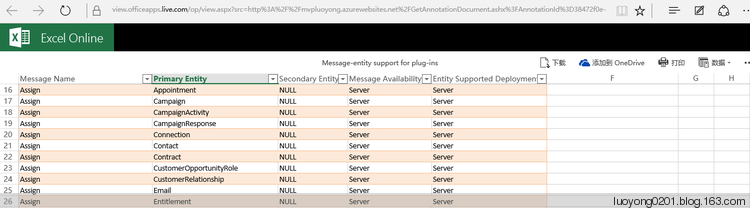
                    window.open("https://view.officeapps.live.com/op/view.aspx?src=" + encodeURIComponent("http://mvpluoyong.azurewebsites.net/GetAnnotationDocument.ashx?AnnotationId=" + NoteId));

                }

                else if (MimeType.indexOf("pdf") > -1) {

                    window.open("http://mvpluoyong.azurewebsites.net/GetAnnotationDocument.ashx?AnnotationId=" + encodeURIComponent(NoteId));

                }

                else{

                    alert("暂时不支持MimeType=" + MimeType + "类型附件的预览,敬请期待后续博文!");

                }

            }

            $(function () {

                var clientUrl = GetGlobalContext().getClientUrl();

                //var id = window.parent.Xrm.Page.data.entity.getId(); //这种方法可以获取表单中的很多信息,包括id

                var match = RegExp('[?&]id=([^&]*)').exec(window.location.search);//这里是外接通过url传递id的值过来

                var id = match && decodeURIComponent(match[1].replace(/\+/g, ' '));

                match = RegExp('[?&]typename=([^&]*)').exec(window.location.search);

                var typename = match && decodeURIComponent(match[1].replace(/\+/g, ' '));

                XrmServiceToolkit.Rest.RetrieveMultiple(

                "AnnotationSet",

                "?$select=AnnotationId,Subject,NoteText,MimeType,FileName,FileSize,IsDocument,CreatedOn,CreatedBy,ModifiedOn,ModifiedBy&$filter=ObjectTypeCode eq '" + typename + "' and ObjectId/Id eq guid'" + id + "'&$orderby=CreatedOn asc",

                function (results) {

                    for (var i = 0; i < results.length; i++) {

                        var tr = $("<tr></tr>");

                        tr.appendTo($("#notestable tbody"));

                        var td = $("<td>" + (i+1) + "</td>");

                        td.appendTo(tr);

                        td = $("<td>" + (results[i].Subject == null ? "" : results[i].Subject) + "</td>");

                        td.appendTo(tr);

                        td = $("<td><a href='" + clientUrl + "/main.aspx?etn=annotation&pagetype=entityrecord&id=%7B" + results[i].AnnotationId + "%7D' target='_blank'>" + results[i].NoteText + "</a></td>");

                        td.appendTo(tr);

                        td = $("<td>" + results[i].CreatedBy.Name + "</td>");

                        td.appendTo(tr);

                        td = $("<td>" + results[i].CreatedOn.format('yyyy-MM-ddThh:mm:ssZ') + "</td>");

                        td.appendTo(tr);

                        td = $("<td>" + results[i].ModifiedBy.Name + "</td>");

                        td.appendTo(tr);

                        td = $("<td>" + results[i].ModifiedOn.format('yyyy-MM-ddThh:mm:ssZ') + "</td>");

                        td.appendTo(tr);

                        td = $("<td>" + (results[i].IsDocument ? "是" : "否") + "</td>");

                        td.appendTo(tr);

                        td = $("<td>" + (results[i].FileName == null ? "" : ("<a href='#' data-annotationid='" + results[i].AnnotationId + "' data-mimetype='" + results[i].MimeType + "'>" + results[i].FileName + "</a>") + "</td>"));

                        td.find("a").click(function() {

                            ShowAttachmentByNoteId($(this).attr("data-annotationid"),$(this).attr("data-mimetype"));

                        });

                        td.appendTo(tr);

                        td = $("<td>" + (results[i].FileSize == null ? "" : Math.round((results[i].FileSize)/1024)) + "</td>");

                        td.appendTo(tr);

                    }

                },

                function (error) {

                    alert(error.message);

                },

                function () {

                },

                true

                );

                $("#dialogclosebtn").click(function (e) {

                    HideDialog();

                    e.preventDefault();

                });

            });

        </script>

 </head>

 <body>

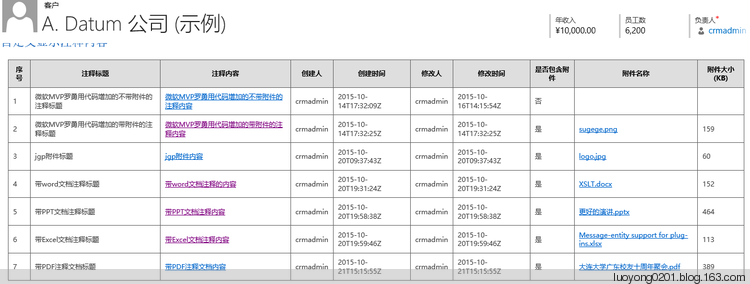
        <table id="notestable">

            <thead>

               <tr>

                   <th>序号</th>

                   <th>注释标题</th>

                   <th>注释内容</th>

                   <th>创建人</th>

                   <th>创建时间</th>

                   <th>修改人</th>

                   <th>修改时间</th>

                   <th>是否包含附件</th>

                   <th>附件名称</th>

                   <th>附件大小(KB)</th>

               </tr>

            </thead>

            <tbody>

            </tbody>

        </table>

        <div id="overlay" class="web_dialog_overlay"></div>

        <div id="dialog" class="web_dialog">

            <div class="web_dialog_title"><span id="dialogtitle" style="float:left;">附件内容预览</span><span id="dialogclosebtn" style="float:right;">关闭</span></div>

        </div>

 </body>

</html>



为Dynamics CRM的Office附件注释定制个无需下载即可在线查看的功能的更多相关文章
- Java实现office文档与pdf文档的在线预览功能
最近项目有个需求要java实现office文档与pdf文档的在线预览功能,刚刚接到的时候就觉得有点难,以自己的水平难以在三四天做完.压力略大.后面查找百度资料.以及在同事与网友的帮助下,四天多把它做完 ...
- Dynamics CRM 365中结合注释和WebApi实现图片上传
首先需要在实体上使用注释,然后在窗体上引用WebResource. WebResource的代码: <!DOCTYPE html> <html> <head> &l ...
- 使用微软提供的Office Online实现Office文档的在线查看,编辑等功能
使用微软提供的Office Online平台只需要一个网址即可在线查看Xls,doc,PPT等文档 http://view.officeapps.live.com/op/view.aspx?src=要 ...
- Dynamics CRM使用元数据之一:查询实体的主字段(托管代码版本)
关注本人微信和易信公众号: 微软动态CRM专家罗勇 ,回复159或者20151013可方便获取本文,同时可以在第一时间得到我发布的最新的博文信息,follow me! Dynamics CRM是基于元 ...
- 为Dynamics CRM注释的图片附件做个预览功能
关注本人微信和易信公众号: 微软动态CRM专家罗勇 ,回复163或者20151017可方便获取本文,同时可以在第一时间得到我发布的最新的博文信息,follow me! Dynamics CRM中注释可 ...
- Dynamics CRM通过定制应用程序功能区为符合条件的实体表单增加按钮
关注本人微信和易信公众号: 微软动态CRM专家罗勇 ,回复167或者20151029可方便获取本文,同时可以在第一时间得到我发布的最新的博文信息,follow me! 前面的博文都是为一个实体添加按钮 ...
- Dynamics CRM邮件附件,你真的了解吗?
关注本人微信和易信公众号: 微软动态CRM专家罗勇 ,回复160或者20151014可方便获取本文,同时可以在第一时间得到我发布的最新的博文信息,follow me! 听人问起怎么读取到一封邮件所有的 ...
- 在Dynamics CRM中自定义一个通用的查看编辑注释页面
关注本人微信和易信公众号: 微软动态CRM专家罗勇 ,回复162或者20151016可方便获取本文,同时可以在第一时间得到我发布的最新的博文信息,follow me! 注释在CRM中的显示是比较特别, ...
- Dynamics CRM中的注释(Note)及RollupRequest消息初探
关注本人微信和易信公众号: 微软动态CRM专家罗勇 ,回复161或者20151015可方便获取本文,同时可以在第一时间得到我发布的最新的博文信息,follow me! 注释,这个实体的架构名称是Ann ...
随机推荐
- console的各种输出格式
console.log('%c',CSS样式)输出css样式 console.log('%s',字符串) 字符串格式化 %d%i 整数格式化: console.log('%o',节点) 可扩展的dom ...
- mysql注入新姿势(数字与字符编码注入) hex,conv
0x01 前言 今天看到师傅们发的一篇文章,感觉mysql注入还能这么用,于是自己搭建了一个简单的环境,进行复现. 0x02原理 首先介绍两个mysql函数 hex和conv conv(N,from_ ...
- 利用Azure虚拟机安装Dynamics 365 Customer Engagement之五:安装SQL Server
我是微软Dynamics 365 & Power Platform方面的工程师罗勇,也是2015年7月到2018年6月连续三年Dynamics CRM/Business Solutions方面 ...
- Spring Boot 2 使用自定义配置
在application.yml定义配置后,可以使用Environment来读取配置,也可以使用@Value注解让业务代码去读取配置.如果属性较多,可以定义属性映射对象. 开发环境:IntelliJ ...
- Good start is a half success(2019-04-07)
一. 回顾你过去将近3年的学习经历. (1)当初你报考的时候,是真正喜欢计算机这个专业吗?. (2)你现在后悔选择了这个专业吗?. (3)你认为你现在最喜欢的领域是什么(可以是计算机的也可以是其它领域 ...
- ORACLE等待事件:read by other session
read by other session简介 官方关于read by other session的介绍如下: When information is requested from the datab ...
- 由导入paramkio包失败,而pip list又能查到此包,而引出的:离线安装python第三方库的实用方法:解决公司内网,服务器/电脑不能上网却需要安装python三方库问题(下:Linux环境中)
问题描述: 公司的Linux服务器是内网,今天要实现某个功能,会用到python控制ssh,需要安装一个Paramkio库,和上一篇一样,仅仅依靠Pypi上下载下来的离线.whl安装包是不行的,lin ...
- EF中嵌套类的where查询
有一个订单类:Order,在订单Order类中有一个子类,订单详细类OrderDetail. 需求:根据订单详细类的字段过滤数据 public class Order { public string ...
- Shell—输入输出重定向
大多数 UNIX 系统命令从你的终端接受输入并将所产生的输出发送回到您的终端.一个命令通常从一个叫标准输入的地方读取输入,默认情况下,这恰好是你的终端.同样,一个命令通常将其输出写入到标准输出,默 ...
- Python 实现 Hangman 小游戏
Hangman--游戏简介--> 百度百科 打印Hangman def printHangman(N): # 第一行 print("\t____") # 第二行 print( ...