
EF core (code first) 通过自定义 Migration History 实现多租户使用同一数据库时更新数据库结构
前言
写这篇文章的原因,其实由于我写EF core 实现多租户的时候,遇到的问题。
具体文章的链接:
Asp.net core下利用EF core实现从数据实现多租户(1)
Asp.net core下利用EF core实现从数据实现多租户(2) : 按表分离 (主要关联文章)
这里我遇到的最主要问题是:由于多租户的表使用的是同一个数据库。由于这个原因,无法通过 Database.EnsureCreated() 自动创建多个结构相同但名字不同的表。
所以我在文中提到,需要自己跑脚本去创建多有的表。
虽然我依然认为在多租户的情况下使用sql管理表是更可靠的方案,但如果可以利用EF core原生提供的Migration机制,在运行时自动创建和更新数据表结构,那更加友好。
实现的思路
其实我们都知道,EF core (code first) 会在数据库中生成唯一一个 __EFMigrationHistory 表,数据库的版本记录在这里。
在我们文章的场景下,由于有多个租户同时使用,同一个表结构(Products)会出现多次,那么意思就是一个 __EFMigrationHistory 无法同时记录多个租户的数据表版本。
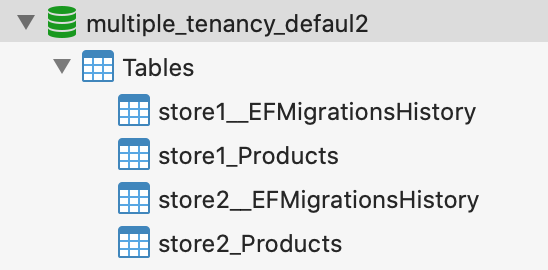
好了,既然问题的关键已经知道了,我们可以在这里先把答案揭晓,在下问在详细说明实现方法:
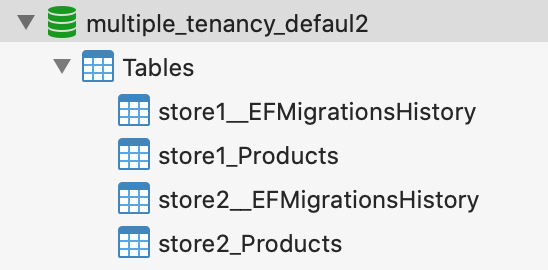
图中可以看到,我们自定义MigrationHistory表,并且在一个数据下,同时出现了store1和store2的 MigrationHistory 表。
实施
项目介绍
这是一个多租户系统,具体来说就是根据不同的租户,创建相同的所有数据表。
项目依赖:
1. .net core app 3.1。在机器上安装好.net core SDK, 版本3.1
2. Mysql. 使用 Pomelo.EntityFrameworkCore.MySql 包
3. EF core,Microsoft.EntityFrameworkCore, 版本3.1.1。这里必须要用3.1的,因为ef core3.0是面向.net standard 2.1.
4. EF core design, Microsoft.EntityFrameworkCore.Design, 版本 3.1.1
5. dotnet-ef tool, 版本 3.1.1
关键的对象:
1. MigrationsAssembly, 利用此类去实现创建对应的Migration单元。
2. Migration files, 这里指的是一批Migration相关的文件,利用执行dotnet-ef 命令生成具体的文件,从而真正地去创建和更新数据库。
实施步骤
1. 运行dotnet-ef命令,生成Migration files
命令:
dotnet-ef migrations add init
执行后,会在项目中的Migrations文件夹下生成多个*.cs文件,其实他们也是可执行C#对象
机构如下:
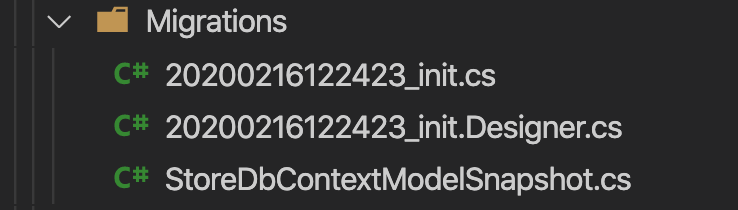
这3个文件中,主要起作用的是*_init.cs这个文件
打开之后我们需要对他进行修改
 using Microsoft.EntityFrameworkCore.Metadata;

 using Microsoft.EntityFrameworkCore.Migrations;

 namespace kiwiho.Course.MultipleTenancy.EFcore.Api.Migrations

 {

     public partial class init : Migration

     {

         private readonly string prefix;

         public init(string prefix)

         {

             if (string.IsNullOrEmpty(prefix))

             {

                 throw new System.ArgumentNullException();

             }

             this.prefix = prefix;

         }

         protected override void Up(MigrationBuilder migrationBuilder)

         {

             migrationBuilder.CreateTable(

                 name: prefix + "_Products",

                 columns: table => new

                 {

                     Id = table.Column<int>(nullable: false)

                         .Annotation("MySql:ValueGenerationStrategy", MySqlValueGenerationStrategy.IdentityColumn),

                     Name = table.Column<string>(maxLength: 50, nullable: false),

                     Category = table.Column<string>(maxLength: 50, nullable: true),

                     Price = table.Column<double>(nullable: true)

                 },

                 constraints: table =>

                 {

                     table.PrimaryKey("PK__Products", x => x.Id);

                 });

         }

         protected override void Down(MigrationBuilder migrationBuilder)

         {

             migrationBuilder.DropTable(

                 name: prefix + "_Products");

         }

     }

 }
init migration
这里修改的主要是:
1.1 新增构造函数,并且在里面添加一个 prefix 参数。
1.2 在Up方法中,对table Name进行修改,把prefix变量加在_Product前面(第21行)
1.3 在Down方法中,对table Name进行修改,把prefix变量加在_Product前面 (第39行)
2. 创建 MigrationByTenantAssembly 文件。
由于上一步讲Migration file的构造函数修改了,理论上EF core已经五法通过默认的方式成功执行改Migration file了
 using System;

 using System.Reflection;

 using Microsoft.EntityFrameworkCore;

 using Microsoft.EntityFrameworkCore.Diagnostics;

 using Microsoft.EntityFrameworkCore.Infrastructure;

 using Microsoft.EntityFrameworkCore.Migrations;

 using Microsoft.EntityFrameworkCore.Migrations.Internal;

 namespace kiwiho.Course.MultipleTenancy.EFcore.Api.Infrastructure

 {

     public class MigrationByTenantAssembly : MigrationsAssembly

     {

         private readonly DbContext context;

         public MigrationByTenantAssembly(ICurrentDbContext currentContext,

               IDbContextOptions options, IMigrationsIdGenerator idGenerator,

               IDiagnosticsLogger<DbLoggerCategory.Migrations> logger)

           : base(currentContext, options, idGenerator, logger)

         {

             context = currentContext.Context;

         }

         public override Migration CreateMigration(TypeInfo migrationClass,

               string activeProvider)

         {

             if (activeProvider == null)

                 throw new ArgumentNullException($"{nameof(activeProvider)} argument is null");

             var hasCtorWithSchema = migrationClass

                     .GetConstructor(new[] { typeof(string) }) != null;

             if (hasCtorWithSchema && context is ITenantDbContext tenantDbContext)

             {

                 var instance = (Migration)Activator.CreateInstance(migrationClass.AsType(), tenantDbContext?.TenantInfo?.Name);

                 instance.ActiveProvider = activeProvider;

                 return instance;

             }

             return base.CreateMigration(migrationClass, activeProvider);

         }

     }

 }
MigrationByTenantAssembly
这个类中没有什么特别的,关键在于29~37行。首先需要判断目标 Migration 对象的是否有一个构造函数的参数有且仅有一个string 类型
判断DbContext是否有实现ITenantDbContext接口。
利用 Activator 创建 Migration 实例(把tenant Name传进构造函数)
3. 在 MultipleTenancyExtension 类的AddDatabase方法中,添加自定义MigrationHistory表名
 var dbOptionBuilder = options.UseMySql(resolver.GetConnection(), builder =>

 {

     if (option.Type == ConnectionResolverType.ByTabel)

     {

         builder.MigrationsHistoryTable(${tenantInfo.Name}__EFMigrationsHistory");

     }

 });

 dbOptionBuilder.ReplaceService<Microsoft.EntityFrameworkCore.Migrations.IMigrationsAssembly, MigrationByTenantAssembly>();
最关键的一点是第5行,调用 MigrationsHistoryTable 设置MigrationHistory表名
另外一点是第10行,用 MigrationByTenantAssembly 类替换 EF core 中默认的实现(IMigrationsAssembly接口)
4. 在ProductController的构造函数中,修改成如下
Database.Migrate 的作用主要是在运行时可以执行数据库的创建和更新
 public ProductController(StoreDbContext storeDbContext)

 {

     this.storeDbContext = storeDbContext;

     this.storeDbContext.Database.Migrate();

 }
查看效果
调用接口
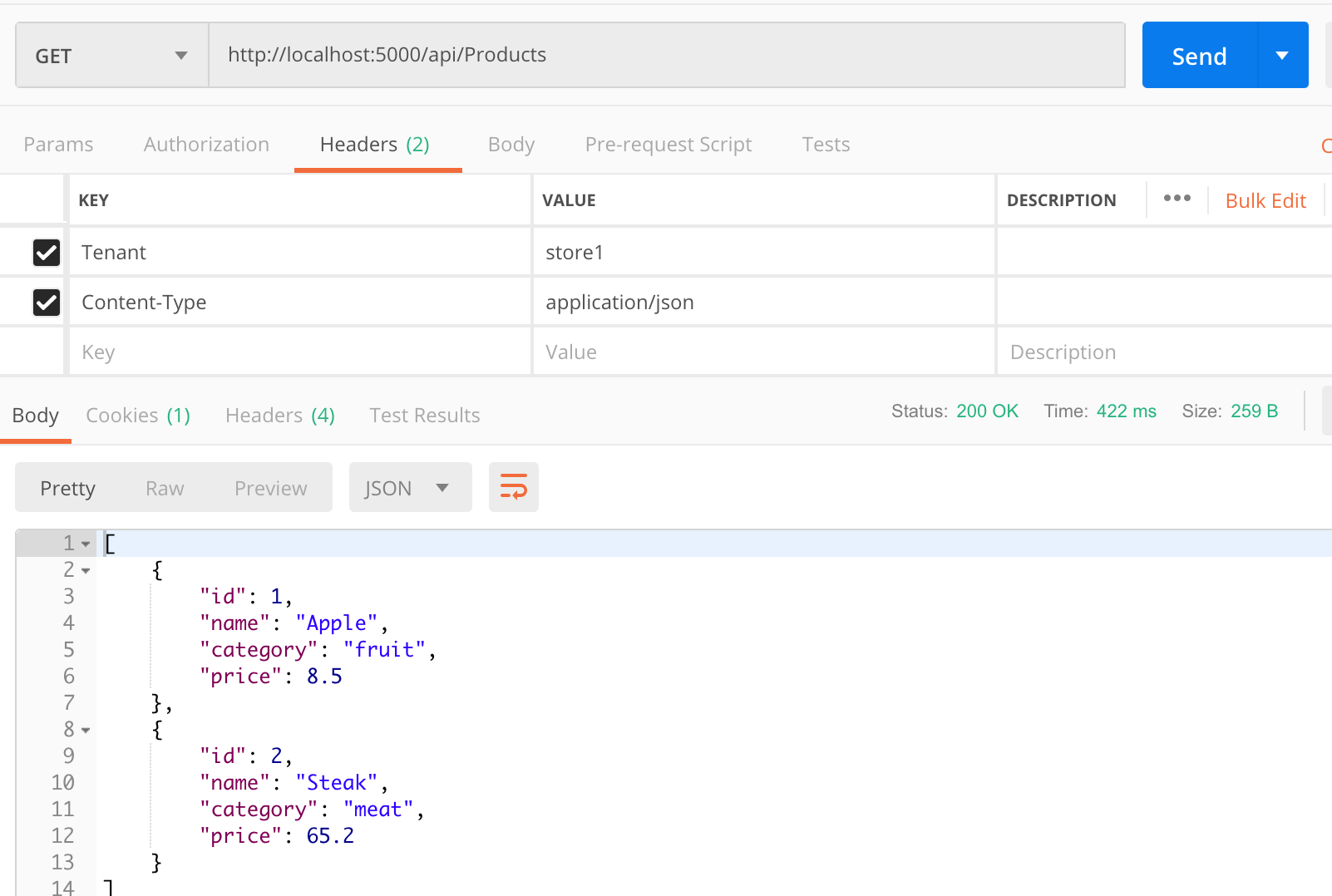
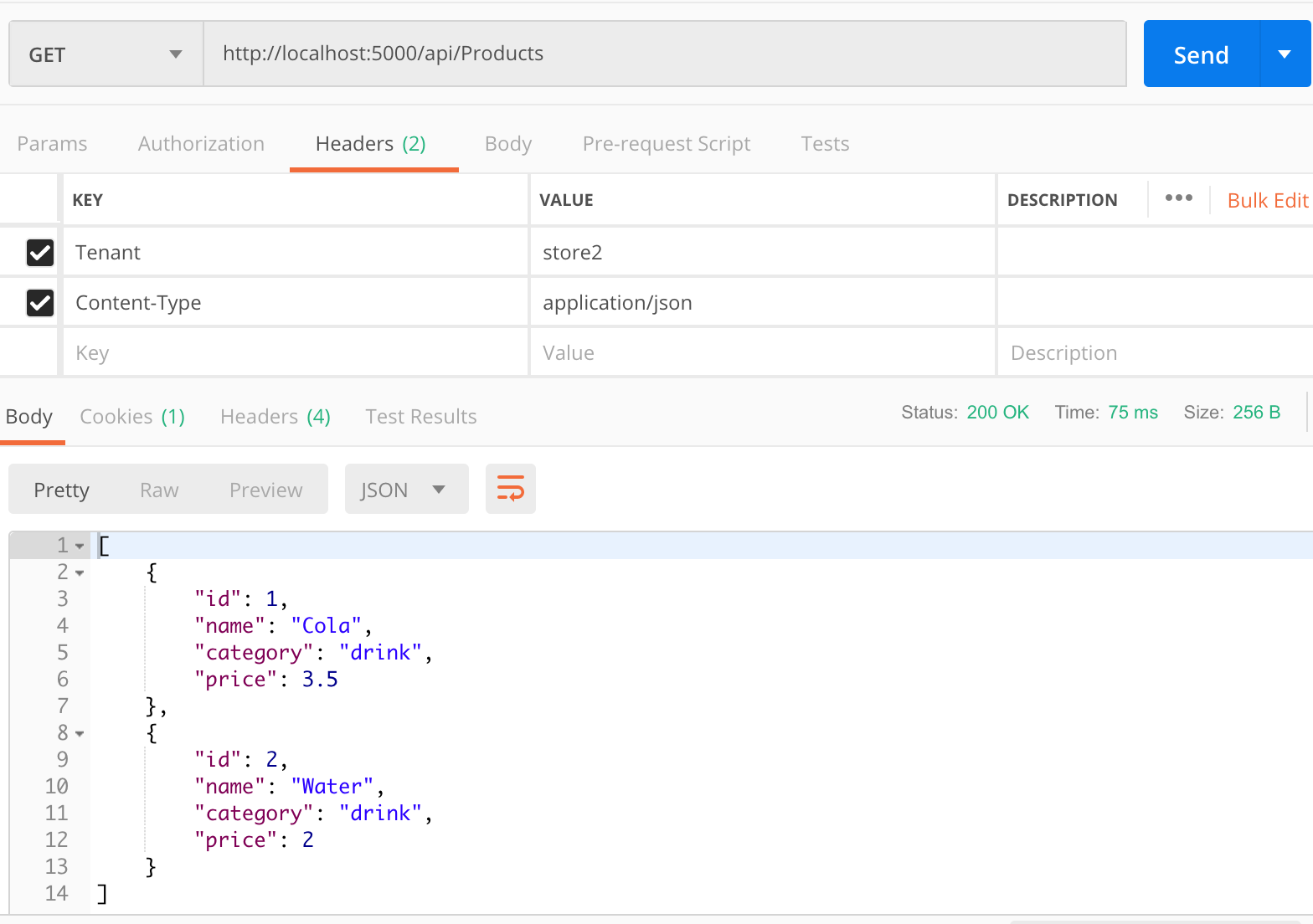
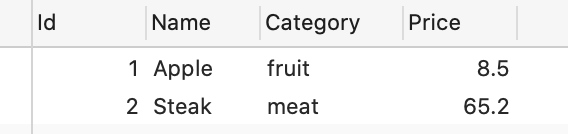
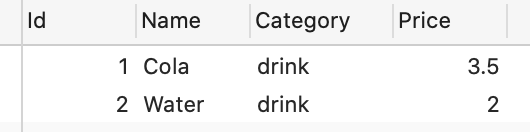
跟系列文章一样,我们先调用创建product的接口分别在store1和store2中添加记录。
下面是store1 的查询结果
store2的查询结果
查看数据库验证数据
数据库的表结构
store1_Products 表数据
store2_Products 表数据
总结
本文中我们介绍了ef core 的code first模式下是如何更新数据库的,并且通过添加 Migration 对象的构造函数 ,自行添加了必要参数。
通过替换EF core中默认的 IMigrationsAssembly 实现, MigrationByTenantAssembly 中自定对Migration对象实例化。
替换EF core中默认的MigrationHistory最终实现需求。
本文虽然只是一个示例,但是却可以在真实项目中使用相同的手段以实现需求。不过还是那句话,对于多租户情况下,我推荐使用db first模式。
关于代码
代码已经传上github,请查看EF_code_first的分支的代码。
https://github.com/woailibain/EFCore.MultipleTenancyDemo/tree/EF_code_first
参考文章
Custom Migrations History Table
EF core (code first) 通过自定义 Migration History 实现多租户使用同一数据库时更新数据库结构的更多相关文章
- EF core (code first) 通过自动迁移实现多租户数据分离 :按Schema分离数据
前言 本文是多租户系列文章的附加操作文章,如果想查看系列中的其他文章请查看下列文章 主线文章 Asp.net core下利用EF core实现从数据实现多租户(1) Asp.net core下利用EF ...
- EF core Code First 简单的使用方法
好吧,我又回来了,其实一直都想写一篇关于EF core 的文章去记录自己在开发时候遇到的问题. 为什么要使用EF框架呢,因为原始的ADO.NET需要编写大量的数据访问代码,所以使用EF会更方便.但是今 ...
- ef core code first from exist db
目标 为现有数据库生成新的连接,允许只选择部分表 可以处理一些很怪的需求,比如EF升级EF Core(这个可能有其他解),EF.EF Core同时连接一个数据库 我遇到的问题是: 原项目是.net f ...
- .Net Core+Angular6 学习 第四部分(EF Core(Code First))
目的: 打算通过EF core 练习从database receive data 显示到UI. 1. 创建一个新的project Model.定义一个 base interface entity以及实 ...
- ef core code frist
https://docs.microsoft.com/zh-cn/ef/core/get-started/aspnetcore/new-db?view=aspnetcore-2.1 1.先创建对应的实 ...
- Asp.Net Core WebApi (Swagger+EF Core/Code First)
Swagger简介: Swagger™的目标是为REST APIs 定义一个标准的,与语言无关的接口,使人和计算机在看不到源码或者看不到文档或者不能通过网络流量检测的情况下能发现和理解各种服务的功能. ...
- EF数据迁移(当模型改变时更新数据库)
https://msdn.microsoft.com/zh-CN/data/jj591621 Enable-Migrations Add-Migration 名称 Update-Database –V ...
- Asp.net core下利用EF core实现从数据实现多租户(3): 按Schema分离 附加:EF Migration 操作
前言 前段时间写了EF core实现多租户的文章,实现了根据数据库,数据表进行多租户数据隔离. 今天开始写按照Schema分离的文章. 其实还有一种,是通过在数据表内添加一个字段做多租户的,但是这种模 ...
- Asp.net core下利用EF core实现从数据实现多租户(1)
前言 随着互联网的的高速发展,大多数的公司由于一开始使用的传统的硬件/软件架构,导致在业务不断发展的同时,系统也逐渐地逼近传统结构的极限. 于是,系统也急需进行结构上的升级换代. 在服务端,系统的I/ ...
随机推荐
- CTPN-自然文本场景检测代码阅读笔记
TensorFlow代码 https://github.com/eragonruan/text-detection-ctpn 训练 main/train.py 1. utils/prepare/spl ...
- 1z0-062 题库解析4
题目: Examine this parameter: NAME TYPE VALUE ------------------------ -- ...
- 唬人的Java泛型并不难
泛型 public interface Foo<E> {}public interface Bar<T> {}public interface Zar<?> {} ...
- pinpoint实现告警推送至钉钉和微信群
前言 在前面的文章中,我们学习了如何通过java实现将消息发送到钉钉.和将消息发送到微信群聊. 基于上述基础,我们今天来接入pinpoint的告警,发送到钉钉群. 实操前准备 开始之前,推荐阅读一下, ...
- .NET绘制旋转太极图
.NET绘制旋转太极图 我之前发了一篇<用.NET写"算命"程序>的文章,但有人纷纷提出了质疑,认为没有"科学"(mi xin)依据
- Windows10内嵌Ubuntu子系统初始化设置
第一次启动 重启ubuntu Since Windows 10 version 1803, closing all WSL terminal windows won't kill background ...
- 关于neo4j初入门(1)
图形数据库也称为图形数据库管理系统或GDBMS. Neo4j的官方网站:http://www.neo4j.org Neo4j的优点 它很容易表示连接的数据 检索/遍历/导航更多的连接数据是非常容易和快 ...
- Java入门 - 语言基础 - 21.Scanner类
原文地址:http://www.work100.net/training/java-scanner.html 更多教程:光束云 - 免费课程 Scanner类 序号 文内章节 视频 1 概述 2 使用 ...
- emeditor安装及插件信息
原文地址:https://www.52pojie.cn/thread-658917-1-1.html 废话不多说 官网:https://www.emeditor.com/download/ 安装版:6 ...
- 玩转Django2.0---Django笔记建站基础四(视图)
第四章 视图 4.1 探究视图 一.视图说明 视图(View)是Django的MTV架构模式的V部分,主要负责处理用户请求和生成相应的相应部分,然后在页面或其它类型文档中显示.也可以理解为视图是MVC ...