
使用Pangolon在同一副图中,画出两个轨迹,比较误差
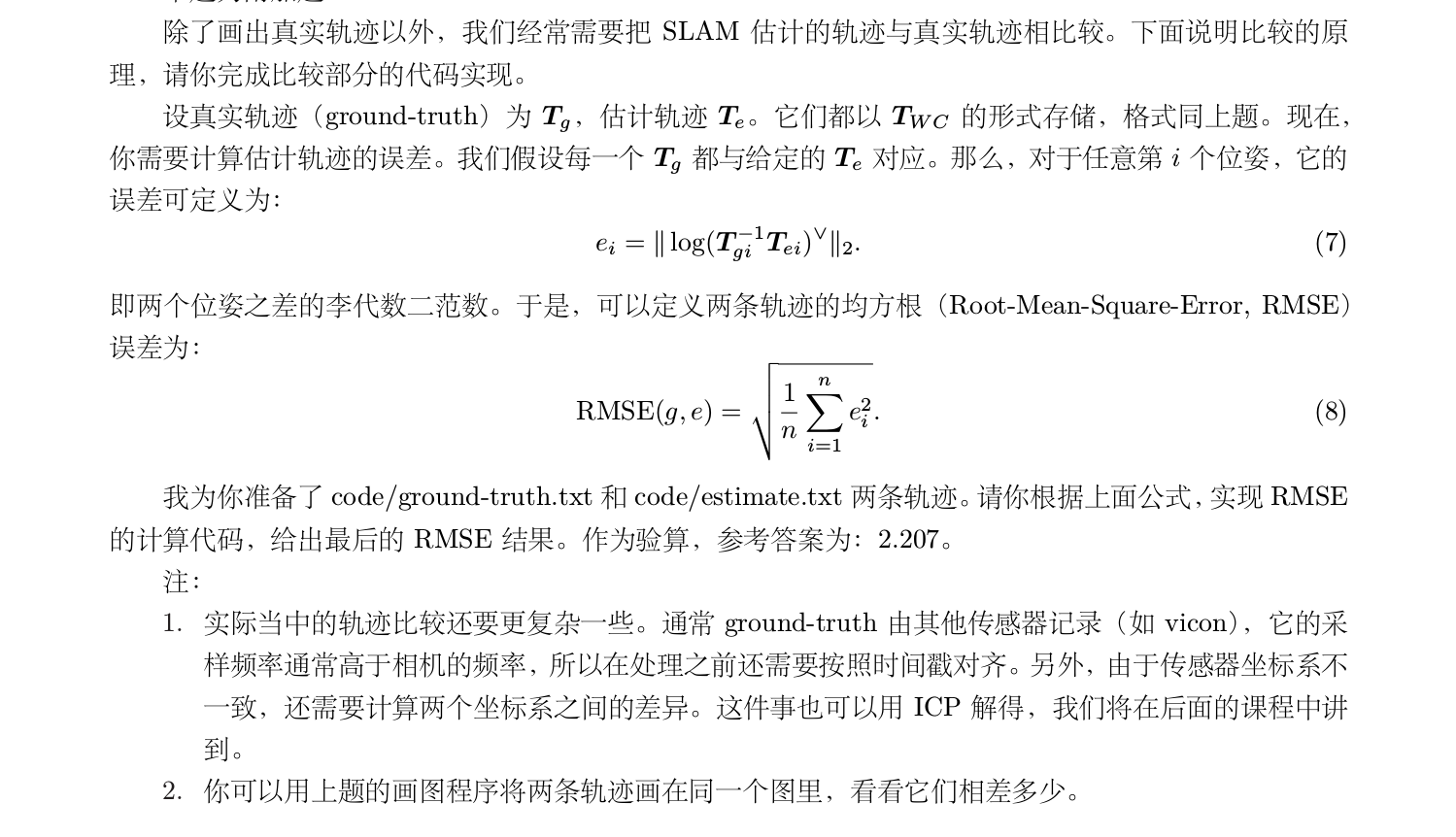
使用 code/ground-truth.txt 和 code/estimate.txt 两条轨迹。请你根据上面公式,实现 RMSE
的计算代码,给出最后的 RMSE 结果。作为验算,参考答案为:2.207。用上题的画图程序将两条轨迹画在同一个图里,看看它们相差多少。
完整题目描述
ground-truth.txt和estimate.txt放在了源文件夹下的data目录下,编写了用于画图的trajectory_compare.cpp文件
相关代码及程序可在我的github中获取,地址:https://github.com/feifanrensheng/trajectory_compare
代码如下:
 // trajectory_compare.cpp created by zhang ning 2018/3/23

 #include <sophus/se3.h>

 #include <string>

 #include <iostream>

 #include <fstream>

 // need pangolin for plotting trajectory

 #include <pangolin/pangolin.h>

 using namespace std;

 // function for plotting trajectory, don't edit this code

 // start point is red and end point is blue

 void DrawTrajectory(vector<Sophus::SE3, Eigen::aligned_allocator<Sophus::SE3>>,vector<Sophus::SE3, Eigen::aligned_allocator<Sophus::SE3>>);

 int main(int argc, char **argv) {

     vector<Sophus::SE3, Eigen::aligned_allocator<Sophus::SE3>> poses1,poses2;

     /// implement pose reading code

     // start your code here (5~10 lines)

     ifstream infile;

     infile.open("../data/estimated.txt");

     if(!infile) cout<<"error"<<endl;

     cout<<"存入数组"<<endl;   //先将文件中的数据存入到一个二维数组中

     double data;

     double a[][];

     double *p=&a[][];

     while(infile>>data)             //遇到空白符结束

     {

         *p=data;

          p++;

     }

     infile.close();

     for(int i=;i<;i++)   //分别对每一行数据生成一个变换矩阵,然后存入动态数组poses中

     {

     Eigen::Quaterniond q1 = Eigen::Quaterniond(a[i][],a[i][],a[i][],a[i][]);

         Eigen::Vector3d t1;

     t1<<a[i][],a[i][],a[i][];

         Sophus::SE3 SE3_qt1(q1,t1);

         poses1.push_back(SE3_qt1);

     }

     ifstream truth;

     truth.open("../data/groundtruth.txt");

     if(!truth) cout<<"error"<<endl;

     cout<<"存入数组"<<endl;   //先将文件中的数据存入到一个二维数组中

     double data1;

     double b[][];

     double *p1=&b[][];

     while(truth>>data1)             //遇到空白符结束

     {

         *p1=data1;

          p1++;

     }

     truth.close();

     for(int i=;i<;i++)   //分别对每一行数据生成一个变换矩阵,然后存入动态数组poses中

     {

     Eigen::Quaterniond q2 = Eigen::Quaterniond(b[i][],b[i][],b[i][],b[i][]);

         Eigen::Vector3d t2;

     t2<<b[i][],b[i][],b[i][];

         Sophus::SE3 SE3_qt2(q2,t2);

         poses2.push_back(SE3_qt2);

     }

     // end your code here

     // draw trajectory in pangolin

     DrawTrajectory(poses1,poses2);

     return ;

 }

 /*******************************************************************************************/

 void DrawTrajectory(vector<Sophus::SE3, Eigen::aligned_allocator<Sophus::SE3>> poses1,vector<Sophus::SE3, Eigen::aligned_allocator<Sophus::SE3>> poses2) {

     if (poses1.empty() || poses2.empty() ) {

         cerr << "Trajectory is empty!" << endl;

         return;

     }

     // create pangolin window and plot the trajectory

     //创建一个窗口

     pangolin::CreateWindowAndBind("Trajectory Viewer", , );

     //启动深度测试

     glEnable(GL_DEPTH_TEST);

     //启动混合

     glEnable(GL_BLEND);

     //混合函数glBlendFunc( GLenum sfactor , GLenum dfactor );sfactor 源混合因子dfactor 目标混合因子

     glBlendFunc(GL_SRC_ALPHA, GL_ONE_MINUS_SRC_ALPHA);

     // Define Projection and initial ModelView matrix

     pangolin::OpenGlRenderState s_cam(

             pangolin::ProjectionMatrix(, , , , , , 0.1, ),

       //对应的是gluLookAt,摄像机位置,参考点位置,up vector(上向量)

             pangolin::ModelViewLookAt(, -0.1, -1.8, , , , 0.0, -1.0, 0.0)

     );

     pangolin::View &d_cam = pangolin::CreateDisplay()

             .SetBounds(0.0, 1.0, pangolin::Attach::Pix(), 1.0, -1024.0f / 768.0f)

             .SetHandler(new pangolin::Handler3D(s_cam));

     while (pangolin::ShouldQuit() == false) {

         glClear(GL_COLOR_BUFFER_BIT | GL_DEPTH_BUFFER_BIT);

         d_cam.Activate(s_cam);

         glClearColor(1.0f, 1.0f, 1.0f, 1.0f);

         glLineWidth();

         for (size_t i = ; i < poses1.size() - ; i++) {

             glColor3f( - (float) i / poses1.size(), 0.0f, (float) i / poses1.size());

             glBegin(GL_LINES);

             auto p1 = poses1[i], p2 = poses1[i + ];

             glVertex3d(p1.translation()[], p1.translation()[], p1.translation()[]);

             glVertex3d(p2.translation()[], p2.translation()[], p2.translation()[]);

             glEnd();

         }

         for (size_t j = ; j < poses2.size() - ; j++) {

             glColor3f( - (float) j / poses2.size(), 0.0f, (float) j / poses2.size());

             glBegin(GL_LINES);

             auto p3 = poses2[j], p4 = poses2[j + ];

             glVertex3d(p3.translation()[], p3.translation()[], p3.translation()[]);

             glVertex3d(p4.translation()[], p4.translation()[], p4.translation()[]);

             glEnd();

         }

         pangolin::FinishFrame();

         usleep();   // sleep 5 ms

     }

 }
#CMakeLists.txt

# writed by zhang ning //

cmake_minimum_required( VERSION 2.8 )

project(trajectory_compare)

set( CMAKE_BUILD_TYPE "Debug" )

set( CMAKE_CXX_FLAGS "-std=c++11 -O3" )

find_package( Sophus REQUIRED)

find_package( Pangolin REQUIRED)

include_directories( "/usr/include/eigen3" )

include_directories( ${Sophus_INCLUDE_DIRS} )

include_directories( ${Pangolin_INCLUDE_DIRS} )

add_executable( trajectory_compare trajectory_compare.cpp)

target_link_libraries( trajectory_compare ${Sophus_LIBRARIES} ${Pangolin_LIBRARIES} )
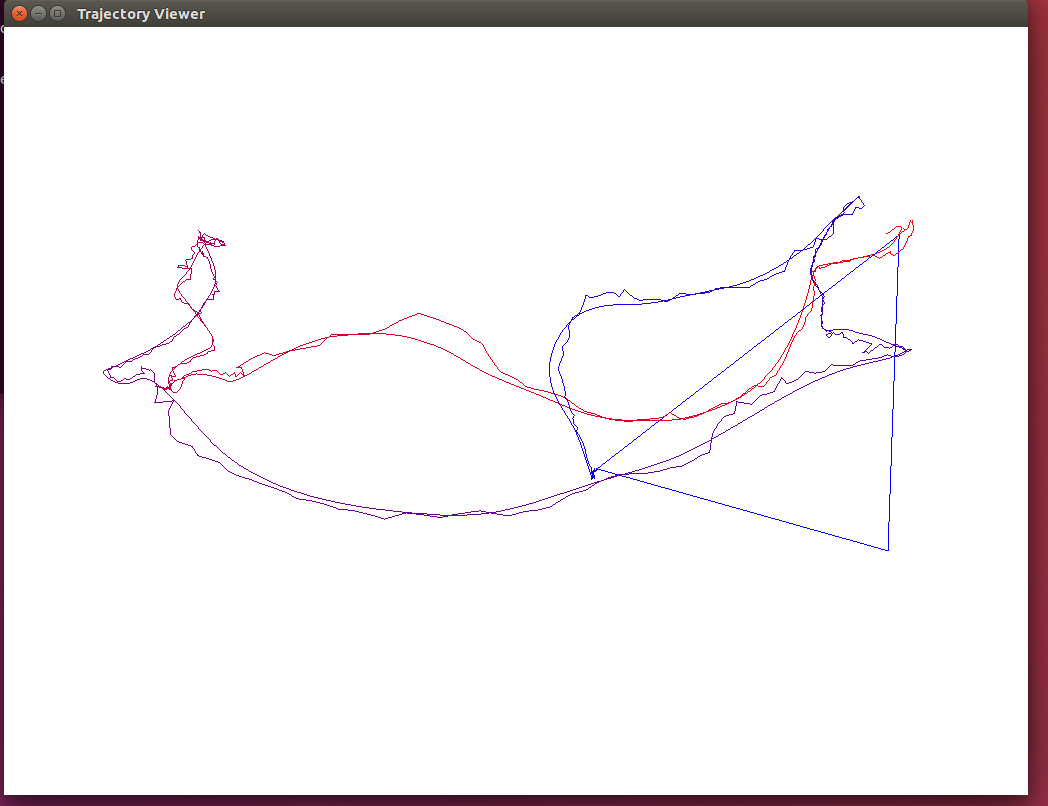
画出效果图如下所示
使用Pangolon在同一副图中,画出两个轨迹,比较误差的更多相关文章
- python—networkx:在一张图中画出多个子图
通过plt.subplot能够在一张图中画出多个子图 #coding: utf-8 #!/usr/bin/env python """ Draw a graph with ...
- 机器学习入门-随机森林温度预测-增加样本数据 1.sns.pairplot(画出两个关系的散点图) 2.MAE(平均绝对误差) 3.MAPE(准确率指标)
在上一个博客中,我们构建了随机森林温度预测的基础模型,并且研究了特征重要性. 在这个博客中,我们将从两方面来研究数据对预测结果的影响 第一方面:特征不变,只增加样本的数据 第二方面:增加特征数,增加样 ...
- wpf 在不同DPI下如何在DrawingVisual中画出清晰的图形
环境Win10 VS2017 .Net Framework4.7.1 本文仅讨论在DrawingVisual中进行的画图. WPF单位,系统DPI,显示器DPI三者的定义及关系 WPF单位:一 ...
- 如何在canvas中画出一个太极图
先放一个效果图: 代码如下 <!DOCTYPE html> <html> <head> <meta charset="utf-8" /&g ...
- matplotlib中在for中画出多张图
import matplotlib.pyplot as plt import numpy as np fig, axes = plt.subplots(2, 2) def showim(): for ...
- Latex中画出函数文件的调用关系拓扑图
流程图,思维导图,拓扑图通常能把我们遇到的一些复杂的关系结构用图形的方式展现出来.在Latex中要想画这样的拓扑图,有一个很好用的绘图工具包 pgf/tikz . 1.pgf/tikz的安装:pgf/ ...
- 百度地图API实时画出动态运行轨迹(一条行驶轨迹),车头实时指向行驶方向,设置角度偏移
参考网址:https://blog.csdn.net/skywqnan/article/details/79036262 改变车的方向:http://www.cnblogs.com/peixuanzh ...
- 使用Eclipse在Excel中找出两张表中相同证件号而姓名或工号却出现不同的的项
1:首先把Excel中的文本复制到txt中,复制如下: A表: 证件号 工号 姓名 310110xxxx220130004 101 傅家宜3101 ...
- 给定一个值S,在有序数组中找出两个元素A和B,使 A+B = S.
在网上看到过一个面试题,感觉挺有意思,看别人的代码写的逻辑不够谨慎,重写了一个,较真了又... package com.array7.algorithm; public class Algorithm ...
随机推荐
- c++const关键字---15
原创博文,转载请标明出处--周学伟 http://www.cnblogs.com/zxouxuewei/ const是一个C++语言的限定符,它限定一个变量不允许被改变.使用const在一定程度上可以 ...
- 从Python学习中得到的一点启发 - Java逆向索引ArrayList
看了几天Python,感觉记忆力不行了,很多东西记不住了.但是终归是得到了一点知识:重写一个ArrayList,允许从负值的索引得到指定的项.然后写一个得到斐波拉契数组的方法,这种方法要比递归调用的方 ...
- spring+hibernate 下载
http://www.cnblogs.com/haogj/archive/2012/07/28/nhibernate.html-------原文 http://www.springframework. ...
- [AX2012]代码更改默认财务维度
在前文(http://www.cnblogs.com/duanshuiliu/p/3243048.html)最后演示了如何使用代码更改默认财务维度,那段代码模拟了创建各数据表记录的过程,实际上AX提供 ...
- Unique ID Generate Notes
Unique ID generation in distributed systems http://www.slideshare.net/davegardnerisme/unique-id-gene ...
- Bypass 360主机卫士SQL注入防御(多姿势)
0x00 前言 在服务器客户端领域,曾经出现过一款360主机卫士,目前已停止更新和维护,官网都打不开了,但服务器中依然经常可以看到它的身影.从半年前的测试虚拟机里面,翻出了360主机卫士Apache版 ...
- Splash autoload() 方法
autoload() 方法可以设置每个页面访问时自动加载的对象,比如自动加载 JavaScript 代码,自动加载 Ajax 代码等等 注意此方法只负责加载 JavaScript/Ajax 代码,不执 ...
- 使用Postfix和Dovecot收发电子邮件
邮件应用协议包括: 简单邮件传输协议(SMTP),用来发送或中转发出的电子邮件,占用tcp 25端口. 第三版邮局协议(POP3),用于将服务器上把邮件存储到本地主机,占用tcp 110端口. 第四版 ...
- 配置React Native环境及解决运行异常
一. 安装Homebrew: Homebrew的官网(多语言版本)简单明了地介绍了如何安装和使用这个工具,;并提供了自己的Wiki. brew的安装很简单,使用一条ruby命令即可,Mac系统上已经默 ...
- 基于thinkphp和ajax的省市区三级联动
练习,就当练习. 省市区三级联动,样式如下图所示: 1,导入两个js文件并且导入数据库文件. 两个js文件分别是jquery-2.1.4.min.js和jquery-1.js,数据库文件,见附件. 2 ...