
IntelliJ IDEA 配合 Maven 的一些技巧:Profiles
环境
- IntelliJ IDEA 2017.1
- Maven 3.3.9
- Nexus 3.2.1
学习前提
- 了解 Maven 配置的基本用法
- 了解私有仓库,比如 nexus 的一些概念
- 强烈建议把 Maven 的 settings.xml 文件同时放在:
%USER_HOME%/.m2/settings.xml和${maven.home}/conf/settings.xml两个地方。避免使用终端的时候默认去调用用户目录下的
Maven 中的 profile
- Maven 中有一个概念叫做:
profile,它的诞生主要是为了解决不同环境所需的不同变量、配置等问题。 - 有了 profile,可以根据激活的条件,启动不同条件下的配置信息。
- profile 是可以有多个的,也可以同时激活多个 profile,方便自由组合。
- profile 一般可以在三个地方:settings.xml,pom.xml,profiles.xml(这个不常用)
- 在 settings.xml 上,一般大家用来做仓库的选择,比如以下 settings.xml 代码:
<?xml version="1.0" encoding="UTF-8"?>

<settings xmlns="http://maven.apache.org/SETTINGS/1.0.0"

          xmlns:xsi="http://www.w3.org/2001/XMLSchema-instance"

          xsi:schemaLocation="http://maven.apache.org/SETTINGS/1.0.0 http://maven.apache.org/xsd/settings-1.0.0.xsd">

    <localRepository>D:\maven\my_local_repository</localRepository>

    <pluginGroups>

    </pluginGroups>

    <proxies>

    </proxies>

    <profiles>

        <profile>

            <id>nexus</id>

            <repositories>

                <repository>

                    <id>nexus</id>

                    <url>http://192.168.1.73:8081/repository/maven-public/</url>

                    <releases>

                        <enabled>true</enabled>

                    </releases>

                    <snapshots>

                        <enabled>true</enabled>

                    </snapshots>

                </repository>

            </repositories>

            <pluginRepositories>

                <pluginRepository>

                    <id>nexus</id>

                    <url>http://192.168.1.73:8081/repository/maven-public/</url>

                    <releases>

                        <enabled>true</enabled>

                    </releases>

                    <snapshots>

                        <enabled>true</enabled>

                    </snapshots>

                </pluginRepository>

            </pluginRepositories>

        </profile>

        <profile>

            <id>aliyun</id>

            <repositories>

                <repository>

                    <id>aliyun</id>

                    <url>http://maven.aliyun.com/nexus/content/groups/public/</url>

                    <releases>

                        <enabled>true</enabled>

                    </releases>

                    <snapshots>

                        <enabled>true</enabled>

                    </snapshots>

                </repository>

            </repositories>

            <pluginRepositories>

                <pluginRepository>

                    <id>aliyun</id>

                    <url>http://maven.aliyun.com/nexus/content/groups/public/</url>

                    <releases>

                        <enabled>true</enabled>

                    </releases>

                    <snapshots>

                        <enabled>true</enabled>

                    </snapshots>

                </pluginRepository>

            </pluginRepositories>

        </profile>

    </profiles>

    <activeProfiles>

        <activeProfile>nexus</activeProfile>

    </activeProfiles>

</settings>
- 以上代码中 profile 就做一件事:设置全局的 profile,一个是 nexus 仓库,一个是 aliyun 仓库,默认激活的是 nexus 仓库。(activeProfiles)
- 在 pom.xml 中,一般用来激活环境配置,比如以下代码:
<profiles>

    <profile>

        <id>dev</id>

        <properties>

            <package.environment>dev</package.environment>

        </properties>

        <activation>

            <activeByDefault>true</activeByDefault>

        </activation>

        <build>

            <resources>

                <resource>

                    <directory>src/main/resources</directory>

                    <includes>

                        <include>**/*</include>

                    </includes>

                    <filtering>true</filtering>

                </resource>

                <resource>

                    <directory>src/main/env/${package.environment}</directory>

                    <includes>

                        <include>**/*</include>

                    </includes>

                    <filtering>true</filtering>

                </resource>

            </resources>

            <finalName>${project.artifactId}</finalName>

        </build>

    </profile>

    <profile>

        <id>product</id>

        <properties>

            <package.environment>product</package.environment>

        </properties>

        <activation>

            <activeByDefault>false</activeByDefault>

        </activation>

        <build>

            <resources>

                <resource>

                    <directory>src/main/resources</directory>

                    <includes>

                        <include>**/*</include>

                    </includes>

                    <filtering>true</filtering>

                </resource>

                <resource>

                    <directory>src/main/env/${package.environment}</directory>

                    <includes>

                        <include>**/*</include>

                    </includes>

                    <filtering>true</filtering>

                </resource>

            </resources>

            <finalName>${project.artifactId}</finalName>

        </build>

    </profile>

</profiles>
- 以上代码中 profile 就做一件事:打包的时候,默认是 dev 模式,打包 src/main/env/dev 下的配置文件,如果选择 product 则打包 src/main/env/product 下的配置文件
IntelliJ IDEA 使用 Maven Profile 的案例
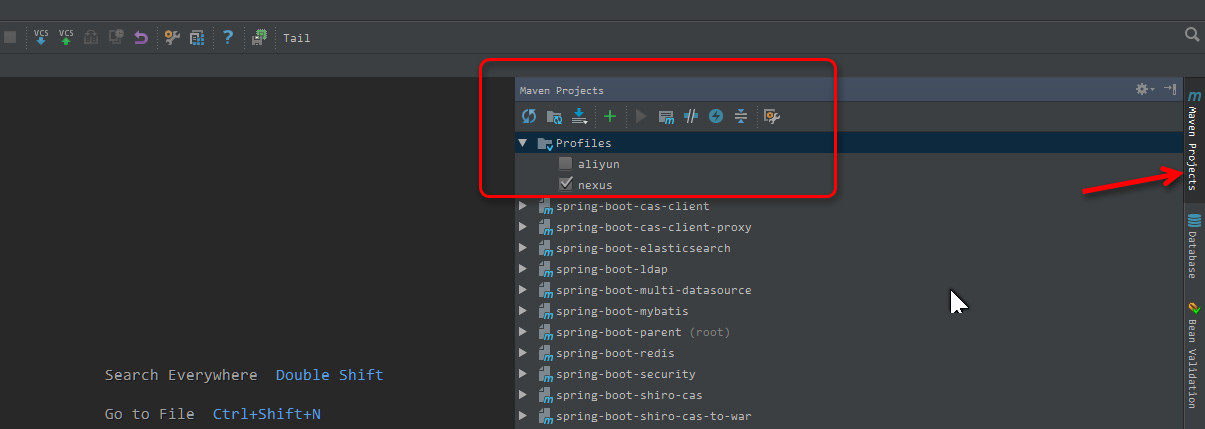
- 在 IntelliJ IDEA 上调用 profile 简单,如下图勾选对应的复选框即可,可以多选。

- 只使用 aliyun 仓库可以这样配置 settings.xml:
<?xml version="1.0" encoding="UTF-8"?>

<settings xmlns="http://maven.apache.org/SETTINGS/1.0.0"

          xmlns:xsi="http://www.w3.org/2001/XMLSchema-instance"

          xsi:schemaLocation="http://maven.apache.org/SETTINGS/1.0.0 http://maven.apache.org/xsd/settings-1.0.0.xsd">

    <localRepository>D:\maven\my_local_repository</localRepository>

    <pluginGroups>

    </pluginGroups>

    <proxies>

    </proxies>

    <profiles>

        <profile>

            <id>aliyun</id>

            <repositories>

                <repository>

                    <id>aliyun</id>

                    <url>http://maven.aliyun.com/nexus/content/groups/public/</url>

                    <releases>

                        <enabled>true</enabled>

                    </releases>

                    <snapshots>

                        <enabled>true</enabled>

                    </snapshots>

                </repository>

            </repositories>

            <pluginRepositories>

                <pluginRepository>

                    <id>aliyun</id>

                    <url>http://maven.aliyun.com/nexus/content/groups/public/</url>

                    <releases>

                        <enabled>true</enabled>

                    </releases>

                    <snapshots>

                        <enabled>true</enabled>

                    </snapshots>

                </pluginRepository>

            </pluginRepositories>

        </profile>

    </profiles>

    <activeProfiles>

        <activeProfile>aliyun</activeProfile>

    </activeProfiles>

</settings>
- 使用 nexus + aliyun 仓库可以这样配置 settings.xml:
<?xml version="1.0" encoding="UTF-8"?>

<settings xmlns="http://maven.apache.org/SETTINGS/1.0.0"

          xmlns:xsi="http://www.w3.org/2001/XMLSchema-instance"

          xsi:schemaLocation="http://maven.apache.org/SETTINGS/1.0.0 http://maven.apache.org/xsd/settings-1.0.0.xsd">

    <localRepository>D:\maven\my_local_repository</localRepository>

    <pluginGroups>

    </pluginGroups>

    <proxies>

    </proxies>

    <profiles>

        <profile>

            <id>nexus</id>

            <repositories>

                <repository>

                    <id>nexus</id>

                    <url>http://192.168.1.73:8081/repository/maven-public/</url>

                    <releases>

                        <enabled>true</enabled>

                    </releases>

                    <snapshots>

                        <enabled>true</enabled>

                    </snapshots>

                </repository>

            </repositories>

            <pluginRepositories>

                <pluginRepository>

                    <id>nexus</id>

                    <url>http://192.168.1.73:8081/repository/maven-public/</url>

                    <releases>

                        <enabled>true</enabled>

                    </releases>

                    <snapshots>

                        <enabled>true</enabled>

                    </snapshots>

                </pluginRepository>

            </pluginRepositories>

        </profile>

        <profile>

            <id>aliyun</id>

            <repositories>

                <repository>

                    <id>aliyun</id>

                    <url>http://maven.aliyun.com/nexus/content/groups/public/</url>

                    <releases>

                        <enabled>true</enabled>

                    </releases>

                    <snapshots>

                        <enabled>true</enabled>

                    </snapshots>

                </repository>

            </repositories>

            <pluginRepositories>

                <pluginRepository>

                    <id>aliyun</id>

                    <url>http://maven.aliyun.com/nexus/content/groups/public/</url>

                    <releases>

                        <enabled>true</enabled>

                    </releases>

                    <snapshots>

                        <enabled>true</enabled>

                    </snapshots>

                </pluginRepository>

            </pluginRepositories>

        </profile>

    </profiles>

    <activeProfiles>

        <activeProfile>nexus</activeProfile>

    </activeProfiles>

</settings>

来源:https://youmeek.gitbooks.io/intellij-idea-tutorial/content/maven-skill-introduce.html
IntelliJ IDEA 配合 Maven 的一些技巧:Profiles的更多相关文章
- Intellij IDEA使用Maven搭建spark开发环境(scala)
如何一步一步地在Intellij IDEA使用Maven搭建spark开发环境,并基于scala编写简单的spark中wordcount实例. 1.准备工作 首先需要在你电脑上安装jdk和scala以 ...
- Maven下载 || 配置本地仓库 || IntelliJ IDEA配置Maven教程
本文章主要介绍1.Maven下载 2.配置本地仓库Repository 3.IDEA配置Maven 三点. 相关博客: Eclipse配置Maven https://www.cnblogs.c ...
- SpringCloud核心教程 | 第二篇: 使用Intellij中的maven来快速构建Spring Cloud工程
spring cloud简介 spring cloud 为开发人员提供了快速构建分布式系统的一些工具,包括配置管理.服务发现.断路器.路由.微代理.事件总线.全局锁.决策竞选.分布式会话等等.它运行环 ...
- IntelliJ IDEA 2018 for Mac使用技巧
IntelliJ IDEA 2018 for Mac是一个综合性的Java编程环境,被许多开发人员和行业专家誉为市场上最好的IDE,它提供了一系列最实用的的工具组合:智能编码辅助和自动控制,支持J2E ...
- 使用IntelliJ IDEA和Maven构建Java web项目并打包部署
爱编程爱分享,原创文章,转载请注明出处,谢谢! http://www.cnblogs.com/fozero/p/6120375.html 一.背景 现在越来越多的人使用IntelliJ IDEA工具进 ...
- 修改Intellij Idea 创建maven项目默认Java编译版本
在使用Intellij Idea 创建Maven项目时,默认的Java Language是1.5,虽然可以在Project Structrue中修改,但是每次pom.xml文件有变化时,工程又会重置到 ...
- Intellij IDEA采用Maven+Spring MVC+Hibernate的架构搭建一个java web项目
原文:Java web 项目搭建 Java web 项目搭建 简介 在上一节java web环境搭建中,我们配置了开发java web项目最基本的环境,现在我们将采用Spring MVC+Spring ...
- 使用intellij idea搭建MAVEN+springmvc+mybatis框架
原文:使用intellij idea搭建MAVEN+springmvc+mybatis框架 1.首先使用idea创建一个maven项目 2.接着配置pom.xml,以下为我的配置 <projec ...
- Intellij idea操作maven时控制台中文乱码
只留存记录 windows环境下,Intellij idea12中maven操作时,控制台中文乱码问题(编译报错或者clean install时出现的其他错误描述乱码) 在cmd中mvn中文正常显示, ...
随机推荐
- CSS——(2)盒子模型与标准流
上篇博客<CSS--(1)基础>中简单介绍了CSS的概念和几种使用方法,现在主要是介绍其的核心内容. 盒子模型 为了理解盒子模型,我们可以先从生活中的盒子入手.盒子是用来放置物品的,内部除 ...
- 【bzoj3747】[POI2015]Kinoman 线段树区间合并
题目描述 一个长度为n的序列,每个数为1~m之一.求一段连续子序列,使得其中之出现过一次的数对应的价值之和最大. 输入 第一行两个整数n,m(1<=m<=n<=1000000). 第 ...
- DP———2.最大m子序列和
Max Sum Plus Plus Time Limit: 2000/1000 MS (Java/Others) Memory Limit: 65536/32768 K (Java/Others ...
- 浅谈android Socket 通信及自建ServerSocket服务端常见问题
摘 要:TCP/IP通信协议是可靠的面向连接的网络协议,它在通信两端各建立一个Socket,从而在两端形成网络虚拟链路,进而应用程序可通过可以通过虚拟链路进行通信.Java对于基于TCP协议的网络通 ...
- 由做网站操作日志想到的HttpModule应用
背景 在以前的Web项目中,记录用户操作日志,总是在方法里,加一行代码,记录此时用户操作类型与相关信息.该记录日志的方法对原来的业务操作侵入性较强,也比较零散,不便于查看和管理.那么有没有更加通用点的 ...
- win7兼容visual studio 2005 的方法
http://blog.sina.com.cn/s/blog_74d572890100xv7p.html 今天花了4个小时,结合网上的介绍,本人终于找到了一个可以在win7环境下运行visual st ...
- c# GDI画图 双缓冲画图分析
双缓冲绘图分析 1.Windows 绘图原理 我们在 Windows 环境下看到各种元素,如菜单.按钮.窗口.图像,从根本上说,都是“画”出来的.这时的屏幕,就相当于一块黑板,而 Windows ...
- itatis中的数据库配置
<!--com.microsoft.sqlserver.jdbc.SQLServerDriver --> <property name="JDBC.Driver" ...
- 使用CSS3制作各种图形
1.正圆形 代码: HTML代码: <div class="circle"></div> CSS代码: .circle { width: 100px; he ...
- Centos7一键安装lnmp脚本
mkdir /root/softwarewget http://mirrors.sohu.com/mysql/MySQL-5.7/mysql-boost-5.7.18.tar.gzwget https ...