
实例讲解Springboot以Repository方式整合Redis
1 简介
Redis是高性能的NoSQL数据库,经常作为缓存流行于各大互联网架构中。本文将介绍如何在Springboot中整合Spring Data Redis,使用Repository的方式操作。
代码结构如下:
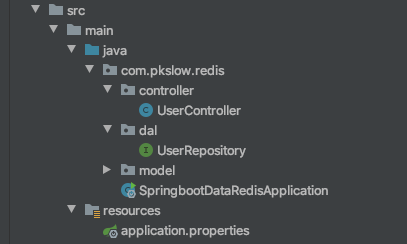
2 整合过程
2.1 安装Redis数据库
为了节省时间,就直接通过Docker来安装了,可以参考文章:Docker安装Redis并介绍漂亮的可视化客户端进行操作,可以快速安装并使用客户端进行查看和操作。
2.2 引入相关依赖
我们引入Springboot Web的依赖,以启动REST服务。还需要引入Spring Data Redis相关的依赖。最后,还需要commons-pool2,不然会因为缺少类而无法启动。
<dependency>

  <groupId>org.springframework.boot</groupId>

  <artifactId>spring-boot-starter-web</artifactId>

</dependency>

<dependency>

  <groupId>org.springframework.boot</groupId>

  <artifactId>spring-boot-starter-data-redis</artifactId>

</dependency>

<dependency>

  <groupId>org.apache.commons</groupId>

  <artifactId>commons-pool2</artifactId>

</dependency>
2.3 配置连接信息
配置Redis的连接信息,这个信息跟你安装时的配置有关,同时配置了连接池,各项的配置及相关解释如下:
# Redis数据库索引,默认为0

spring.redis.database=0

# Redis端口

spring.redis.port=6379

# Redis服务器主机

spring.redis.host=localhost

# 连接池最大连接数

spring.redis.lettuce.pool.max-active=8

# 连接池最大空闲

spring.redis.lettuce.pool.max-idle=8

# 连接池最小空闲

spring.redis.lettuce.pool.min-idle=2

# 连接池最大阻塞等待时间

spring.redis.lettuce.pool.max-wait=1ms

# 超时时间

spring.redis.lettuce.shutdown-timeout=100ms
2.4 创建实体类
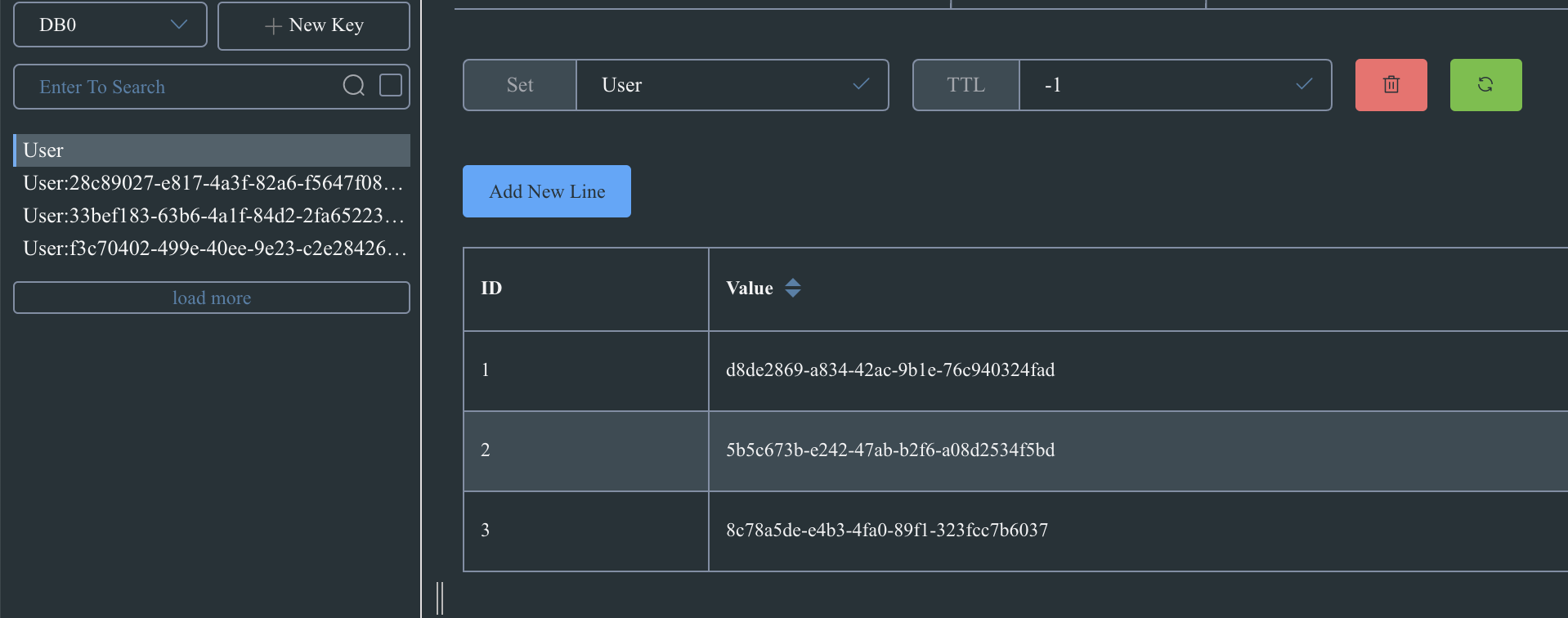
存入Redis中的数据类型,可以是自定义的一个类,注意需要加上注解@RedisHash和@Id。存入Redis的数据为Set类型。
具体代码如下:
package com.pkslow.redis.model;

import org.springframework.data.annotation.Id;

import org.springframework.data.redis.core.RedisHash;

import java.util.Date;

@RedisHash("User")

public class User {

    @Id

    private String userId;

    private String name;

    private Integer age;

    private Date createTime = new Date();

    public String getUserId() {

        return userId;

    }

    public void setUserId(String userId) {

        this.userId = userId;

    }

    public String getName() {

        return name;

    }

    public void setName(String name) {

        this.name = name;

    }

    public Integer getAge() {

        return age;

    }

    public void setAge(Integer age) {

        this.age = age;

    }

    public Date getCreateTime() {

        return createTime;

    }

    public void setCreateTime(Date createTime) {

        this.createTime = createTime;

    }

}
2.5 数据库访问层UserRepository接口
直接继承CrudRepository接口就行了,不用自己来实现,需要注意CrudRepository<User, String>的泛型类型:
package com.pkslow.redis.dal;

import com.pkslow.redis.model.User;

import org.springframework.data.repository.CrudRepository;

public interface UserRepository extends CrudRepository<User, String> {

}
2.6 实现Controller
Controller实现了RESTful风格的增删改查功能,只要把UserRepository注入便可以使用它来操作:
package com.pkslow.redis.controller;

import com.pkslow.redis.dal.UserRepository;

import com.pkslow.redis.model.User;

import org.springframework.beans.factory.annotation.Autowired;

import org.springframework.web.bind.annotation.*;

@RestController

@RequestMapping("/user")

public class UserController {

    @Autowired

    private final UserRepository userRepository;

    public UserController(UserRepository userRepository) {

        this.userRepository = userRepository;

    }

    @GetMapping("")

    public Iterable<User> getAllUsers() {

        return userRepository.findAll();

    }

    @GetMapping("/{userId}")

    public User getByUserId(@PathVariable String userId) {

        return userRepository.findById(userId).orElse(new User());

    }

    @PostMapping("")

    public User addNewUser(@RequestBody User user) {

        return userRepository.save(user);

    }

    @DeleteMapping("/{userId}")

    public String delete(@PathVariable String userId) {

        User user = new User();

        user.setUserId(userId);

        userRepository.deleteById(userId);

        return "deleted: " + userId;

    }

    @PutMapping("")

    public User update(@RequestBody User user) {

        return userRepository.save(user);

    }

}
3 Postman接口测试
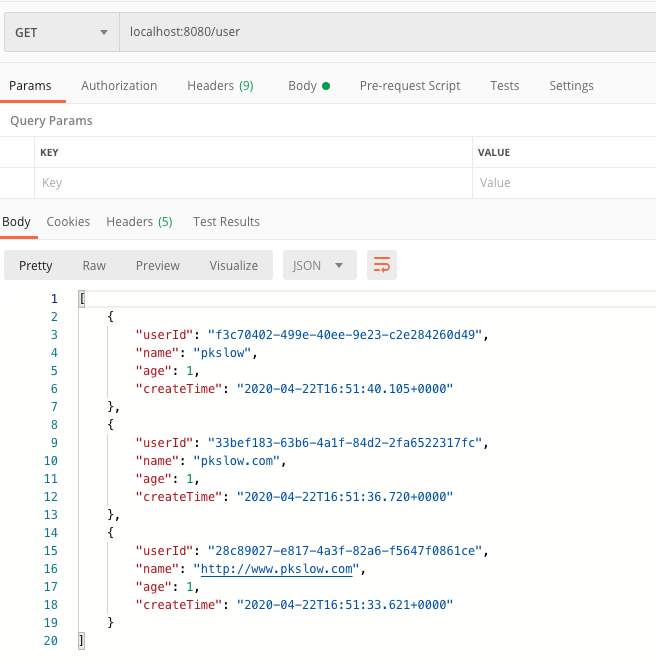
本文使用Postman进行测试,结果显示的时间为GMT时间,每个功能测试如下:
(1)新增User
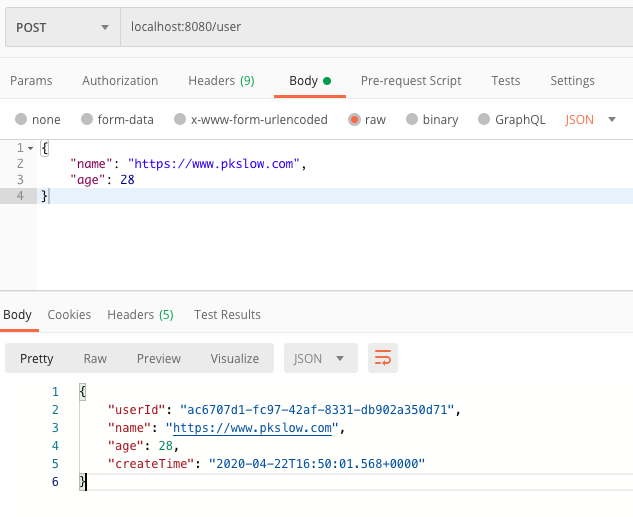
(2)根据UserId查询特定User
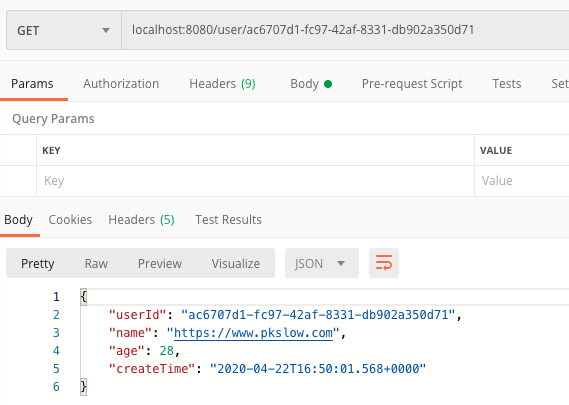
(3)修改User
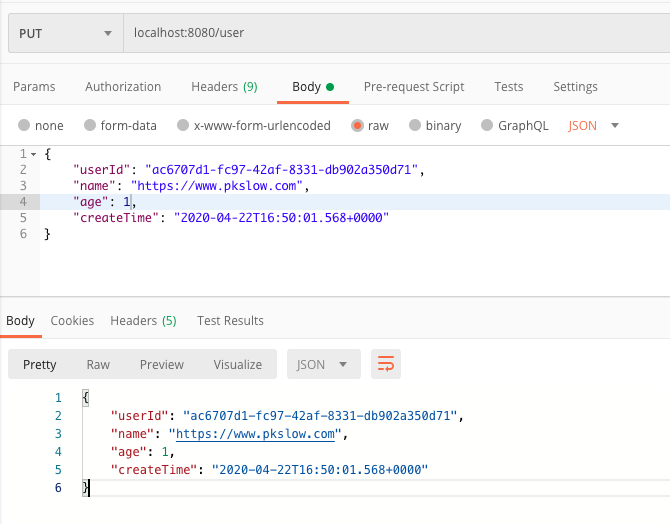
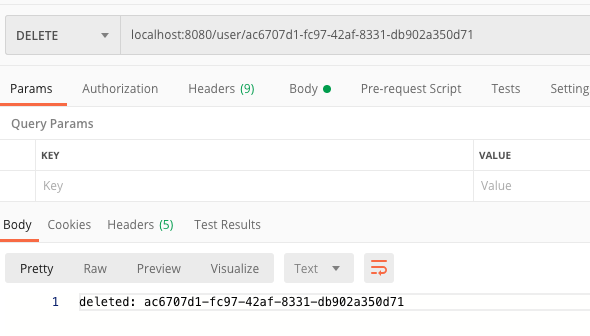
(4)删除一个User
(5)查询所有User
在Redis中的数据如下所示:
4 总结
本文通过实例讲解了如何整合Springboot和Redis,使用的是Repository的方式。详细代码可在南瓜慢说公众号回复<SpringbootRedisRepository>获取。
欢迎访问南瓜慢说 www.pkslow.com获取更多精彩文章!
欢迎关注微信公众号<南瓜慢说>,将持续为你更新...

多读书,多分享;多写作,多整理。
实例讲解Springboot以Repository方式整合Redis的更多相关文章
- 实例讲解Springboot以Template方式整合Redis及序列化问题
1 简介 之前讲过如何通过Docker安装Redis,也讲了Springboot以Repository方式整合Redis,建议阅读后再看本文效果更佳: (1) Docker安装Redis并介绍漂亮的可 ...
- SpringBoot使用注解方式整合Redis
1.首先导入使用Maven导入jar包 <dependency> <groupId>org.springframework.boot</groupId> <a ...
- 实例讲解Springboot整合MongoDB进行CRUD操作的两种方式
1 简介 Springboot是最简单的使用Spring的方式,而MongoDB是最流行的NoSQL数据库.两者在分布式.微服务架构中使用率极高,本文将用实例介绍如何在Springboot中整合Mon ...
- springboot学习笔记-3 整合redis&mongodb
一.整合redis 1.1 建立实体类 @Entity @Table(name="user") public class User implements Serializable ...
- 【SpringBoot】Springboot2.x整合Redis(一)
备注: springboto整合redis依赖于spring-boot-starter-data-redis这个jar 一,项目环境和依赖 1.POM.xml配置 <parent> < ...
- 【Springboot】实例讲解Springboot整合OpenTracing分布式链路追踪系统(Jaeger和Zipkin)
1 分布式追踪系统 随着大量公司把单体应用重构为微服务,对于运维人员的责任就更加重大了.架构更复杂.应用更多,要从中快速诊断出问题.找到性能瓶颈,并不是一件容易的事.因此,也随着诞生了一系列面向Dev ...
- 33. Springboot 系列 原生方式引入Redis,非RedisTemplate
0.pom.xml <dependency> <groupId>redis.clients</groupId> <artifactId>jedis&l ...
- SpringBoot学习- 5、整合Redis
SpringBoot学习足迹 SpringBoot项目中访问Redis主要有两种方式:JedisPool和RedisTemplate,本文使用JedisPool 1.pom.xml添加dependen ...
- SpringBoot(三)整合Redis
spring boot对常用的数据库支持外,对nosql 数据库也进行了封装自动化. redis介绍 Redis是目前业界使用最广泛的内存数据存储.相比memcached,Redis支持更丰富的数据结 ...
随机推荐
- 微信内置浏览器的JsAPI(WeixinJSBridge续)进入全屏
微信内置浏览器的JsAPI(WeixinJSBridge续)进入全屏 之前有写过几篇关于微信内置浏览器(WebView)中特有的Javascript API(Javascript Interface) ...
- 如何利用python实现为每行添加行数编号
可能还有更好的方法,在这里我是这么写的,针对小文件可以,但是如果文件内容太多,这种方法感觉不太好 先把所有的数据读取出来,然后利用W覆盖写入模式打开文件进行写入 遍历枚举类型数据后,默认是从0开始,然 ...
- Ali_Cloud++:安装 RabbitMQ安装及环境配置
注意事项:rabbitMA版本和erlang并不是同步更新的,会出现版本不匹配,安装不了. 两都版本对应 参考官网文档 其它下载地址 1):Erlang安装 (因为是erlant语言编写的, ...
- iOS UIViewController的瘦身计划
代码的组织结构,以及为何要这样写. 那些场景适合使用子控制器,那些场景应该避免使用子控制器? 分离UITableView的数据源和UITableViewDataSource协议. MVVM的重点是Vi ...
- Mybatis入门三
一.连接数据库的配置单独放在一个properties文件中 之前,我们是直接将数据库的连接配置信息写在了MyBatis的conf.xml文件中,如下: <?xml version="1 ...
- Markdown语法快速学习
Markdown 简洁语法说明 0.前言 一直以来都是以word文档做笔记,存在很多问题,比如代码格式.高亮等.这次公司要求使用markdown,感觉眼前一亮,以前word的问题都得到了解决,而且可以 ...
- 原来rollup这么简单之 tree shaking篇
大家好,我是小雨小雨,致力于分享有趣的.实用的技术文章. 内容分为翻译和原创,如果有问题,欢迎随时评论或私信,希望和大家一起进步. 分享不易,希望能够得到大家的支持和关注. 计划 rollup系列打算 ...
- CSS躬行记(2)——伪类和伪元素
一.伪类选择器 伪选择器弥补了常规选择器的不足,能够实现一些特殊情况下的样式,例如在鼠标悬停时或只给字符串中的第一个字符指定样式.与类选择器类似,可以从HTML元素的class属性中查看到,但伪选择器 ...
- GitHub 热点速览 Vol.14:周获 2k+ Vim 掀起三维编程风
作者:HelloGitHub-小鱼干 摘要(用于 公众号/博客园等地方)寓教于乐,应该是上周 Trending 的主题了,无论是被多人转发推荐的三维 Vim 项目 Vim³ 或者是流体运动的 WebG ...
- 【cs224w】Lecture 1 & 2 - 图的性质 及 随机图
目录 Lecture 1: Introduction Lecture 2: Properties and Random Graph Degree Distribution Path Length Cl ...