
Datagridview 实现二维表头和行合并
借鉴别人的,改了改,没用timer
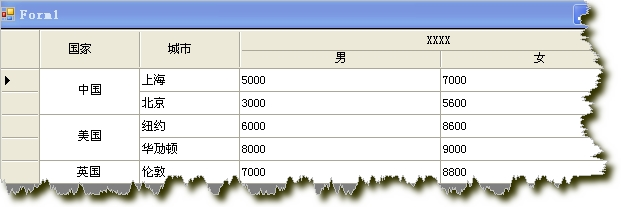
using System;
using System.Collections.Generic;
using System.ComponentModel;
using System.Data;
using System.Drawing;
using System.Text;
using System.Windows.Forms;
using System.Runtime.InteropServices;
using System.Drawing.Design;
namespace Salem.Library.Control.DataGridView
{
/// <summary>
/// 拥有默认样式带合并表头功能的DataGridView
/// </summary>
public partial class DataGridViewEx : System.Windows.Forms.DataGridView
{
#region 字段属性
//是否显示行号
private bool showNum = false;
/// <summary>
/// 是否显示行号
/// </summary>
[DefaultValue(true), Description("是否显示行号")]
public bool ShowNum
{
get
{
return showNum;
}
set
{
showNum = value;
if (value)
{
this.RowHeadersVisible = true;
}
}
}
private Dictionary<int, SpanInfo> SpanRows = new Dictionary<int, SpanInfo>();
private List<string> _mergecolumnname = new List<string>();
/// <summary>
/// 合并列的名称
/// </summary>
[MergableProperty(false), Editor("System.Windows.Forms.Design.ListControlStringCollectionEditor, System.Design, Version=2.0.0.0, Culture=neutral, PublicKeyToken=b03f5f7f11d50a3a", typeof(UITypeEditor)), DesignerSerializationVisibility(DesignerSerializationVisibility.Visible), Localizable(true), Description("设置或获取合并列的集合"), Browsable(true), Category("单元格合并")]
public List<string> MergeColumnNames
{
get
{
return this._mergecolumnname;
}
set
{
this._mergecolumnname = value;
}
}
#endregion
#region 构造函数
public DataGridViewEx()
{
SetProperty();
SetStyle(
ControlStyles.AllPaintingInWmPaint |
ControlStyles.OptimizedDoubleBuffer |
ControlStyles.ResizeRedraw |
ControlStyles.DoubleBuffer, true);
InitializeComponent();
}
#endregion
#region 样式设置方法
//设置样式属性
private void SetProperty()
{
this.AutoGenerateColumns = false;
this.BackgroundColor = Color.White;
//设置奇数行单元格的样式
this.AlternatingRowsDefaultCellStyle = CreatAlternatingCellStyle();
//设置默认单元格的样式
this.DefaultCellStyle = CreatDefaultCellStyle();
this.ColumnHeadersDefaultCellStyle.Alignment = DataGridViewContentAlignment.MiddleCenter;
this.ColumnHeadersDefaultCellStyle.BackColor = Color.FromArgb(247, 247, 247);
this.ColumnHeadersDefaultCellStyle.Font = new Font("宋体", 10);
//this.AutoSizeColumnsMode = DataGridViewAutoSizeColumnsMode.Fill;
this.CellBorderStyle = DataGridViewCellBorderStyle.SunkenHorizontal;
this.ColumnHeadersBorderStyle = DataGridViewHeaderBorderStyle.None;
this.ColumnHeadersHeightSizeMode = DataGridViewColumnHeadersHeightSizeMode.EnableResizing;
this.ColumnHeadersHeight = 35;
this.EnableHeadersVisualStyles = false;
this.RowHeadersBorderStyle = DataGridViewHeaderBorderStyle.None;
this.RowHeadersVisible = false;
this.SelectionMode = DataGridViewSelectionMode.FullRowSelect;
this.RowTemplate.Height = 35;
}
//设置奇数行的样式
private DataGridViewCellStyle CreatAlternatingCellStyle()
{
DataGridViewCellStyle alternatingRowStyle = new DataGridViewCellStyle();
alternatingRowStyle.Font = new System.Drawing.Font("宋体", 10);
//alternatingRowStyle.Alignment = DataGridViewContentAlignment.MiddleCenter;
alternatingRowStyle.BackColor = Color.White;
alternatingRowStyle.ForeColor = Color.Black;
alternatingRowStyle.SelectionBackColor = Color.FromArgb(255, 230, 162);
alternatingRowStyle.SelectionForeColor = Color.Black;
return alternatingRowStyle;
}
//设置默认单元格的样式
private DataGridViewCellStyle CreatDefaultCellStyle()
{
DataGridViewCellStyle defaultCellStyle = new DataGridViewCellStyle();
//defaultCellStyle.Alignment = DataGridViewContentAlignment.MiddleCenter;
defaultCellStyle.Font = new System.Drawing.Font("宋体", 10);
defaultCellStyle.BackColor = Color.White;
defaultCellStyle.ForeColor = Color.Black;
defaultCellStyle.SelectionBackColor = Color.FromArgb(255, 230, 162);
defaultCellStyle.SelectionForeColor = Color.Black;
return defaultCellStyle;
}
/// <summary>
/// 设置单元格和列头有边框
/// </summary>
public void SetGirdCellAndColHeaderBorderStyle()
{
this.CellBorderStyle = DataGridViewCellBorderStyle.Single;
this.ColumnHeadersBorderStyle = DataGridViewHeaderBorderStyle.Single;
}
#endregion
#region 重绘方法
protected override void OnPaint(PaintEventArgs pe)
{
base.OnPaint(pe);
}
protected override void OnCellPainting(DataGridViewCellPaintingEventArgs e)
{
try
{
if (e.RowIndex > -1 && e.ColumnIndex > -1)
{
//DrawCell(e);
}
else
{
//合并表头
if (e.RowIndex == -1)
{
if (SpanRows.ContainsKey(e.ColumnIndex)) //被合并的列
{
//画边框
Graphics g = e.Graphics;
e.Paint(e.CellBounds, DataGridViewPaintParts.Background | DataGridViewPaintParts.Border);
int left = e.CellBounds.Left, top = e.CellBounds.Top + 2,
right = e.CellBounds.Right, bottom = e.CellBounds.Bottom;
switch (SpanRows[e.ColumnIndex].Position)
{
case 1:
left += 2;
break;
case 2:
break;
case 3:
right -= 2;
break;
}
//画底色
g.FillRectangle(new SolidBrush(e.CellStyle.BackColor), left, top,
right - left, (bottom - top)/2);
//画中线
g.DrawLine(new Pen(this.GridColor), left-2, (top + bottom) / 2,
right, (top + bottom) / 2);
//写合并标题
StringFormat _sf = new StringFormat { Alignment = StringAlignment.Center, LineAlignment = StringAlignment.Center };
g.DrawString(e.Value + "", e.CellStyle.Font, Brushes.Black,
new Rectangle(left, (top + bottom) / 2, right - left, (bottom - top) / 2), _sf);
//写原来列标题
StringFormat sf = new StringFormat();
sf.Alignment = StringAlignment.Center;
sf.LineAlignment = StringAlignment.Center;
left = this.GetColumnDisplayRectangle(SpanRows[e.ColumnIndex].Left, true).Left - 2;
if (left < 0) left = this.GetCellDisplayRectangle(-1, -1, true).Width;
right = this.GetColumnDisplayRectangle(SpanRows[e.ColumnIndex].Right, true).Right - 2;
if (right < 0) right = this.Width;
g.DrawString(SpanRows[e.ColumnIndex].Text, this.ColumnHeadersDefaultCellStyle.Font, new SolidBrush(e.CellStyle.ForeColor),
new Rectangle(left, top, right - left, (bottom - top)/2), sf);
e.Handled = true;
}
}
}
base.OnCellPainting(e);
}
catch
{ }
}
//绘制行号
protected override void OnRowPostPaint(DataGridViewRowPostPaintEventArgs e)
{
if (ShowNum)
{
this.RowHeadersVisible = true;
SolidBrush solidBrush = new SolidBrush(Color.Black);
e.Graphics.DrawString((e.RowIndex + 1).ToString(), e.InheritedRowStyle.Font, solidBrush, e.RowBounds.Location.X + 15, e.RowBounds.Location.Y + 5);
}
base.OnRowPostPaint(e);
}
//重绘滚动条
protected override void OnScroll(ScrollEventArgs e)
{
this.ReDrawHead();
base.OnScroll(e);
}
//重绘标题行
public void ReDrawHead()
{
foreach (int num in this.SpanRows.Keys)
{
base.Invalidate(base.GetCellDisplayRectangle(num, -1, true));
}
}
#endregion
#region 自定义方法
/// <summary>
/// 画单元格
/// </summary>
/// <param name="e"></param>
private void DrawCell(DataGridViewCellPaintingEventArgs e)
{
if (e.CellStyle.Alignment == DataGridViewContentAlignment.NotSet)
{
e.CellStyle.Alignment = DataGridViewContentAlignment.MiddleCenter;
}
Brush gridBrush = new SolidBrush(this.GridColor);
SolidBrush backBrush = new SolidBrush(e.CellStyle.BackColor);
SolidBrush fontBrush = new SolidBrush(e.CellStyle.ForeColor);
int cellwidth;
//上面相同的行数
int UpRows = 0;
//下面相同的行数
int DownRows = 0;
//总行数
int count = 0;
if (this.MergeColumnNames.Contains(this.Columns[e.ColumnIndex].Name) && e.RowIndex != -1)
{
cellwidth = e.CellBounds.Width;
Pen gridLinePen = new Pen(gridBrush);
string curValue = e.Value == null ? "" : e.Value.ToString().Trim();
string curSelected = this.CurrentRow.Cells[e.ColumnIndex].Value == null ? "" : this.CurrentRow.Cells[e.ColumnIndex].Value.ToString().Trim();
if (!string.IsNullOrEmpty(curValue))
{
#region 获取下面的行数
for (int i = e.RowIndex; i < this.Rows.Count; i++)
{
if (this.Rows[i].Cells[e.ColumnIndex].Value.ToString().Equals(curValue))
{
//this.Rows[i].Cells[e.ColumnIndex].Selected = this.Rows[e.RowIndex].Cells[e.ColumnIndex].Selected;
if (!this.Rows[i].Cells[0].Value.ToString().Equals(this.Rows[e.RowIndex].Cells[0].Value.ToString()))
break;
DownRows++;
if (e.RowIndex != i)
{
cellwidth = cellwidth < this.Rows[i].Cells[e.ColumnIndex].Size.Width ? cellwidth : this.Rows[i].Cells[e.ColumnIndex].Size.Width;
}
}
else
{
break;
}
}
#endregion
#region 获取上面的行数
for (int i = e.RowIndex; i >= 0; i--)
{
if (this.Rows[i].Cells[e.ColumnIndex].Value.ToString().Equals(curValue))
{
if (!this.Rows[e.RowIndex].Cells[0].Value.ToString().Equals(this.Rows[i].Cells[0].Value.ToString()))
{
break;
}
//this.Rows[i].Cells[e.ColumnIndex].Selected = this.Rows[e.RowIndex].Cells[e.ColumnIndex].Selected;
UpRows++;
if (e.RowIndex != i)
{
cellwidth = cellwidth < this.Rows[i].Cells[e.ColumnIndex].Size.Width ? cellwidth : this.Rows[i].Cells[e.ColumnIndex].Size.Width;
}
}
else
{
break;
}
}
#endregion
count = DownRows + UpRows - 1;
if (count < 2)
{
return;
}
}
if (this.Rows[e.RowIndex].Selected)
{
backBrush.Color = e.CellStyle.SelectionBackColor;
fontBrush.Color = e.CellStyle.SelectionForeColor;
}
//以背景色填充
e.Graphics.FillRectangle(backBrush, e.CellBounds);
//画字符串
PaintingFont(e, cellwidth, UpRows, DownRows, count);
if (DownRows == 1)
{
e.Graphics.DrawLine(gridLinePen, e.CellBounds.Left, e.CellBounds.Bottom - 1, e.CellBounds.Right - 1, e.CellBounds.Bottom - 1);
count = 0;
}
// 画右边线
e.Graphics.DrawLine(gridLinePen, e.CellBounds.Right - 1, e.CellBounds.Top, e.CellBounds.Right - 1, e.CellBounds.Bottom);
e.Handled = true;
}
}
/// <summary>
/// 画字符串
/// </summary>
/// <param name="e"></param>
/// <param name="cellwidth"></param>
/// <param name="UpRows"></param>
/// <param name="DownRows"></param>
/// <param name="count"></param>
private void PaintingFont(System.Windows.Forms.DataGridViewCellPaintingEventArgs e, int cellwidth, int UpRows, int DownRows, int count)
{
SolidBrush fontBrush = new SolidBrush(e.CellStyle.ForeColor);
int fontheight = (int)e.Graphics.MeasureString(e.Value.ToString(), e.CellStyle.Font).Height;
int fontwidth = (int)e.Graphics.MeasureString(e.Value.ToString(), e.CellStyle.Font).Width;
int cellheight = e.CellBounds.Height;
if (e.CellStyle.Alignment == DataGridViewContentAlignment.BottomCenter)
{
e.Graphics.DrawString((String)e.Value, e.CellStyle.Font, fontBrush, e.CellBounds.X + (cellwidth - fontwidth) / 2, e.CellBounds.Y + cellheight * DownRows - fontheight);
}
else if (e.CellStyle.Alignment == DataGridViewContentAlignment.BottomLeft)
{
e.Graphics.DrawString((String)e.Value, e.CellStyle.Font, fontBrush, e.CellBounds.X, e.CellBounds.Y + cellheight * DownRows - fontheight);
}
else if (e.CellStyle.Alignment == DataGridViewContentAlignment.BottomRight)
{
e.Graphics.DrawString((String)e.Value, e.CellStyle.Font, fontBrush, e.CellBounds.X + cellwidth - fontwidth, e.CellBounds.Y + cellheight * DownRows - fontheight);
}
else if (e.CellStyle.Alignment == DataGridViewContentAlignment.MiddleCenter)
{
e.Graphics.DrawString((String)e.Value, e.CellStyle.Font, fontBrush, e.CellBounds.X + (cellwidth - fontwidth) / 2, e.CellBounds.Y - cellheight * (UpRows - 1) + (cellheight * count - fontheight) / 2);
}
else if (e.CellStyle.Alignment == DataGridViewContentAlignment.MiddleLeft)
{
e.Graphics.DrawString((String)e.Value, e.CellStyle.Font, fontBrush, e.CellBounds.X, e.CellBounds.Y - cellheight * (UpRows - 1) + (cellheight * count - fontheight) / 2);
}
else if (e.CellStyle.Alignment == DataGridViewContentAlignment.MiddleRight)
{
e.Graphics.DrawString((String)e.Value, e.CellStyle.Font, fontBrush, e.CellBounds.X + cellwidth - fontwidth, e.CellBounds.Y - cellheight * (UpRows - 1) + (cellheight * count - fontheight) / 2);
}
else if (e.CellStyle.Alignment == DataGridViewContentAlignment.TopCenter)
{
e.Graphics.DrawString((String)e.Value, e.CellStyle.Font, fontBrush, e.CellBounds.X + (cellwidth - fontwidth) / 2, e.CellBounds.Y - cellheight * (UpRows - 1));
}
else if (e.CellStyle.Alignment == DataGridViewContentAlignment.TopLeft)
{
e.Graphics.DrawString((String)e.Value, e.CellStyle.Font, fontBrush, e.CellBounds.X, e.CellBounds.Y - cellheight * (UpRows - 1));
}
else if (e.CellStyle.Alignment == DataGridViewContentAlignment.TopRight)
{
e.Graphics.DrawString((String)e.Value, e.CellStyle.Font, fontBrush, e.CellBounds.X + cellwidth - fontwidth, e.CellBounds.Y - cellheight * (UpRows - 1));
}
else
{
e.Graphics.DrawString((String)e.Value, e.CellStyle.Font, fontBrush, e.CellBounds.X + (cellwidth - fontwidth) / 2, e.CellBounds.Y - cellheight * (UpRows - 1) + (cellheight * count - fontheight) / 2);
}
}
#endregion
#region 合并表头方法
/// <summary>
/// 合并列
/// </summary>
/// <param name="ColIndex">列的索引</param>
/// <param name="ColCount">需要合并的列数</param>
/// <param name="Text">合并列后的文本</param>
public void AddSpanHeader(int ColIndex, int ColCount, string Text)
{
if (ColCount < 2)
{
//throw new Exception("行宽应大于等于2,合并1列无意义。");
}
//将这些列加入列表
int Right = ColIndex + ColCount - 1; //同一大标题下的最后一列的索引
SpanRows[ColIndex] = new SpanInfo(Text, 1, ColIndex, Right); //添加标题下的最左列
SpanRows[Right] = new SpanInfo(Text, 3, ColIndex, Right); //添加该标题下的最右列
for (int i = ColIndex + 1; i < Right; i++) //中间的列
{
SpanRows[i] = new SpanInfo(Text, 2, ColIndex, Right);
}
}
/// <summary>
/// 清除合并表头
/// </summary>
public void ClearSpanInfo()
{
this.SpanRows.Clear();
}
#endregion
#region 获取绑定数据
/// <summary>
/// 获取显示列绑定数据
/// </summary>
/// <returns></returns>
public DataTable GetVisibleBoundData()
{
DataTable dt = new DataTable();
foreach (DataGridViewColumn dgvc in this.Columns)
{
if (!dgvc.Visible || string.IsNullOrEmpty(dgvc.HeaderText))
{
continue;
}
if (dgvc is DataGridViewTextBoxColumn || dgvc is DataGridViewComboBoxColumn || dgvc is DataGridViewLinkColumn)
{
if (!dt.Columns.Contains(dgvc.HeaderText) && dgvc.HeaderText.Length > 0)
{
if (dgvc.ValueType == null)
{
dt.Columns.Add(dgvc.HeaderText);
}
else
{
dt.Columns.Add(dgvc.HeaderText, dgvc.ValueType);
}
}
}
}
foreach (DataGridViewRow dgvr in this.Rows)
{
if (dgvr.IsNewRow)
{
continue;
}
if (string.IsNullOrEmpty(dgvr.Cells[1].Value != null ? dgvr.Cells[1].Value.ToString() : ""))
{
continue;
}
DataRow dr = dt.NewRow();
foreach (DataGridViewColumn dgvc in this.Columns)
{
if (dt.Columns.Contains(dgvc.HeaderText))
{
if (dgvr.Cells[dgvc.Name].FormattedValue.ToString().Length > 0)
{
dr[dgvc.HeaderText] = dgvr.Cells[dgvc.Name].FormattedValue;
}
}
}
dt.Rows.Add(dr);
}
return dt;
}
#endregion
}
[StructLayout(LayoutKind.Sequential)]
public struct SpanInfo
{
/// <summary>
/// 合并后的标题
/// </summary>
public string Text;
/// <summary>
/// 本身位置(是左边界列还是有边界列)
/// </summary>
public int Position;
/// <summary>
/// 左边界列
/// </summary>
public int Left;
/// <summary>
/// 右边界列
/// </summary>
public int Right;
public SpanInfo(string Text, int Position, int Left, int Right)
{
this.Text = Text;
this.Position = Position;
this.Left = Left;
this.Right = Right;
}
}
}
使用:
DataTable dt = new DataTable();
dt.Columns.Add("1"); dt.Columns.Add("2"); dt.Columns.Add("3"); dt.Columns.Add("4"); dt.Rows.Add("中国", "上海", "5000", "7000"); dt.Rows.Add("中国", "北京", "3000", "5600"); dt.Rows.Add("美国", "纽约", "6000", "8600"); dt.Rows.Add("美国", "华劢顿", "8000", "9000"); dt.Rows.Add("英国", "伦敦", "7000", "8800"); this.rowMergeView1.DataSource = dt; this.rowMergeView1.ColumnHeadersHeight = 40; this.rowMergeView1.ColumnHeadersHeightSizeMode = DataGridViewColumnHeadersHeightSizeMode.DisableResizing; //this.rowMergeView1.MergeColumnNames.Add("Column1"); this.rowMergeView1.AddSpanHeader(2, 2, "XXXX");Datagridview 实现二维表头和行合并的更多相关文章
- Datagridview 实现二维表头和行合并【转载】
using System; using System.Collections.Generic; using System.ComponentModel; using System.Drawing; u ...
- 如何通过DataGridView 实现单元格合并和二维表头
先看下实现出来的效果(这里随便写了几组数据,用来测试) 先初始一个DataGridView 设置哪几列 DataGridView 里男女这两列的 AutoSizeMode 可以设置Fill. publ ...
- 【Winform-自定义控件】DataGridView 单元格合并和二维表头
DataGridView单元格合并和二维表头应用: //DataGridView绑定数据 DataTable dt = new DataTable(); dt.Columns.Add("); ...
- PyTorch 如何理解张量:一维张量、二维张量、行/列向量、矩阵
理解张量,并将张量与线性代数的知识连接起来,我认为最重要的是理解 tensor 的两个属性:shape 和 ndim . ndim 表示张量的维度,一维张量的 ndim 值为 1,二维张量的 ndim ...
- C#获取二维数组的行数和列数及其多维。。。
原文发布时间为:2008-11-26 -- 来源于本人的百度文章 [由搬家工具导入] 有一个二维数组sz[,] 怎样获取sz 的行数和列数呢? sz.GetLength(0) 返回第一维的长度(即行数 ...
- (转)DataGridView多维表头及其扩展功能
dataGridView1.RowHeadersVisible = false;把整行选中那一列去掉.如果需要整行选中,新增一按钮列模拟实现.上源码:多维DataGridView 有个简易的方法: 1 ...
- C#中如何获取一个二维数组的两维长度,即行数和列数?以及多维数组各个维度的长度?
如何获取二维数组中的元素个数呢? int[,] array = new int[,] {{1,2,3},{4,5,6},{7,8,9}};//定义一个3行3列的二维数组int row = array. ...
- C#中Winform程序中如何实现多维表头【不通过第三方报表程序】
问题:C#中Winform程序中如何实现多维表头. 在网上搜了很多方法,大多数方法对于我这种新手,看的都不是很懂.最后在新浪博客看到了一篇比较易懂的文章:[DataGridView二维表头与合并单元格 ...
- 扫二维码下载apk并统计被扫描次数(及微信屏蔽下载解决方案)
转载请注明出处:http://www.cnblogs.com/Joanna-Yan/p/5395715.html 需求:想让用户扫描一个二维码就能下载APP,并统计被扫描次数. 两种实现方法: 1.一 ...
随机推荐
- 10. react 基础 ref 的使用 及 React 16 的生命周期函数 及 生命周期函数使用场景
一. ref 的使用 ( 直接获取 DOM 元素 ) 在 input 标签上 可以使用 ref 属性 获取当前DOM节点 eg: import React , { Component, Fragmen ...
- linux_ssh用户枚举猜测
新建一个用户名txt文档,写入常用的用户名 msfconsole use auxiliary/scanner/ssh/ssh_enumusers3
- 如何编译生成 mkfs.ubifs、ubinize 工具
参考文档: 1.<CoM335X linux开发指南.pdf>的附件1 2.ubifs的制作,移植的重点详解(使用交叉编译器) 3.UBIFS文件系统简介 与 利用mkfs.ubifs和u ...
- 循环(while,break,continue),转义字符
01. 程序的三大流程 在程序开发中,一共有三种流程方式: 顺序 -- 从上向下,顺序执行代码 分支 -- 根据条件判断,决定执行代码的 分支 循环 -- 让 特定代码 重复 执行 02. while ...
- unable to execute /bin/mv: Argument list too long
四种解决”Argument list too long”参数列表过长的办法 转自 http://hi.baidu.com/cpuramdisk/item/5aa49ce00c0757aecf2d4f2 ...
- python 设置系统/用户环境变量
系统环境变量 winreg.HKEY_LOCAL_MACHINE\SYSTEM\CurrentControlSet\Control\Session Manager\Environment' 用户环境变 ...
- i春秋-web-爆破-1
题目内容:flag就在某六位变量中. 题目 include "flag.php"; $a = @$_REQUEST['hello']; if(!preg_match('/^\w*$ ...
- B - Common Divisors (codeforces)数论算法基本定理,唯一分解定理模板
You are given an array aa consisting of nn integers. Your task is to say the number of such positive ...
- TCP_Wrappers简介
转载自:http://www.cnblogs.com/duzhaoqi/ TCP_Wrappers 简介 TCP_Wrappers是一个工作在第四层(传输层)的的安全工具,对有状态连接的特定服 ...
- idea指定启动参数、环境变量
1. 点击Edit Configurations 2 # VM Arguments 是设置的虚拟机的属性 # VM options # 环境变量参数 这里需要指定-D参数 -server -XX:M ...