
(转)DataGridView多维表头及其扩展功能
有个简易的方法:
2,添加CellPainting,代码如下:
private void DataGridViewEx_CellPainting(object sender, DataGridViewCellPaintingEventArgs e)

{

    if (e.RowIndex == -)

    {

        //   int w = dataGridView1.HorizontalScrollingOffset + dataGridView1.TopLeftHeaderCell.Size.Width + dataGridView1.Columns[0].Width + 10;

        Rectangle newRect = new Rectangle(e.CellBounds.X + ,

        e.CellBounds.Y + , e.CellBounds.Width - ,

        e.CellBounds.Height - );

        using (

            Brush gridBrush = new SolidBrush(this.GridColor),

            backColorBrush = new SolidBrush(e.CellStyle.BackColor))

        {

            using (Pen gridLinePen = new Pen(gridBrush))

            {

                // Erase the cell.

                e.Graphics.FillRectangle(backColorBrush, e.CellBounds);

                // Draw the grid lines (only the right and bottom lines;

                // DataGridView takes care of the others).

                e.Graphics.DrawLine(gridLinePen, e.CellBounds.Left,

                    e.CellBounds.Bottom - , e.CellBounds.Right - ,

                    e.CellBounds.Bottom - );

                if (e.ColumnIndex > - && topRow != null && topRow.Cells[e.ColumnIndex].ColSpan > )

                {

                    e.Graphics.DrawLine(gridLinePen, e.CellBounds.Right - ,

                        e.CellBounds.Top + e.ClipBounds.Height / , e.CellBounds.Right - ,

                        e.CellBounds.Bottom);

                }

                else

                {

                    e.Graphics.DrawLine(gridLinePen, e.CellBounds.Right - ,

                                                    e.CellBounds.Top, e.CellBounds.Right - ,

                                                    e.CellBounds.Bottom);

                }

                // Draw the inset highlight box.

                //   e.Graphics.DrawRectangle(Pens.Blue, newRect);

                int scale = e.CellBounds.Height / ;

                if (e.ColumnIndex > - && topRow.Cells[e.ColumnIndex].Text != null)

                {

                    scale = e.CellBounds.Height / ;

                    e.Graphics.DrawLine(gridLinePen, e.CellBounds.Left, e.CellBounds.Bottom - e.CellBounds.Height / , e.CellBounds.Right, e.CellBounds.Bottom - e.CellBounds.Height / );

                }

                // Draw the text content of the cell, ignoring alignment.

                if (e.Value != null)

                {

                    e.Graphics.DrawString(e.Value.ToString(), e.CellStyle.Font,

                        Brushes.Crimson, e.CellBounds.X + ,

                        e.CellBounds.Y + scale + , StringFormat.GenericDefault);

                }

                if (e.ColumnIndex > - && topRow.Cells[e.ColumnIndex].RelateIndex > - && topRow.Cells[e.ColumnIndex].Text != null)

                {

                    Rectangle recCell = new Rectangle(e.CellBounds.X -  - topRow.Cells[e.ColumnIndex].SpanRowWith,

    e.CellBounds.Y + , topRow.Cells[e.ColumnIndex].SpanRowWith,

    e.CellBounds.Height / );

                    StringFormat sf = new StringFormat();

                    sf.Alignment = StringAlignment.Center;

                    e.Graphics.DrawString(topRow.Cells[e.ColumnIndex].Text, e.CellStyle.Font, Brushes.Crimson, recCell, sf);

                }

                e.Handled = true;

            }

        }

    }

}
 dataGridViewEx1.TopRow.Cells[2].Text = "入库"; dataGridViewEx1.TopRow.Cells[2].ColSpan = 2; dataGridViewEx1.TopRow.Cells[4].Text = "出库"; dataGridViewEx1.TopRow.Cells[4].ColSpan = 2;
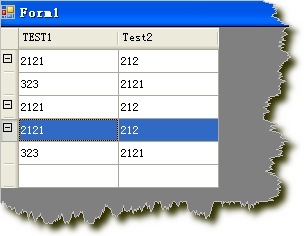
4,效果图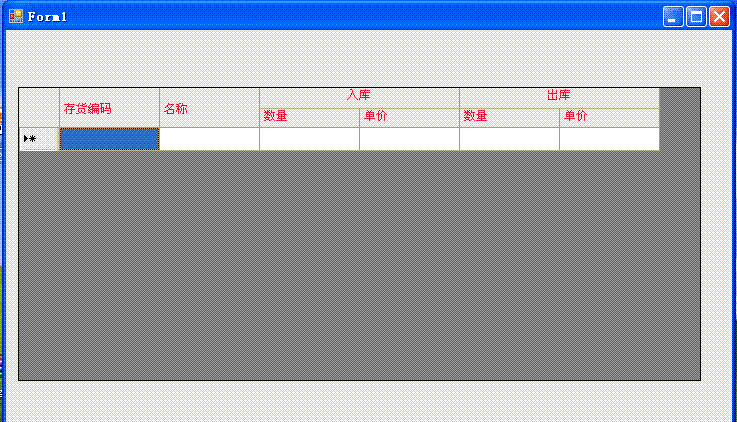
至于表尾合计,也做出了原型。二维表头+表尾合计,基本上满足需求了。
url:http://greatverve.cnblogs.com/archive/2012/03/05/Multi-DataGridView.html
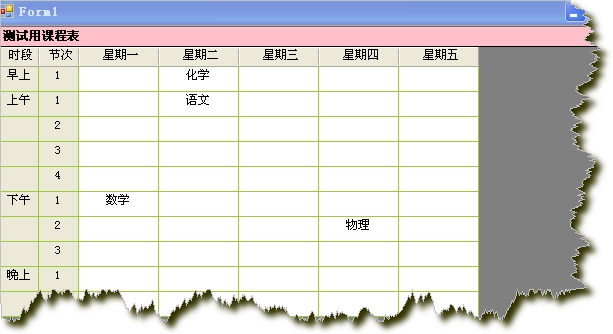
1.DataGridView实现课程表 testcontrol.rar
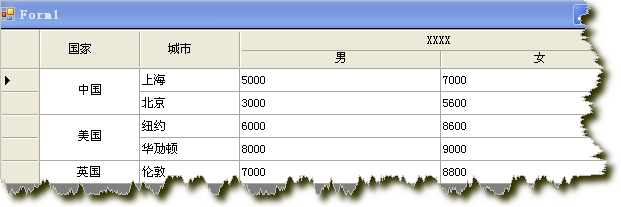
2.DataGridView二维表头及单元格合并 DataGridView单元格合并和二维表头.rar myMultiColHeaderDgv.rar
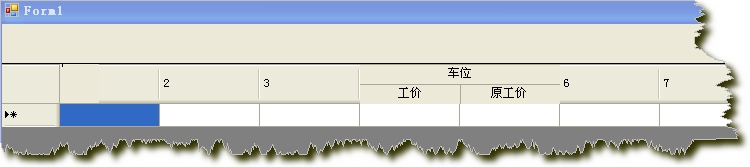
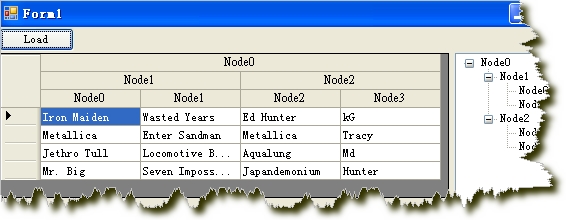
3.DataGridView单元格显示GIF图片 gifanimationindatagrid.rar
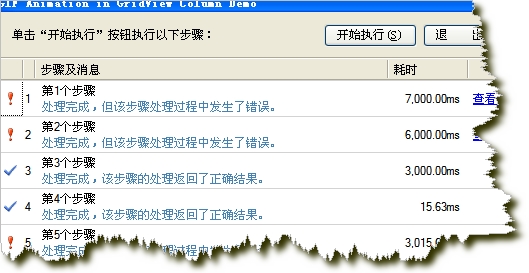
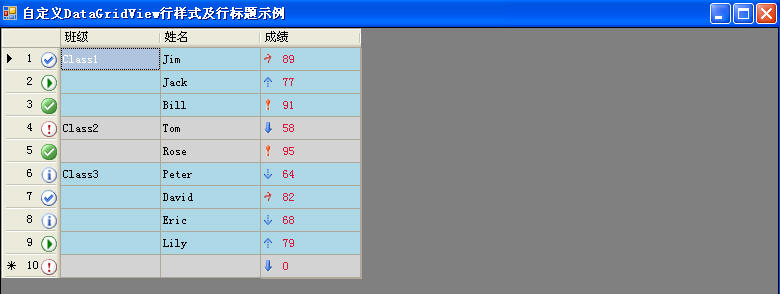
4.自定义显示DataGridView列(行头显示行号与图标,同一单元格显示图片也显示文字)TestDataGridViewRowStyle2.rar
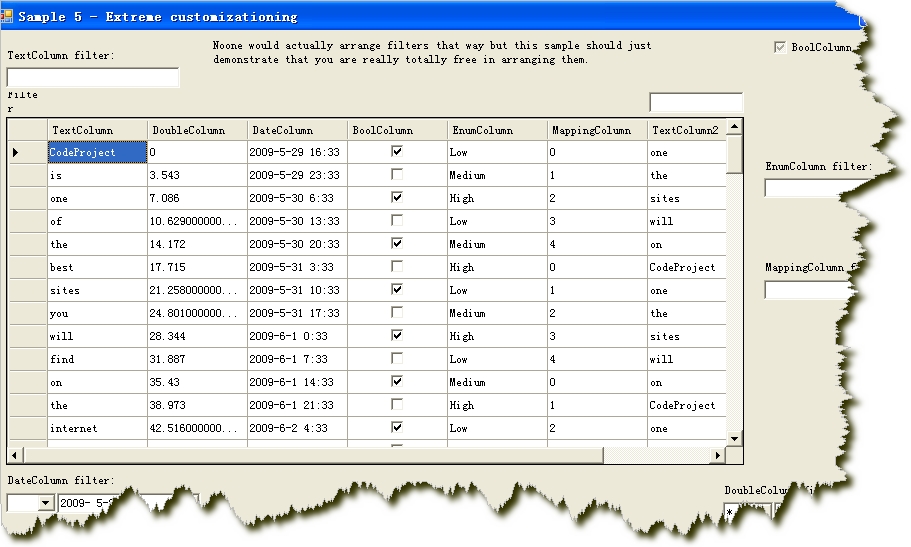
5.扩展DataGridView功能
相关文章
CheckBox Header Column For DataGridView
DataGridView填充、更新、删除(多行)Sql Express 2005数据库
DataGridView扩展的一些想法(二维表头、合并单元格、合计行)
DataGridView分页功能的实现
在DataGridView控件中加入ComboBox下拉列表框的实现
DataGridView中虚拟模式(Virtual Mode)的使用
从 DataGridView 控件 托放数据 到 TreeView控件
相关一些资料下载(收集自网络)
微软提供的例子 datagridviewsamples.rar
DataGridView使用文档 DataGridView_Doc.rar
Excel与DataGridView互导数据 Excl导入datagridview.rar
DataGridView扩展功能代码
--------------------------------------------------------------------------
还有用第三方控件的:
在做信息管理系统时,很多中式报表都是多维的,要实现报表数据显示,通常要用到多维表头。然而,非常遗憾的是,Winform中DataGrid、DataGridView本身不提供多维表头设计,要实现多维报表只好利用第三方的控件。通过对DataGridView的扩展,利用标题行进行重绘,可实现多维表头的友好界面。下面是对多维表头的探讨和实现。
1、常用多表头制作方法
a.第三方控件实现多维表头:FlexGrid--展示效果很好,就是数据量大加载时显示速度较慢。
b.报表方式实现多维表头:CrystalReport、Grid++Report--通过预览方式实现数据显示
c、DataGridView实现多维表头
2、DataGridView多维表头实现原理
通过重绘标题栏进行多栏实现,通过RowSpan和ColSpan来进行合并,类似Html的Table实现方式。
3、调用方法

private void Form1_Load(object sender, EventArgs e)
{
InitDataTable();
InitDataGridView();
}
DataTable table = new DataTable();
private void InitDataTable()
{
DataColumn col;
col = new DataColumn();
col.ColumnName = "客户名称";
table.Columns.Add(col);
col = new DataColumn();
col.ColumnName = "产品名称";
table.Columns.Add(col);
col = new DataColumn();
col.ColumnName = "规格";
table.Columns.Add(col);
col = new DataColumn();
col.ColumnName = "单位";
table.Columns.Add(col);
col = new DataColumn();
col.ColumnName = "期初存货数量";
col.DataType = System.Type.GetType("System.Decimal");
table.Columns.Add(col);
col = new DataColumn();
col.ColumnName = "期初货款";
col.DataType = System.Type.GetType("System.Decimal");
table.Columns.Add(col);
col = new DataColumn();
col.ColumnName = "期初帐款";
col.DataType = System.Type.GetType("System.Decimal");
table.Columns.Add(col);
col = new DataColumn();
col.ColumnName = "发货数量";
col.DataType = System.Type.GetType("System.Decimal");
table.Columns.Add(col);
col = new DataColumn();
col.ColumnName = "发货金额";
col.DataType = System.Type.GetType("System.Decimal");
table.Columns.Add(col);
col = new DataColumn();
col.ColumnName = "开票数量";
col.DataType = System.Type.GetType("System.Decimal");
table.Columns.Add(col);
col = new DataColumn();
col.ColumnName = "开票金额";
col.DataType = System.Type.GetType("System.Decimal");
table.Columns.Add(col);
col = new DataColumn();
col.ColumnName = "回款数量";
col.DataType = System.Type.GetType("System.Decimal");
table.Columns.Add(col);
col = new DataColumn();
col.DataType = System.Type.GetType("System.Decimal");
col.ColumnName = "回款金额";
table.Columns.Add(col);
col = new DataColumn();
col.DataType = System.Type.GetType("System.Decimal");
col.ColumnName = "未开票回款数量";
table.Columns.Add(col);
col = new DataColumn();
col.DataType = System.Type.GetType("System.Decimal");
col.ColumnName = "未开票回款金额";
table.Columns.Add(col);
col = new DataColumn();
col.DataType = System.Type.GetType("System.Decimal");
col.ColumnName = "期末存货数量";
table.Columns.Add(col);
col = new DataColumn();
col.DataType = System.Type.GetType("System.Decimal");
col.ColumnName = "期末应收货款";
table.Columns.Add(col);
col = new DataColumn();
col.DataType = System.Type.GetType("System.Decimal");
col.ColumnName = "期末应收帐款";
table.Columns.Add(col);
}
private void InitDataGridView()
{
MutilGridHeader topRow = new MutilGridHeader();
topRow.SetRowCol(3, 18);
//第一行
topRow.Cells[0][0].Value = "客户";
topRow.Cells[0][0].RowSpan = 3;
topRow.Cells[0][1].Value = "产品名称";
topRow.Cells[0][1].RowSpan = 3;
topRow.Cells[0][2].Value = "规格";
topRow.Cells[0][2].RowSpan = 3;
topRow.Cells[0][3].Value = "单位";
topRow.Cells[0][3].RowSpan = 3;
topRow.Cells[0][4].Value = "期初";
topRow.Cells[0][4].ColSpan = 3;
topRow.Cells[0][7].Value = "本期";
topRow.Cells[0][7].ColSpan = 8;
topRow.Cells[0][15].Value = "期末";
topRow.Cells[0][15].ColSpan = 3;
//第二行
topRow.Cells[1][4].Value = "存货数量";
topRow.Cells[1][4].RowSpan = 2;
topRow.Cells[1][5].Value = "应收货款";
topRow.Cells[1][5].RowSpan = 2;
topRow.Cells[1][6].Value = "应收帐款";
topRow.Cells[1][6].RowSpan = 2;
topRow.Cells[1][7].Value = "发货";
topRow.Cells[1][7].ColSpan = 2;
topRow.Cells[1][9].Value = "开票";
topRow.Cells[1][9].ColSpan = 2;
topRow.Cells[1][11].Value = "回款";
topRow.Cells[1][11].ColSpan = 2;
topRow.Cells[1][13].Value = "未开票回款";
topRow.Cells[1][13].ColSpan = 2;
topRow.Cells[1][15].Value = "存货数量";
topRow.Cells[1][15].RowSpan = 2;
topRow.Cells[1][16].Value = "应收货款";
topRow.Cells[1][16].RowSpan = 2;
topRow.Cells[1][17].Value = "应收票款";
topRow.Cells[1][17].RowSpan = 2;
//第三行
topRow.Cells[2][7].Value = "数量";
topRow.Cells[2][8].Value = "金额";
topRow.Cells[2][9].Value = "数量";
topRow.Cells[2][10].Value = "金额";
topRow.Cells[2][11].Value = "数量";
topRow.Cells[2][12].Value = "金额";
topRow.Cells[2][13].Value = "数量";
topRow.Cells[2][14].Value = "金额";
dataGridViewEx1.Header = topRow;
dataGridViewEx1.DataSource = table;
table.DefaultView.AllowNew = false;
dataGridViewEx1.Columns[0].Width = 120;
dataGridViewEx1.Columns[1].Width = 100;
dataGridViewEx1.Columns[2].Width = 80;
for(int i = 2;i<18;i++)
dataGridViewEx1.Columns[i].Width = 60;
}
4、界面显示
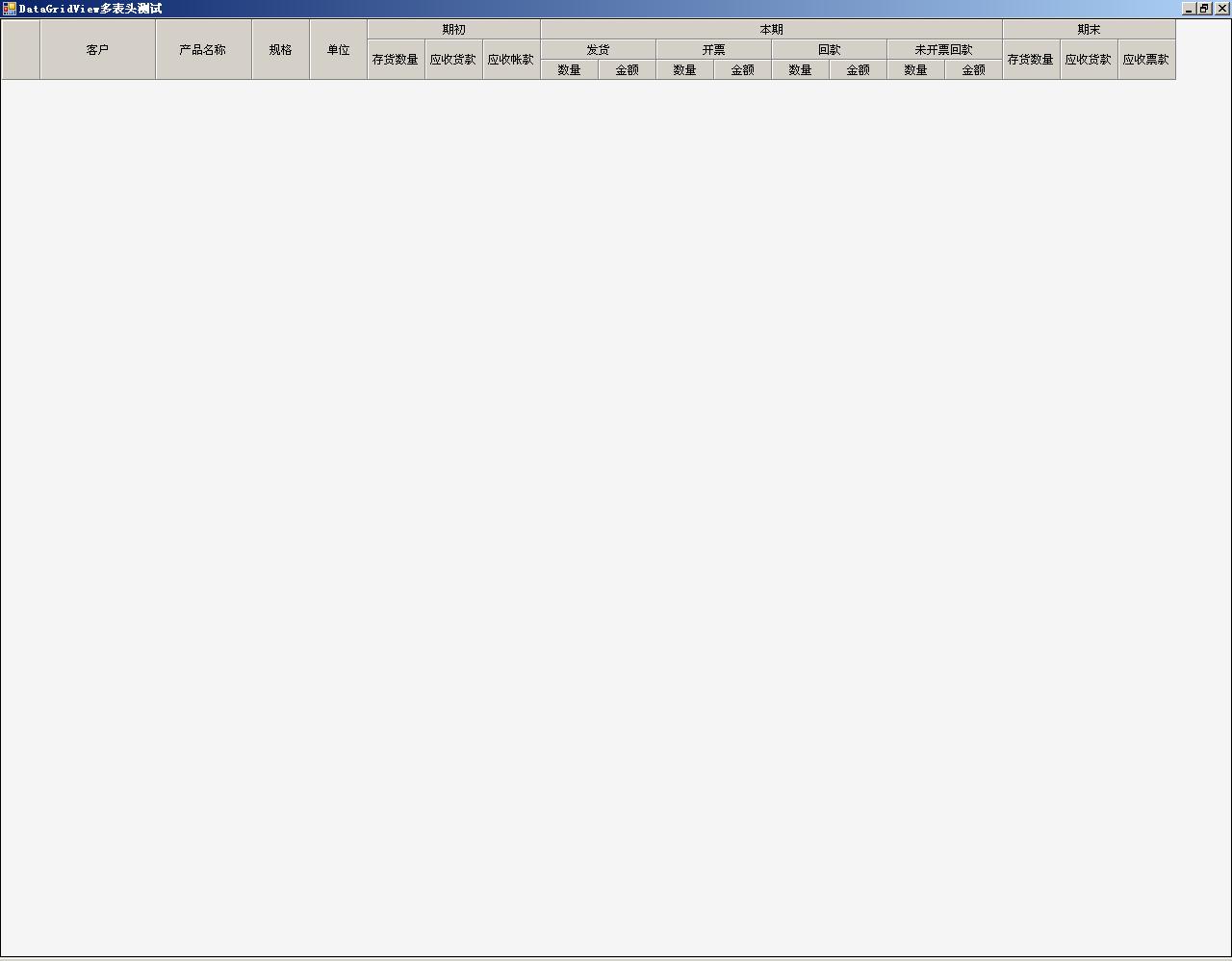
这段代码是两年前写的,由于当时时间和编程水平有限,很多代码段没有加注释,代码的可读性极差,只是为了达到效果,具体合并的实现方法自己也已模糊。
(转)DataGridView多维表头及其扩展功能的更多相关文章
- 【Winform-自定义控件】 DataGridView多维表头
[datagridview与treeview绑定] treeview 代码: DataTable dtable = new DataTable("Rock") ...
- C#中Winform程序中如何实现多维表头【不通过第三方报表程序】
问题:C#中Winform程序中如何实现多维表头. 在网上搜了很多方法,大多数方法对于我这种新手,看的都不是很懂.最后在新浪博客看到了一篇比较易懂的文章:[DataGridView二维表头与合并单元格 ...
- Datagridview 实现二维表头和行合并【转载】
using System; using System.Collections.Generic; using System.ComponentModel; using System.Drawing; u ...
- 如何通过DataGridView 实现单元格合并和二维表头
先看下实现出来的效果(这里随便写了几组数据,用来测试) 先初始一个DataGridView 设置哪几列 DataGridView 里男女这两列的 AutoSizeMode 可以设置Fill. publ ...
- 【Winform-自定义控件】DataGridView 单元格合并和二维表头
DataGridView单元格合并和二维表头应用: //DataGridView绑定数据 DataTable dt = new DataTable(); dt.Columns.Add("); ...
- c# 高效率导出多维表头excel
[DllImport("User32.dll", CharSet = CharSet.Auto)] public static extern int GetWindowThread ...
- SILVERLIGHT 多维表头、复杂表头 MULTIPLE HEADER
先上图, 众所周知,利用silverlight datagrid展示数据相当方便,但是想要弄出一个漂亮的表头却要费尽周折.此文的目的就是简要介绍一下利用第三方控件 C1.Silverlight.Fle ...
- Datagridview 实现二维表头和行合并
借鉴别人的,改了改,没用timer using System;using System.Collections.Generic;using System.ComponentModel;using Sy ...
- C# WinForm开发系列 - DataGridView
1.DataGridView实现课程表 testcontrol.rar 2.DataGridView二维表头及单元格合并 DataGridView单元格合并和二维表头.rar myMultiColHe ...
随机推荐
- python实现屏幕截图
from selenium import webdriver import time def capture(url, save_fn="capture.png"): browse ...
- BestCoder Round #43
T1:pog loves szh I(hdu 5264) 题目大意: 给出把AB两个字符串交叉拼起来的结果,求出原串. 题解: 不解释..直接每次+2输出. T2:pog loves szh II(h ...
- 设计模式之三:单例模式singleton
单例设计模式确切的说就是一个类只有一个实例,有一个全局的接口来访问这个实例.当第一次载入的时候,它通常使用延时加载的方法创建单一实例. 提示:苹果大量的使用了这种方法.例子:[NSUserDefaul ...
- css3基础教程:CSS3弹性盒模型
今天给大家分享一篇关于CSS3基础教程 文章,主要是讲CSS3弹性盒模型.弹性布局的主要思想是让容器有能力来改变项目的宽度和高度,以填满可用空间(主要是为了容纳所有类型的显示设备和屏幕尺寸)的能力. ...
- Python学习路程day1
变量起名: 变量名如果太长,推荐使用下划线来分开,让人看得清晰明白.例:nums_of_alex_girl=19 .或者是驼峰写法,即首字母大写.例:NumOfAlexGf=18 注意:不合法的变量起 ...
- svg DOM的一些js操作
这是第一个实例,其中讲了如何新建svg,添加元素,保存svg document,查看svg. 下面将附上常用一些元素的添加方法:(为js的,但基本上跟java中操作一样,就是类名有点细微差别) Cir ...
- MySQL起航
以前学php的时候用过MySQL,但是都没有认真地学习,只会在php代码中用几条极其简单SQL语句,以为MySQL就这么点用法,当时还在嘲笑学长们为什么会觉得MySQL难学,真是太尴尬了.好在开了数据 ...
- Activity 和 生命周期: 创建
了解了整体的android创建流程之后,就分析一下到底这个过程中做了什么? activity创建中开始时由activityStack中的realstartActivityLocked函数中调用了act ...
- iOS-Gdata XML解析配置和简单使用
简单介绍使用废话少说直接上图就能看明白... 导入libxml2,使用第三方AFNetworking网络请求,第三方XML解析GData GData需要的配置 Build Settings 里搜索,添 ...
- UVA 572
这是一道纯正的深度优先搜索题目. 题目要求在有多少个不同的块,而不同块的定义则是,一个块中的任意一点和l另一个块中的任意一点不会相连,而相连的定义则是 在横向.纵向和对角线上相连. #include& ...