
使用vue搭建应用二加入element
安装使用 element
1.安装
yarn add element-ui
2.使用
(1)在 main.js 中引入 element
main.js 为修改
import Vue from 'vue'

import App from './App'

import router from './router'

import ElementUI from 'element-ui'

import 'element-ui/lib/theme-chalk/index.css'

Vue.config.productionTip = false

Vue.use(ElementUI)

/* eslint-disable no-new */

new Vue({

  el: '#app',

  router,

  render: h => h(App)

})
(2)简单应用
修改 src/components/HelloWorld.vue
<template>

  <div class="hello">

    <h1>{{ msg }}</h1>

    <el-row>

      <el-button icon="el-icon-search" circle></el-button>

      <el-button type="primary" icon="el-icon-edit" circle></el-button>

      <el-button type="success" icon="el-icon-check" circle></el-button>

      <el-button type="info" icon="el-icon-message" circle></el-button>

      <el-button type="warning" icon="el-icon-star-off" circle></el-button>

      <el-button type="danger" icon="el-icon-delete" circle></el-button>

    </el-row>

  </div>

</template>

<script>

export default {

  name: 'HelloWorld',

  data () {

    return {

      msg: 'Welcome to Your Vue.js App'

    }

  }

}

</script>

<!-- Add "scoped" attribute to limit CSS to this component only -->

<style scoped>

h1, h2 {

  font-weight: normal;

}

</style>
重新启动,预览 http://localhost:8080,变为
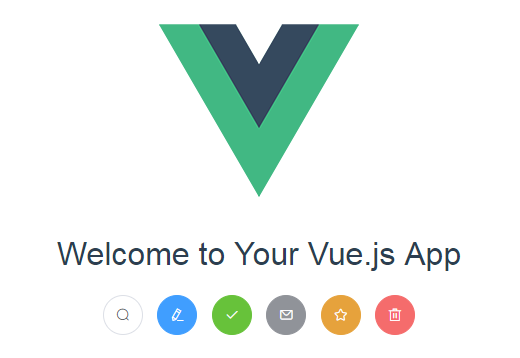
(3)修改路由
将src下的components改为views,在views下添加页面Login.vue、Home.vue、404.vue
Login.vue
Home.vue
404.vue
修改src/router/index.js,添加对应的路由
import Vue from 'vue'

import Router from 'vue-router'

import Login from '@/views/Login'

import Home from '@/views/Home'

import NotFound from '@/views/404'

Vue.use(Router)

export default new Router({

  routes: [

    {

      path: '/',

      name: 'Home',

      component: Home

    }, {

      path: '/login',

      name: 'Login',

      component: Login

    }

    , {

      path: '/404',

      name: 'NotFound',

      component: NotFound

    }

  ]

})
重新启动服务
http://localhost:8080/#/

http://localhost:8080/#/login显示Login页面
使用vue搭建应用二加入element的更多相关文章
- vue项目搭建 (二) axios 封装篇
vue项目搭建 (二) axios 封装篇 项目布局 vue-cli构建初始项目后,在src中进行增删修改 // 此处是模仿github上 bailicangdu 的 ├── src | ├── ap ...
- 二、Electron + Webpack + Vue 搭建开发环境及打包安装
目录 Webpack + Vue 搭建开发环境及打包安装 ------- 打包渲染进程 Electron + Webpack 搭建开发环境及打包安装 ------- 打包主进程 Electron + ...
- Electron-vue实战(一)—搭建项目与安装Element UI
Electron-vue实战—搭建项目与安装Element UI 作者:狐狸家的鱼 本文链接 GitHub:sueRimn 一.新建项目1.初始化项目打开cmd,新建一个项目,我使用的是electro ...
- Vue小项目二手书商城:(一)准备工作、组件和路由
本项目基于vue2.5.2,与低版本部分不同之处会在(五)参考资料中提出 完整程序:https://github.com/M-M-Monica/bukesi 实现内容: 资源准备(mock数据) 组件 ...
- 深入浅出的webpack构建工具--webpack4+vue搭建环境 (十三)
深入浅出的webpack构建工具--webpack4+vue搭建环境 (十三) 从上面一系列的webpack配置的学习,我们现在来使用webpack来搭建vue的开发环境.首先我们来设想下我们的项目的 ...
- vue搭建骨架屏步骤配置
1.什么是骨架屏幕? 在页面加载数据之前,有一段空白时间,要么用loading加载,要么就用骨架屏. 在开发webapp的时候总是会受到首屏加载时间过长的影响,主流的解决方法是在载入完成之前显示loa ...
- Vue 搭建项目
Vue 搭建项目 一.node下载安装: 1.下载:https://nodejs.org/en/download/ 2.安装默认许选择,下一步就行: 3.安装完之后就可以使用npm命令 二.通过@v ...
- (原创)LAMP搭建之二:apache配置文件详解(中英文对照版)
LAMP搭建之二:apache配置文件详解(中英文对照版) # This is the main Apache server configuration file. It contains the # ...
- Selenium终极自动化测试环境搭建(二)Selenium+Eclipse+Python
Selenium终极自动化测试环境搭建(二)Selenium+Eclipse+Python 前面举例了Selenium+Eclipse+Junit+TestNG自动化测试环境的搭建,在前一篇的基础上, ...
随机推荐
- Java批量下载文件并zip打包
客户需求:列表勾选需要的信息,点击批量下载文件的功能.这里分享下我们系统的解决方案:先生成要下载的文件,然后将其进行压缩,生成zip压缩文件,然后使用浏览器的下载功能即可完成批量下载的需求.以下是zi ...
- http 和 https(通俗原理了解)
超文本传输协议HTTP协议被用于在Web浏览器和网站服务器之间传递信息,HTTP协议以明文方式发送内容,不提供任何方式的数据加密,如果攻击者截取了Web浏览器和网站服务器之间的传输报文,就可以直接读懂 ...
- Java-Eclipse-findbugs-sonar学习
一.findbugs 和sonar的安装 可以通过Eclipse的Help-Eclipse marketplace中安装. 推荐:findbugs安装Help-install new Software ...
- react native 依赖库管理:入门
目标文件:package.json { .... "dependencies": { "react": "16.8.3", "re ...
- CRLF
提示信息: Inject false data in the journalisation log. -------------日志中注入错误数据 开始挑战后,进入如下界面-------------- ...
- Xamarin.Forms之主题
Xamarin.Forms应用程序可以使用DynamicResource标记扩展在运行时动态响应样式更改. 此标记扩展类似于StaticResource标记扩展,两者都使用字典键从ResourceDi ...
- 请找出"aaaabbcccdddd"字符串中出现最多的字母
function getCount(str) { for(var code=32;code<128;code++){ var mych=String.fromCharCode(code); va ...
- 退役IV次后做题记录
退役IV次后做题记录 我啥都不会了.... AGC023 D 如果所有的楼房都在\(S\)同一边可以直接得出答案. 否则考虑最左最右两边的票数,如果左边>=右边,那么最右边会投给左边,因为就算车 ...
- SSL证书创建与部署
SSL证书简介SSL证书创建SSL证书部署-NginxSSL证书部署-ApacheSSL证书部署-Tomcat SSL简介以及发展SSL协议原理SSL应用场景 SSL简介以及发展传输层安全性协议,以及 ...
- Cloud-init原理
Ubuntu修改主机名后,重启自动恢复原来的主机名? 这是因为Ubuntu18.10上,默认安装并启动了cloud-init, 需要停止它的四个服务进程,才可以使用传统的方式修改主机名. cloud- ...