
mapReduce编程之auto complete
1 n-gram模型与auto complete
n-gram模型是假设文本中一个词出现的概率只与它前面的N-1个词相关。auto complete的原理就是,根据用户输入的词,将后续出现概率较大的词组显示出来。因此我们可以基于n-gram模型来对用户的输入作预测。
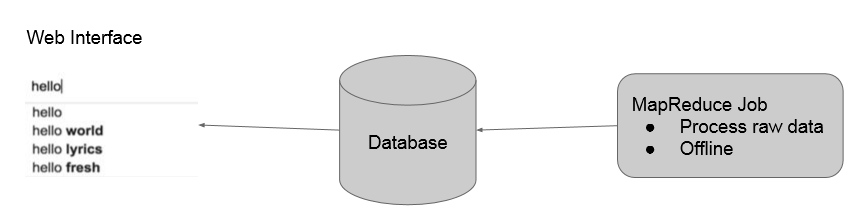
我们的实现方法是:首先用mapreduce在offline对语料库中的数据进行n-gram建模,存到数据库中。然后用户在输入的时候向数据库中查询,获取之后出现的概率较大的词,通过前端php脚本刷新实时显示在界面上。如下所示:
2 mapReduce流程
2.1 MR1
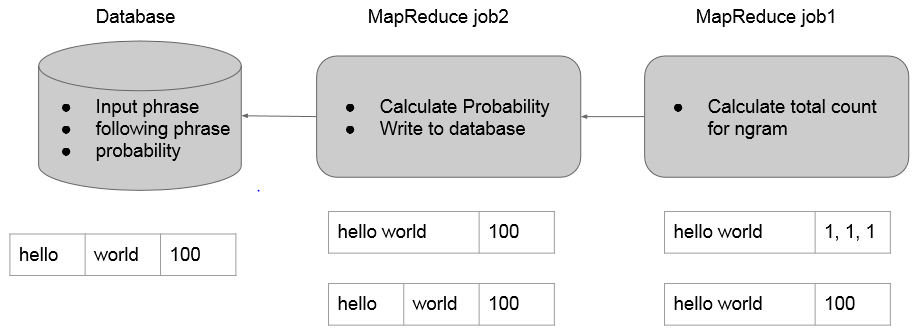
mapper负责按句读入语料库中的数据,分别作2~Ngram的切分(1-gram在这里没用),发送给reducer。
reducer则统计所有N-gram出现的次数。(这里就是一个wordcount)
2.2 MR2
mapper负责读入之前生成的N-gram及次数,将最后一个单词切分出来,以前面N-1个单词为key向reducer发送。
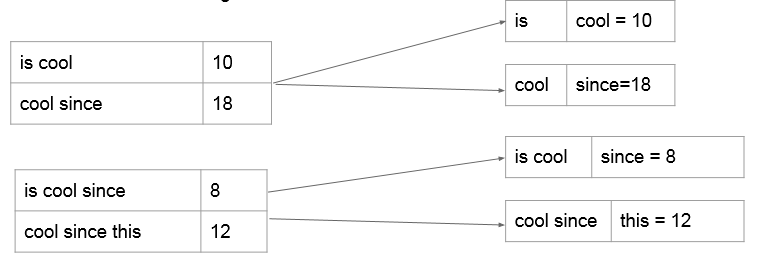
reducer里面得到的就是N-gram概率模型,即已知前N-1个词组成的phrase,最后一个词出现的所有可能及其概率。这里我们不用计算概率,仍然沿用词频能达到相同的效果,因为auto complete关注的是概率之间的相对大小而不是概率值本身。这里我们选择出现概率最大的topk个词来存入数据库,可以用treemap或者priorityQueue来做。

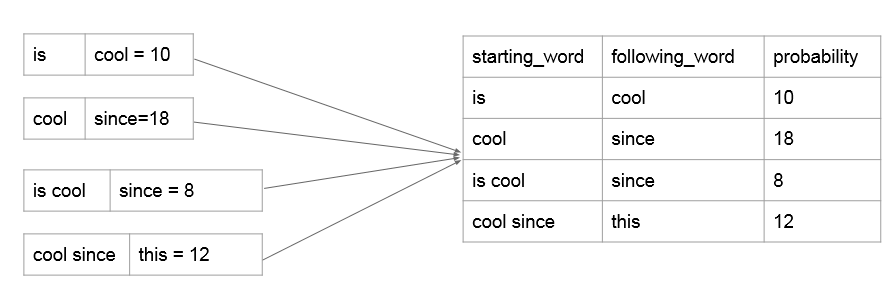
(注:这里的starting_word是1~n-1个词,following_word只能是一个词,因为这样才符合我们N-gram概率模型的意义。)
2.3 如何预测后面n个单词
数据库中的n-gram模型:

如上所述,我们看出使用n-gram模型只能与预测下一个单词。为了预测结果的多样性,如果我们要预测之后的n个单词怎么做?

使用sql语句,查询的时候查询匹配"input%"的所有starting_phrase,就可以实现。
3 代码
NGramLibraryBuilder.java
 import java.io.IOException;

 import org.apache.hadoop.conf.Configuration;

 import org.apache.hadoop.fs.Path;

 import org.apache.hadoop.io.IntWritable;

 import org.apache.hadoop.io.LongWritable;

 import org.apache.hadoop.io.Text;

 import org.apache.hadoop.mapreduce.lib.input.TextInputFormat;

 import org.apache.hadoop.mapreduce.Job;

 import org.apache.hadoop.mapreduce.Mapper;

 import org.apache.hadoop.mapreduce.Reducer;

 import org.apache.hadoop.mapreduce.Mapper.Context;

 import org.apache.hadoop.mapreduce.lib.input.FileInputFormat;

 import org.apache.hadoop.mapreduce.lib.output.FileOutputFormat;

 import org.apache.hadoop.mapreduce.lib.output.TextOutputFormat;

 public class NGramLibraryBuilder {

     public static class NGramMapper extends Mapper<LongWritable, Text, Text, IntWritable> {

         int noGram;

         @Override

         public void setup(Context context) {

             Configuration conf = context.getConfiguration();

             noGram = conf.getInt("noGram", 5);

         }

         // map method

         @Override

         public void map(LongWritable key, Text value, Context context) throws IOException, InterruptedException {

             String line = value.toString();

             line = line.trim().toLowerCase();

             line = line.replaceAll("[^a-z]", " ");

             String[] words = line.split("\\s+"); //split by ' ', '\t'...ect

             if(words.length<2) {

                 return;

             }

             //I love big data

             StringBuilder sb;

             for(int i = 0; i < words.length-1; i++) {

                 sb = new StringBuilder();

                 sb.append(words[i]);

                 for(int j=1; i+j<words.length && j<noGram; j++) {

                     sb.append(" ");

                     sb.append(words[i+j]);

                     context.write(new Text(sb.toString().trim()), new IntWritable(1));

                 }

             }

         }

     }

     public static class NGramReducer extends Reducer<Text, IntWritable, Text, IntWritable> {

         // reduce method

         @Override

         public void reduce(Text key, Iterable<IntWritable> values, Context context)

                 throws IOException, InterruptedException {

             int sum = 0;

             for(IntWritable value: values) {

                 sum += value.get();

             }

             context.write(key, new IntWritable(sum));

         }

     }

 }
LanguageModel.java
 import java.io.IOException;

 import java.util.ArrayList;

 import java.util.Collections;

 import java.util.Iterator;

 import java.util.List;

 import java.util.Set;

 import java.util.TreeMap;

 import org.apache.hadoop.conf.Configuration;

 import org.apache.hadoop.fs.Path;

 import org.apache.hadoop.io.LongWritable;

 import org.apache.hadoop.io.NullWritable;

 import org.apache.hadoop.io.Text;

 import org.apache.hadoop.mapreduce.Job;

 import org.apache.hadoop.mapreduce.Mapper;

 import org.apache.hadoop.mapreduce.Reducer;

 import org.apache.hadoop.mapreduce.lib.input.FileInputFormat;

 public class LanguageModel {

     public static class Map extends Mapper<LongWritable, Text, Text, Text> {

         int threashold;

         // get the threashold parameter from the configuration

         @Override

         public void setup(Context context) {

             Configuration conf = context.getConfiguration();

             threashold = conf.getInt("threashold", 20);

         }

         @Override

         public void map(LongWritable key, Text value, Context context) throws IOException, InterruptedException {

             if((value == null) || (value.toString().trim()).length() == 0) {

                 return;

             }

             //this is cool\t20

             String line = value.toString().trim();

             String[] wordsPlusCount = line.split("\t");

             if(wordsPlusCount.length < 2) {

                 return;

             }

             String[] words = wordsPlusCount[0].split("\\s+");

             int count = Integer.valueOf(wordsPlusCount[1]);

             if(count < threashold) {

                 return;

             }

             //this is --> cool = 20

             StringBuilder sb = new StringBuilder();

             for(int i = 0; i < words.length-1; i++) {

                 sb.append(words[i]).append(" ");

             }

             String outputKey = sb.toString().trim();

             String outputValue = words[words.length - 1];

             if(!((outputKey == null) || (outputKey.length() <1))) {

                 context.write(new Text(outputKey), new Text(outputValue + "=" + count));

             }

         }

     }

     public static class Reduce extends Reducer<Text, Text, DBOutputWritable, NullWritable> {

         int n;

         // get the n parameter from the configuration

         @Override

         public void setup(Context context) {

             Configuration conf = context.getConfiguration();

             n = conf.getInt("n", 5);

         }

         @Override

         public void reduce(Text key, Iterable<Text> values, Context context) throws IOException, InterruptedException {

             //this is, <girl = 50, boy = 60>

             TreeMap<Integer, List<String>> tm = new TreeMap<Integer, List<String>>(Collections.reverseOrder());

             for(Text val: values) {

                 String curValue = val.toString().trim();

                 String word = curValue.split("=")[0].trim();

                 int count = Integer.parseInt(curValue.split("=")[1].trim());

                 if(tm.containsKey(count)) {

                     tm.get(count).add(word);

                 }

                 else {

                     List<String> list = new ArrayList<String>();

                     list.add(word);

                     tm.put(count, list);

                 }

             }

             //<50, <girl, bird>> <60, <boy...>>

             Iterator<Integer> iter = tm.keySet().iterator();

             for(int j=0; iter.hasNext() && j<n; j++) {

                 int keyCount = iter.next();

                 List<String> words = tm.get(keyCount);

                 for(String curWord: words) {

                     context.write(new DBOutputWritable(key.toString(), curWord, keyCount),NullWritable.get());

                     j++;

                 }

             }

         }

     }

 }
DBOutputWritable.java
 import java.sql.PreparedStatement;

 import java.sql.ResultSet;

 import java.sql.SQLException;

 import org.apache.hadoop.mapreduce.lib.db.DBWritable;

 public class DBOutputWritable implements DBWritable{

     private String starting_phrase;

     private String following_word;

     private int count;

     public DBOutputWritable(String starting_prhase, String following_word, int count) {

         this.starting_phrase = starting_prhase;

         this.following_word = following_word;

         this.count= count;

     }

     public void readFields(ResultSet arg0) throws SQLException {

         this.starting_phrase = arg0.getString(1);

         this.following_word = arg0.getString(2);

         this.count = arg0.getInt(3);

     }

     public void write(PreparedStatement arg0) throws SQLException {

         arg0.setString(1, starting_phrase);

         arg0.setString(2, following_word);

         arg0.setInt(3, count);

     }

 }
Driver.java
 import java.io.IOException;

 import org.apache.hadoop.conf.Configuration;

 import org.apache.hadoop.fs.Path;

 import org.apache.hadoop.io.IntWritable;

 import org.apache.hadoop.io.NullWritable;

 import org.apache.hadoop.io.Text;

 import org.apache.hadoop.mapreduce.Job;

 import org.apache.hadoop.mapreduce.lib.db.DBConfiguration;

 import org.apache.hadoop.mapreduce.lib.db.DBOutputFormat;

 import org.apache.hadoop.mapreduce.lib.input.TextInputFormat;

 import org.apache.hadoop.mapreduce.lib.output.TextOutputFormat;

 public class Driver {

     public static void main(String[] args) throws ClassNotFoundException, IOException, InterruptedException {

         //job1

         Configuration conf1 = new Configuration();

         conf1.set("textinputformat.record.delimiter", ".");

         conf1.set("noGram", args[2]);

         Job job1 = Job.getInstance();

         job1.setJobName("NGram");

         job1.setJarByClass(Driver.class);

         job1.setMapperClass(NGramLibraryBuilder.NGramMapper.class);

         job1.setReducerClass(NGramLibraryBuilder.NGramReducer.class);

         job1.setOutputKeyClass(Text.class);

         job1.setOutputValueClass(IntWritable.class);

         job1.setInputFormatClass(TextInputFormat.class);

         job1.setOutputFormatClass(TextOutputFormat.class);

         TextInputFormat.setInputPaths(job1, new Path(args[0]));

         TextOutputFormat.setOutputPath(job1, new Path(args[1]));

         job1.waitForCompletion(true);

         //how to connect two jobs?

         // last output is second input

         //2nd job

         Configuration conf2 = new Configuration();

         conf2.set("threashold", args[3]);

         conf2.set("n", args[4]);

         DBConfiguration.configureDB(conf2,

                 "com.mysql.jdbc.Driver",

                 "jdbc:mysql://ip_address:port/test",

                 "root",

                 "password");

         Job job2 = Job.getInstance(conf2);

         job2.setJobName("Model");

         job2.setJarByClass(Driver.class);

         job2.addArchiveToClassPath(new Path("path_to_ur_connector"));

         job2.setMapOutputKeyClass(Text.class);

         job2.setMapOutputValueClass(Text.class);

         job2.setOutputKeyClass(DBOutputWritable.class);

         job2.setOutputValueClass(NullWritable.class);

         job2.setMapperClass(LanguageModel.Map.class);

         job2.setReducerClass(LanguageModel.Reduce.class);

         job2.setInputFormatClass(TextInputFormat.class);

         job2.setOutputFormatClass(DBOutputFormat.class);

         DBOutputFormat.setOutput(job2, "output",

                 new String[] {"starting_phrase", "following_word", "count"});

         TextInputFormat.setInputPaths(job2, args[1]);

         job2.waitForCompletion(true);

     }

 }
mapReduce编程之auto complete的更多相关文章
- MapReduce编程之wordcount
实践 MapReduce编程之wordcount import org.apache.hadoop.conf.Configuration; import org.apache.hadoop.fs.Fi ...
- mapReduce编程之Recommender System
1 协同过滤算法 协同过滤算法是现在推荐系统的一种常用算法.分为user-CF和item-CF. 本文的电影推荐系统使用的是item-CF,主要是由于用户数远远大于电影数,构建矩阵的代价更小:另外,电 ...
- mapReduce编程之google pageRank
1 pagerank算法介绍 1.1 pagerank的假设 数量假设:每个网页都会给它的链接网页投票,假设这个网页有n个链接,则该网页给每个链接平分投1/n票. 质量假设:一个网页的pagerank ...
- MapReduce编程之Reduce Join多种应用场景与使用
在关系型数据库中 Join 是非常常见的操作,各种优化手段已经到了极致.在海量数据的环境下,不可避免的也会碰到这种类型的需求, 例如在数据分析时需要连接从不同的数据源中获取到数据.不同于传统的单机模式 ...
- MapReduce编程之Semi Join多种应用场景与使用
Map Join 实现方式一 ● 使用场景:一个大表(整张表内存放不下,但表中的key内存放得下),一个超大表 ● 实现方式:分布式缓存 ● 用法: SemiJoin就是所谓的半连接,其实仔细一看就是 ...
- MapReduce编程之Map Join多种应用场景与使用
Map Join 实现方式一:分布式缓存 ● 使用场景:一张表十分小.一张表很大. ● 用法: 在提交作业的时候先将小表文件放到该作业的DistributedCache中,然后从DistributeC ...
- Hadoop基础-Map端链式编程之MapReduce统计TopN示例
Hadoop基础-Map端链式编程之MapReduce统计TopN示例 作者:尹正杰 版权声明:原创作品,谢绝转载!否则将追究法律责任. 一.项目需求 对“temp.txt”中的数据进行分析,统计出各 ...
- C++混合编程之idlcpp教程Python篇(6)
上一篇在这 C++混合编程之idlcpp教程Python篇(5) 第一篇在这 C++混合编程之idlcpp教程(一) 工程PythonTutorial4中加入了四个文件:PythonTutorial4 ...
- C++混合编程之idlcpp教程Lua篇(6)
上一篇在这 C++混合编程之idlcpp教程Lua篇(5) 第一篇在这 C++混合编程之idlcpp教程(一) 工程LuaTutorial4中加入了四个文件:LuaTutorial4.cpp, Tut ...
随机推荐
- Iterator接口。集合输出
在集合中支持以下几种方式. iterator ListIterator foreach输出 emumeration输出. 集合输出的标准操作: 集合输出的时候必须形成以下的思路:只要碰到了集合输出的操 ...
- c语言函数
听着函数这两个字多多少少都会觉得有点复杂吧.因为一想到函数大多数人都会想到f(x),但其实c语言里面的函数不是那样的,老师教了一个很好的理解方法函数就是个机器人,而这个机器人是你自己做出来的.所有不用 ...
- ReactJS基础视频教程
React是什么?React.js 是 Facebook 推出的一个用来构建用户界面的 JavaScript 库.Facebook开源了React,这是该公司用于构建反应式图形界面的JavaScrip ...
- jquery富文本在线编辑器UEditor
UEditor 是由百度「FEX前端研发团队」开发的所见即所得富文本web编辑器,具有轻量,可定制,注重用户体验等特点,开源基于MIT协议,允许自由使用和修改代码. UEditor的功能非常强大,官方 ...
- 【Jquery】$.Deferred 对象
源:http://www.ruanyifeng.com/ deferred三个状态 “已完成”“未完成”“已失败” (1) $.Deferred() 生成一个deferred对象. ...
- 87 resize2fs-增大或者收缩未加载的“ext2/ext3”文件系统的大小
resize2fs命令被用来增大或者收缩未加载的"ext2/ext3"文件系统的大小.如果文件系统是处于mount状态下,那么它只能做到扩容,前提条件是内核支持在线resize., ...
- __ block
1.__block对象在block中是可以被修改.重新赋值的. 2.__block对象在block中不会被block强引用一次,从而不会出现循环引用问题. API Reference对__weak变量 ...
- facebook 用curl获取用户资料
用facebook获取用户信息 $graph_url= "https://graph.facebook.com/me?scope=email&fields=id,name,email ...
- float,double和decimal类型
float:浮点型,含字节数为4,32bit,数值范围为-3.4E38~3.4E38(7个有效位) double:双精度实型,含字节数为8,64bit数值范围-1.7E308~1.7E308(15个有 ...
- Asp.Net通过HttpModule实现URL重写
首先总结一下为什么要对URL进行Rewrite,比如我可以把/Default.aspx?param=3替换成/Home/Default/3(类似mvc). 一.缩短url,隐藏实际路径提高安全性; 二 ...