
1.3 Quick Start中 Step 3: Create a topic官网剖析(博主推荐)
不多说,直接上干货!
一切来源于官网
http://kafka.apache.org/documentation/
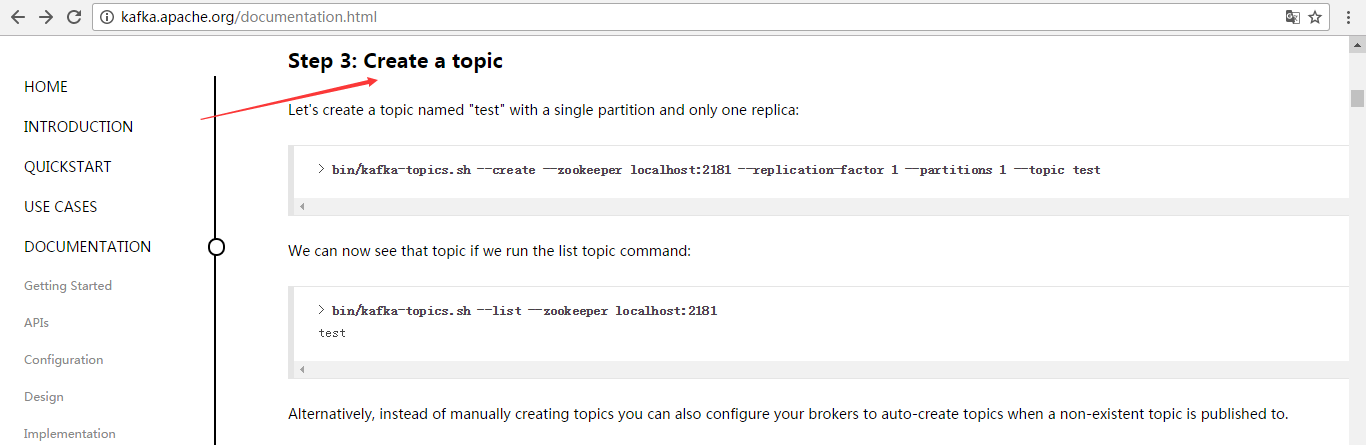
Step 3: Create a topic
Let's create a topic named "test" with a single partition and only one replica:
> bin/kafka-topics.sh --create --zookeeper localhost:2181 --replication-factor 1 --partitions 1 --topic test
We can now see that topic if we run the list topic command:
创建好之后,可以通过运行以下命令,查看已创建的topic信息:
> bin/kafka-topics.sh --list --zookeeper localhost:2181

test
Alternatively, instead of manually creating topics you can also configure your brokers to auto-create topics when a non-existent topic is published to.
其实,这个很简单,比如--create就是创建,--list是查看。当然,不能局限于官网,大家要灵活多变,官网只是个参考和引子。
--topic test 名字为test的topic
--partitions 1 分区数为1
--replication-factor 1 复制因子是1(即每个分区在集群中有1份数据)
--zookeeper localhost:2181 这个不多说,太简单
比如,我们一般写
bin/kafka-topics.sh --create --zookeeper master: --replication-factor --partitions --topic t-behavior
或
bin/kafka-topics.sh --create --zookeeper hadoop1: --replication-factor --partitions --topic t-behavior
说明:

--replication-factor 3     指定了复制因子3,即每个分区在集群中有3份数据

--partitions  10          指定topic的分区数10
--topic t-behavior 指定创建名为t-behavior的topic
同时,查看topic详情
bin/kafka-topics.sh --zookeeper txy001: --topic t-behavior --describe
打印如下:

Topic:t-behavior  PartitionCount:       ReplicationFactor:     Configs:

        Topic: t-behavior Partition:     Leader:        Replicas: ,, Isr: ,,

        Topic: t-behavior Partition:     Leader:        Replicas: ,, Isr: ,,

        Topic: t-behavior Partition:     Leader:        Replicas: ,, Isr: ,,

        Topic: t-behavior Partition:     Leader:        Replicas: ,, Isr: ,,

        Topic: t-behavior Partition:     Leader:        Replicas: ,, Isr: ,,

        Topic: t-behavior Partition:     Leader:        Replicas: ,, Isr: ,,

        Topic: t-behavior Partition:     Leader:        Replicas: ,, Isr: ,,

        Topic: t-behavior Partition:     Leader:        Replicas: ,, Isr: ,,

        Topic: t-behavior Partition:     Leader:        Replicas: ,, Isr: ,,

        Topic: t-behavior Partition:     Leader:        Replicas: ,, Isr: ,,

说明;

ReplicationFactor 表示复制因子,即每个分区有几份数据

Leader 分区的主在那个broker上

Replicas 表示分区数据分布在哪些broker上

Isr 表示可立即作为分区的主的broker,即标识3分数据已经保持一致了。
over
1.3 Quick Start中 Step 3: Create a topic官网剖析(博主推荐)的更多相关文章
- 1.3 Quick Start中 Step 4: Send some messages官网剖析(博主推荐)
不多说,直接上干货! 一切来源于官网 http://kafka.apache.org/documentation/ Step 4: Send some messages Step : 发送消息 Kaf ...
- 1.3 Quick Start中 Step 2: Start the server官网剖析(博主推荐)
不多说,直接上干货! 一切来源于官网 http://kafka.apache.org/documentation/ Step 2: Start the server Step : 启动服务 Kafka ...
- 1.3 Quick Start中 Step 5: Start a consumer官网剖析(博主推荐)
不多说,直接上干货! 一切来源于官网 http://kafka.apache.org/documentation/ Step 5: Start a consumer Step : 消费消息 Kafka ...
- 1.3 Quick Start中 Step 1: Download the code官网剖析(博主推荐)
不多说,直接上干货! 一切来源于官网 http://kafka.apache.org/documentation/ 不要局限于,这个版本,我只是以最新的版本,来做个引子,让大家对官网的各个kafka版 ...
- 1.1 Introduction中 Kafka as a Storage System官网剖析(博主推荐)
不多说,直接上干货! 一切来源于官网 http://kafka.apache.org/documentation/ Kafka as a Storage System kafka作为一个存储系统 An ...
- 1.1 Introduction中 Kafka as a Messaging System官网剖析(博主推荐)
不多说,直接上干货! 一切来源于官网 http://kafka.apache.org/documentation/ Kafka as a Messaging System kafka作为一个消息系统 ...
- 1.3 Quick Start中 Step 8: Use Kafka Streams to process data官网剖析(博主推荐)
不多说,直接上干货! 一切来源于官网 http://kafka.apache.org/documentation/ Step 8: Use Kafka Streams to process data ...
- 1.3 Quick Start中 Step 7: Use Kafka Connect to import/export data官网剖析(博主推荐)
不多说,直接上干货! 一切来源于官网 http://kafka.apache.org/documentation/ Step 7: Use Kafka Connect to import/export ...
- 1.3 Quick Start中 Step 6: Setting up a multi-broker cluster官网剖析(博主推荐)
不多说,直接上干货! 一切来源于官网 http://kafka.apache.org/documentation/ Step 6: Setting up a multi-broker cluster ...
随机推荐
- java回调方法、钩子方法以及模板方法模式
在面向对象的语言中,回调则是通过接口或抽象类来实现的,我们把实现这种接口的类称为回调类,回调类的对象称为回调对象,其处理事件的方法叫做回调方法.(摘自百度百科) 那么通过上面那句话将百度百科中的&qu ...
- spark transform系列__groupByKey
这个操作的作用依据同样的key的全部的value存储到一个集合中的一个玩意. def groupByKey(): RDD[(K, Iterable[V])] = self.withScope { g ...
- openCV 和GDI画线效率对照
一. 因为项目须要,原来用GDI做的画线的功能.新的项目中考虑到垮平台的问题.打算用openCV来实现.故此做个效率对照. 二. 2点做一条线,来測试效率. 用了相同的画板大小---256*256的大 ...
- ListView阻尼效果
效果图省略.. . activity_main.xml(仅仅有一个自己定义ListView) <RelativeLayout xmlns:android="http://schemas ...
- .Net中字典的使用
/// <summary> /// 获取用户市信息 /// </summary> /// <param name="CustomerId">&l ...
- Docker安装配置教程
Docker公开课 1 Docker介绍 1.1 Docker是什么 云计算\云服务 IAAS(基础设施即服务).PAAS(平台即服务).SAAS(软件即服务) Docker到底是什么呢? Docke ...
- 简单的字符串压缩--C代码
#include <stdio.h> #include <string.h> bool compress(char *str) { char *p=str,c; ; if(!s ...
- Network Stack : Disk Cache
Disk Cache 目录 1 Overview 2 External Interface 3 Disk Structure 3.1 Cache Address 3.2 Index File Stru ...
- HDU 1668 Islands and Bridges
Islands and Bridges Time Limit: 4000ms Memory Limit: 65536KB This problem will be judged on HDU. Ori ...
- Spring Cloud学习笔记【一】Eureka服务注册与发现
Spring Cloud Eureka 是 Spring Cloud Netflix 微服务套件的一部分,基于 Netflix Eureka 做了二次封装,主要负责完成微服务架构中的服务治理功能,服务 ...