
Spring Security构建Rest服务-0200-搭建项目
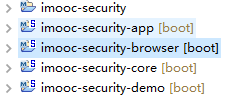
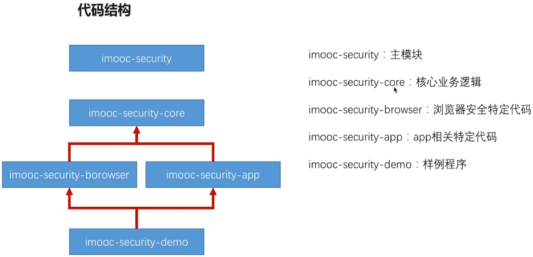
一、代码结构:
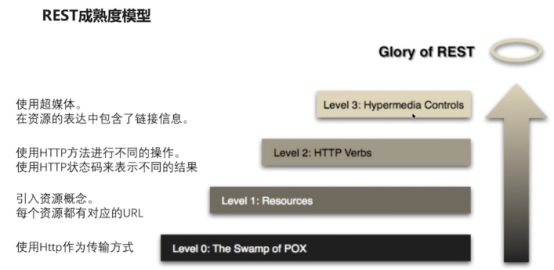
二、使用Springmvc开发restful API
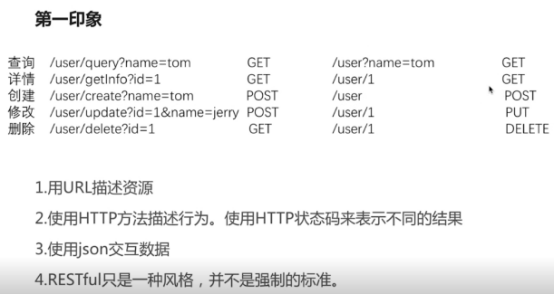
传统url和rest区别:
三、写代码
1,编写RestfulAPI的测试用例:使用MockMvc伪造mvc
package com.imooc.web.controller;

import java.time.LocalDateTime;

import java.time.ZoneId;

import java.util.Date;

import org.junit.Before;

import org.junit.Test;

import org.junit.runner.RunWith;

import org.springframework.beans.factory.annotation.Autowired;

import org.springframework.boot.test.context.SpringBootTest;

import org.springframework.http.MediaType;

import org.springframework.test.context.junit4.SpringRunner;

import org.springframework.test.web.servlet.MockMvc;

import org.springframework.test.web.servlet.request.MockMvcRequestBuilders;

import org.springframework.test.web.servlet.result.MockMvcResultMatchers;

import org.springframework.test.web.servlet.setup.MockMvcBuilders;

import org.springframework.web.context.WebApplicationContext;

@RunWith(SpringRunner.class)

@SpringBootTest

public class UserControllerTest {

    @Autowired

    private WebApplicationContext webCtx;

    //伪造mvc

    private MockMvc mockMvc;

    @Before

    public void setup(){

        mockMvc = MockMvcBuilders.webAppContextSetup(webCtx).build();

    }

    /**

     * 查询

     */

    @Test

    public void whenQuerySuccess() throws Exception{

        String result = mockMvc.perform(MockMvcRequestBuilders.get("/user") //路径

                .param("page", "10")   //参数

                .param("size", "12")

                .param("sort", "age,desc")

                .param("username", "xiaoming")

                .param("age", "18")

                .param("ageTo", "40")

                .param("other", "otherProperty")

                .contentType(MediaType.APPLICATION_JSON_UTF8))

                .andExpect(MockMvcResultMatchers.status().isOk()) //状态码200

                .andExpect(MockMvcResultMatchers.jsonPath("$.length()").value(3))//长度为3,具体查看github的jsonPath项目

                .andReturn().getResponse().getContentAsString();

        System.err.println(result);

    }

    /**

     * 详情

     */

    @Test

    public void whenGetInfoSuccess() throws Exception{

        String result = mockMvc.perform(MockMvcRequestBuilders.get("/user/1")

                .contentType(MediaType.APPLICATION_JSON_UTF8))

                .andExpect(MockMvcResultMatchers.status().isOk())

                .andExpect(MockMvcResultMatchers.jsonPath("$.username").value("tom"))

                .andReturn().getResponse().getContentAsString();

        System.err.println(result);

    }

    /**

     * 详情失败

     */

    @Test

    public void whenGetInfoFail() throws Exception{

        mockMvc.perform(MockMvcRequestBuilders.get("/user/a") //匹配正则

                .contentType(MediaType.APPLICATION_JSON_UTF8))

                .andExpect(MockMvcResultMatchers.status().is4xxClientError());

    }

    @Test

    public void whenCreateSuccess() throws Exception{

        long date = new Date().getTime();

        System.err.println(">>>>>>>>"+date);

        String content = "{\"username\":\"tom\",\"password\":null,\"birthday\":"+date+"}";

         String result = mockMvc.perform(MockMvcRequestBuilders.post("/user")

                 .contentType(MediaType.APPLICATION_JSON_UTF8)

                 .content(content))

                  .andExpect(MockMvcResultMatchers.status().isOk())

                  .andExpect(MockMvcResultMatchers.jsonPath("$.id").value("1"))

                  .andReturn().getResponse().getContentAsString();

         System.err.println(result);

    }

    @Test

    public void whenUpdateSuccess() throws Exception{

        //jdk8新增,当前日期加一年,测试生日@past注解

        Date date = new Date(LocalDateTime.now().plusYears(1).atZone(ZoneId.systemDefault()).toInstant().toEpochMilli());

        System.err.println(">>>>>>>>"+date);

        String content = "{\"id\":\"1\",\"username\":\"tom\",\"password\":null,\"birthday\":"+date.getTime()+"}";

         String result = mockMvc.perform(MockMvcRequestBuilders.put("/user/1") //put

                 .contentType(MediaType.APPLICATION_JSON_UTF8)

                 .content(content))

                  .andExpect(MockMvcResultMatchers.status().isOk())

                  .andExpect(MockMvcResultMatchers.jsonPath("$.id").value("1"))

                  .andReturn().getResponse().getContentAsString();

         System.err.println("update result>>>>> "+result);

    }

    @Test

    public void whenDeleteSuccess() throws Exception {

        mockMvc.perform(MockMvcRequestBuilders.delete("/user/1")

                .contentType(MediaType.APPLICATION_JSON_UTF8))

                .andExpect(MockMvcResultMatchers.status().isOk());

    }

}
Controller:使用注解声明RestfulAPI
package com.imooc.web.controller;

import java.util.ArrayList;

import java.util.List;

import javax.validation.Valid;

import org.springframework.data.domain.Pageable;

import org.springframework.validation.BindingResult;

import org.springframework.web.bind.annotation.DeleteMapping;

import org.springframework.web.bind.annotation.GetMapping;

import org.springframework.web.bind.annotation.PathVariable;

import org.springframework.web.bind.annotation.PostMapping;

import org.springframework.web.bind.annotation.PutMapping;

import org.springframework.web.bind.annotation.RequestBody;

import org.springframework.web.bind.annotation.RequestMapping;

import org.springframework.web.bind.annotation.RestController;

import com.fasterxml.jackson.annotation.JsonView;

import com.imooc.dto.User;

import com.imooc.dto.UserQueryCondition;

@RestController

@RequestMapping("/user")

public class UserController {

    /**

     * @Description: 条件查询

     * @param @param condition

     * @param @param pageable

     * @param @return

     * @return List<User>

     * @throws

     * @author lihaoyang

     * @date 2018年2月24日

     */

    @GetMapping()

    @JsonView(User.UserSimpleView.class)

    public List<User> query(

            //@RequestParam(value="username",required=false,defaultValue="lhy") String username

            UserQueryCondition condition , Pageable pageable){

//        System.err.println(username);

        System.err.println(condition.toString());

        System.err.println(pageable.toString());

        List<User> users = new ArrayList<User>();

        users.add(new User());

        users.add(new User());

        users.add(new User());

        return users;

    }

    /**

     * 详情

     * @Description: TODO

     * @param @param id

     * @param @return

     * @return User

     * @throws

     * @author lihaoyang

     * @date 2018年2月24日

     */

    @GetMapping("{id:\\d+}") //{}里可以是正则,匹配数字

//    @GetMapping("detail/{id}")

    @JsonView(User.UserDetailView.class)

    public User getInfo(@PathVariable(value="id",required=true) String id){

        System.err.println(id);

        User user = new User();

        user.setUsername("tom");

        user.setPassword("123456");

        user.setId("1");

        return user;

    }

    /**

     * 创建

     * @Description:

     * //@RequestBody:json映射到java

     *     @Valid 和User类上的@NotBlank注解一起做校验

     *  BindingResult存储的是校验错误信息

     * @param @param user

     * @param @return

     * @return User

     * @throws

     * @author lihaoyang

     * @date 2018年2月24日

     */

    @PostMapping

    public User create(@Valid @RequestBody User user,BindingResult errors){

        if(errors.hasErrors()){

            errors.getAllErrors().stream()

            .forEach(error -> System.err.println(error.getDefaultMessage()));

        }

        user.setId("1");

        System.err.println(user);

        return user;

    }

    @PutMapping("/{id:\\d+}")

    public User update(@Valid @RequestBody User user,BindingResult errors){

        if(errors.hasErrors()){

            errors.getAllErrors().stream()

            .forEach(error -> System.err.println(error.getDefaultMessage()));

        }

        System.err.println(user);

        return user;

    }

    @DeleteMapping("/{id:\\d+}")

    public void delete(@PathVariable String id){

        System.err.println("delete method id is >>>>>>>"+id);

    }

}
到这里只是说了RestfulAPI增删改查的做法,使用查询使用@GetMapping()、新增使用@PostMapping、修改使用@PutMapping、删除使用@DeleteMapping。restful是根据响应的状态码确定接口调用是否成功的。
完整代码放在了github:https://github.com/lhy1234/spring-security
Spring Security构建Rest服务-0200-搭建项目的更多相关文章
- Spring Security构建Rest服务-1300-Spring Security OAuth开发APP认证框架之JWT实现单点登录
基于JWT实现SSO 在淘宝( https://www.taobao.com )上点击登录,已经跳到了 https://login.taobao.com,这是又一个服务器.只要在淘宝登录了,就能直接访 ...
- Spring Security构建Rest服务-1202-Spring Security OAuth开发APP认证框架之重构3种登录方式
SpringSecurityOAuth核心源码解析 蓝色表示接口,绿色表示类 1,TokenEndpoint 整个入口点,相当于一个controller,不同的授权模式获取token的地址都是 /oa ...
- Spring Security构建Rest服务-1201-Spring Security OAuth开发APP认证框架之实现服务提供商
实现服务提供商,就是要实现认证服务器.资源服务器. 现在做的都是app的东西,所以在app项目写代码 认证服务器: 新建 ImoocAuthenticationServerConfig 类,@Ena ...
- Spring Security构建Rest服务-1200-SpringSecurity OAuth开发APP认证框架
基于服务器Session的认证方式: 前边说的用户名密码登录.短信登录.第三方登录,都是普通的登录,是基于服务器Session保存用户信息的登录方式.登录信息都是存在服务器的session(服务器的一 ...
- Spring Security构建Rest服务-1001-spring social开发第三方登录之spring social基本原理
OAuth协议是一个授权协议,目的是让用户在不将服务提供商的用户名密码交给第三方应用的条件下,让第三方应用可以有权限访问用户存在服务提供商上的资源. 接着上一篇说的,在第三方应用获取到用户资源后,如果 ...
- Spring Security构建Rest服务-1205-Spring Security OAuth开发APP认证框架之Token处理
token处理之二使用JWT替换默认的token JWT(Json Web Token) 特点: 1,自包含:jwt token包含有意义的信息 spring security oauth默认生成的t ...
- Spring Security构建Rest服务-1204-Spring Security OAuth开发APP认证框架之Token处理
token处理之一基本参数配置 处理token时间.存储策略,客户端配置等 以前的都是spring security oauth默认的token生成策略,token默认在org.springframe ...
- Spring Security构建Rest服务-0900-rememberMe记住我
Spring security记住我基本原理: 登录的时候,请求发送给过滤器UsernamePasswordAuthenticationFilter,当该过滤器认证成功后,会调用RememberMeS ...
- Spring Security构建Rest服务-0800-Spring Security图片验证码
验证码逻辑 以前在项目中也做过验证码,生成验证码的代码网上有很多,也有一些第三方的jar包也可以生成漂亮的验证码.验证码逻辑很简单,就是在登录页放一个image标签,src指向一个controller ...
随机推荐
- SpringMVC零碎笔记
在web.xml里可以配置webapp的默认首页,格式如下: <welcome-file-list> <welcome-file>index.html</welcome- ...
- jar 包和 mysql 服务器部署
(1)创建好本地服务器: navicat新建链接: 链接名:自定义,这里命名为test 配置同jar包 (2)给予登陆权限,loclhost_3306,右击选择“命令行界面”,输入如下: create ...
- 大文件上传插件webupload插件
版权所有 2009-2018荆门泽优软件有限公司 保留所有权利 官方网站:http://www.ncmem.com/ 产品首页:http://www.ncmem.com/webapp/up6.2/in ...
- nexus 私服跑一跑流程
尝试建立新项目上传,分享 D:\dev\workspace\helloworld>tree /F 卷 DATAPART 的文件夹 PATH 列表 卷序列号为 2C22-0A1A D:. │ po ...
- 使用process_monitor.sh监控hadoop进程的crontab配置
可以从下列链接找到process_monitor.sh:https://github.com/eyjian/libmooon/blob/master/shell/process_monitor.sh ...
- C语言 fread()与fwrite()函数说明与示例
1.作用 读写文件数据块. 2.函数原型 (1)size_t fread ( void * ptr, size_t size, size_t count, FILE * stream ); 其中,pt ...
- 【Linux】文件操作系统调用
一. 文件描述符 在Linux下使用文件描述符来表示设备文件和普通文件.文件描述符是一个整型的数据,所有对文件的操作都通过文件描述符实现.文件描述符的范围是0~OPEN_MAX,系统中有3个已经分配的 ...
- Oracle sql 优化の索引监控
1.监视索引是否使用 除了主键是完整性约束而自动变为索引外,创建普通索引的目的就是为了提高查询速度,如果我们创建了索引而没有被使用,那么这些不被使用的索引将起到阻碍性能的作用. 语法: --检查某个索 ...
- matlab 生成mat文件
生成MAT文件 假如你的矩阵A.B都已赋值,现在需要将A,B矩阵保存成mat格式文件,执行如下命令:save mydata A B 就会把A B矩阵数据保存在yourdata.dat文件中了 保存指定 ...
- 【Win2D】【译】Win2D 快速入门
原文链接:http://microsoft.github.io/Win2D/html/QuickStart.htm 快速入门 这是 Win2D 的快速入门教程,将会介绍 Win2D 中的基本功能.你将 ...