
带索引的tableView
带索引的tableView
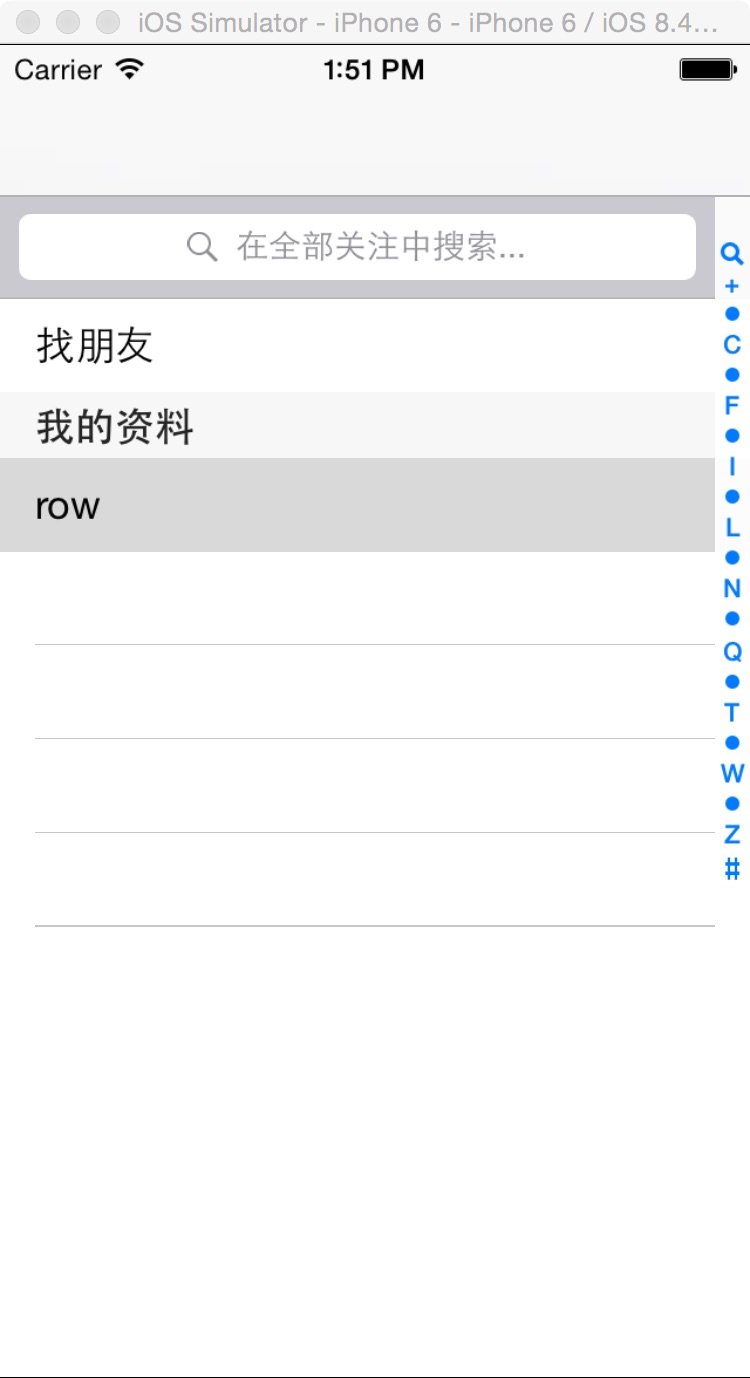
一,效果图。
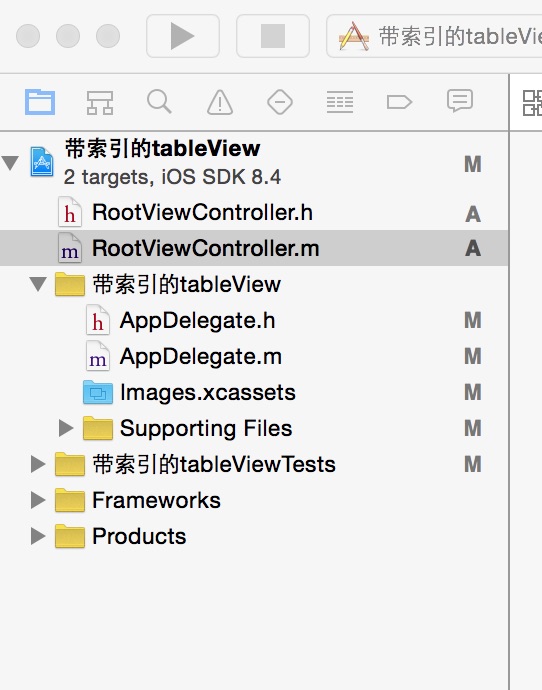
二,工程图。
三,代码。
RootViewController.h
#import <UIKit/UIKit.h>
@interface RootViewController : UIViewController
<UITableViewDelegate,UITableViewDataSource,UISearchDisplayDelegate,UISearchBarDelegate>
{
UITableView * tableview;
NSMutableArray * Aarray;
UISearchBar * searchBar;
UISearchDisplayController *searchControl;
}
@end
复制代码
复制代码
RootViewController.m
复制代码
复制代码
#import "RootViewController.h"
@interface RootViewController ()
@end
@implementation RootViewController
- (id)initWithNibName:(NSString *)nibNameOrNil bundle:(NSBundle *)nibBundleOrNil
{
self = [super initWithNibName:nibNameOrNil bundle:nibBundleOrNil];
if (self) {
// Custom initialization
}
return self;
}
- (void)viewDidLoad
{
[super viewDidLoad];
// Do any additional setup after loading the view.
//初始化背景图
[self initBackGroundView];
}
#pragma -mark -functions
-(void)initBackGroundView
{
Aarray = [[NSMutableArray alloc] initWithObjects:@"+",@"我",@"A",@"B",@"C",@"D",@"E",@"F",@"G",@"H",@"I",@"J",@"K",@"L",@"M",@"N",@"O",@"P",@"Q",@"R",@"S",@"T",@"U",@"V",@"W",@"X",@"Y",@"Z",@"#",nil];
//tableView
tableview = [[UITableView alloc] initWithFrame:CGRectMake(0, 0, 320, 460-44-10-10-20) style:UITableViewStylePlain];
tableview.tag = 101;
tableview.delegate = self;
tableview.dataSource = self;
[self.view addSubview:tableview];
//searchView
searchBar = [[UISearchBar alloc] initWithFrame:CGRectMake(0, 0, 320, 44)];
tableview.tableHeaderView = searchBar;
searchBar.showsScopeBar = YES;
searchBar.placeholder = @"在全部关注中搜索...";
//搜索的时候会有左侧滑动的效果
searchControl = [[UISearchDisplayController alloc]initWithSearchBar:searchBar contentsController:self];
searchControl.delegate = self;
searchControl.searchResultsDataSource = self;
searchControl.searchResultsDelegate = self;
}
#pragma -mark -searchbar
-(void)searchBar:(UISearchBar *)searchBar selectedScopeButtonIndexDidChange:(NSInteger)selectedScope
{
;
}
#pragma -mark -UITableViewDelegate
-(NSInteger)numberOfSectionsInTableView:(UITableView *)tableView
{
return 2;
}
-(NSInteger)tableView:(UITableView *)tableView numberOfRowsInSection:(NSInteger)section
{
if (section == 0) {
return 1;
}
return 100;
}
- (CGFloat)tableView:(UITableView *)tableView heightForRowAtIndexPath:(NSIndexPath *)indexPath
{
return 40.0;
}
-(UITableViewCell *)tableView:(UITableView *)tableView cellForRowAtIndexPath:(NSIndexPath *)indexPath
{
NSString * strID = @"ID";
UITableViewCell * cell = [tableview dequeueReusableCellWithIdentifier:strID];
if (cell == nil) {
cell = [[UITableViewCell alloc]initWithStyle:UITableViewCellStyleValue1 reuseIdentifier:strID];
}
if (indexPath.section == 0 && indexPath.row == 0) {
cell.textLabel.text = @"找朋友";
}else if(indexPath.section ==1 && indexPath.row == 0){
cell.textLabel.text=@"row";
}
return cell;
}
-(NSString *)tableView:(UITableView *)tableView titleForHeaderInSection:(NSInteger)section
{
if (section == 1) {
return @"我的资料";
}
return nil;
}
-(NSArray *)sectionIndexTitlesForTableView:(UITableView *)tableView
{
return [NSArray arrayWithObjects:UITableViewIndexSearch,@"+",@"A",@"B",@"C",@"D",@"E",@"F",@"G",@"H",@"I",@"J",@"K",@"L",@"M",@"N",@"O",@"P",@"Q",@"R",@"S",@"T",@"U",@"V",@"W",@"X",@"Y",@"Z",@"#", nil];
}
- (void)didReceiveMemoryWarning
{
[super didReceiveMemoryWarning];
// Dispose of any resources that can be recreated.
}
复制代码

带索引的tableView的更多相关文章
- jQuery仿3D旋转木马效果插件(带索引按钮)
项目中需要用到旋转木马效果,但是我在网上找的插件,基本都是不带按钮或者只是带前后按钮的,而项目要求的是带索引按钮,也就是说有3张图片轮播,对应的要有3个小按钮,点击按钮,对应的图片位于中间位置.于是就 ...
- Android带索引联系人列表
网上Android联系人列表的样例也非常多,都和微信的联系人差点儿相同,因为项目用到了联系人列表索引功能(产品把字母item给去掉了),只是也还是好实现.这里我也来分享分享我的实现,免得以后忘了.那先 ...
- List带索引的常用方法,以及集合的三种遍历
package cn.learn.collection.List; import com.sun.source.tree.NewArrayTree; import java.util.ArrayLis ...
- 【代码笔记】iOS-带索引的tableView
一,效果图. 二,工程图. 三,代码. RootViewController.h #import <UIKit/UIKit.h> @interface RootViewController ...
- Python3基础 list(enumerate()) 将一个列表的每一个元素转换成 带索引值的元组
镇场诗: 诚听如来语,顿舍世间名与利.愿做地藏徒,广演是经阎浮提. 愿尽吾所学,成就一良心博客.愿诸后来人,重现智慧清净体.-------------------------------------- ...
- Python3基础 list enumerate 将列表的每个元素转换成 带索引值的元组
Python : 3.7.0 OS : Ubuntu 18.04.1 LTS IDE : PyCharm 2018.2.4 Conda ...
- ngFor 循环带索引
*ngFor="let item of userList,let i = index" 或者 *ngFor="let item of userList index a ...
- C# 数组排序带索引
想到了两种方法来实现,分别利用了List.Sort()和Dictionary.OrderBy()方法,代码如下: , , , , , , , , , }; //List.Sort() List< ...
- 3D游戏引擎设计 实时计算机图形学的应用方法 第2版 pdf 带索引书签目录
3D游戏引擎设计 实时计算机图形学的应用方法 第2版 目录 第1章 概述1.1 图形硬件和游戏发展史1.2 本书版本与软件发展史1.3 章节导读 第2章 图形系统2.1 基础知识2.1.1 坐标系 ...
随机推荐
- Windows安装MySQL解压版
1:解压 2:设置环境变量 3:修改my.ini [mysqld] basedir = D:\MySQL\Server\mysql--win32 datadir = D:\MySQL\Server\d ...
- ElasticSearch异常归纳(能力工场小马哥)
异常1: can not run elasticsearch as root [WARN ][o.e.b.ElasticsearchUncaughtExceptionHandler] [node-2] ...
- html中title属性换行实现
本文主要讲解titile属性换行的实现方式.<title> 元素可定义文档的标题,可以应用在img.a等标签上. 1.实现方式: <!DOCTYPE html> <htm ...
- fis3 scss 版本报错
fis3 scss编译需要安装的node版本为4.x,node版本高了fis会报错.如下图所示:
- quartz实现定时任务调度
一. 业务需求: 实际工作中我们一般会遇到这种需求: 使用Ajax技术每隔几秒从缓存或数据库中读取一些数据, 然后再显示在页面上, 眼下有一个比較好的定时调度框架: quartz能够满足我们的需求. ...
- iOS仿支付宝芝麻信用仪表盘效果
概述 自定义View之高仿支付宝芝麻信用分数仪表盘动画效果 详细 代码下载:http://www.demodashi.com/demo/10654.html 仿支付宝芝麻信用仪表盘效果 一.主要思路 ...
- HDFS架构设计
原文:http://hadoop.apache.org/docs/r2.6.4/hadoop-project-dist/hadoop-hdfs/HdfsDesign.html 介绍 HDFS是个分布式 ...
- Timer与AlarmManager的差别
线程 通过调用Thread类的 start()方法来启动一个线程,这时此线程处于就绪(可执行)状态.但此时并没有执行,它须要CPU时间片. 一旦得到CPU时间片.就会执行run()方法. run()的 ...
- 【laravel5.4】中jquery的post Ajax提交
1.post的ajax需要提交csrf_token字段,进行安全过滤 <meta name="csrf-token" content="{{ csrf_token( ...
- eclipse 垃圾回收器,内存释放
http://zhangrong-0825-163-com.iteye.com/blog/7334071.如何在eclipse里修改web工程的访问路径,步骤如下: 点击web工程——>选择pr ...