
Salesforce LWC学习(三十三) lightning-datatable 翻页bug处理
本来lightning-datatable这种标签,基本上任何的项目都会用到而且很精通,所以当时感觉没有太大的单独一篇写的必要,在Salesforce LWC学习(三十) lwc superbadge项目实现 中也有使用这个标签的demo,所以有类似需要的小伙伴参考一下也可以照猫画虎搞定需求。项目中遇见了两个datatable的问题,解决以后感觉有必要写一下,后期遇见这种坑的小伙伴可以快速对应。话不多说,先弄一个简单的分页效果的UI,UI很丑,旨在实现功能。
AccountListController.cls:一个简单的搜索list返回
public without sharing class AccountListController {

    public static final Integer DEFAULT_PAGE_SIZE = 100;

    @AuraEnabled(cacheable=false)

    public static List<Account> fetchAccountList(String serializedAccount){

        Account account = (Account)JSON.deserialize(serializedAccount,Account.class);

        String fetchAccountSQL = 'SELECT Id,Name,Industry,AccountSource,Owner.Name FROM Account WHERE IsDeleted = false ';

        if(String.isNotBlank(account.name)) {

            fetchAccountSQL += 'AND Name like' +  '\'%' + account.name + '%\'';

        }

        if(String.isNotBlank(account.industry)) {

            fetchAccountSQL += ' AND industry = \'' + account.industry + '\'';

        }

        if(String.isNotBlank(account.AccountSource)) {

            fetchAccountSQL += ' AND AccountSource = \'' + account.AccountSource + '\'';

        }

        Integer accountSize = DEFAULT_PAGE_SIZE;

        fetchAccountSQL += ' LIMIT ' + accountSize;

        List<Account> accountList = Database.query(fetchAccountSQL);

        return accountList;

    }

}
accountSearchForm.html
<template>

    <!--use LDS to bind account -->

    <lightning-record-edit-form

        object-api-name='Account'

        onsubmit={handleRecordFormSubmit}

    >

        <!--used to show section close/open-->

        <lightning-accordion allow-multiple-sections-open

            active-section-name={activeSections}>

            <lightning-accordion-section name="basic" label="basic">

                <lightning-layout multiple-rows="true">

                    <lightning-layout-item  padding="around-small" flexibility='auto' size='4'>

                        <lightning-input-field field-name='Name'></lightning-input-field>

                    </lightning-layout-item>

                    <lightning-layout-item padding="around-small" flexibility='auto' size='4'>

                        <lightning-input-field field-name="AccountSource"></lightning-input-field>

                    </lightning-layout-item>

                    <lightning-layout-item padding="around-small" flexibility='auto' size='4'>

                        <lightning-input-field field-name="Industry"></lightning-input-field>

                    </lightning-layout-item>

                </lightning-layout>

            </lightning-accordion-section>

        </lightning-accordion>

        <!-- button group area -->

        <lightning-layout horizontal-align="center">

            <lightning-layout-item >

                <lightning-button variant="brand" label="search" type="submit" name="search"></lightning-button>

            </lightning-layout-item>

        </lightning-layout>

    </lightning-record-edit-form>

</template>
accountSearchForm.js
import { LightningElement,track } from 'lwc';

export default class AccountSearchForm extends LightningElement {

    @track activeSections = ['basic'];

    @track account;

    handleRecordFormSubmit(event) {

        event.preventDefault();

        this.account = event.detail;

        this.dispatchEvent(new CustomEvent('searchaccount',{detail:this.account}));

    }

}
myAccountList.html
<template>

    <lightning-card title="list for account data" icon-name="standard:account">

        <div style="height: 150px;">

            <lightning-datatable

                data={accountListForCurrentPage}

                columns={columns}

                show-row-number-column

                key-field="id">

            </lightning-datatable>

        </div>

        <lightning-layout horizontal-align="center">

            <lightning-layout-item flexibility='auto' size='1'>

                <lightning-combobox

                    value={perSize}

                    options={entryList}

                    placeholder="choose size"

                    onchange={handlePerSizeChange} >

                </lightning-combobox>

            </lightning-layout-item>

            <lightning-layout-item flexibility='auto' size='9' class="slds-text-align_center">

                totalSize: {totalSize}

            </lightning-layout-item>

            <lightning-layout-item flexibility="auto" size="2">

                <lightning-button variant="brand" label="<--" disabled={isFirstPage} onclick={handlePreviousPageClick}></lightning-button>

                <lightning-button variant="brand" label="-->" disabled={isLastPage} title="next" onclick={handleNextPageClick}></lightning-button>

            </lightning-layout-item>

        </lightning-layout>

    </lightning-card>

</template>
myAccountList.js
import { LightningElement,api, track } from 'lwc';

const columns = [

    {label: 'Account Name', fieldName: 'Name'},

    {label: 'Account Industry', fieldName: 'Industry'},

    {label: 'Account Source', fieldName: 'AccountSource'},

    {label: 'Owner Name', fieldName: 'OwnerName'}

];

export default class MyAccountList extends LightningElement {

    //searched account list used to show in component table

    @api accountList;

    //indicator if table header checkbox check or not, true for check

    @api totalChecked;

    //list total entryList

    @api totalSize;

    //per size for show in table

    @api perSize;

    //current page index

    @api currentPageIndex;

    //list show in table

    @api accountListForCurrentPage;

    //indicator if current page is first page

    @api isFirstPage;

    //indicator if current page is last page

    @api isLastPage;

    @track columns = columns;

    get entryList() {

        return [

            { label: '3', value: '3' },

            { label: '5', value: '5' },

            { label: '10', value: '10' },

        ];

    }

    /**

     * description: item checkbox check/uncheck, dispatch itemcheck custom event and parent component handle this

     * @param event system event,used to get which item check/uncheck

     */

    handleItemCheckboxClick(event) {

        this.dispatchEvent(new CustomEvent('itemcheck',{detail:{id:event.currentTarget.value,checked:event.currentTarget.checked}}));

    }

    /**

     * description: table header checkbox check/check, dispatch allcheck custom event

     * @param  event system event, used to get if table header checkbox check/uncheck

     */

    handleAllCheckboxClick(event) {

        this.dispatchEvent(new CustomEvent('allcheck',{detail:{checked:event.currentTarget.checked}}));

    }

    handleNextPageClick() {

        this.dispatchEvent(new CustomEvent('nextpage'));

    }

    handlePreviousPageClick() {

        this.dispatchEvent(new CustomEvent('previouspage'));

    }

    handlePerSizeChange(event) {

        let currentSize = event.detail.value;

        this.dispatchEvent(new CustomEvent('persizechange',{detail:{currentSize:currentSize}}));

    }

}
accountListContainer.html
<template>

    <c-account-search-form onsearchaccount={handleSearchAccountEvent}></c-account-search-form>

    <c-my-account-list is-first-page={isFirstPage} is-last-page={isLastPage} account-list={accountList} account-list-for-current-page={accountListForCurrentPage} total-checked={totalChecked} onitemcheck={handleItemCheckEvent} onallcheck={handleAllCheckedEvent} onnextpage={handleNextPageEvent} onpreviouspage={handlePreviousPageEvent} total-size={totalSize} per-size={perSize} onpersizechange={handlePerSizeChangeEvent}></c-my-account-list>

</template>
accountListContainer.js
import { LightningElement,track } from 'lwc';

import fetchAccountList from '@salesforce/apex/AccountListController.fetchAccountList';

export default class AccountListContainer extends LightningElement {

    //account list used to show in account table

    @track accountList = [];

    //account form used to store form information user searched

    @track accountForm;

    //errors when fetch account list error

    @track errors;

    //indicator if table header total check box checked or not, true means checked

    @track totalChecked = false;

    //indicator if list modal close

    @track showSelectedListModal = false;

    @track data = [];

    //list total size

    @track totalSize;

    //per size for show in table

    @track perSize = 5;

    //current page index

    @track currentPageIndex;

    //list show in table

    @track accountListForCurrentPage;

    @track isFirstPage = true;

    @track isLastPage = true;

    /**

     * description: search account data by form information and set the result to account list to show in table

     * @param  event system event used to get form detail information

     */

    handleSearchAccountEvent(event) {

        this.totalChecked = false;

        this.accountForm = event.detail;

        fetchAccountList({serializedAccount:JSON.stringify(event.detail)})

            .then(result => {

                this.accountList = result;

                this.totalSize = result.length;

                this.currentPageIndex = 1;

                if(this.totalSize > this.perSize * this.currentPageIndex) {

                    this.setPagination();

                } else {

                    this.accountListForCurrentPage = this.accountList;

                    this.accountListForCurrentPage.forEach(item => {

                        if(item.Owner) {

                            item.OwnerName = item.Owner.Name;

                        }

                    });

                    this.isLastPage = true;

                }

                this.errors = undefined;

            })

            .catch(error =>{

                this.errors = error;

                this.accountList = undefined;

            });

    }

    handlePreviousPageEvent() {

        this.currentPageIndex = this.currentPageIndex - 1;

        this.setPagination();

    }

    handlePerSizeChangeEvent(event) {

        this.perSize = event.detail.currentSize;

        this.currentPageIndex = 1;

        this.setPagination();

    }

    handleNextPageEvent() {

        this.currentPageIndex = this.currentPageIndex + 1;

        this.setPagination();

    }

    setPagination() {

        this.accountListForCurrentPage = [];

        let tmpList = [];

        for(let index = (this.perSize * (this.currentPageIndex - 1)); index < this.totalSize; index++) {

            if(index < this.perSize * this.currentPageIndex) {

                if(this.accountList[index].Owner) {

                    this.accountList[index].OwnerName = this.accountList[index].Owner.Name;

                }

                tmpList.push(this.accountList[index]);

            }

        }

        this.accountListForCurrentPage = tmpList;

        if(this.currentPageIndex === 1) {

            this.isFirstPage = true;

        } else {

            this.isFirstPage = false;

        }

        if(this.perSize * this.currentPageIndex >= this.totalSize) {

            this.isLastPage = true;

        } else {

            this.isLastPage = false;

        }

    }

}
结果展示:
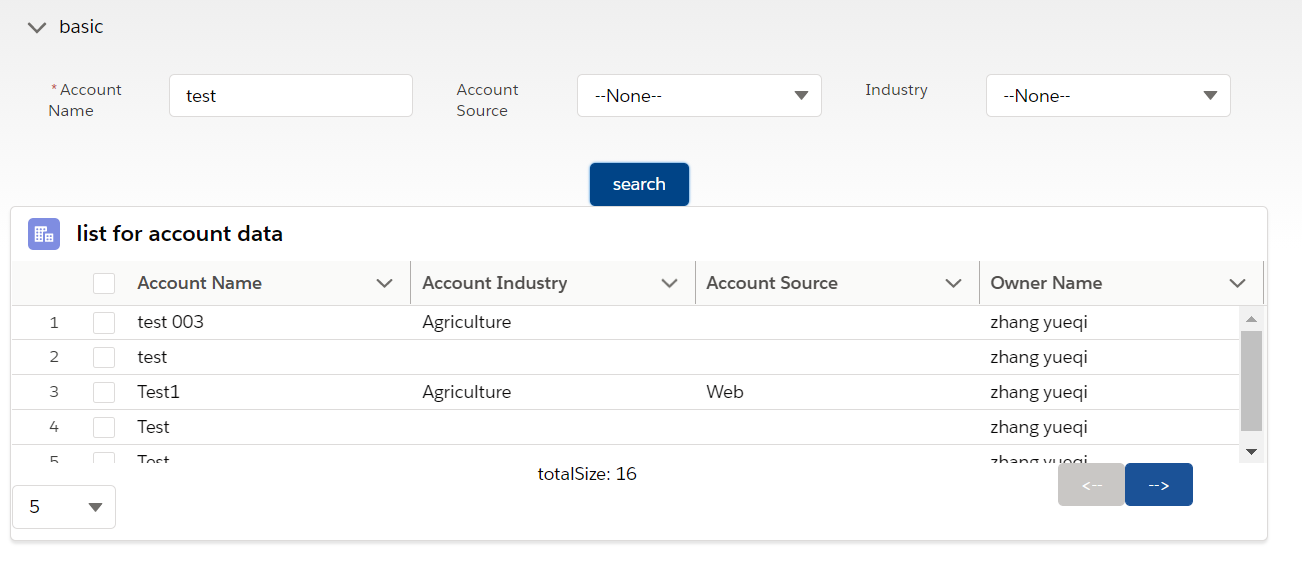 看上去还可以是吧,但是有两个潜在的问题。
按照以下操作步骤,第一页有拖动条,选择了第5条数据
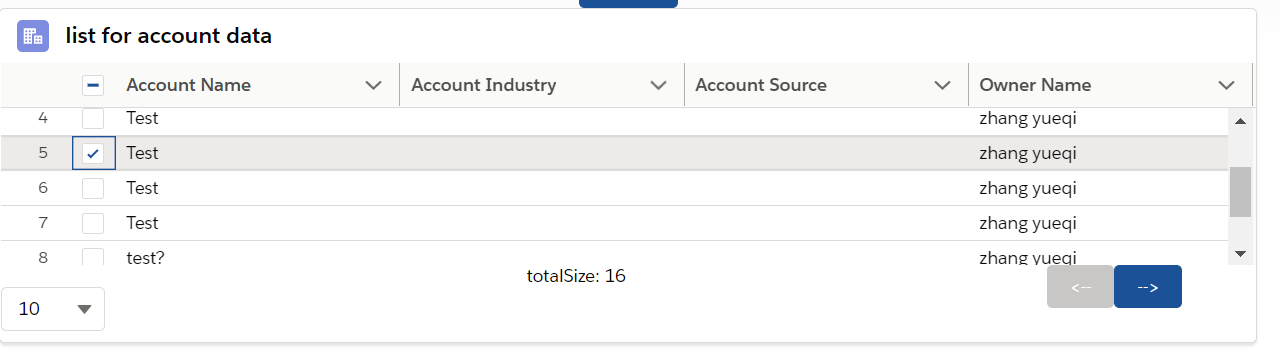
点击翻页以后,两个问题如下:
1)第二页的第五条同样的默认勾选了,尽管这个时候我们如果使用event.detail.selectedRows去获取选中的选项,第二页是没有在这里的,但是UI撒谎了,这个是一个很严重的bug;
2)第二页进去以后,滚动条没有在最上面,即没有默认展示第一条数据。
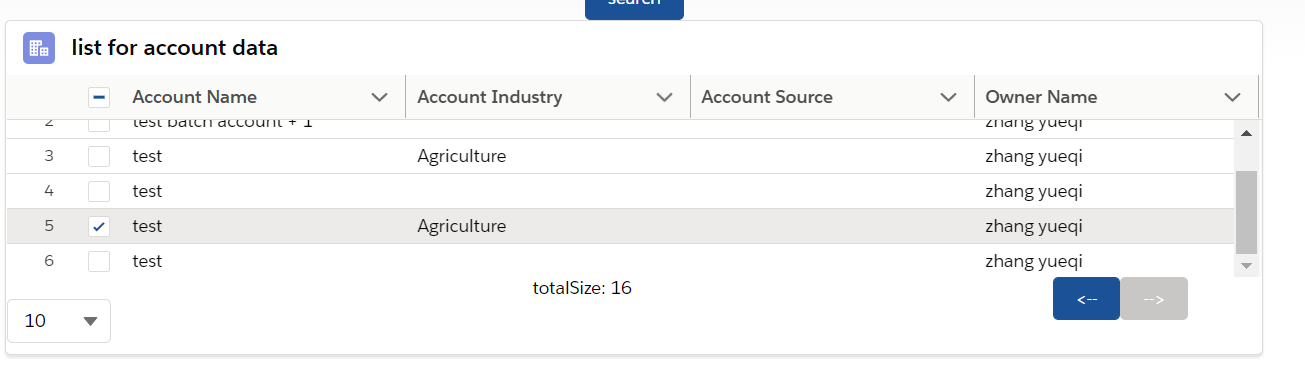
这两个问题,第二个问题是小问题,可以忍;第一个问题会让用户有concern,属于很严重的问题。但是什么原因呢???其实我也不太清楚是什么原因,datatable官方的设计中也没有翻页的demo,大部分都是loadMore当页增加数据场景,所以可能针对每页的index处选中效果有某个隐藏的bug。当我们尽管更新了list的数据,但是index给渲染了,很容易是render层的bug。所以我们想一下如何去处理这种问题。既然同步的渲染有问题,我们考虑其他方式,setTimeout弄成异步调用或者改成Promise实现。优化后的方案如下所示:
myAccountList.js新增一个方法
@api handleTableScrollTop() {

    this.template.querySelector('div').scrollTop = 0;

 }
accountListContainer.js修改一下 setPagination方法。新增了 setList这个Promise,js执行顺序 : 同步代码 > Promise > setTimeout这种异步方式。
setPagination() {

        this.accountListForCurrentPage = [];

        let tmpList = [];

        for(let index = (this.perSize * (this.currentPageIndex - 1)); index < this.totalSize; index++) {

            if(index < this.perSize * this.currentPageIndex) {

                if(this.accountList[index].Owner) {

                    this.accountList[index].OwnerName = this.accountList[index].Owner.Name;

                }

                tmpList.push(this.accountList[index]);

            }

        }

        //this.accountListForCurrentPage = tmpList;

        if(this.currentPageIndex === 1) {

            this.isFirstPage = true;

        } else {

            this.isFirstPage = false;

        }

        if(this.perSize * this.currentPageIndex >= this.totalSize) {

            this.isLastPage = true;

        } else {

            this.isLastPage = false;

        }

        const setList = () =>

        new Promise((resolve, reject) => {

            resolve(tmpList);

        });

        setList()

        .then((result) => {

            this.accountListForCurrentPage = tmpList;

            this.template.querySelector('c-my-account-list').handleTableScrollTop();

        });

    }
通过以上的代码就可以解决上述的两个问题了。原理的话因为不清楚 datatable的渲染方式,只能找到解决这种问题的workaround的方式,同时作为sf开发人员在开发lightning的过程中,javascript真的是越来越重要了!!!
总结:篇中代码实现了通过 lightning-datatable翻页效果以及针对两个潜在的bug的修复。偏中有错误欢迎指出,有不懂欢迎留言。有更好方式欢迎交流。
Salesforce LWC学习(三十三) lightning-datatable 翻页bug处理的更多相关文章
- Salesforce LWC学习(二十三) Lightning Message Service 浅谈
本篇参考: https://trailhead.salesforce.com/content/learn/superbadges/superbadge_lwc_specialist https://d ...
- Salesforce LWC学习(三十) lwc superbadge项目实现
本篇参考:https://trailhead.salesforce.com/content/learn/superbadges/superbadge_lwc_specialist 我们做lwc的学习时 ...
- Salesforce LWC学习(三十九) lwc下quick action的recordId的问题和解决方案
本篇参考: https://developer.salesforce.com/docs/component-library/bundle/force:hasRecordId/documentation ...
- Salesforce LWC学习(三十七) Promise解决progress-indicator的小问题
本篇参考:https://developer.salesforce.com/docs/component-library/bundle/lightning-progress-indicator/exa ...
- Salesforce LWC学习(三十五) 使用 REST API实现不写Apex的批量创建/更新数据
本篇参考: https://developer.salesforce.com/docs/atlas.en-us.224.0.api_rest.meta/api_rest/resources_compo ...
- Salesforce LWC学习(三) import & export / api & track
我们使用vs code创建lwc 时,文件会默认生成包含 template作为头的html文件,包含了 import LightningElement的 js文件以及对应的.js-meta.xml文件 ...
- Salesforce LWC学习(三十六) Quick Action 支持选择 LWC了
本篇参考: https://developer.salesforce.com/docs/component-library/documentation/en/lwc/lwc.use_quick_act ...
- Salesforce LWC学习(三十一) Quick Action适配
本篇参考:https://www.lightningdesignsystem.com/components/modals/ 随着salesforce lwc的优化,越来越多的项目从aura转到了lwc ...
- Salesforce LWC学习(三十二)实现上传 Excel解析其内容
本篇参考:salesforce lightning零基础学习(十七) 实现上传 Excel解析其内容 上一篇我们写了aura方式上传excel解析其内容.lwc作为salesforce的新宠儿,逐渐的 ...
- Salesforce LWC学习(三十四) 如何更改标准组件的相关属性信息
本篇参考: https://www.cnblogs.com/zero-zyq/p/14548676.html https://www.lightningdesignsystem.com/platfor ...
随机推荐
- 非线性优化-SLAM14CP6
在前声明下面有一部分直接引用高翔老师SLAM14讲中的内容.因为我实在是看不懂.临时放在这里.以后有用到再做详细研究. 在SLAM14讲的CP2中第一次引入运动方程以及观测方程来描述物体带着传感器在空 ...
- mysql剪贴板
// mysql 8.0 连接数据源的配置文件 <!--数据源--><bean id="dataSource" class="com.alibaba.d ...
- zabbix监控mysql数据库——qps和tps
首先可以继续顺着zabbix监控mysql继续往下做 1.首先在42的继续编写qps和tps 1.1qps 在41服务端查询: 1.2 tps 2.在web进行查看
- Erlang Mnesia数据库迁移方法
本文参考https://blog.csdn.net/yangzm/article/details/51686249 需求 因为一些原因,需要把一个Mnesia节点的数据库搬迁到另一个节点,然后弃用原来 ...
- Verilog教程
1. 简介 当用 Verilog 设计完成数字模块后进行仿真时,需要在外部添加激励,激励文件叫 testbench. Verilog 的主要特性: 可采用 3 种不同的方式进行设计建模:行为级描述-- ...
- 4组-Beta冲刺-2/5
一.基本情况 队名:摸鲨鱼小队 组长博客:https://www.cnblogs.com/smallgrape/p/15595704.html github链接:https://github.com/ ...
- 10s后再次获取手机验证码
一般手机验证码获取都会加个间隔时间 js代码如下: function getDxCode(btn){ var reg = /^1[3|4|5|7|8][0-9]{9}$/; //验证规则 var mo ...
- doy 18 定时任务
1.定时任务 1.什么是定时任务 类似日常生活之中的闹钟:主要用于定时执行某些命令,达到定时处理数据的作用. 2.定时任务的软件的种类 1.linux操作系统自带的软件:crontab 2.第三方的定 ...
- Linux让部署在服务器上的项目一直保持运行状态…&跑多个项目
在idea通过package得到的.jar包或者.war包可通过 java -jar xxx.jar/xxx.war 命令直接在linux或者windows系统运行: 将打好包的项目放在linux ...
- oracle表名中带@什么意思,例如:select * from dim.dim_area_no@to_dw
转载自:https://zhidao.baidu.com/question/259154968.html @是调用数据库链接(database link)的意思. 数据库链接的作用是从a数据库到b数据 ...