
SpringCloud之Turbine
【前面的话】书接上文,本文的某些知识依赖我的上一篇SpringCLoud的文章:SpringCloud之Feign,如果没有看过可以先移步去看一下。前文提到了hystrix的应用,以及hystrix的监控,当时我们在实际生产过程中往往会在多个服务中或者说网关集群中使用hystrix,这样我们来监控的是否再去分别查看当时的每个应用的话,效率就会显得很低下呢,这里我们就要用的上文提到的集群监控了。
壹、Turbine的简介
看单个的Hystrix Dashboard的数据并没有什么多大的价值,要想看这个系统的Hystrix Dashboard数据就需要用到Hystrix Turbine。Hystrix Turbine将每个服务Hystrix Dashboard数据进行了整合。Hystrix Turbine的使用非常简单,只需要引入相应的依赖和加上注解和配置就可以了。
简而言之:Turbine就是聚合监控多个Hystrix Dashboard的数据。
贰、准备工作
新建一个feign子工程lovin-cloud-turbine,用于后面的操作。下面是主要的pom依赖:
<parent>

        <artifactId>lovincloud</artifactId>

        <groupId>com.eelve.lovincloud</groupId>

        <version>1.0-SNAPSHOT</version>

    </parent>

    <modelVersion>4.0.0</modelVersion>

    <artifactId>lovin-cloud-turbine</artifactId>

    <packaging>jar</packaging>

    <name>lovincloudturbine</name>

    <version>0.0.1</version>

    <description>turbine监控</description>

    <dependencies>

        <dependency>

            <groupId>org.springframework.cloud</groupId>

            <artifactId>spring-cloud-starter-netflix-eureka-client</artifactId>

        </dependency>

        <dependency>

            <groupId>org.springframework.boot</groupId>

            <artifactId>spring-boot-starter-security</artifactId>

        </dependency>

        <dependency>

            <groupId>org.springframework.boot</groupId>

            <artifactId>spring-boot-starter-web</artifactId>

        </dependency>

        <dependency>

            <groupId>de.codecentric</groupId>

            <artifactId>spring-boot-admin-starter-client</artifactId>

            <version>2.1.6</version>

        </dependency>

        <dependency>

            <groupId>org.springframework.cloud</groupId>

            <artifactId>spring-cloud-starter-turbine</artifactId>

            <version>1.4.7.RELEASE</version>

        </dependency>

        <dependency>

            <groupId>org.springframework.cloud</groupId>

            <artifactId>spring-cloud-netflix-turbine</artifactId>

        </dependency>

        <dependency>

            <groupId>org.springframework.boot</groupId>

            <artifactId>spring-boot-starter-actuator</artifactId>

        </dependency>

        <!--

        <dependency>

            <groupId>org.springframework.cloud</groupId>

            <artifactId>spring-cloud-starter-turbine-amqp</artifactId>

            <version>1.4.7.RELEASE</version>

        </dependency>

        -->

    </dependencies>

    <build>

        <plugins>

            <plugin>

                <groupId>org.springframework.boot</groupId>

                <artifactId>spring-boot-maven-plugin</artifactId>

            </plugin>

        </plugins>

    </build>
- 这里为了安全,我这里还是添加spring-boot-starter-security
server:

  port: 8808   # 服务端口号

spring:

  application:

    name: lovincloudturbine     # 服务名称

  security:

    basic:

      enabled: true

    user:

      name: lovin

      password: ${REGISTRY_SERVER_PASSWORD:lovin}

eureka:

  client:

    serviceUrl:

      defaultZone: http://lovin:lovin@localhost:8881/eureka/   # 注册到的eureka服务地址

  instance:

    leaseRenewalIntervalInSeconds: 10

    health-check-url-path: /actuator/health

    metadata-map:

      user.name: lovin

      user.password: lovin

management:

  endpoints:

    web:

      exposure:

        include: "*"

  endpoint:

    health:

      show-details: ALWAYS

turbine:

  aggregator:

    clusterConfig: default   # 指定聚合哪些集群,多个使用","分割,默认为default。可使用http://.../turbine.stream?cluster={clusterConfig之一}访问

  appConfig: lovinfeignclient,lovinribbonclient  ### 配置Eureka中的serviceId列表,表明监控哪些服务

  clusterNameExpression: new String("default")

  # 1. clusterNameExpression指定集群名称,默认表达式appName;此时:turbine.aggregator.clusterConfig需要配置想要监控的应用名称

  # 2. 当clusterNameExpression: default时,turbine.aggregator.clusterConfig可以不写,因为默认就是default

  # 3. 当clusterNameExpression: metadata['cluster']时,假设想要监控的应用配置了eureka.instance.metadata-map.cluster: ABC,则需要配置,同时turbine.aggregator.clusterConfig: ABC
- 配置spring-boot-starter-security,这里为了方便我这里放开所有请求
package com.eelve.lovin.config;

import org.springframework.context.annotation.Configuration;

import org.springframework.security.config.annotation.web.builders.HttpSecurity;

import org.springframework.security.config.annotation.web.configuration.WebSecurityConfigurerAdapter;

/**

 * @ClassName SecurityConfig

 * @Description TDO

 * @Author zhao.zhilue

 * @Date 2019/8/16 14:13

 * @Version 1.0

 **/

@Configuration

public class WebSecurityConfig extends WebSecurityConfigurerAdapter {

    @Override

    protected void configure(HttpSecurity http) throws Exception {

        http.authorizeRequests().anyRequest().permitAll()

                .and().csrf().disable();

    }

}
- 在主类上添加@EnableTurbine,当然也需要注册到注册中心:
package com.eelve.lovin;

import org.springframework.boot.SpringApplication;

import org.springframework.boot.autoconfigure.SpringBootApplication;

import org.springframework.cloud.client.discovery.EnableDiscoveryClient;

import org.springframework.cloud.netflix.turbine.EnableTurbine;

import org.springframework.cloud.netflix.turbine.stream.EnableTurbineStream;

/**

 * @ClassName LovinCloudTurbineApplication

 * @Description TDO

 * @Author zhao.zhilue

 * @Date 2019/8/25 17:17

 * @Version 1.0

 *

 **/

@SpringBootApplication

@EnableDiscoveryClient

@EnableTurbine

public class LovinCloudTurbineApplication {

    public static void main(String[] args) {

        SpringApplication.run(LovinCloudTurbineApplication.class,args);

    }

}
- 改造lovin-feign-client,使之变成集群,添加第二份配置文件
叁、启动测试
- 依次启动eureka的服务端和两个客户端,以及lovin-feign-client、lovin-ribbon-client和新建的lovin-cloud-turbine
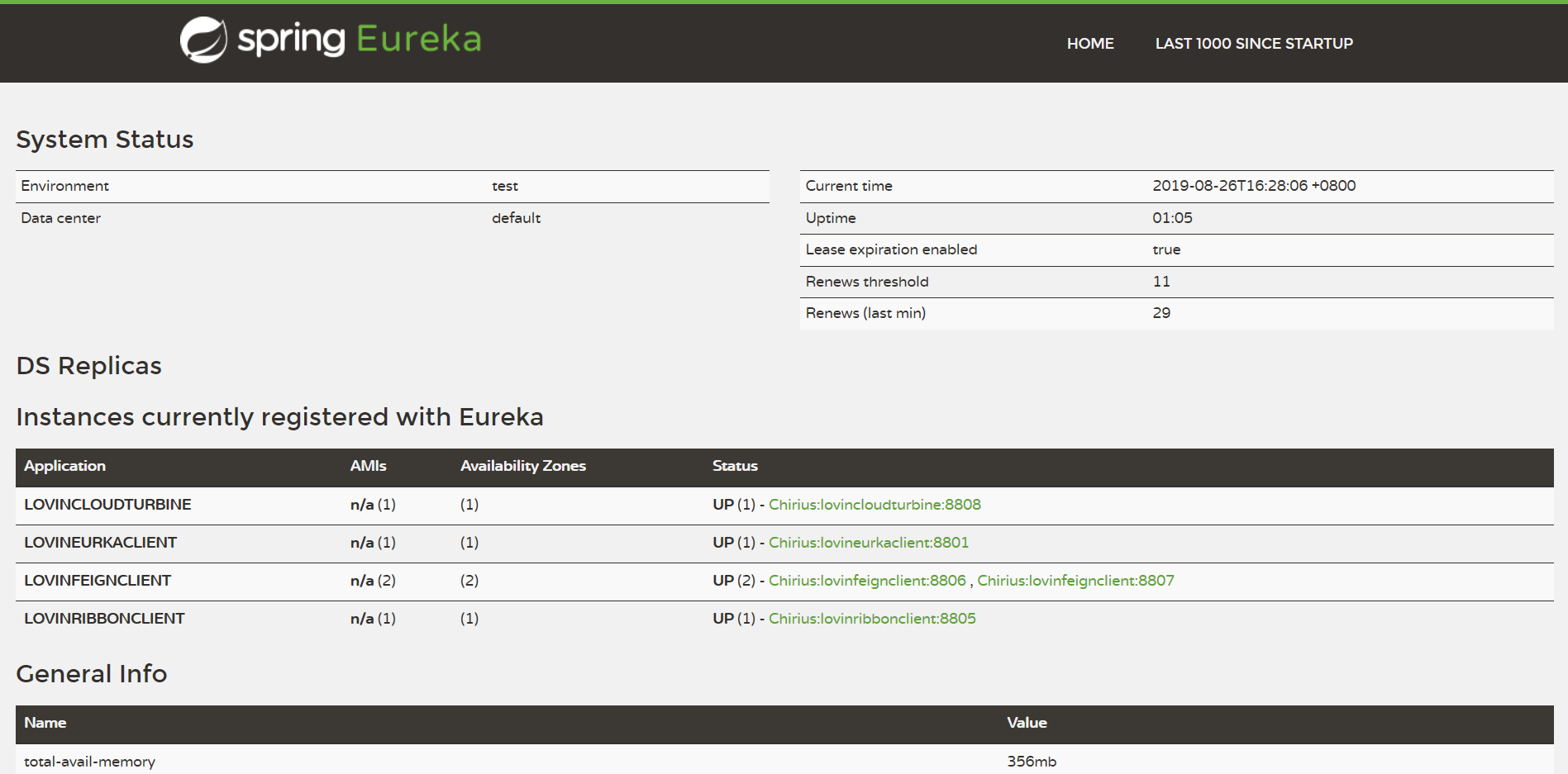
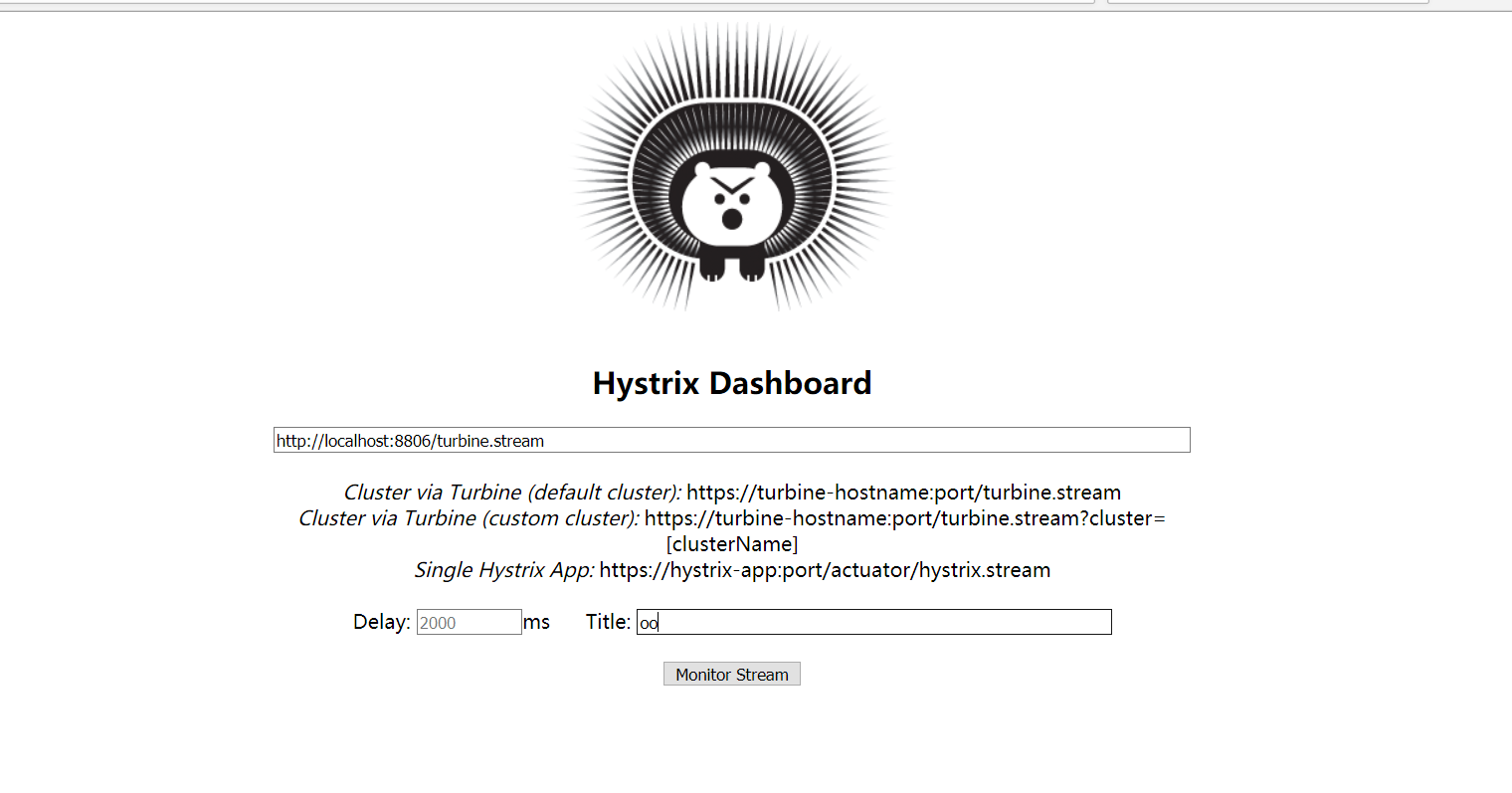
我们可以看到服务已经全部启动成功 - 然后访问几次http://localhost:8806/getHello和http://localhost:8805/hello使之产生熔断器数据,然后访问http://localhost:8806/hystrix按照提示选择第一个集群监控

肆、消息队列来做到异步监控
turbine服务端修改
- 修改pom依赖
<dependencies>

        <dependency>

            <groupId>org.springframework.cloud</groupId>

            <artifactId>spring-cloud-starter-netflix-eureka-client</artifactId>

        </dependency>

        <dependency>

            <groupId>org.springframework.boot</groupId>

            <artifactId>spring-boot-starter-security</artifactId>

        </dependency>

        <dependency>

            <groupId>org.springframework.boot</groupId>

            <artifactId>spring-boot-starter-web</artifactId>

        </dependency>

        <dependency>

            <groupId>de.codecentric</groupId>

            <artifactId>spring-boot-admin-starter-client</artifactId>

            <version>2.1.6</version>

        </dependency>

        <dependency>

            <groupId>org.springframework.cloud</groupId>

            <artifactId>spring-cloud-starter-turbine</artifactId>

            <version>1.4.7.RELEASE</version>

        </dependency>

        <dependency>

            <groupId>org.springframework.cloud</groupId>

            <artifactId>spring-cloud-netflix-turbine</artifactId>

        </dependency>

        <dependency>

            <groupId>org.springframework.boot</groupId>

            <artifactId>spring-boot-starter-actuator</artifactId>

        </dependency>

        <dependency>

            <groupId>org.springframework.cloud</groupId>

            <artifactId>spring-cloud-starter-turbine-amqp</artifactId>

            <version>1.4.7.RELEASE</version>

        </dependency>

    </dependencies>

    <build>

        <plugins>

            <plugin>

                <groupId>org.springframework.boot</groupId>

                <artifactId>spring-boot-maven-plugin</artifactId>

            </plugin>

        </plugins>

    </build>
可以看到这里主要引入了spring-cloud-starter-turbine-amqp依赖,它实际上就是包装了spring-cloud-starter-turbine-stream和pring-cloud-starter-stream-rabbit。
- 添加连接rabbitmq配置
spring:

  rabbitmq:

    host: 127.0.0.1

    port: 5672

    username: guest

    password: guest
- 在应用主类中使用@EnableTurbineStream注解来启用Turbine Stream的配置
package com.eelve.lovin;

import org.springframework.boot.SpringApplication;

import org.springframework.boot.autoconfigure.SpringBootApplication;

import org.springframework.cloud.client.discovery.EnableDiscoveryClient;

import org.springframework.cloud.netflix.turbine.EnableTurbine;

import org.springframework.cloud.netflix.turbine.stream.EnableTurbineStream;

/**

 * @ClassName LovinCloudTurbineApplication

 * @Description TDO

 * @Author zhao.zhilue

 * @Date 2019/8/25 17:17

 * @Version 1.0

 *

 **/

@SpringBootApplication

@EnableDiscoveryClient

@EnableTurbineStream

public class LovinCloudTurbineApplication {

    public static void main(String[] args) {

        SpringApplication.run(LovinCloudTurbineApplication.class,args);

    }

}
对服务消费者进行修改
- 添加spring-cloud-netflix-hystrix-amqp依赖
	<dependency>

		<groupId>org.springframework.cloud</groupId>

		<artifactId>spring-cloud-netflix-hystrix-amqp</artifactId>

        <version>1.4.7.RELEASE</version>

	</dependency>
- 添加连接rabbitmq配置
spring:

  rabbitmq:

    host: 127.0.0.1

    port: 5672

    username: guest

    password: guest
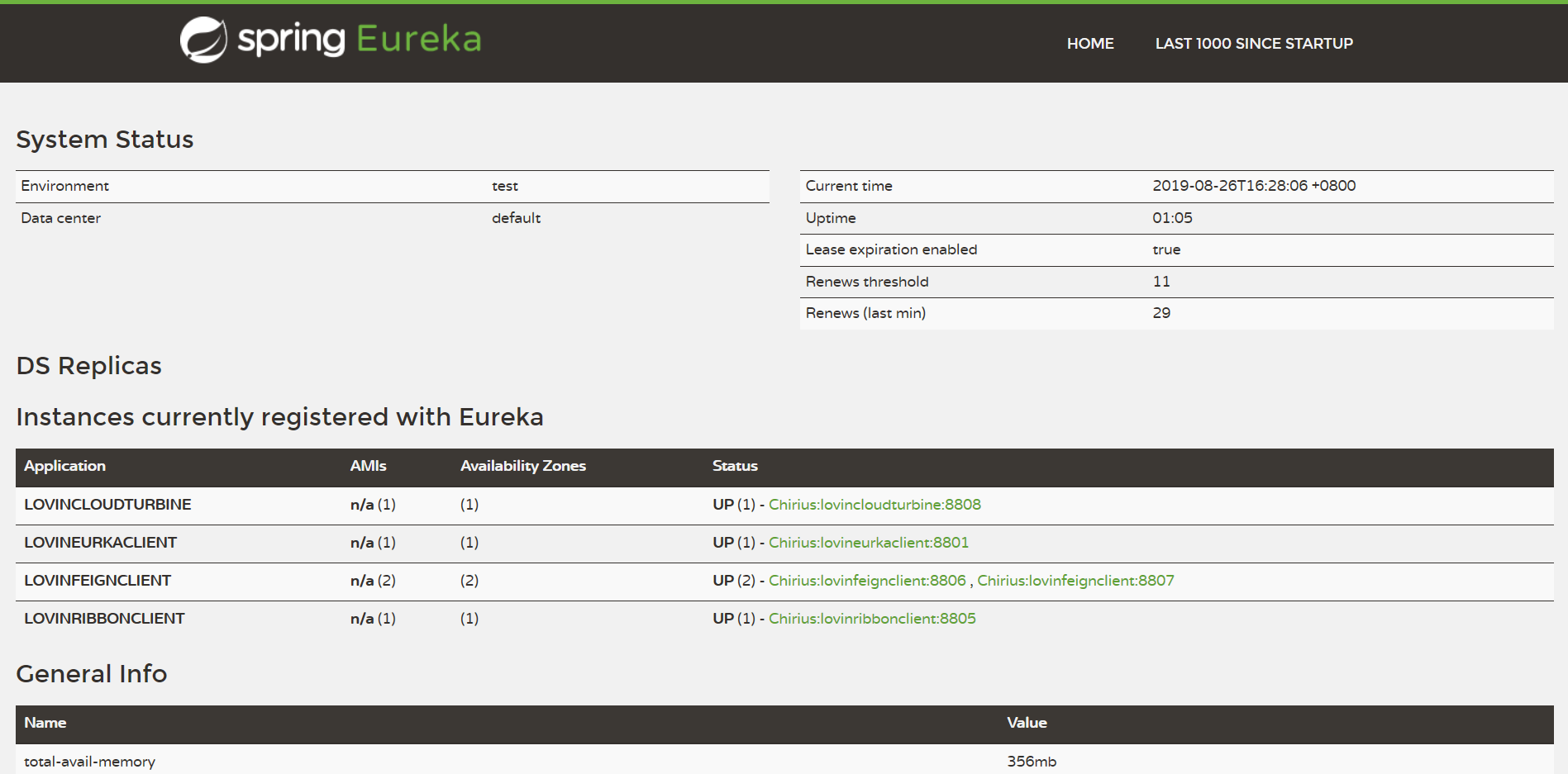
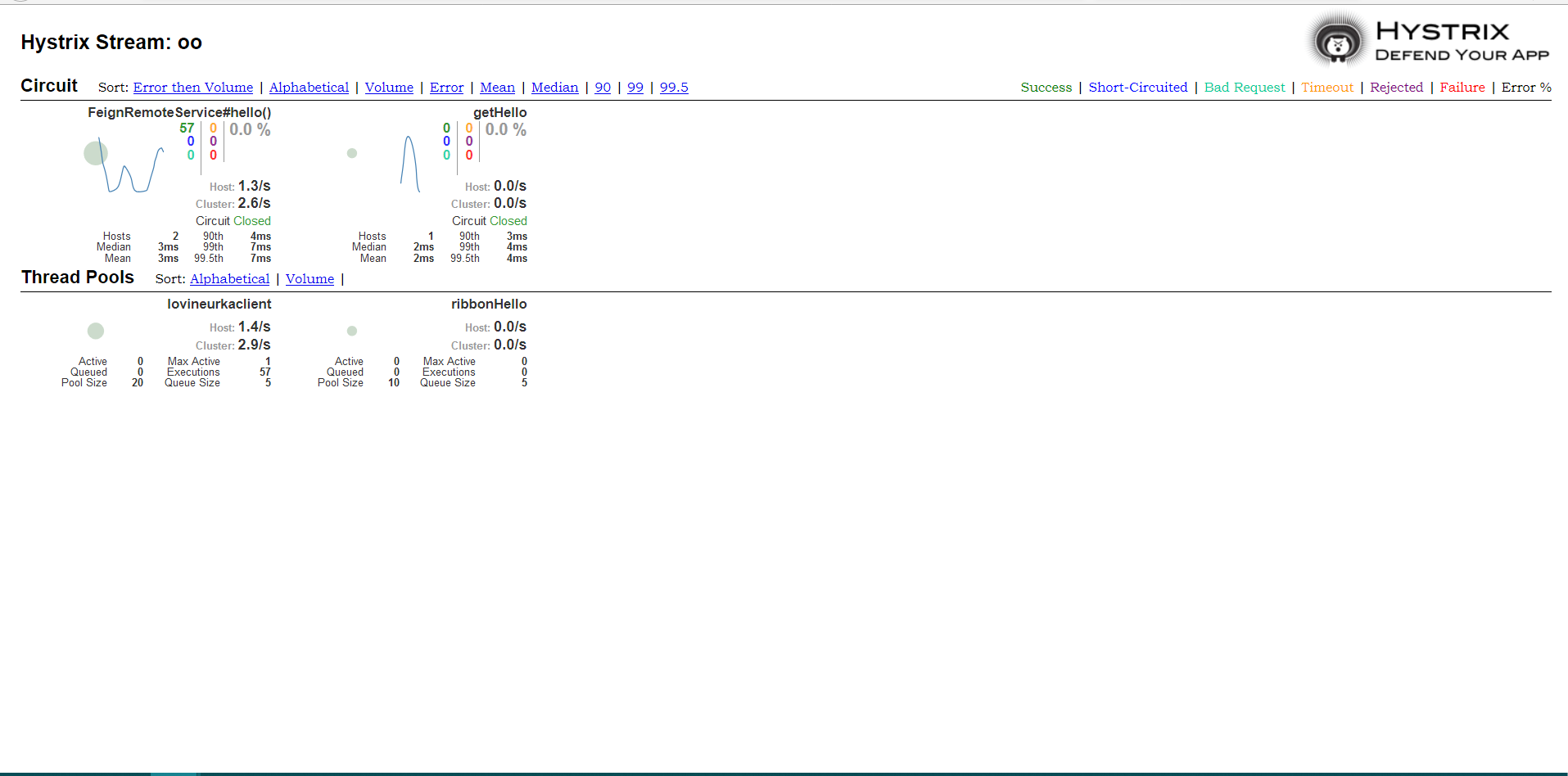
然后重启服务之后,就可以再次看到监控详情
伍、监控数据流图
- 我们可以看到我们调用的服务不再是像再上一篇文章中的直接访问对应的服务,而是通过feign的Ribbon的负载均衡的去调用的,而且这里说明一点,Ribbon的默认机制是轮询。
- 直接使用Turbine监控
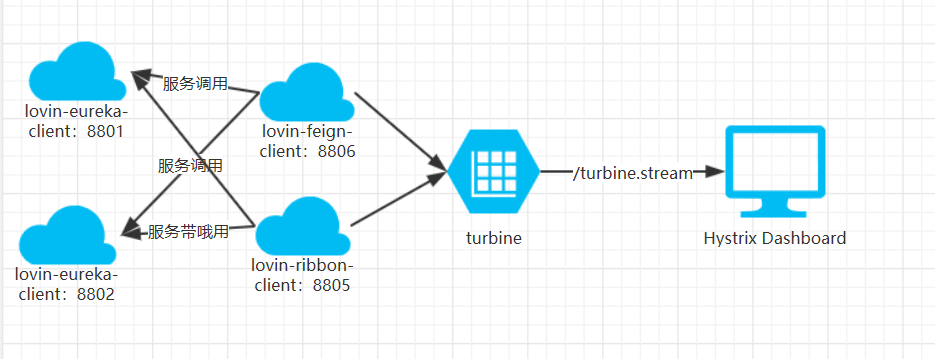
- 使用RabbitMQ异步监控
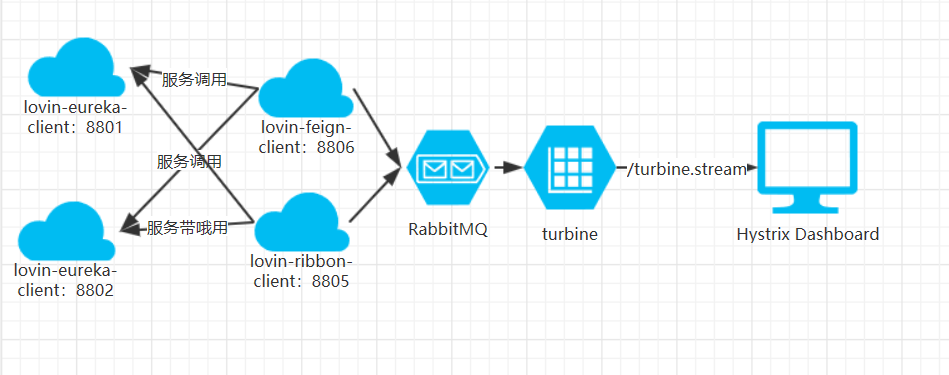
- 其中后者更能做到和业务解耦
陆、Turbine详解
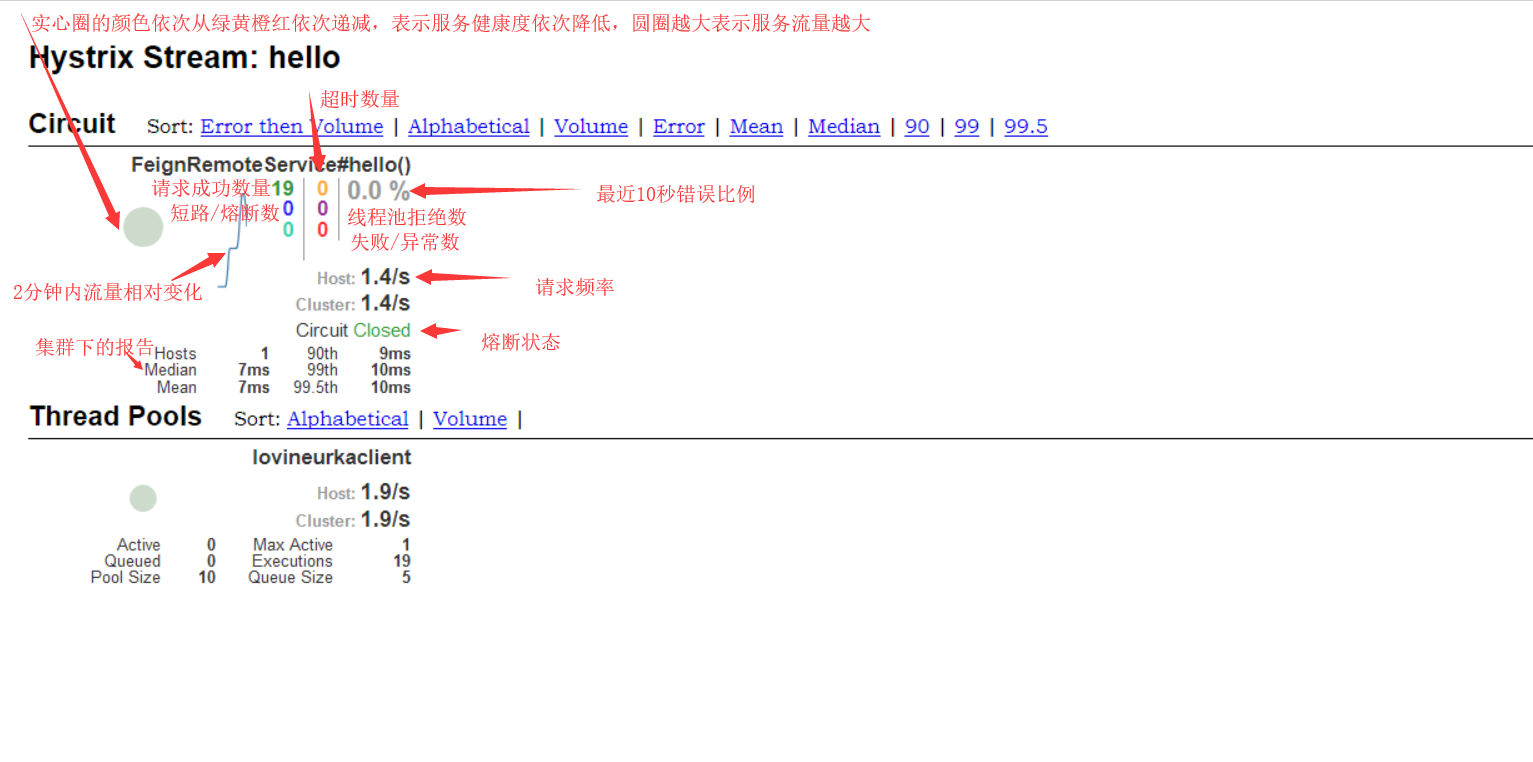
- 我们可以在监控信息的左上部分找到两个重要的图形信息:一个实心圆和一条曲线。
- 实心圆:共有两种含义。它通过颜色的变化代表了实例的健康程度,如下图所示,它的健康度从绿色、黄色、橙色、红色递减。该实心圆除了颜色的变化之外,它的大小也会根据实例的请求流量发生变化,流量越大该实心圆就越大。所以通过该实心圆的展示,我们就可以在大量的实例中快速的发现故障实例和高压力实例。
- 曲线:用来记录2分钟内流量的相对变化,我们可以通过它来观察到流量的上升和下降趋势。
SpringCloud之Turbine的更多相关文章
- springcloud的turbine集成zookeeper
1.turbine监控界面显示一直是loading的状态,如何解决 http://blog.didispace.com/spring-cloud-tips-4/ 2.通过追踪turbine的依赖可以看 ...
- springcloud的Turbine配置监控多个服务的一些坑!!!!InstanceMonitor$MisconfiguredHostException,No message available","path":"/actuator/hystrix.stream,页面不显示服务或者一直loading
踩了几个小时坑,使用仪表盘监控单个服务的时候很容易,但是一到多个服务,瞬间坑就来了,大概碰到下面三个: 1InstanceMonitor$MisconfiguredHostException, No ...
- springcloud-知识点总结(三):Hystrix & Dashboard & turbine & Zuul & SpringCloud Config
1.Hystrix断路器简介 Hystrix断路器简介 hystrix对应的中文名字是“豪猪”,豪猪周身长满了刺,能保护自己不受天敌的伤害,代表了一种防御机制,这与hystrix本身的功能不谋而合,因 ...
- springcloud微服务实战:Eureka+Zuul+Feign/Ribbon+Hystrix Turbine+SpringConfig+sleuth+zipkin
相信现在已经有很多小伙伴已经或者准备使用springcloud微服务了,接下来为大家搭建一个微服务框架,后期可以自己进行扩展.会提供一个小案例: 服务提供者和服务消费者 ,消费者会调用提供者的服务,新 ...
- 【SpringCloud】第十二篇: 断路器监控(Hystrix Turbine)
前言: 必需学会SpringBoot基础知识 简介: spring cloud 为开发人员提供了快速构建分布式系统的一些工具,包括配置管理.服务发现.断路器.路由.微代理.事件总线.全局锁.决策竞选. ...
- 史上最简单的SpringCloud教程 | 第十三篇: 断路器聚合监控(Hystrix Turbine)(Finchley版本)
转载请标明出处: 原文首发于:https://www.fangzhipeng.com/springcloud/2018/08/30/sc-f13-turbine/ 本文出自方志朋的博客 上一篇文章讲述 ...
- 白话SpringCloud | 第六章:Hystrix监控面板及数据聚合(Turbine)
前言 前面一章,我们讲解了如何整合Hystrix.而在实际情况下,使用了Hystrix的同时,还会对其进行实时的数据监控,反馈各类指标数据.今天我们就将讲解下Hystrix Dashboard和Tur ...
- springcloud(十一):熔断聚合监控Hystrix Turbine
springcloud(十一):熔断聚合监控Hystrix Turbine
- 跟我学SpringCloud | 第五篇:熔断监控Hystrix Dashboard和Turbine
SpringCloud系列教程 | 第五篇:熔断监控Hystrix Dashboard和Turbine Springboot: 2.1.6.RELEASE SpringCloud: Greenwich ...
随机推荐
- 企查查app (二)
企查查app sign算法破解 已删除!!!! 这次我们又找到设备id,现在就只差aXM这个了. 关注小白公众号,小白带你成长.
- Flink的Job启动Driver端(源码分析)
整个Flink的Job启动是通过在Driver端通过用户的Envirement的execute()方法将用户的算子转化成StreamGraph,然后得到JobGraph通过远程RPC将这个JobGra ...
- 亲,麻烦给个五星好评!—RatingBar
引言 上一篇的CheckBox已经让大家越来越接近实战演练了,本章我们继续分享干货给大家,今天介绍一个实用的UI控件RatingBar(星级评分条),对于使用过电商APP(某东,某宝等)的小伙伴们来说 ...
- ionic 删除返回按钮文字,及自定义nav两侧的按钮和title格式
1.删除返回按钮文字 1)可以在app.js进行配置 .config(function($stateProvider, $urlRouterProvider,$ionicConfigProvider) ...
- 快速掌握SPSS数据分析
SPSS难吗?无非就是数据类型的区别后,就能理解应该用什么样的分析方法,对应着分析方法无非是找一些参考资料进行即可.甚至在线网页SPSS软件直接可以将数据分析结果指标人工智能地分析出来,这有多难呢 ...
- Jedis操作Redis--Set类型
/** * Set(集合) * SADD,SCARD,SDIFF,SDIFFSTORE,SINTER,SINTERSTORE,SISMEMBER,SMEMBERS,SMOVE,SPOP,SRANDME ...
- lightoj 1057 - Collecting Gold(状压dp)
题目链接:http://www.lightoj.com/volume_showproblem.php?problem=1057 题解:看似有点下记忆话搜索但是由于他是能走8个方向的也就是说两点的距离其 ...
- 基于LinkedhashMap实现的LRU算法
LRU全称是Least Recently Used,即最近最久未使用的意思.LRU算法的设计原则是:如果一个数据在最近一段时间没有被访问到,那么在将来它被访问的可能性也很小.也就是说,当限定的空间已存 ...
- 【Offer】[25] 【合并两个排序的链表】
题目描述 思路分析 测试用例 Java代码 代码链接 题目描述 输入两个递增排序的链表,合并这两个链表并使新链表中的节点仍然是递增排序的.例如,输入图中的链表1和链表2,则合并之后的升序链表如链表3所 ...
- Django+Nginx概念安装和使用–使用Django建立你的第一个网站
一 前记 最近在使用Django倒腾属于自己的网站,由于以前没有接触过多少这类信息,所以,很多东西都是从零开始学习的.在参考网上的资料时候,发现很多对这方面记录的,很多人都写的不是很清楚,也许我这个新 ...