
UINavigationController详解二(转)页面切换和SegmentedController
原文出自:http://blog.csdn.net/totogo2010/article/details/7682433,非常感谢。
1、RootView 跳到SecondView
首先我们需要新一个View。新建SecondView,按住Command键然后按N,弹出新建页面,我们新建SecondView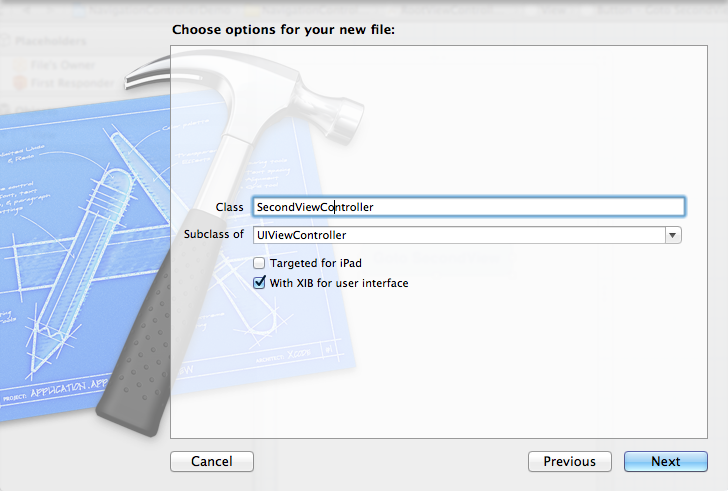
2、为Button 添加点击事件,实现跳转
在RootViewController.xib中和RootViewController.h文件建立连接

在RootViewController.m中实现代码,alloc一个SecondViewController,用pushViewController到navigationController中去,并为
SecondViewController这是title为 secondView.title =@"Second View"; 默认情况下,titie为下个页面返回按钮的名字。
- - (IBAction)gotoSecondView:(id)sender {
- SecondViewController *secondView = [[SecondViewController alloc] init];
- [self.navigationController pushViewController:secondView animated:YES];
- secondView.title = @"Second View";
- }
这是点击GotoSecondView 按钮,出现
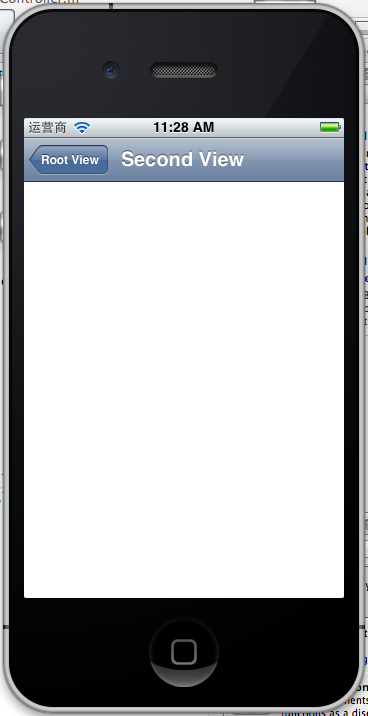
这就是SecondView了。
3、添加segmentedController
在nav bar这样的效果是如何实现的呢?
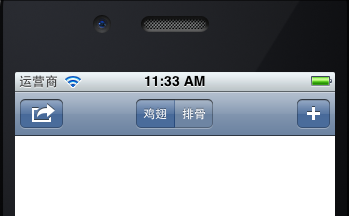
这就是segmentedController。
3.1在RootViewController.m的viewDidLoad添加如下代码:
- NSArray *array = [NSArray arrayWithObjects:@"鸡翅",@"排骨", nil];
- UISegmentedControl *segmentedController = [[UISegmentedControl alloc] initWithItems:array];
- segmentedController.segmentedControlStyle = UISegmentedControlSegmentCenter;
- [segmentedController addTarget:self action:@selector(segmentAction:) forControlEvents:UIControlEventValueChanged];
- self.navigationItem.titleView = segmentedController;
3.2[segmentedController addTarget:selfaction:的实现
- -(void)segmentAction:(id)sender
- {
- switch ([sender selectedSegmentIndex]) {
- case 0:
- {
- UIAlertView *alter = [[UIAlertView alloc] initWithTitle:@"提示" message:@"你点击了鸡翅" delegate:self cancelButtonTitle:@"确定" otherButtonTitles:nil, nil];
- [alter show];
- }
- break;
- case 1:
- {
- UIAlertView *alter = [[UIAlertView alloc] initWithTitle:@"提示" message:@"你点击了排骨" delegate:self cancelButtonTitle:@"确定" otherButtonTitles:nil, nil];
- [alter show];
- }
- break;
- default:
- break;
- }
- }
这样就能响应鸡翅和排骨按钮了
4、自定义backBarButtonItem
左上角的返回上级View的barButtonitem的名字是上级目录的Title,如果title或者适合做button的名字,怎么办呢?我们可以自己定义
代码如下:
- UIBarButtonItem *backButton = [[UIBarButtonItem alloc] initWithTitle:@"根视图" style:UIBarButtonItemStyleDone target:nil action:nil];
- self.navigationItem.leftBarButtonItem = backButton;
效果:

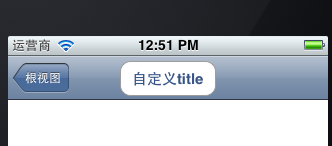
6、自定义title
UINavigationController的title可以用别view替代,比如用UIButton UILable等,下面我用UIButton.
在SecondViewController.m中添加下面如下。
- - (void)viewDidLoad
- {
- [super viewDidLoad];
- UIButton *button = [UIButton buttonWithType: UIButtonTypeRoundedRect];
- [button setTitle: @"自定义title" forState: UIControlStateNormal];
- [button sizeToFit];
- self.navigationItem.titleView = button;}
运行程序,goto secondView,运行效果
UINavigationController详解二(转)页面切换和SegmentedController的更多相关文章
- [转]iOS学习之UINavigationController详解与使用(二)页面切换和segmentedController
转载地址:http://blog.csdn.net/totogo2010/article/details/7682433 iOS学习之UINavigationController详解与使用(一)添加U ...
- iOS学习之UINavigationController详解与使用(二)页面切换和segmentedController
iOS学习之UINavigationController详解与使用(一)添加UIBarButtonItem是上篇,我们接着讲UINavigationController的重要作用,页面的管理和切换. ...
- iOS学习之UINavigationController详解与使用(一)添加UIBarButtonItem
http://blog.csdn.net/totogo2010/article/details/7681879 1.UINavigationController导航控制器如何使用 UINavigati ...
- [转]iOS学习之UINavigationController详解与使用(三)ToolBar
转载地址:http://blog.csdn.net/totogo2010/article/details/7682641 iOS学习之UINavigationController详解与使用(二)页面切 ...
- UINavigationController详解一(转)UIBarButtonItem
本文出自:http://www.cnblogs.com/smileEvday/archive/2012/05/14/2495153.html 特别感谢. 1.UINavigationControlle ...
- iOS学习之UINavigationController详解与使用(三)ToolBar
1.显示Toolbar 在RootViewController.m的- (void)viewDidLoad方法中添加代码,这样Toobar就显示出来了. [cpp] view plaincopy [ ...
- Shiro 安全框架详解二(概念+权限案例实现)
Shiro 安全框架详解二 总结内容 一.登录认证 二.Shiro 授权 1. 概念 2. 授权流程图 三.基于 ini 的授权认证案例实现 1. 实现原理图 2. 实现代码 2.1 添加 maven ...
- .NET DLL 保护措施详解(二)关于性能的测试
先说结果: 加了缓存的结果与C#原生代码差异不大了 我对三种方式进行了测试: 第一种,每次调用均动态编译 第二种,缓存编译好的对象 第三种,直接调用原生C#代码 .net dll保护系列 ------ ...
- PopUpWindow使用详解(二)——进阶及答疑
相关文章:1.<PopUpWindow使用详解(一)——基本使用>2.<PopUpWindow使用详解(二)——进阶及答疑> 上篇为大家基本讲述了有关PopupWindow ...
随机推荐
- 《JAVA NIO》第一章 简介
1.2 CPU已不再是束缚 相反,是JVM 自身在I/O 方面效率欠佳.操作系统与Java 基于流的I/O模型有些不匹配. 操作系统要移动的是大块数据(缓冲区),这往往是在硬件直接存储器存取(DMA) ...
- Android 使用PullToRefreshExpandableListView不能setAdapter的问题
private PullToRefreshExpandableListView lv; lv = (PullToRefreshExpandableListView) findViewById(R.id ...
- MVC项目实践,在三层架构下实现SportsStore-07,实现订单提交
SportsStore是<精通ASP.NET MVC3框架(第三版)>中演示的MVC项目,在该项目中涵盖了MVC的众多方面,包括:使用DI容器.URL优化.导航.分页.购物车.订单.产品管 ...
- 运用bat进行数据库备份
执行Bat脚本 @echo off sqlplus sys/welcome@orcl as sysdba @C:\Users\yangfan\Desktop\login.sql echo 按任意键结束 ...
- django 用户登陆注册
注册登陆 views.py #!/usr/bin/env python # -*- coding:utf- -*- from django.shortcuts import render,render ...
- javascript设计模式学习之二——this
一.this指向问题 1)默认绑定,即作为独立的普通函数调用 此时this指向全局对象window,如果是严格模式下,则指向undefined; 2)隐式绑定,即具有调用上下文(一种场景就是作为对象的 ...
- javascript实例学习之五——瀑布流布局
瀑布流布局的特征: 1,各列的高度参差不齐 2,页面向下滚动时,自动请求和加载新数据 目前,瀑布流布局的主流实现方式有两种: 1,基于浮动,每一列是一个ul,这些ul都向左浮动,这种方法的好处是布局容 ...
- iOS面试必看,最全梳理
序言 目前形势,参加到iOS队伍的人是越来越多,甚至已经到供过于求了.今年,找过工作人可能会更深刻地体会到今年的就业形势不容乐观,加之,培训机构一火车地向用人单位输送iOS开发人员,打破了生态圈的动态 ...
- Windows下MongoDB安装与PHP扩展
MongoDB是什么就不再累述了,下面只写MongoDB安装与PHP扩展的方法. 一,安装准备 MongoDB 如果网速慢,可以到MongoDB中文社区的百度网盘下载,密码3gun.(根据你的操作系统 ...
- Javascript中Number()、parseIn()和parseFloat()的区别
有3个函数可以把非数值转化成数值:Number().parseInt()和parseFloat().第一个函数,即转型函数Number()可以用于任何数据类型,而另两个函数则专门用于把字符串转换成数值 ...