
【转载】Spring Security Oauth2 自定义 OAuth2 Exception
https://www.cnblogs.com/merryyou/p/9100260.html
前言
在使用Spring Security Oauth2登录和鉴权失败时,默认返回的异常信息如下
{

  "error": "unauthorized",

  "error_description": "Full authentication is required to access this resource"

}
。它与我们自定义返回信息不一致,并且描述信息较少。那么如何自定义Spring Security Oauth2异常信息呢,下面我们简单实现以下。格式如下:
{

"error": "400",

"message": "坏的凭证",

"path": "/oauth/token",

"timestamp": "1527432468717"

}
自定义登录失败异常信息
新增CustomOauthException
- 添加自定义异常类,指定
json序列化方式
@JsonSerialize(using = CustomOauthExceptionSerializer.class)

public class CustomOauthException extends OAuth2Exception {

    public CustomOauthException(String msg) {

        super(msg);

    }

}
新增CustomOauthExceptionSerializer
- 添加
CustomOauthException的序列化实现
public class CustomOauthExceptionSerializer extends StdSerializer<CustomOauthException> {

    public CustomOauthExceptionSerializer() {

        super(CustomOauthException.class);

    }

    @Override

    public void serialize(CustomOauthException value, JsonGenerator gen, SerializerProvider provider) throws IOException {

        HttpServletRequest request = ((ServletRequestAttributes) RequestContextHolder.getRequestAttributes()).getRequest();

        gen.writeStartObject();

        gen.writeStringField("error", String.valueOf(value.getHttpErrorCode()));

        gen.writeStringField("message", value.getMessage());

//        gen.writeStringField("message", "用户名或密码错误");

        gen.writeStringField("path", request.getServletPath());

        gen.writeStringField("timestamp", String.valueOf(new Date().getTime()));

        if (value.getAdditionalInformation()!=null) {

            for (Map.Entry<String, String> entry : value.getAdditionalInformation().entrySet()) {

                String key = entry.getKey();

                String add = entry.getValue();

                gen.writeStringField(key, add);

            }

        }

        gen.writeEndObject();

    }

}
添加CustomWebResponseExceptionTranslator
- 添加
CustomWebResponseExceptionTranslator,登录发生异常时指定exceptionTranslator
public class CustomOauthExceptionSerializer extends StdSerializer<CustomOauthException> {

    public CustomOauthExceptionSerializer() {

        super(CustomOauthException.class);

    }

    @Override

    public void serialize(CustomOauthException value, JsonGenerator gen, SerializerProvider provider) throws IOException {

        HttpServletRequest request = ((ServletRequestAttributes) RequestContextHolder.getRequestAttributes()).getRequest();

        gen.writeStartObject();

        gen.writeStringField("error", String.valueOf(value.getHttpErrorCode()));

        gen.writeStringField("message", value.getMessage());

//        gen.writeStringField("message", "用户名或密码错误");

        gen.writeStringField("path", request.getServletPath());

        gen.writeStringField("timestamp", String.valueOf(new Date().getTime()));

        if (value.getAdditionalInformation()!=null) {

            for (Map.Entry<String, String> entry : value.getAdditionalInformation().entrySet()) {

                String key = entry.getKey();

                String add = entry.getValue();

                gen.writeStringField(key, add);

            }

        }

        gen.writeEndObject();

    }

}
修改MerryyouAuthorizationServerConfig
- 指定自定义
customWebResponseExceptionTranslator
@Override

    public void configure(AuthorizationServerEndpointsConfigurer endpoints) throws Exception {

        endpoints.tokenStore(tokenStore)

                .authenticationManager(authenticationManager)

                .userDetailsService(userDetailsService);

        //扩展token返回结果

        if (jwtAccessTokenConverter != null && jwtTokenEnhancer != null) {

            TokenEnhancerChain tokenEnhancerChain = new TokenEnhancerChain();

            List<TokenEnhancer> enhancerList = new ArrayList();

            enhancerList.add(jwtTokenEnhancer);

            enhancerList.add(jwtAccessTokenConverter);

            tokenEnhancerChain.setTokenEnhancers(enhancerList);

            //jwt

            endpoints.tokenEnhancer(tokenEnhancerChain)

                    .accessTokenConverter(jwtAccessTokenConverter);

        }

        endpoints.exceptionTranslator(customWebResponseExceptionTranslator);

    }
自定义Token异常信息
添加AuthExceptionEntryPoint
- 自定义
AuthExceptionEntryPoint用于tokan校验失败返回信息
public class AuthExceptionEntryPoint implements AuthenticationEntryPoint {

    @Override

    public void commence(HttpServletRequest request, HttpServletResponse response,

                         AuthenticationException authException)

            throws  ServletException {

        Map map = new HashMap();

        map.put("error", "401");

        map.put("message", authException.getMessage());

        map.put("path", request.getServletPath());

        map.put("timestamp", String.valueOf(new Date().getTime()));

        response.setContentType("application/json");

        response.setStatus(HttpServletResponse.SC_UNAUTHORIZED);

        try {

            ObjectMapper mapper = new ObjectMapper();

            mapper.writeValue(response.getOutputStream(), map);

        } catch (Exception e) {

            throw new ServletException();

        }

    }

}
添加CustomAccessDeniedHandler
- 授权失败(forbidden)时返回信息
@Slf4j

@Component("customAccessDeniedHandler")

public class CustomAccessDeniedHandler implements AccessDeniedHandler {

    @Autowired

    private ObjectMapper objectMapper;

    @Override

    public void handle(HttpServletRequest request, HttpServletResponse response, AccessDeniedException accessDeniedException) throws IOException, ServletException {

        response.setContentType("application/json;charset=UTF-8");

            Map map = new HashMap();

            map.put("error", "400");

            map.put("message", accessDeniedException.getMessage());

            map.put("path", request.getServletPath());

            map.put("timestamp", String.valueOf(new Date().getTime()));

            response.setContentType("application/json");

            response.setStatus(HttpServletResponse.SC_UNAUTHORIZED);

            response.getWriter().write(objectMapper.writeValueAsString(map));

    }

}
修改MerryyouResourceServerConfig
    @Override

    public void configure(ResourceServerSecurityConfigurer resources) throws Exception {

        resources.authenticationEntryPoint(new AuthExceptionEntryPoint())

        .accessDeniedHandler(CustomAccessDeniedHandler);

    }
效果如下
登录异常
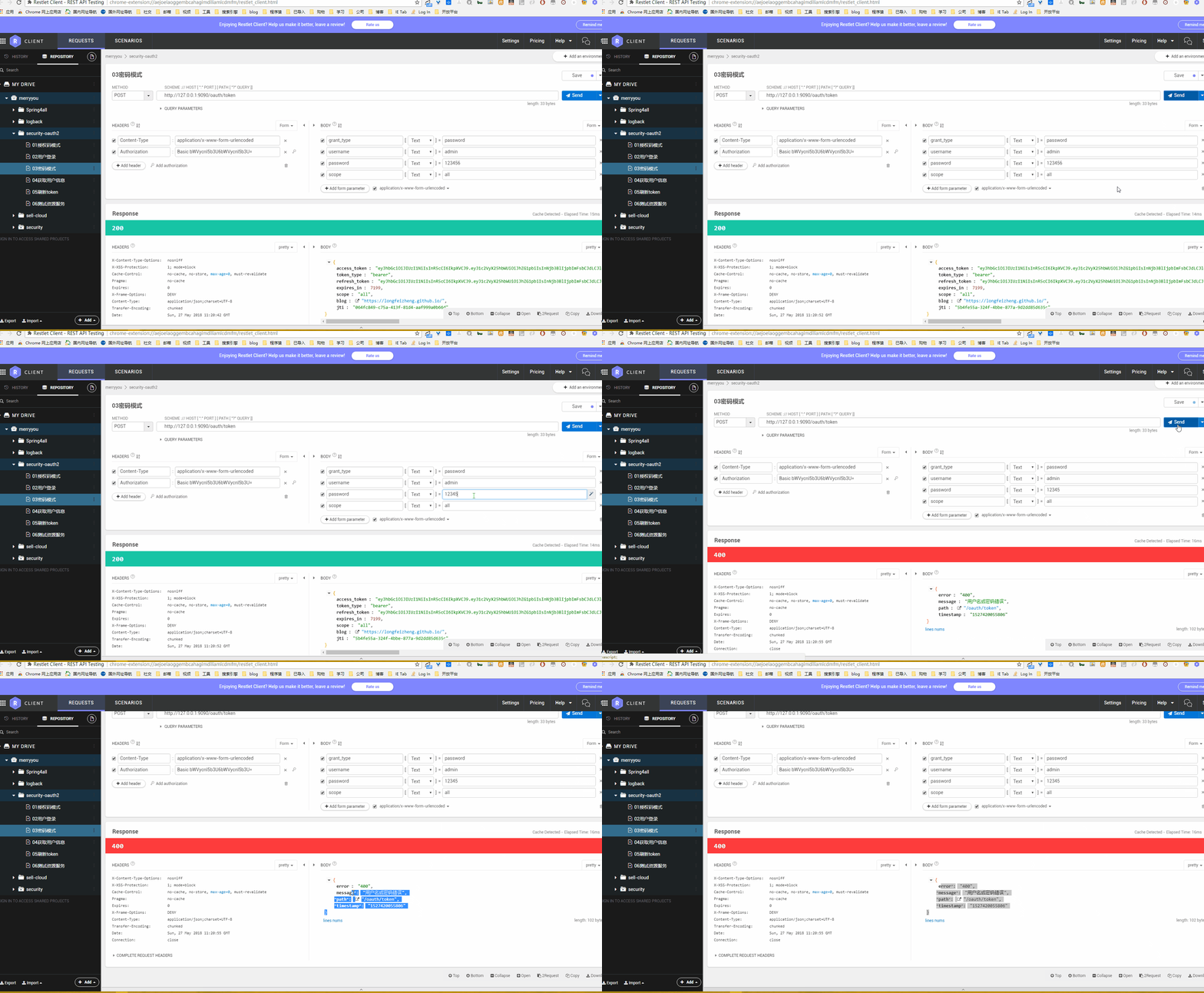
token异常
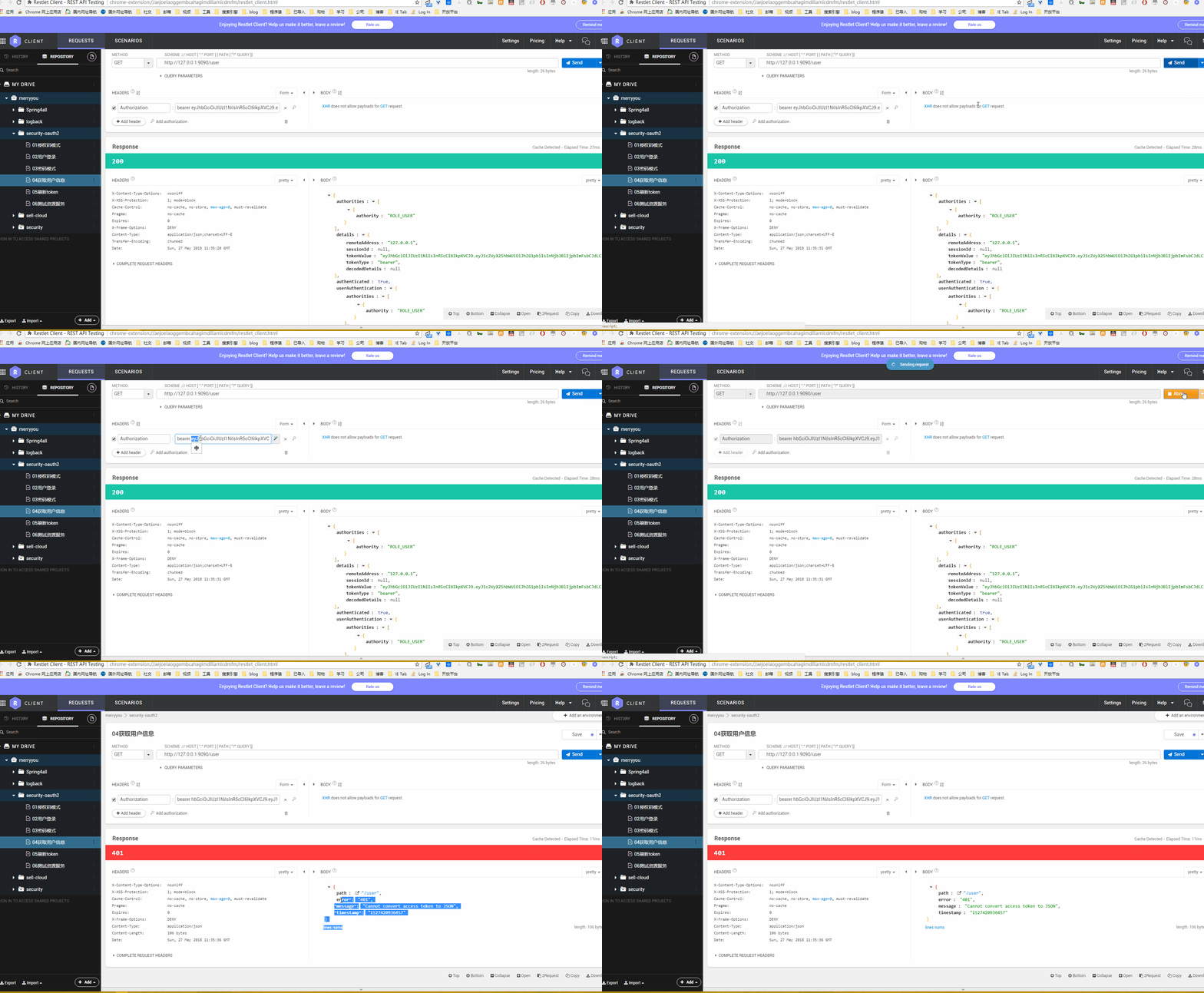
禁止访问
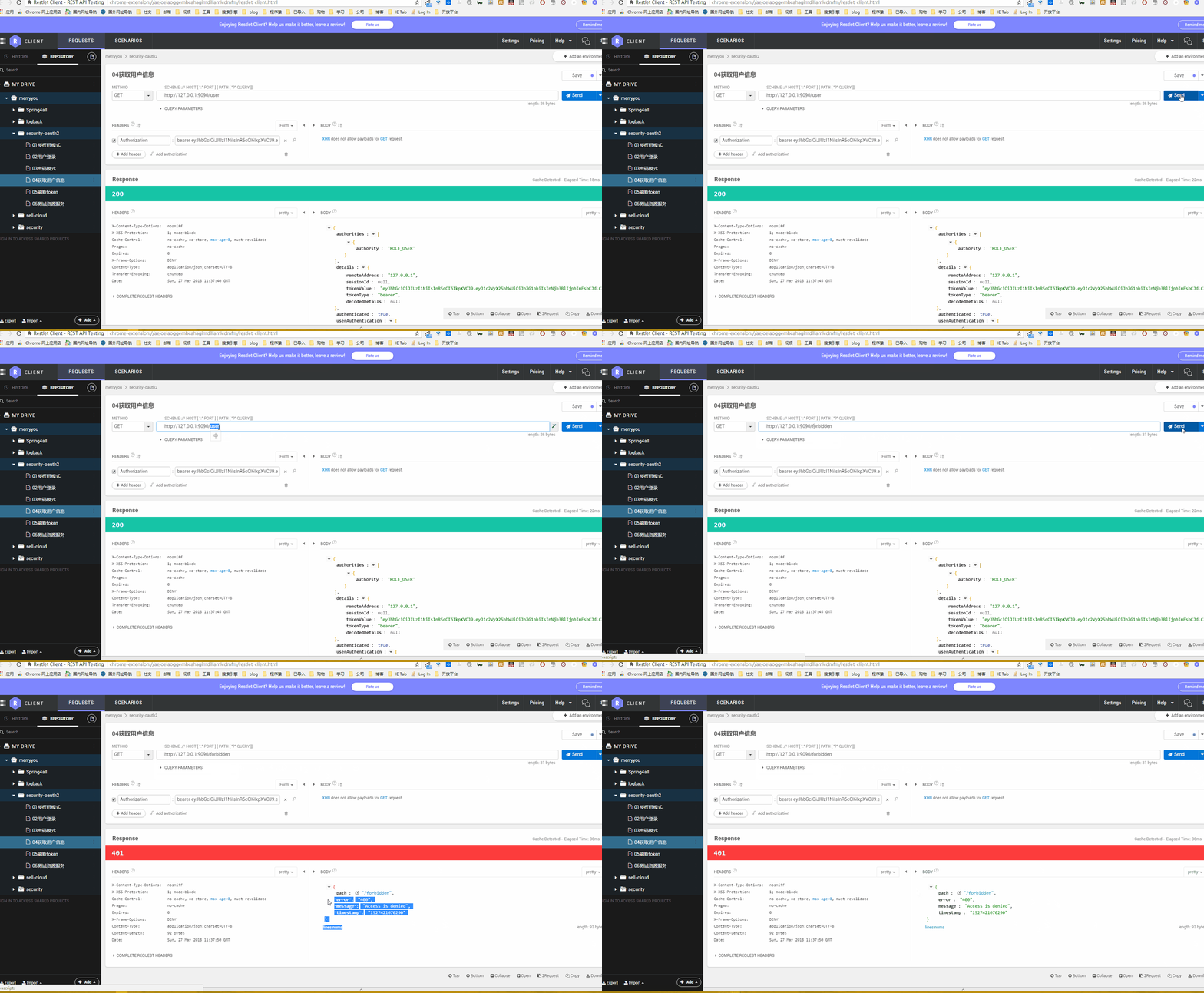
token失效
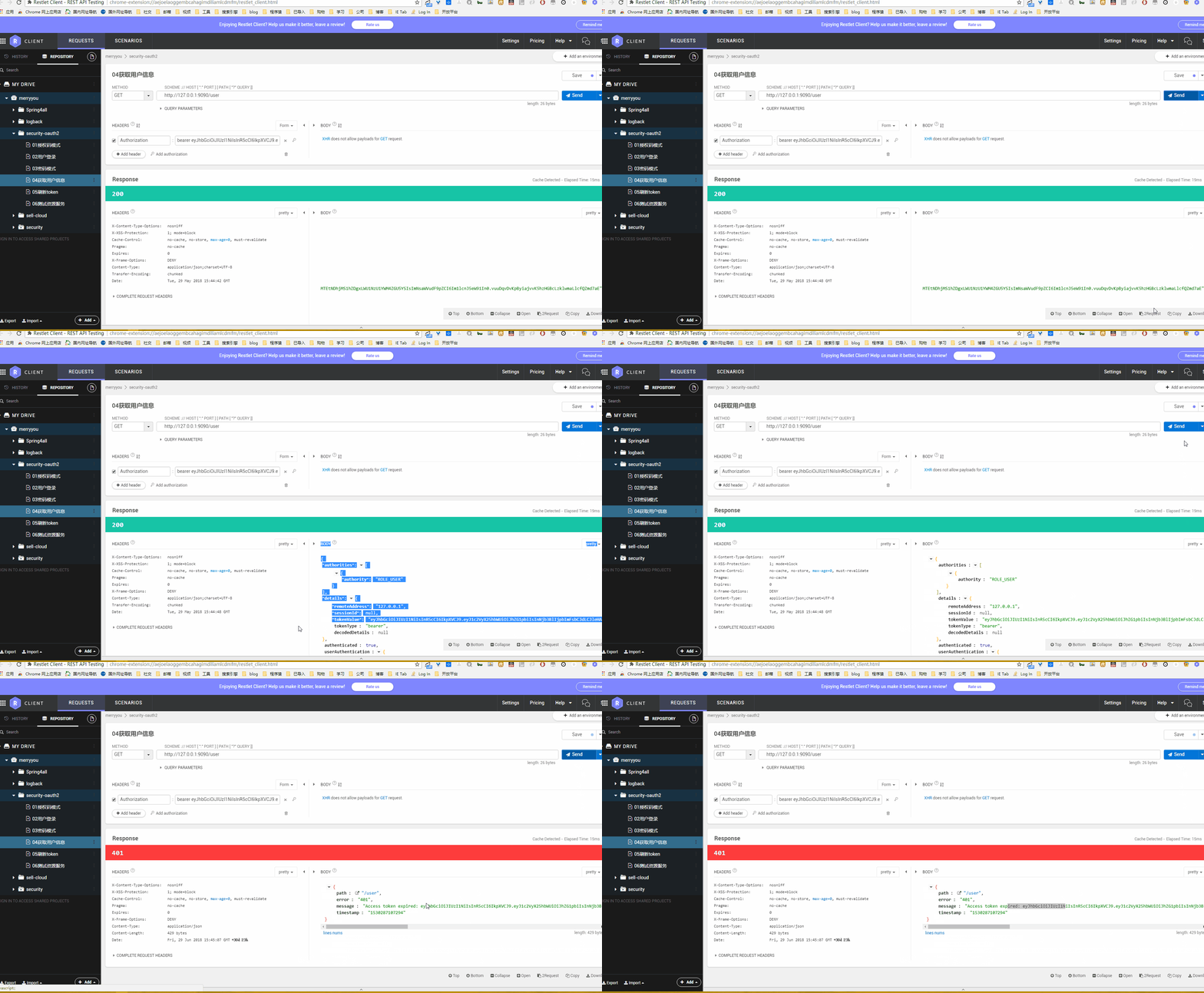
代码下载
- github:https://github.com/longfeizheng/security-oauth2
- gitee:https://gitee.com/merryyou/security-oauth2
【转载】Spring Security Oauth2 自定义 OAuth2 Exception的更多相关文章
- Spring Security Oauth2 自定义 OAuth2 Exception
付出就要得到回报,这种想法是错的. 前言 在使用Spring Security Oauth2登录和鉴权失败时,默认返回的异常信息如下 { "error": "unauth ...
- 朱晔和你聊Spring系列S1E10:强大且复杂的Spring Security(含OAuth2三角色+三模式完整例子)
Spring Security功能多,组件抽象程度高,配置方式多样,导致了Spring Security强大且复杂的特性.Spring Security的学习成本几乎是Spring家族中最高的,Spr ...
- spring security使用自定义登录界面后,不能返回到之前的请求界面的问题
昨天因为集成spring security oauth2,所以对之前spring security的配置进行了一些修改,然后就导致登录后不能正确跳转回被拦截的页面,而是返回到localhost根目录. ...
- spring security采用自定义登录页和退出功能
更新... 首先采用的是XML配置方式,请先查看 初识Spring security-添加security 在之前的示例中进行代码修改 项目结构如下: 一.修改spring-security.xml ...
- [转载]spring security 的 logout 功能
原文地址:security 的 logout 功能">spring security 的 logout 功能作者:sumnny 转载自:http://lengyun3566.iteye ...
- spring security 3 自定义认证,授权示例
1,建一个web project,并导入所有需要的lib. 2,配置web.xml,使用Spring的机制装载: <?xml version="1.0" encoding=& ...
- 阶段5 3.微服务项目【学成在线】_day16 Spring Security Oauth2_06-SpringSecurityOauth2研究-Oauth2授权码模式-申请令牌
3.3 Oauth2授权码模式 3.3.1 Oauth2授权模式 Oauth2有以下授权模式: 授权码模式(Authorization Code) 隐式授权模式(Implicit) 密码模式(Reso ...
- 阶段5 3.微服务项目【学成在线】_day16 Spring Security Oauth2_07-SpringSecurityOauth2研究-Oauth2授权码模式-资源服务授权测试
下面要完成 5.6两个步骤 3.3.4 资源服务授权 3.3.4.1 资源服务授权流程 资源服务拥有要访问的受保护资源,客户端携带令牌访问资源服务,如果令牌合法则可成功访问资源服务中的资 源,如下图 ...
- 阶段5 3.微服务项目【学成在线】_day16 Spring Security Oauth2_09-SpringSecurityOauth2研究-Oauth2密码模式授权
密码模式(Resource Owner Password Credentials)与授权码模式的区别是申请令牌不再使用授权码,而是直接 通过用户名和密码即可申请令牌. 测试如下: Post请求:htt ...
- spring security 之自定义表单登录源码跟踪
上一节我们跟踪了security的默认登录页的源码,可以参考这里:https://www.cnblogs.com/process-h/p/15522267.html 这节我们来看看如何自定义单表认 ...
随机推荐
- 过滤器 多少时间之前发布 dayjs relative'TrelativeTime
import dayjs from "dayjs"; import relativveTime from "dayjs/plugin/relativeTime" ...
- 王树森Attention与Self-Attention学习笔记
目录 Seq2Seq + Attention Attention的原理 方法一(Used in the original paper) 方法二(more popular,the same to Tra ...
- JOI Open 2017(口胡)
T1 Amusement Park 题意:通信题.给定一张 \(n\) 个点 \(m\) 条边的无向连通图.Alice 会得到一个 \([0, 2^{60})\) 中的数 \(x\),并且她需要给这张 ...
- Nuxt.js 应用中的 modules:before 事件钩子详解
title: Nuxt.js 应用中的 modules:before 事件钩子详解 date: 2024/10/15 updated: 2024/10/15 author: cmdragon exce ...
- KubeSphere 3.2.0 发布:带来面向 AI 场景的 GPU 调度与更灵活的网关
现如今最热门的服务器端技术是什么?答案大概就是云原生!KubeSphere 作为一个以 Kubernetes 为内核的云原生分布式操作系统,也是这如火如荼的云原生热潮中的一份子.KubeSphere ...
- 云原生爱好者周刊:非容器化应用也需要 Docker Compose
开源项目推荐 Process Compose Process Compose 是一个调度编排工具,不过不是用来调度容器的,而是用来调度非容器化的应用,可以定义进程的依赖性和启动顺序,也可以定义重启策略 ...
- 使用 Cursor 和 Devbox 快速开发基于 Rust 的 WASM 智能合约
本教程以一个智能合约(使用 NEAR 的一个官方 Fungible Tokens 来实现)的例子来介绍一下 Devbox 的强大功能,轻松构建环境,轻松发布. NEAR 是一个去中心化的应用平台,使用 ...
- HTB打靶记录-Infiltrator
nmap scan nmap -A 10.10.11.31 Starting Nmap 7.94SVN ( https://nmap.org ) at 2024-10-15 13:18 CST Nma ...
- C++之OpenCV入门到提高001:使用 Visual Studio2022 配置 OpenCV 环境
一.介绍 从今天开始,我们又要开始一个新的系列了,这个系列就是<C++之 Opencv 入门到提高>.这个系列是有关如何使用 C++ 语言,通过 Opencv 来实现图像处理.缺陷检测.视 ...
- 国内SRC信息收集
SRC之信息收集 前言: 关于SRC信息收集不在于工具是否全面,工具固然重要,它们能帮我们节省大量的时间收集资产,但不是说我们一定要用到所有工具,收集到某个SRC的所有资产才罢休.资产总会有遗漏, ...