
第一个WPF应用程序
- WPF使用一种新的XAML(Extensible Application Markup Language)语言来开发界面,这将把界面开发以及后台逻辑很好的分开,降低了耦合度,使用户界面设计师与程序开发者能更好的合作,降低维护和更新的成本。这也使得应用不仅仅局限于winforme ,更可以移植到网页(HTML5)上,使得网页拥有客户端的效果。
2.全新的数据banding,使得开发起来更加容易
1.随着win8的出现,微软开始边缘化WPF/SilverLight而热捧HTML5。
2.但是WPF还是Windows上方便快捷地进行桌面应用开发的不错选择。同时Win8风格的应用也支持XAML。
总而言之,就是为了界面与逻辑分离
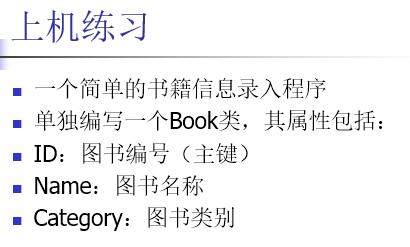

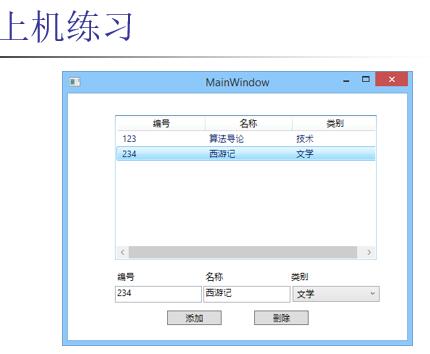
参考C#代码:
using System;

using System.Collections.Generic;

using System.Linq;

using System.Text;

using System.Windows;

using System.Windows.Controls;

using System.Windows.Data;

using System.Windows.Documents;

using System.Windows.Input;

using System.Windows.Media;

using System.Windows.Media.Imaging;

using System.Windows.Navigation;

using System.Windows.Shapes;

namespace Practice

{

    /// <summary>

    /// MainWindow.xaml 的交互逻辑

    /// 2016年4月11日 BY 伊甸一点

    /// </summary>

    public partial class MainWindow : Window

    {

        public MainWindow()

        {

            InitializeComponent();

        }

        private void ListView_Loaded(object sender, RoutedEventArgs e)//listview 加载时对gridview实现动态完成

        {

            GridView gridview = new GridView();

            gridview.Columns.Add(new GridViewColumn { Header = "ID", DisplayMemberBinding = new Binding("Id") });

            gridview.Columns.Add(new GridViewColumn { Header = "NAME", DisplayMemberBinding = new Binding("Name") });

            gridview.Columns.Add(new GridViewColumn { Header = "CATEGORY", DisplayMemberBinding = new Binding("Category") });

            listView1.View = gridview;

        }

        private void Button_Click(object sender, RoutedEventArgs e)//完成添加功能

        {

            string text1 = textBox1.Text;

            string text2 = textBox2.Text;

            string text3 = comoboBox1.Text.ToString();

            Boolean flag = false;//进行标记,flag == false 说明ID都不重复, flag == true 说明ID有重复

            if (text1 == "" || text2 == "" || text3 == "")

                MessageBox.Show("Incomplete information", "Tips");//提示信息不完整

            else

            {

                foreach (Book item in listView1.Items)//进行循环判断 item.id( Book的实例 )是否与listView1.Items的某个text1相等

                {

                    if (text1 == item.Id)

                    {

                        MessageBox.Show("Already have same ID number", "Tips");//提醒已经有相同ID存在

                        flag = true;//修改flag

                    }

                }

            }

            if (!flag)//相当于 if( flag == false )

                listView1.Items.Add(new Book(text1, text2, text3));

        }

        private void Button_Click_1(object sender, RoutedEventArgs e)//完成删除功能

        {

            if (listView1.SelectedItem == null)//判断是否选择中ListView中的某行

                MessageBox.Show("Nothing have been choosed ", "Tips");

            else

                listView1.Items.Remove(listView1.SelectedItem);//删除选中的行

        }

    }

    class Book

    {

        public Book(string ID, string NAME, string CATEGORY)//构造函数

        {

            Id = ID;

            Name = NAME;

            Category = CATEGORY;

        }

        private string id;//封装的要求

       //可以通过{ 右键--->重构--->封装字段 }实现自动完成get set函数

        //下面相同

        public string Id//再次使用id 时只需要调用Id即可

        {

            get { return id; }

            set { id = value; }

        }

        private string name;

        public string Name

        {

            get { return name; }

            set { name = value; }

        }

        private string category;

        public string Category

        {

            get { return category; }

            set { category = value; }

        }

    }

}
参考XAML代码:
<Window x:Class="Practice.MainWindow"

        xmlns="http://schemas.microsoft.com/winfx/2006/xaml/presentation"

        xmlns:x="http://schemas.microsoft.com/winfx/2006/xaml"

        Title="MainWindow" Height="350" Width="525">

    <Grid Margin="0,0,2,0">

        <TextBox x:Name="textBox1" HorizontalAlignment="Left" Height="23" Margin="40,240,0,0" TextWrapping="Wrap" VerticalAlignment="Top" Width="120"/>

        <TextBox x:Name="textBox2" HorizontalAlignment="Left" Height="23" Margin="192,240,0,0" TextWrapping="Wrap" VerticalAlignment="Top" Width="120"/>

        <TextBox HorizontalAlignment="Left" Height="0" Margin="119,276,0,0" TextWrapping="Wrap" Text="TextBox" VerticalAlignment="Top" Width="4"/>

        <ComboBox x:Name="comoboBox1" HorizontalAlignment="Left" Margin="352,240,0,0" VerticalAlignment="Top" Width="120">

            <ComboBoxItem Content="文化" Height="23" Width="100"/>

            <ComboBoxItem Content="科技" Height="23" Width="100"/>

            <ComboBoxItem Content="软件" Height="23" Width="100"/>

        </ComboBox>

        <Button Content="Add" HorizontalAlignment="Left" Margin="134,276,0,0" VerticalAlignment="Top" Width="75" Click="Button_Click"/>

        <Button Content="Delete" HorizontalAlignment="Left" Margin="283,276,0,0" VerticalAlignment="Top" Width="75" Click="Button_Click_1"/>

        <Grid Margin="40,10,43,139">

            <ListView x:Name="listView1" HorizontalAlignment="Left" Height="170" VerticalAlignment="Top" Width="432" Loaded="ListView_Loaded">

                <ListView.View>

                    <GridView/>

                </ListView.View>

            </ListView>

        </Grid>

        <Label Content="ID" HorizontalAlignment="Left" Margin="40,210,0,0" VerticalAlignment="Top"/>

        <Label Content="Name" HorizontalAlignment="Left" Margin="192,210,0,0" VerticalAlignment="Top"/>

        <Label Content="Category" HorizontalAlignment="Left" Margin="352,210,0,0" VerticalAlignment="Top"/>

    </Grid>

</Window>
对应的界面:
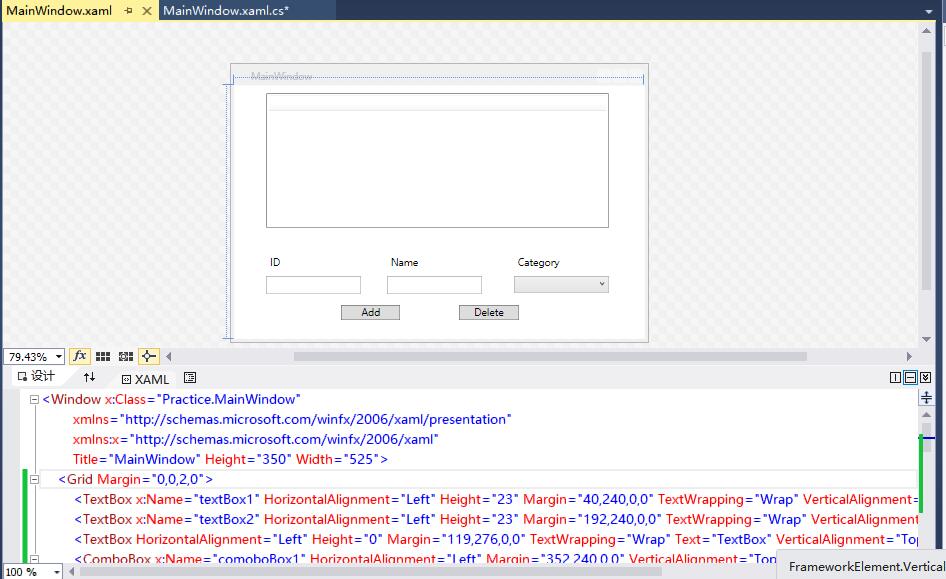
运行界面:

第一个WPF应用程序的更多相关文章
- 演练:我的第一个 WPF 桌面应用程序 https://docs.microsoft.com/zh-cn/dotnet/framework/wpf/getting-started/walkthrough-my-first-wpf-desktop-application
这篇文章演示如何开发简单的 Windows Presentation Foundation (WPF) 应用程序包括元素所共有的大多数 WPF 应用程序: 可扩展应用程序标记语言 (XAML) 标记. ...
- WPF入门教程系列(一) 创建你的第一个WPF项目
WPF入门教程系列(一) 创建你的第一个WPF项目 WPF基础知识 快速学习绝不是从零学起的,良好的基础是快速入手的关键,下面先为大家摞列以下自己总结的学习WPF的几点基础知识: 1) C#基础语法知 ...
- WPF 之 WPF应用程序事件
当新建一个wpf应用程序,会自动生成一个App.xaml和MainWindow.xaml文件. 其中 App.xam 用来设置Application,应用程序的起始文件和资源及应用程序的一些属性和事件 ...
- wpf应用程序 打印标签
新建一个wpf应用程序,Xaml如下: <Window x:Class="CreateBarCodeDemo.MainWindow" xmlns="http://s ...
- 使用MVVM设计模式构建WPF应用程序
使用MVVM设计模式构建WPF应用程序 本文是翻译大牛Josh Smith的文章,WPF Apps With The Model-View-ViewModel Design Pattern,译者水平有 ...
- 运用Edraw为WPF应用程序嵌入Office文档的方法总结
具体描述了运用Edraw Office Viewer Component为WPF应用长须嵌入MS Word,Excel以及Power Point的方法. 打开Visual Studio,并创建一个新的 ...
- WPF应用程序顶级标签一定是Window吗?
原文:WPF应用程序顶级标签一定是Window吗? WPF应用程序顶级标签一定是Window吗? 很多人误以为是.可是,答案却是否定的.我们不妨来测试一下. 首先使用顶级标签为Window,这是最普通 ...
- 搭建QQ聊天通信的程序:(1)基于 networkcomms.net 创建一个WPF聊天客户端服务器应用程序 (1)
搭建QQ聊天通信的程序:(1)基于 networkcomms.net 创建一个WPF聊天客户端服务器应用程序 原文地址(英文):http://www.networkcomms.net/creating ...
- 写一个去除AI2XAML注释及多余数字位数的WPF窗体程序
原文:写一个去除AI2XAML注释及多余数字位数的WPF窗体程序 使用正则表达式去除多余注释及冗余数字位,关键代码: string pattern = @"/b(/d+ ...
随机推荐
- Json.Net
下载地址:Json.NET 文档地址:Json.NET Documentation 基本的序列化与反序列化 public class Product { public string Name { ge ...
- c#中的正则表达式
using System; using System.Collections.Generic; using System.Linq; using System.Text; using System.T ...
- 正则表达式匹配a标签的href
JS代码: <html> <head> <script language="javascript"> var a='<P><A ...
- ms sql 2005和2008收缩日志的方法
步骤1: 2005的sql 语句为:back up log 数据库名称 with no_log 目的:截断数据库日志 2008的sql 语句为:alter database 数据库名称 set rec ...
- Java连接MYSQL 数据库的连接步骤
这篇文章主要以MySQL为例讲下Java如何连接到数据库的. 当然,首先要安装有JDK(一般是JDK1.5.X).然后安装MySQL,这些都比较简单,具体过程就不说了.配置好这两个环境后,下载JDBC ...
- MEF入门之不求甚解,但力求简单能讲明白(二)
在上一篇文章中,我们已经学到了很基本的MEF概念和使用方法. 但我们导出的是一个object类型的实例,只能用来tostring,没有引用部件类库,也不能用里面的成员方法. 本篇,我们逐渐往简单的文件 ...
- 【Java每日一题】20161128
package Nov2016; import java.util.ArrayList; import java.util.List; public class Ques1128 { public s ...
- 解决之前上架的 App 在 iOS 9 会闪退问题 (更新:已有 Hotfix)
最新更新:(2015.10.02) 开发环境: Delphi 10 Seattle OS X El Capitan v10.11 需使用下列 HotfixID: 30398, PAServer Hot ...
- 第 27 章 CSS 传统布局[下]
学习要点: 1.定位布局 2.box-sizing 3.resize 主讲教师:李炎恢 本章主要探讨 HTML5 中 CSS 早期所使用的传统布局,很多情况下,这些布局方式还是非常有用的. 一.定位布 ...
- Java中使用Jedis操作Redis
使用Java操作Redis需要jedis-2.1.0.jar,下载地址:http://files.cnblogs.com/liuling/jedis-2.1.0.jar.zip 如果需要使用Redis ...