
Tweened Animations 渐变动作
Tweened Animations 渐变动作
Animations分两类:
第一类:渐变的(Tweened): 淡入淡出(Alpha),旋转(Rotate),移动(Translate),缩放(Scale);
第二类:Frame-by-Frame: 就如电影一般由多张图片按照一定的时间间隔显示。
使用Tweened Animations的Java代码使用步骤(当然你也可以不用AnimationSet):
1. 创建一个AnimationSet对象
2. 根据需要创建相应的Animation对象(AlphaAnimation、RotateAnimation、ScaleAnimation、TranslateAnimation)
3. 设置Animation对象相应的数据(duration, startoffset......)
4. 使用addAnimation方法将Animation对象添加到AnimationSet对象当中
5. 使用控件对象开始执行AnimationSet
l view.startAnimation(animation);
l view.setAnimation(animation);
view.startNow();
取消动作:
l animation.cancel(); //动作本身取消
l animationset.cancel(); //动作集取消
l (View控件)img.clearAnimation(); //控件取消附在其上的动作
AnimationSet
用于控制View对象进行多个动作的组合,该类继承于Animation类
l AnimationSet animationSet = new AnimationSet(true);
l animationSet.addAnimation(rotateAnimation);
l animationSet.cancel();
e.g.创建一个移动的动作

l //设置动画执行事件(单位:毫秒)
l setDuration(long durationMills);
l //如果fillAfter的值为true,则动画执行后,控件将停留在执行结果的状态
l setFillAfter(boolean fillAfter);
l //如果fillBefore的值为true,则动画执行后,控件将回到动画执行之前的状态
l setFillBefore(boolen fillBefore);
l //设置动画执行之前的等待时间
l setStartOffSet(long startOffSet);
l //设置动画再重复执行的次数 注意repeatcount(x)共执行x+1次
l setRepeatCount(int repeatCount);
l //设置动作重复的模式 repeatMode为Animation.REVERSE或Animation.RESTART
l setRepeatMode(int repeatMode);
AlphaAnimation
public AlphaAnimation (float fromAlpha, float toAlpha)
起始透明度和终止透明度,1为不透明,0为透明。
RotateAnimation
l RotateAnimation(float fromDegrees, float toDegrees)
l RotateAnimation(float fromDegrees, float toDegrees, float pivotX, float pivotY)
l RotateAnimation (float fromDegrees, float toDegrees, int pivotXType, float pivotXValue, int pivotYType, float pivotYValue)
参数说明:
float fromDegrees:旋转的开始角度。 0f
float toDegrees:旋转的结束角度。 360f
这2个参数确定从什么角度旋转到什么角度
int pivotXType:X轴的伸缩模式,可以取值为ABSOLUTE、RELATIVE_TO_SELF、RELATIVE_TO_PARENT。
float pivotXValue:旋转中心X坐标的伸缩值。
int pivotYType:Y轴的伸缩模式,可以取值为ABSOLUTE、RELATIVE_TO_SELF、RELATIVE_TO_PARENT。
float pivotYValue:旋转中心Y坐标的伸缩值。
这4个参数确定旋转的中心点,即以哪个点为轴进行旋转。
Animation.ABSOLUTE:具体的坐标值,指绝对的屏幕像素单位
Animation.RELATIVE_TO_SELF:相对自己的坐标值,0.1f是指自己的坐标值乘以0.1
Animation.RELATIVE_TO_PARENT:相对父容器的坐标值,0.1f是指父容器的坐标值乘以0.1
TranslateAnimation
l TranslateAnimation(float fromXDelta, float toXDelta, float fromYDelta, float toYDelta)
l TranslateAnimation(int fromXType, float fromXValue, int toXType, float toXValue, int fromYType, float fromYValue, int toYType, float toYValue)
参数说明:
float fromXDelta:这个参数表示动画开始的点离当前View X坐标上的差值;
float toXDelta, 这个参数表示动画结束的点离当前View X坐标上的差值;
float fromYDelta, 这个参数表示动画开始的点离当前View Y坐标上的差值;
float toYDelta, 这个参数表示动画开始的点离当前View Y坐标上的差值;
这4个参数确定移动的起点和终点
fromXType:x轴(Animation.ABSOLUTE, Animation.RELATIVE_TO_SELF, Animation.RELATIVE_TO_PARENT);
fromXValue:第二个参数是第一个参数类型的起始值;
toXType,toXValue:第三个参数与第四个参数是x轴方向的终点参照与对应值;
这8个参数也是确定移动的起点和终点
l ScaleAnimation(float fromX, float toX, float fromY, float toY)
l ScaleAnimation(float fromX, float toX, float fromY, float toY, float pivotX, float pivotY)
l ScaleAnimation(float fromX, float toX, float fromY, float toY, int pivotXType, float pivotXValue, int pivotYType, float pivotYValue)
参数说明:
float fromX 动画起始时 X坐标上的伸缩尺寸
float toX 动画结束时 X坐标上的伸缩尺寸
float fromY 动画起始时Y坐标上的伸缩尺寸
float toY 动画结束时Y坐标上的伸缩尺寸
这4个参数确定从什么大小缩放到什么大小
int pivotXType 动画在X轴相对于物件位置类型
float pivotXValue 动画相对于物件的X坐标的开始位置
int pivotYType 动画在Y轴相对于物件位置类型
float pivotYValue 动画相对于物件的Y坐标的开始位置
这4个参数确定开始缩放的坐标,最后坐标是原来的坐标
疑问:
明明已经在每个动作开始之前取消了动作,但是……
若在渐变过程中点击其他动作,如旋转,则图片还是会以渐变过程中保持的透明度进行其他动作,而后正常。
但若在选择过程中点击其他动作,如移动,那图片的方向还是正常的。
也就是说,取消动作并不能改变当前图片的透明度,但是方向却恢复了正常。
代码如下:
<?xml version="1.0" encoding="utf-8"?>

<RelativeLayout xmlns:android="http://schemas.android.com/apk/res/android"

              android:orientation="vertical"

              android:layout_width="fill_parent"

              android:layout_height="fill_parent">

    <ImageView

            android:layout_width="wrap_content"

            android:layout_height="wrap_content"

            android:src="@drawable/n"

            android:id="@+id/img"

            android:layout_gravity="center"></ImageView>

    <Button

            android:layout_width="wrap_content"

            android:layout_height="wrap_content"

            android:text="渐变"

            android:id="@+id/button1"

            android:layout_alignParentRight="true"

            android:layout_alignParentTop="true"/>

    <Button

            android:layout_width="wrap_content"

            android:layout_height="wrap_content"

            android:text="旋转"

            android:id="@+id/button2"

            android:layout_alignRight="@+id/button1"

            android:layout_below="@+id/button1"/>

    <Button

            android:layout_width="wrap_content"

            android:layout_height="wrap_content"

            android:text="移动"

            android:id="@+id/button3"

            android:layout_alignRight="@+id/button2"

            android:layout_below="@+id/button2"/>

    <Button

            android:layout_width="wrap_content"

            android:layout_height="wrap_content"

            android:text="缩放"

            android:id="@+id/button4"

            android:layout_alignRight="@+id/button3"

            android:layout_below="@+id/button3"/>

</RelativeLayout>
package com.example.Animations;

import android.app.Activity;

import android.os.Bundle;

import android.view.View;

import android.view.animation.*;

import android.widget.Button;

import android.widget.ImageView;

public class MyActivity extends Activity

{

    private Button button1, button2, button3, button4;

    private ImageView img;

    /*

    * 若在渐变过程中点击其他动作,如旋转,则图片还是会以渐变过程中保持的透明度进行其他动作,而后正常

    */

    @Override

    public void onCreate(Bundle savedInstanceState)

    {

        super.onCreate(savedInstanceState);

        setContentView(R.layout.main);

        init();

        Alpha();

        Rotate();

        Translate();

        Scale();

    }

    public void init()

    {

        button1 = (Button) findViewById(R.id.button1);

        button2 = (Button) findViewById(R.id.button2);

        button3 = (Button) findViewById(R.id.button3);

        button4 = (Button) findViewById(R.id.button4);

        img = (ImageView) findViewById(R.id.img);

    }

    public void Alpha()

    {

        //public AlphaAnimation (float fromAlpha, float toAlpha)

        //起始透明度和终止透明度,1为不透明,0为透明。

        final AlphaAnimation alphaAnimation = new AlphaAnimation(1, 0);

        alphaAnimation.setDuration(1000);

        alphaAnimation.setRepeatCount(1);

        alphaAnimation.setFillAfter(true);

        alphaAnimation.setStartOffset(10);

        button1.setOnClickListener(new View.OnClickListener()

        {

            @Override

            public void onClick(View view)

            {

                //若不清除,则每按一次动作叠加。

                img.clearAnimation();

                img.startAnimation(alphaAnimation);

            }

        });

    }

    public void Rotate()

    {

        final RotateAnimation rotateAnimation = new RotateAnimation(0f, 360f, Animation.RELATIVE_TO_SELF, 1.5f,

                Animation.RELATIVE_TO_SELF, 1.5f);

        rotateAnimation.setDuration(3000);

        button2.setOnClickListener(new View.OnClickListener()

        {

            @Override

            public void onClick(View view)

            {

                img.clearAnimation();

                img.startAnimation(rotateAnimation);

            }

        });

    }

    public void Translate()

    {

        final TranslateAnimation translateAnimation = new TranslateAnimation(Animation.RELATIVE_TO_SELF, 0f,

                Animation.RELATIVE_TO_SELF, 2f, Animation.RELATIVE_TO_SELF, 0f, Animation.RELATIVE_TO_SELF, 2f);

        translateAnimation.setDuration(3000);

        translateAnimation.setRepeatMode(Animation.REVERSE);

        translateAnimation.setRepeatCount(3);

        button3.setOnClickListener(new View.OnClickListener()

        {

            @Override

            public void onClick(View view)

            {

                img.clearAnimation();

                img.startAnimation(translateAnimation);

            }

        });

    }

    public void Scale()

    {

        final ScaleAnimation scaleAnimation = new ScaleAnimation(0f, 1f, 0f, 1f, Animation.RELATIVE_TO_SELF, 1.5f,

                Animation.RELATIVE_TO_SELF, 1.5f);

        scaleAnimation.setDuration(3000);

        scaleAnimation.setRepeatMode(Animation.RESTART);

        scaleAnimation.setRepeatCount(2);

        button4.setOnClickListener(new View.OnClickListener()

        {

            @Override

            public void onClick(View view)

            {

                img.clearAnimation();

                img.startAnimation(scaleAnimation);

            }

        });

    }

}
效果图:
渐变

旋转
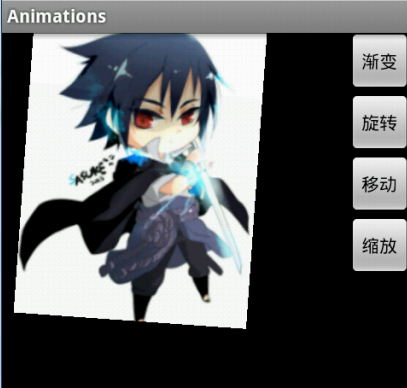
移动

缩放

ps.这篇本来是在wps上写好的,若直接复制过来格式全没了,幸好找到了一个方法,就是将wps另存为html,然后将html的源代码复制到这里的html编辑框,很实用。以后就不用每次都用这个垃圾编辑框了。不过在wps上有些格式处理的不统一,所以有些地方格式乱了。
Tweened Animations 渐变动作的更多相关文章
- android Tweened Animations
Android提供了两种类型的动画: 一类是Tween动画:提供了旋转.移动.伸展和淡出等效果: 第二类是Frame-by-frame动画:这一类Animations可以创建一个Drawable序列, ...
- 补间动画Tweened Animations
本例子简单讲一下怎么用补间动画 1.在xml中定义好动画的资源文件,如下(注意把不同的效果放在一起可以一起用,同时起效果) <?xml version="1.0" encod ...
- Mars视频笔记——Animation
Animations的使用(1) 什么是Animations 提供了一系列的动画效果,可以应用在绝大多数控件中 Animations的分类 1 Tweened Animations 渐变动画 提供了旋 ...
- Android Animations 视图动画使用详解!!!
转自:http://www.open-open.com/lib/view/open1335777066015.html Android Animations 视图动画使用详解 一.动画类型 Andro ...
- Android Animations动画使用详解
一.动画类型 Android的animation由四种类型组成:alpha.scale.translate.rotate XML配置文件中 alpha 渐变透明度动画效果 scale 渐变尺寸伸缩动画 ...
- Cocos2dx源码赏析(4)之Action动作
Cocos2dx源码赏析(4)之Action动作 本篇,依然是通过阅读源码的方式来简单赏析下Cocos2dx中Action动画的执行过程.当然,这里也只是通过这种方式来总结下对Cocos2dx引擎的理 ...
- 19、android面试题整理(自己给自己充充电吧)
(转载,出处丢失,请原作者原谅,如有意见,私信我我会尽快删除本文) JAVA 1.GC是什么? 为什么要有GC?GC是垃圾收集的意思(Gabage Collection),内存处理是编程人员容易出现问 ...
- Translation002—Package Index(Android包索引)
!!!!!!!!!!!!!!!!!!!!!!!!!!!!!!!!!!!!!!!!!!! 看本翻译前请您注意: 本人初学android,可能有的翻译不是非常准确,但本人尽最大努力,不清楚处会做标记,并附 ...
- android Animation动画的xml使用
在Android应用程序,使用动画效果,能带给用户更好的感觉,做动画能够通过XML或Android代码来实现. Animation动画效果的实现能够通过两种方式进行实现,一种是tweened anim ...
随机推荐
- Gamescom2014:中国游戏公司37.com进军西方海外市场
在2014年的德国科隆国际游戏展上.Xsolla曾与37.com聊天.我们讨论了中国公司眼下进军西方市场的战略,谈到营销的最有效方法.游戏货币化,并讨论在欧洲和土耳其的网页游戏的前景. 37wan 能 ...
- Android Studio之基本设置与运行
项目结构 当我们新建一个项目的目录结构默认是这样的 可以看到和Eclipse的目录结构有很大区别,Studio一个窗口只能有一个项目,而Eclipse则可以同时存在很多项目,如果你看着不习惯可以点击左 ...
- 基于shiro+jwt的真正rest url权限管理,前后端分离
代码地址如下:http://www.demodashi.com/demo/13277.html bootshiro & usthe bootshiro是基于springboot+shiro+j ...
- jqgrid 加按钮列
1.在jqgrid表格中增加列,内容是图标,定义图标单击事件,可以操作这一行的数据,如下图 2.前台代码 <div id="grid_List"> <table ...
- VS2012安装git
新安装了vs2012,尝试使用Git,安装过程比较简单,记录下来以备以后查阅. 1. 下载.安装Git 我的系统是Windows 7,需要安装Git for Windows. 下载地址: http ...
- C#定时任务的偷懒实现
通常会有些定时任务的工作,例如每分钟统计一下xxx用户的xxx数量 或者 定时拉取下数据 之类的任务. 通常要实现定时调度功能和控制线程是否可以并发执行. 所以通常一个简单的小项目搞成大项目,但是使用 ...
- Cocos2d-X中的ZORDER和Tag
ZORDER:是描写叙述渲染顺序的值,每一个CCNode都有ZORDER,默认是0 ZORDER越大,越后面绘制 假设ZORDER同样.那么看arrival顺序.先增加的节点先绘制 ZORDER仅仅在 ...
- unity, change shader for me and all my children
public void changeShaderForMeAndAllMyChildren(){ Transform[] childrenTransformList = GetComponentsIn ...
- unity文件写入与读取
using System.Collections; using System.Collections.Generic; using UnityEngine; using UnityEditor; us ...
- NGUI拖拽简介
挂上UIDragDropItem就可以实现拖拽,按钮监听Drop消息即可实现对拖放的监听. UIDragDropItem有一个Clone On Drag选项,勾上可以克隆,但会被ScrollView遮 ...