
【原创】大数据基础之Mesos(1)简介、安装、使用
Mesos 1.7.1

官方:http://mesos.apache.org/
一 简介
Program against your datacenter like it’s a single pool of resources
mesos使数据中心(庞大的服务器集群)看起来像是一个资源(CPU、内存、存储、网络带宽、端口等)池;
Apache Mesos abstracts CPU, memory, storage, and other compute resources away from machines (physical or virtual), enabling fault-tolerant and elastic distributed systems to easily be built and run effectively.
mesos对服务器(物理机或者虚拟机)的资源(CPU、内存、存储、网络带宽、端口等)进行抽象;
What is Mesos? A distributed systems kernel
Mesos is built using the same principles as the Linux kernel, only at a different level of abstraction. The Mesos kernel runs on every machine and provides applications (e.g., Hadoop, Spark, Kafka, Elasticsearch) with API’s for resource management and scheduling across entire datacenter and cloud environments.
mesos使用linux内核相同的原则进行设计和构建,mesos运行在每台服务器上,使得各种应用(hadoop、spark、kafka、es等)可以通过api的方式进行资源管理和调度,无论是在数据中心或者云上;
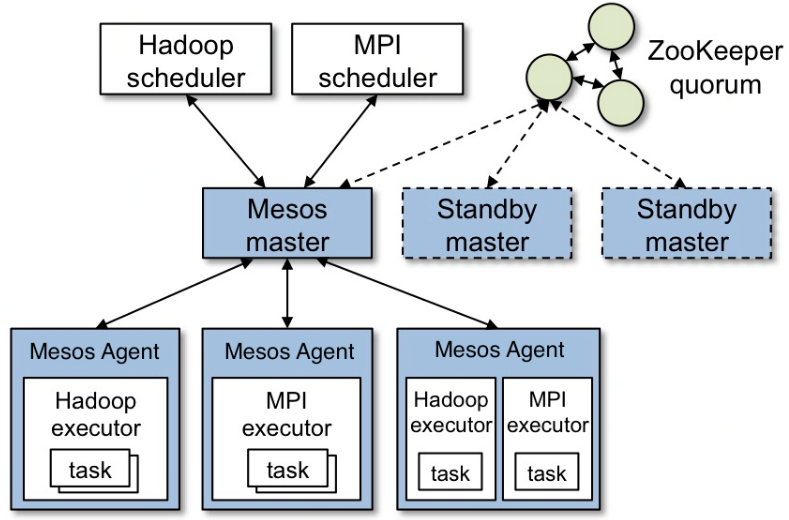
The above figure shows the main components of Mesos. Mesos consists of a master daemon that manages agent daemons running on each cluster node, and Mesos frameworks that run tasks on these agents.
mesos由master和agent组成,其中agent运行在集群中的每台服务器上;mesos framework(应用,比如hadoop、spark等)会在agent上运行task;
角色
master & agent
The master enables fine-grained sharing of resources (CPU, RAM, …) across frameworks by making them resource offers. Each resource offer contains a list of <agent ID, resource1: amount1, resource2: amount2, ...>. The master decides how many resources to offer to each framework according to a given organizational policy, such as fair sharing or strict priority. To support a diverse set of policies, the master employs a modular architecture that makes it easy to add new allocation modules via a plugin mechanism.
master通过resouce offer的方式来实现细粒度的框架间资源共享;每一个resource offer包含一个列表,每个元素看起来是<agent ID, resource1: amount1, resource2: amount2, ...>,即某个agent的各项资源的剩余情况;master根据给定的分组策略(比如fair sharing或strict priority)来决定为每个framework提供多少资源;master还提供插件机制来满足定制化需求;
概念
1 framework(scheduler & executor)
A framework running on top of Mesos consists of two components: a scheduler that registers with the master to be offered resources, and an executor process that is launched on agent nodes to run the framework’s tasks. While the master determines how many resources are offered to each framework, the frameworks' schedulers select which of the offered resources to use. When a framework accepts offered resources, it passes to Mesos a description of the tasks it wants to run on them. In turn, Mesos launches the tasks on the corresponding agents.
一个framework运行在mesos之上,有两部分组成:1)scheduler向mesos master注册并接收resource offer;2)executor在mesos agent上启动来运行task;
当scheduler收到resource offer后可以选择使用其中哪些资源(也可以拒绝),如果一些资源被确认使用,scheduler会给mesos发送希望在这些资源上运行的task描述,然后mesos就会在对应的agent上启动task;
2 resource offer

To ensure that such failures are handled appropriately, production deployments of Mesos typically use a process supervisor (such as systemd or supervisord) to detect when Mesos processes exit. The supervisor can be configured to restart the failed process automatically and/or to notify the cluster operator to investigate the situation.
二 安装
rpm安装
# yum install libevent libevent-devel cyrus-sasl cyrus-sasl-devel cyrus-sasl-md5 subversion-devel
$ wget http://repos.mesosphere.com/el/7/x86_64/RPMS/mesos-1.7.1-2.0.1.el7.x86_64.rpm
$ rpm -ivh mesos-1.7.1-2.0.1.el7.x86_64.rpm
手工编译安装
1 环境准备
$ wget http://repos.fedorapeople.org/repos/dchen/apache-maven/epel-apache-maven.repo -O /etc/yum.repos.d/epel-apache-maven.repo
$ yum install -y epel-release
$ bash -c 'cat > /etc/yum.repos.d/wandisco-svn.repo <<EOF
[WANdiscoSVN]
name=WANdisco SVN Repo 1.9
enabled=1
baseurl=http://opensource.wandisco.com/centos/7/svn-1.9/RPMS/\$basearch/
gpgcheck=1
gpgkey=http://opensource.wandisco.com/RPM-GPG-KEY-WANdisco
EOF'
$ yum update systemd
$ yum groupinstall -y "Development Tools"
$ yum install -y apache-maven python-devel python-six python-virtualenv java-1.8.0-openjdk-devel zlib-devel libcurl-devel openssl-devel cyrus-sasl-devel cyrus-sasl-md5 apr-devel subversion-devel apr-util-devel
以上为centos7的准备过程,其他系统详见编译过程参考
2 下载编译安装
$ wget http://www.apache.org/dist/mesos/1.7.1/mesos-1.7.1.tar.gz
$ tar -zxf mesos-1.7.1.tar.gz
$ cd mesos-1.7.1
$ mkdir build
$ cd build
$ ../configure
$ make
$ make check
$ make install
启动
1 单机启动
$ ./bin/mesos-master.sh --ip=127.0.0.1 --work_dir=/var/lib/mesos
$ ./bin/mesos-agent.sh --master=127.0.0.1:5050 --work_dir=/var/lib/mesos
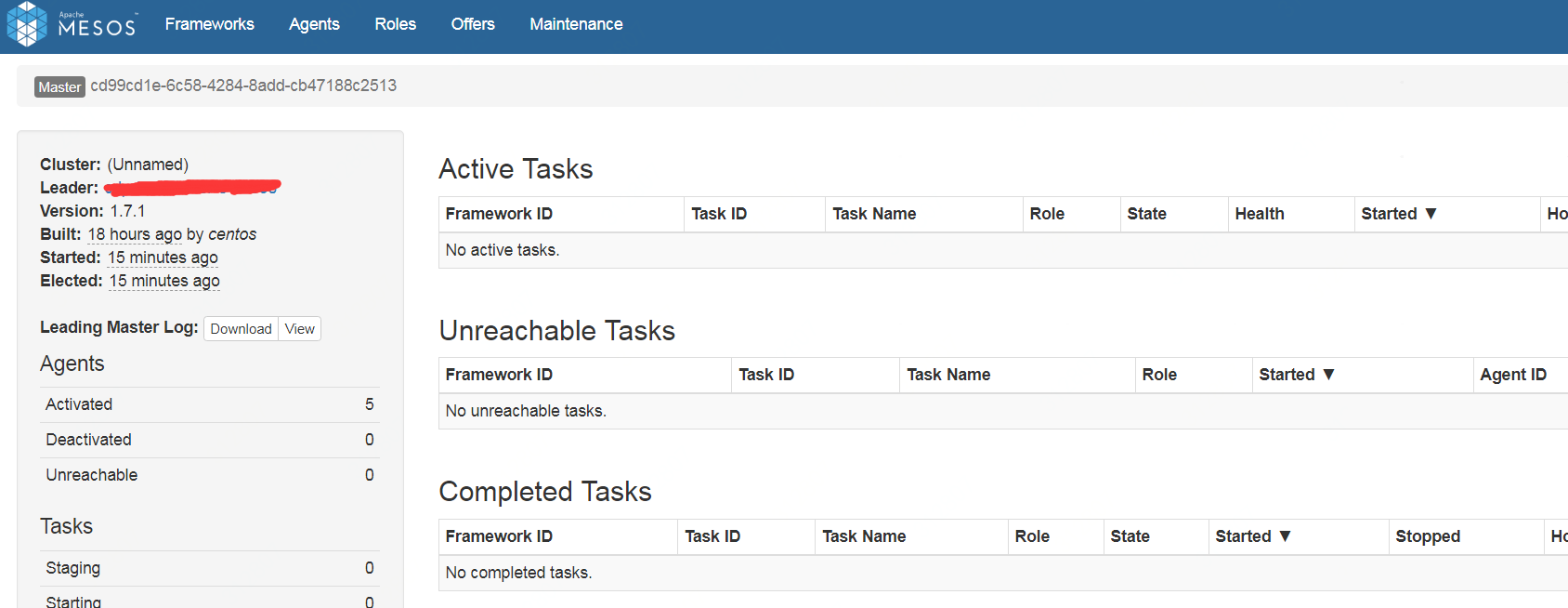
访问 http://127.0.0.1:5050
2 集群启动
$ ./bin/mesos-master.sh --work_dir=/var/lib/mesos --zk=zk://host1:port1,host2:port2,.../path
$ ./bin/mesos-agent.sh --work_dir=/var/lib/mesos --master=zk://host1:port1,host2:port2,.../path
如果是rpm安装,可以修改配置文件
$ vi /etc/mesos/zk
然后通过service启动
# service mesos-master start
# service mesos-slave startor
# systemctl start mesos-master
# systemctl start mesos-slave
其他配置修改
$ vi /etc/mesos-master/quorum
$ vi /etc/mesos-master/work_dir
$ vi /etc/mesos-slave/work_dir
3 开机启动
$ systemctl enable mesos-master
$ systemctl enable mesos-slave
编译过程参考:
http://mesos.apache.org/documentation/latest/building/
启动参数参考:
http://mesos.apache.org/documentation/latest/configuration/master-and-agent/
http://mesos.apache.org/documentation/latest/configuration/master/
http://mesos.apache.org/documentation/latest/configuration/agent/
附:mesos编译过程中 ../configure 这一步有可能报错
checking for python... /data/anaconda2/bin/python
checking for python version... 2.7
checking for python platform... linux2
checking for python script directory... ${prefix}/lib/python2.7/site-packages
checking for python extension module directory... ${exec_prefix}/lib/python2.7/site-packages
checking for python2.7... (cached) /data/anaconda2/bin/python
checking for a version of Python >= '2.1.0'... yes
checking for a version of Python >= '2.6'... yes
checking for the distutils Python package... yes
checking for Python include path... -I/data/anaconda2/include/python2.7
checking for Python library path... -L/data/anaconda2/lib -lpython2.7
checking for Python site-packages path... /data/anaconda2/lib/python2.7/site-packages
checking python extra libraries... -lpthread -ldl -lutil -lm
checking python extra linking flags... -Xlinker -export-dynamic
checking consistency of all components of python development environment... no
configure: error: in `/data/mesos-1.7.0/build':
configure: error:
Could not link test program to Python. Maybe the main Python library has been
installed in some non-standard library path. If so, pass it to configure,
via the LDFLAGS environment variable.
Example: ./configure LDFLAGS="-L/usr/non-standard-path/python/lib"
============================================================================
ERROR!
You probably have to install the development version of the Python package
for your distribution. The exact name of this package varies among them.
============================================================================See `config.log' for more details
这时优先看有没有安装python-devel,安装之后重试configure
$ yum install python-devel
如果已经安装过python-devel还是报相同的错,极有可能是存在多个python版本导致的(比如系统自带一个python,anaconda自带一个python),这时通过conda安装python-devel后还是报相同的错
$ conda create --name dev python=[version here]
可以通过恢复系统默认python来暂时解决
$ vi ~/.bashrc
安装anaconda后默认会修改当前用户的.bashrc,将以下部分注释即可
# added by Anaconda2 2018.12 installer
# >>> conda init >>>
...
# <<< conda init <<<
三 使用
配置文件
~/.mesos/config.toml
命令
$ mesos help
【原创】大数据基础之Mesos(1)简介、安装、使用的更多相关文章
- 【原创】大数据基础之Mesos+Marathon+Docker部署nginx
一 安装 安装docker:https://www.cnblogs.com/barneywill/p/10343091.html安装mesos:https://www.cnblogs.com/barn ...
- 大数据基础环境--jdk1.8环境安装部署
1.环境说明 1.1.机器配置说明 本次集群环境为三台linux系统机器,具体信息如下: 主机名称 IP地址 操作系统 hadoop1 10.0.0.20 CentOS Linux release 7 ...
- 【原创】大数据基础之Zookeeper(2)源代码解析
核心枚举 public enum ServerState { LOOKING, FOLLOWING, LEADING, OBSERVING; } zookeeper服务器状态:刚启动LOOKING,f ...
- CentOS6安装各种大数据软件 第八章:Hive安装和配置
相关文章链接 CentOS6安装各种大数据软件 第一章:各个软件版本介绍 CentOS6安装各种大数据软件 第二章:Linux各个软件启动命令 CentOS6安装各种大数据软件 第三章:Linux基础 ...
- 大数据应用日志采集之Scribe 安装配置指南
大数据应用日志采集之Scribe 安装配置指南 大数据应用日志采集之Scribe 安装配置指南 1.概述 Scribe是Facebook开源的日志收集系统,在Facebook内部已经得到大量的应用.它 ...
- 【原创】大数据基础之Impala(1)简介、安装、使用
impala2.12 官方:http://impala.apache.org/ 一 简介 Apache Impala is the open source, native analytic datab ...
- 【原创】大数据基础之Benchmark(2)TPC-DS
tpc 官方:http://www.tpc.org/ 一 简介 The TPC is a non-profit corporation founded to define transaction pr ...
- 【原创】大数据基础之词频统计Word Count
对文件进行词频统计,是一个大数据领域的hello word级别的应用,来看下实现有多简单: 1 Linux单机处理 egrep -o "\b[[:alpha:]]+\b" test ...
- 大数据基础知识:分布式计算、服务器集群[zz]
大数据中的数据量非常巨大,达到了PB级别.而且这庞大的数据之中,不仅仅包括结构化数据(如数字.符号等数据),还包括非结构化数据(如文本.图像.声音.视频等数据).这使得大数据的存储,管理和处理很难利用 ...
随机推荐
- 即将发布的 ASP.NET Core 2.2 会有哪些新玩意儿?
今年 6 月份的时候时候 .NET 团队就在 GitHub 公布了 ASP.NET Core 2.2 版本的 Roadmap(文末有链接),而前两天 ASP.NET Core 2.2 预览版 2 已经 ...
- 在OSGI容器Equinox中嵌入HttpServer
原文地址:https://liugang594.iteye.com/blog/1328050 简单介绍一下如何在一个osgi的bundle中内嵌使用http服务 一.基础 首先看看在OSGI中怎么启动 ...
- hMailServer相关视频教程
来源:https://www.hmailserver.org/viewtopic.php?f=4&t=34
- java异常处理规范
异常处理的优势[存在意义]:异常检测者有检测出异常的能力,但不知道在出现该异常的情况下应该怎么处理.故库方法一般会抛出异常给调用者来处理.所以总结而言,异常处理的优势就是,将处理错误(调用者处理)从检 ...
- Python——字符转换(int , bool ,str)
while True: pass while 1: pass #效果相同,后者 效果更快 s = 1 y = bool (s) #结果为True,int只要不是0,就为真 s = 'abc' y = ...
- jQuery对页面的操作
一.对元素内容和值进行操作 1.对元素内容操作 [text()]:获取值. [text(val)]:获取并修改值. [html()]:获取值. [html(val)]:获取并修改值,与text的区别在 ...
- fifo 实现问题
AR# 63960 FIFO Generator v12.0 - [Common 17-55] 'get_property' expects at least one object.[axis_fif ...
- ES-6常用语法和Vue初识
一.ES6常用语法 1.变量的定义 1. 介绍 ES6以前 var关键字用来声明变量,无论声明在何处都存在变量提升这个事情,会提前创建变量. 作用域也只有全局作用域以及函数作用域,所以变量会提升在函数 ...
- BZOJ 3653: 谈笑风生(离线, 长链剖分, 后缀和)
题意 给你一颗有 \(n\) 个点并且以 \(1\) 为根的树.共有 \(q\) 次询问,每次询问两个参数 \(p, k\) .询问有多少对点 \((p, a, b)\) 满足 \(p,a,b\) 为 ...
- L2-006 树的遍历 (25 分) (根据后序遍历与中序遍历建二叉树)
题目链接:https://pintia.cn/problem-sets/994805046380707840/problems/994805069361299456 L2-006 树的遍历 (25 分 ...