
Web从入门到放弃<4>
1,插入
如下html:
<!DOCTYPE html>

<html lang="en">

<head>

    <meta charset="UTF-8">

    <title>Title</title>

</head>

<body>

<h1>snapshot</h1>

<ul id="imageGallery">

    <li><a href="images/1.png" title="AA samples"> image 1</a></li>

    <li><a href="images/2.jpg" title="China map"> image 2</a></li>

</ul>

<script src="showpic.js"></script>

</body>

</html>
现在要修改以前的使 description(显示链接描述) 和 placeholder(显示图片) 以javascript形式插入:
window.onload = function () {

    var body = document.getElementsByTagName('body')[0];

    var placeHolder = document.createElement('img');

    placeHolder.setAttribute('id','placeHolder');

    placeHolder.setAttribute('src','#');

    placeHolder.setAttribute('alt','Selection to change pictures');

    var description = document.createElement('p');

    description.setAttribute('id','description');

    var descText = document.createTextNode('Description');

    description.appendChild(descText);

    body.appendChild(placeHolder);

    body.appendChild(description);

}
当前会显示成这样:
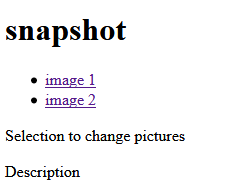
<1>node.insertBefore(element,target)
如果要将placeholder (也就是Selection to change pictures) 插入到snapshot 之后,但在image1,image2之前:
然后让Description在placehoder 之前:

window.onload = function () {

    var body = document.getElementsByTagName('body')[0];

    var placeHolder = document.createElement('img');

    placeHolder.setAttribute('id','placeHolder');

    placeHolder.setAttribute('src','#');

    placeHolder.setAttribute('alt','Selection to change pictures');

    var description = document.createElement('p');

    description.setAttribute('id','description');

    var descText = document.createTextNode('Description');

    description.appendChild(descText);

    //body.appendChild(placeHolder);

    //body.appendChild(description);

    var gallery = document.getElementById('imageGallery');

    body.insertBefore(placeHolder,gallery);      // insert in before imageGallery

    body.insertBefore(description,placeHolder);  // insert description before placeholder

};
其中body 也可以:
var body = gallery.parentNode;

var body = document.getElementsByTagName('body')[0];

var body = document.body;
如下换下顺序:

body.insertBefore(placeHolder,gallery);      // insert in before imageGallery

body.insertBefore(description,gallery);      // insert description before imageGallery
图片程序最终版本:
html:
<!DOCTYPE html>

<html lang="en">

<head>

    <meta charset="UTF-8">

    <title>Title</title>

</head>

<body style="background-color: darkgrey; font-family: Consolas">

<h1 style="background-color: #222222;color: white; padding: 0">snapshot</h1>

<ul id="imageGallery">

    <li><a href="images/1.png" title="AA samples">image1</a></li>

    <li><a href="images/2.jpg" title="China map">image2</a></li>

</ul>

<script src="showpic.js"></script>

</body>

</html>
js:
function addLoadEvent(func) {

    var oldEvent = window.onload;

    if(typeof window.onload !== 'function'){

        window.onload = func;  // if have no event , direct use new event function

    }

    else{

        window.onload = function () {

            oldEvent(); // add origin event

            func();     // add new event

        }

    }

}

function insertAfter(newElement,targetElement) {

    var parent  = targetElement.parentNode;

    if (parent.lastChild === targetElement){

        parent.appendChild(newElement);

    }

    else{

        //console.log("function2 will insert:" , newElement, "| to targetElement:", targetElement, "->nextSibling",targetElement.nextSibling);

        parent.insertBefore(newElement,targetElement.nextSibling);

    }

}

function preparePlaceHolder() {

    var body = document.getElementsByTagName('body')[0];

    var placeHolder = document.createElement('img');

    placeHolder.setAttribute('id','placeHolder');

    placeHolder.setAttribute('src','#');

    placeHolder.setAttribute('alt','Selection to change pictures');

    var description = document.createElement('p');

    description.setAttribute('id','description');

    var descText = document.createTextNode('Description');

    description.appendChild(descText);

    //body.appendChild(placeHolder);

    //body.appendChild(description);

    var gallery = document.getElementById('imageGallery');

    //body.insertBefore(placeHolder,gallery);      // insert in before imageGallery

    //body.insertBefore(description,gallery);    // insert description before imageGallery

    insertAfter(placeHolder,gallery);

    insertAfter(description,placeHolder);

}

function prepareGallery() {

    // get gallery

    var gallery = document.getElementById('imageGallery');

    var links = gallery.getElementsByTagName('a');

    for(var i =0;i<links.length;i++){

        links[i].onclick = function () {

            console.log(this);

            return showPic(this);

        };

        links[i].onkeypress = links[i].onclick;

    }

}

function showPic(obj) {

    var source = obj.getAttribute('href');

    var title = obj.getAttribute('title');

    var placeholder = document.getElementById('placeHolder');

    if(!placeholder) return false;

    placeholder.src = source;

    // get description

    var description = document.getElementById('description');

    if (description)

        description.firstChild.nodeValue = title;

    return false;

}

addLoadEvent(preparePlaceHolder);

addLoadEvent(prepareGallery);
2,Ajax
html:
<!DOCTYPE html>

<html lang="en">

<head>

    <meta charset="UTF-8">

    <title>Title</title>

</head>

<body>

<div id="new">

</div>

<script src="example.js"></script>

</body>

</html>
js:
function addLoadEvent(func){

    oldEvent = window.onload;

    if(typeof window.onload !== "function"){

        window.onload = func;

    } else{

      window.onload = function () {

          oldEvent();

          func();

      }

    }

}

function getHTTPObject(){

    return new XMLHttpRequest();

}

function getNewContent()

{

    var request = getHTTPObject();

    console.log(request);

    if(request)

    {

        request.open("GET","example.txt",true);

        request.onreadystatechange = function () // event

        {

            if(request.readyState === 4) // if ==4 , meaning:completed

            {

                alert("request Received");

                var para = document.createElement('p');

                var txt  = document.createTextNode(request.responseText);

                para.appendChild(txt);

                var getDiv = document.getElementById('new');

                getDiv.appendChild(para);

            }

        };

        request.send(null);  // send request

    }

    else

    {

        alert("Your browser doesn't support XMLHttpRequest");

    }

    alert('function done');

}

addLoadEvent(getNewContent);
3,一个javascript列表疑惑:
var defs = new Array();

defs[0] = 1;

defs['a'] = 2;

defs['b'] = 3;

console.log(defs);

console.log("length :", defs.length);

for(val in defs) {

    console.log(defs[val]);

}
上面的列表length是1
val 在for 循环是个key,所以访问用defs[val]
不过在下面是一定相同的:
var defs2 = [1,2,3,4,5,6];

for(var i=0;i<defs2.length;i++){

    console.log(defs2[i]);

}

console.log('use key to access');

for(val in defs2){

    console.log(defs2[val]);

}
列表内容混合时候,遍历一定for(key in defs){ console.log(defs[key];}
跟字典区别:
a = [];

a['name'] = 'liuyangping';

a['age']  = 27;

console.log(a);

b = {'name':'liuyangping','age':27};

b['name'] = 'json';

console.log(b);

4,动态生成列表
在网页经常会有
<p> What's <abbr title="Application programming interface">API</abbr>? </p>
如果想动态的显示解释,而不用鼠标hover上去才会显示注释:
用javascript来动态生成:如图
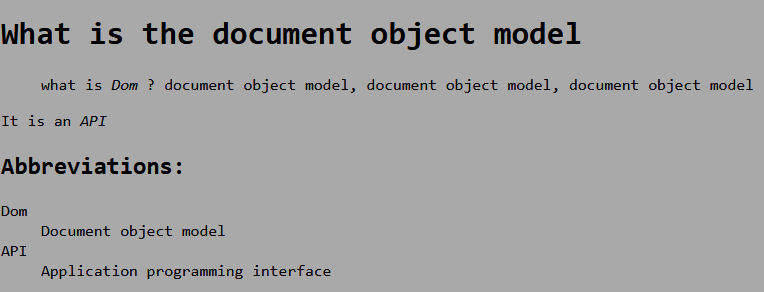
文本中有Dom, API是以斜体字(style)显示,是一个abbr标签。
从bbreviations:开始都是用java动态生成。这样解释比较明了:
html:
<!DOCTYPE html>

<html lang="en">

<head>

    <meta charset="UTF-8">

    <title>Title</title>

    <link href="typography.css" rel="stylesheet" media="screen">

</head>

<h1> What is the document object model</h1>

<body style="background-color: darkgrey">

<blockquote cite="http://www.w3.org/DOM/"> <p> what is <abbr title="Document object model">Dom</abbr> ?

    document object model, document object model, document object model</p></blockquote>

<p>It is an <abbr title="Application programming interface">API</abbr></p>

<script src="cp_01.js"> </script>

</body>

</html>
css:
body{

    background-color: #333333;

    font-family: Consolas;

}

abbr{

    text-decoration: none;

    border:;

    font-style: italic;

}
js:
function addLoadEvent(func) {

    var oldOnLoad = window.onload;

    if(typeof window.onload !== "function"){

        window.onload = func;

    }

    else {

        window.onload = function () {

            oldOnLoad();

            func();

        }

    }

}

function displayAbbreviations() {

    var abbreviations = document.getElementsByTagName('abbr');

    if(abbreviations.length<1)return false;

    var defs = new Array();

    for(var i=0; i<abbreviations.length;i++){

        var current_abbr = abbreviations[i];

        var definition = current_abbr.getAttribute('title');

        var key = current_abbr.lastChild.nodeValue;

        defs[key] = definition;

    }

    for(key in defs){

        console.log(defs[key]);

    }

    var dlist = document.createElement('dl');

    for(key in defs){

        var definition = defs[key];

        var dtitle = document.createElement('dt');

        var dtitleText = document.createTextNode(key);

        dtitle.appendChild(dtitleText);

        var ddesc = document.createElement('dd');

        var ddesc_text = document.createTextNode(definition);

        ddesc.appendChild(ddesc_text);

        dlist.appendChild(dtitle);

        dlist.appendChild(ddesc);

    }

    // create abbreviations

    var header = document.createElement('h2');

    var header_text = document.createTextNode('Abbreviations:');

    header.appendChild(header_text);

    document.body.appendChild(header);

    document.body.appendChild(dlist);

}

addLoadEvent(displayAbbreviations);
又重新试了下{} Object的遍历 重新搞个:

html:
<!DOCTYPE html>

<html lang="en">

<head>

    <meta charset="UTF-8">

    <title>Title</title>

</head>

<body style="font-family: Consolas">

<h1>The world most popular animation softwares</h1>

<blockquote >

    <p>

        <abbr title="3D Studio Max,常简称为3ds Max或MAX,

        是Autodesk公司开发的基于PC系统的三维动画渲染和制作软件。其前身是基于DOS操作系">3DMAX</abbr>,

        <abbr title="Maya是美国Autodesk公司出品的世界顶级的三维动画软件,应用对象是专业的影视广告,

    角色动画,电影特技等。Maya功能完善,工作灵活,易学易用,制作效率极高,

    渲染真实感极强,是电影级别的高端制作软件">MAYA</abbr>、

        <abbr title="LightWave是一个具有悠久历史和众多成功案例的为数不多的重量级3D软件之一">LIGHTWAVE</abbr> ,

        <abbr title="Houdini (电影特效魔术师) Side Effects Software的旗舰级产品,是创建高级视觉效果的有效工具,

        因为它有横跨公司的整个产品线的能力,Houdini Master为那些想让电脑动画更加精彩的动画制作家们提供了空前的能力和工作效率。">Houdini</abbr>

    </p>

</blockquote>

<script src="index.js"> </script>

</body>

</html>
js:
function addLoadEvent(func) {

    var oldEvent = window.onload;

    if(typeof window.onload !== "function"){

        window.onload = func;

    }

    else{

        window.onload = function () {

            oldEvent();

            func();

        }

    }

}

function makeAbbreviations() {

    var dlist = document.createElement('dl');

    var abbreviations = document.getElementsByTagName('abbr');

    var items = {};

    for(var i=0;i<abbreviations.length;i++){

        var title     = abbreviations[i].title;

        var abbrText  = abbreviations[i].lastChild.nodeValue;

        items[abbrText] = title;

    }

    console.log(items);

    for(var p in items){

        console.log(items[p]);

        var dtitle         = document.createElement('dt');

        var dtitleText     = document.createTextNode(p);

        dtitle.appendChild(dtitleText);

        var definition     = document.createElement('dd');

        var definitionText = document.createTextNode(items[p]);

        definition.appendChild(definitionText);

        dlist.appendChild(dtitle);

        dlist.appendChild(definition);

    }

    var header = document.createElement('h2');

    var headerText =document.createTextNode('Abbreviations:');

    header.appendChild(headerText);

    document.body.appendChild(header);

    document.body.appendChild(dlist);

}

addLoadEvent(makeAbbreviations);
。
Web从入门到放弃<4>的更多相关文章
- Web从入门到放弃<8>
Ref: Cameron D. - HTML5, JavaScript and jQuery (Programmer to Programmer) - 2015 http://www.runoob.c ...
- Web从入门到放弃<7>
从这章开始读<javascript高级程序设计> <1>typeof 返回字符串 / 类型 未定义:undefined 布尔:boolean 字符串:string 数值:num ...
- Web从入门到放弃<5>
<1> CSS_DOM 1,structural layer 2,presentation layer 3,behavior layer style也是一个属性 <!DOCTYPE ...
- Web从入门到放弃<1>
HTML大法: <01> <!DOCTYPE html> <html lang="en"> <head> <meta char ...
- Web从入门到放弃<6>
<1> Canvas. 1,灰度图: js: function showAsGray() { var imgNode = document.getElementById('img'); ...
- Web从入门到放弃<3>
UI简单的美化全部来源于Bootstrap 知识来自<javascript dom编程艺术第二版> <1> 点击列表 页面不跳转图片刷新: 主要点: href如何点击完如何不 ...
- Web从入门到放弃<2>
<添加debug-toolbar> django现在1.11是必须这么做: pip install django-debug-toolbar 设置1: INSTALLED_APPS = [ ...
- 后端API入门到放弃指北
后端API入门学习指北 了解一下一下概念. RESTful API标准] 所有的API都遵循[RESTful API标准]. 建议大家都简单了解一下HTTP协议和RESTful API相关资料. 阮一 ...
- OpenStack从入门到放弃
OpenStack从入门到放弃 目录: 为何选择云计算/云计算之前遇到的问题 什么是云计算 云服务模式 云应用形式 传统应用与云感知应用 openstack及其相关组件介绍 flat/vlan/gre ...
随机推荐
- InheritedWidget
下面这个示例是InheritedWidgt的一个简单用法: class CounterProvider extends InheritedWidget{//数据之前必须加上final,下面这三个数据都 ...
- (转)lwip TCP client & FreeRTOS 打开TCP 的 保活机制 LWIP_TCP_KEEPALIVE==1
参考大神教程:http://blog.sina.com.cn/s/blog_62a85b950101aw8x.html 老衲五木 :http://blog.sina.com.cn/s/blog_6 ...
- WSL、Git on Windows 、Putty等的创建的rsa秘钥与连接linux的使用。
1. 在windows 上面可以使用多种方式创建公钥和私钥 这里从一开始说: 1.1 windows subsystem linux 的方式最简单了 cmd 命令行 下 进入 WSL 输入命令 bas ...
- 【idea设置】去掉IntelliJ IDEA 中 mybatis 对应的 xml 文件警告
- centos7之rsync+serrsync
Rsync+Inotify-tools与Rsync+sersync这两种架构有什么区别 1.Rsync+Inotify-tools(1):Inotify-tools只能记录下被监听的目录发生了变化(包 ...
- "unexpected console statement” in Node.js
.eslintrc.js module.exports = { rules: { 'no-console': 'off', }, };
- elasticsearch系列七:ES Java客户端-Elasticsearch Java client(ES Client 简介、Java REST Client、Java Client、Spring Data Elasticsearch)
一.ES Client 简介 1. ES是一个服务,采用C/S结构 2. 回顾 ES的架构 3. ES支持的客户端连接方式 3.1 REST API ,端口 9200 这种连接方式对应于架构图中的RE ...
- Google Translation Via Python
没什么好说的,直接送包 https://github.com/mouuff/mtranslate
- [M$]微软提供的ProcessExplorer等系统工具集合
https://docs.microsoft.com/en-us/sysinternals/downloads/index
- purge旧的ubuntu 的linux内核
https://www.sysgeek.cn/remove-old-kernels-ubuntu-16-04/