
Web从入门到放弃<6>
<1> Canvas.
1,灰度图:
js:
function showAsGray() {

    var imgNode = document.getElementById('img');

    if(!imgNode)return false;

    var origSource = imgNode.src;

    imgNode.onmouseover = function () {

        imgNode.src = createGray(imgNode);

    };

    imgNode.onmouseout = function () {

        imgNode.src = origSource;

    }

}

function createGray(img) {

    var canvas = document.createElement('canvas');

    canvas.width = img.width;

    canvas.height = img.height;

    var ctx = canvas.getContext('2d');

    ctx.drawImage(img,0,0);

    var raw = ctx.getImageData(0,0,img.width,img.height);

    for(var i=0;i<raw.height;i++){

        for(var j=0;j<raw.width;j++){

            var x = i*4 * raw.width + j*4;

            var r = raw.data[x];

            var g = raw.data[x+1];

            var b = raw.data[x+2];

            //var a = raw.data[x+3];

            var a = 1;

            raw.data[x] = raw.data[x+1] = raw.data[x+2] = a* ((r+g+b)/3);

        }

    }

    ctx.putImageData(raw,0,0,0,0,raw.width,raw.height);

    return canvas.toDataURL();

}

window.onload = showAsGray;
html:
<!DOCTYPE html>

<html lang="en">

<head>

    <meta charset="UTF-8">

    <title>Title</title>

</head>

<body>

<img src="data:images/img.jpg" id="img">

<script src="data:image_gray.js"></script>

</body>

</html>
<2>JS大法
1,
点击h1标签消失,点击button显示
html:
<!DOCTYPE html>

<html lang="en">

<head>

    <meta charset="UTF-8">

    <title>Title</title>

</head>

<body>

<h1 id="header">Click me to hide</h1>

<button id="button">ShowText</button>

<script src="index.js"></script>

</body>

</html>
js:
window.onload = function (ev) {

    var header = document.getElementById('header');

    header.onclick = function () {

        header.style.display='none';

    };

    var button = document.getElementById('button');

    button.onclick = function () {

        header.style.display = "";

    }

};
2,jquery :
显示<li>里的text:
window.onload = function () {

    $('li').each(function (i) {

        console.log(this.lastChild.nodeValue);

    })

};
3,jquery tag探索
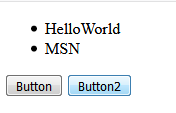
jquery的$('tag')一定是返回一个{} , 并且是一种{0:type,1:type,2:type}
比如:
window.onload = function () {

    $('li').each(

        function (i) {

        console.log(this.lastChild.nodeValue);}

    );

    var button = $('button');

    console.log(button);

    button.click(function () {

        $('li').hide();

    })

};
注意是给两个button都绑定了隐藏$('li').
4,点击<li>标签自动隐藏:给所有的标签都设置
方法1:
window.onload = function (ev) {

    $('li').each(function (i) {

        this.onclick = function () {

            this.style.display='none';

        }

    })

};
方法2:
window.onload = function (ev) {

    $('li').each(function (i) {

        this.onclick = function () {

            $(this).hide();

        }

    })

};
方法3:
window.onload = function () {

    $('li').each(function (i)

    {

        $(this).click(function () {

            $(this).hide();

        });

    })

};
经过验证,必须要使用$(this)才能使用它的click() , 也只有$(this)才能hide(),必须包裹成jquery对象
$('li').hide()隐藏所有li
$('button').hide()
$('.test').hide()隐藏所有.test类
$('#test').hide()隐藏所有id=test
$(document).ready(function(){} ) 就是window.onload
5,折叠板子...
可能涉及到函数
hide(),show(),toggle(),fadeToggle(),fadeIn(),fadeOut(),fadeTo(time,opacity,callback)
slideToggle(500,callback) 本例这个才是真正的卷上去
slideUp(),slideDown()

点击Collapse,地下的直接缩起来,然后再点击再show出来。
js:
$(document).ready(function () {

    var dialog = $('#clk-dialog');

    var h1 = $('div#clk-dialog h1');

    var text = $('div#clk-dialog p');

    $(h1).click(function () {

        $(text).toggle(500);

    });

});
css:
body{

    background-color: #222222;

}

#clk-dialog{

    width: 200px;

    display: block;

    font-family: Consolas;

    color: white;

}

#clk-dialog h1{

    background: darkorange;

    border: 1px solid #222222;

    padding:;

    margin:;

    text-align: center;

}

#clk-dialog p{

    margin:;;

    padding:;

    border-bottom: 1px solid darkcyan;

}
html:
<!DOCTYPE html>

<html lang="en">

<head>

    <meta charset="UTF-8">

    <title>Title</title>

    <script src="../jquery-3.2.1.min.js"></script>

    <link rel="stylesheet" href="cp_01.css">

</head>

<body>

<div id="clk-dialog">

    <h1>Collapse</h1>

    <p>Hello this is my all text here .button margin,padding,border should 0,

        必须要学习dom编程 RTFM RTFM,RTFM,RTFM</p>

</div>

<script src="cp_01.js"></script>

</body>

</html>
<3>AnimationControl:
语句:(多个语句可以排队动画,跟关键帧一样)
$('#aniblock').animate({left:'+=10px',top:'+=10px',height:'+=10px',width:'+=10px'},100)
$('#aniblock').animate({height:'toggle',width:'toggle'},100) // toggle设置,类似点击按钮就会缩放消失,然后缩放出现。
<!DOCTYPE html>

<html lang="en">

<head>

    <meta charset="UTF-8">

    <title>Title</title>

    <script src="js/jquery-3.2.1.min.js"></script>

</head>

<body>

<button>button</button>

<div id="aniblock" style="width:200px;height: 200px;position: relative;background-color: black" >

</div>

<script>

    $(document).ready(function () {

        $('button').click(function () {

            $('#aniblock').animate({left:'+=10px',top:'+=10px',height:'+=10px',width:'+=10px'},100)

        })

    })

</script>

</body>

</html>
<4>HTML操作
$(selector).text()
$(selector).html()
$(selector).val() // 通常获取form里面的input的value
$(selector).attr() // 获取属性,比如要获取id='test' 的<a>标签. $('test').attr('href')
1,获取<h1>HelloWorld</h1>的text: DOM和jquery方法比较:
<!DOCTYPE html>

<html lang="en">

<head>

    <meta charset="UTF-8">

    <title>Title</title>

    <script src="js/jquery-3.2.1.min.js"></script>

</head>

<body>

<h1 id="hello">"HelloWorld"</h1>

</body>

<script>

    $(document).ready(function () {

        console.log($('#hello').text());

        // use dom method

        var h1Node = document.getElementById('hello');

        console.log(h1Node.lastChild.nodeValue);

    })

</script>

</html>
2,设置 DOM ,也就是给参数的情况下,会设置新值
$(selector).text('HelloWorld')
$(selector).html('<b>HelloWorld</b>')
$(selector).val('HelloWorld') 设置一个input的值
$(selector).attr('href','www.baidu.com') 设置属性
也可以是用回调方法
$(selector).text(function(i,origText){return "newText"})
$(selector).attr("href", function(i,origValue){return 'www.baidu.com'}) //属性回调
<!DOCTYPE html>

<html lang="en">

<head>

    <meta charset="UTF-8">

    <title>Title</title>

    <script src="js/jquery-3.2.1.min.js"></script>

</head>

<body>

<p id="hid">origText</p>

<p id="pid"></p>

<input type="email" id="eid">

<a id="link" target="_blank"> </a>

<script>

    $(document).ready(function () {

        $("#hid").text(function (i,origText) {

            console.log(i,origText);

            return "New Text";

        });

        $('#pid').html('<b>Hello javascript</b>');

        $('#eid').val('gearslogy@qq.com');

        $('#link').attr('href',"http://www.baidu.com");

        $('#link').text('baidu.com');

    })

</script>

</body>

</html>
2,添加移除方法:
append()
prepend()
after()
before()
移除:
remove() // 可能移除
$("p").remove(".italic");
添加class
$().addClass()
$().removeClass()
$().toggleClass()
/
Web从入门到放弃<6>的更多相关文章
- Web从入门到放弃<8>
Ref: Cameron D. - HTML5, JavaScript and jQuery (Programmer to Programmer) - 2015 http://www.runoob.c ...
- Web从入门到放弃<7>
从这章开始读<javascript高级程序设计> <1>typeof 返回字符串 / 类型 未定义:undefined 布尔:boolean 字符串:string 数值:num ...
- Web从入门到放弃<5>
<1> CSS_DOM 1,structural layer 2,presentation layer 3,behavior layer style也是一个属性 <!DOCTYPE ...
- Web从入门到放弃<1>
HTML大法: <01> <!DOCTYPE html> <html lang="en"> <head> <meta char ...
- Web从入门到放弃<4>
1,插入 如下html: <!DOCTYPE html> <html lang="en"> <head> <meta charset=&q ...
- Web从入门到放弃<3>
UI简单的美化全部来源于Bootstrap 知识来自<javascript dom编程艺术第二版> <1> 点击列表 页面不跳转图片刷新: 主要点: href如何点击完如何不 ...
- Web从入门到放弃<2>
<添加debug-toolbar> django现在1.11是必须这么做: pip install django-debug-toolbar 设置1: INSTALLED_APPS = [ ...
- 后端API入门到放弃指北
后端API入门学习指北 了解一下一下概念. RESTful API标准] 所有的API都遵循[RESTful API标准]. 建议大家都简单了解一下HTTP协议和RESTful API相关资料. 阮一 ...
- OpenStack从入门到放弃
OpenStack从入门到放弃 目录: 为何选择云计算/云计算之前遇到的问题 什么是云计算 云服务模式 云应用形式 传统应用与云感知应用 openstack及其相关组件介绍 flat/vlan/gre ...
随机推荐
- 软件工程(GZSD2015) 第二次作业小结
第二次作业,从4月7号开始,陆续开始提交作业.根据同学们提交的作业报告,相比第一次作业,已经有了巨大改变,大家开始有了完整的实践,对那些抽象的名词也开始有了直观的感受,这很好.然后有一些普遍存在的问题 ...
- REST命令控制Player
本文用Postman工具演示通过REST控制Cnario Playr 注意:Player的REST通信默认关闭,使用前需要从Setting>>Remote devices打开Use RES ...
- 【转】shell脚本中如何传入参数
(1)直接用$1,$2取传入的参数vim /root/test.sh#!/bin/bashif [ $1 == "start" ] then echo "do ...
- CodeForces 219D Choosing Capit
题目链接:http://codeforces.com/contest/219/problem/D 题目大意: 给定一个n个节点的数和连接n个节点的n - 1条有向边,现在要选定一个节点作为起始节点,从 ...
- elasticsearch6.6及其插件安装记录(较详细)
借鉴网上资料并实施验证结果 elasticsearch6.6安装 安装包下载路径 https://www.elastic.co/downloads/elasticsearch 本文使用安装包 elas ...
- Comparable vs Comparator
Comparable interface can be used to provide single way of sorting whereas Comparator interface is us ...
- Python——Flask框架——程序的结构
一.项目结构 |-flasky |-app Flask程序一般都保存在这里 |-templates/ |-static/ |main/ |-__init__.py |-errors.py |-form ...
- Unity3d中如何查找一个脚本被挂在那些预设上面?
用一个脚本函数可以获取到选择的脚本文件被哪些预设和场景引用 [MenuItem("Assets/Tool/GetReference")] static void GetRefere ...
- Red Hat Enterprise Linux AS4, C++ OCCI connect Oracle 9i
前提是已经安装好Oracle 9i. 1. 下载对应的ORACLE client安装. http://www.oracle.com/technetwork/database/features/inst ...
- jdk8在windows及linux环境下安装
jdk下载 下载地址:https://www.oracle.com/technetwork/java/javase/downloads/index.html 目前大部分公司内部使用的还是jdk8,大部 ...