
SilverLight-DataBinding:二、Bingding to a Collection Objects(绑定一个集合对象)
| ylbtech-SilverLight-DataBinding: Bingding to a Collection Objects(绑定一个集合对象) |
- 1.A, Building a Data Object(创建一个数据对象)
- 1.B, Calling a Data Service(调用一个数据服务)【测试数据】
- 1.C, Binding to a Collection of Objects(绑定一个对象集合)
- 1.D, Binding to a Collection of Objects 2(绑定一个对象集合 2)
| 1.A, Building a Data Object(创建一个数据对象)返回顶部 |
using System;

using System.Collections.Generic;

using System.Linq;

using System.ComponentModel.DataAnnotations;

namespace SLYlbtechApp.Access

{

    /// <summary>

    /// 产品类

    /// </summary>

    public class Product

    {

        int productId;

        /// <summary>

        /// 编号【PK】

        /// </summary>

        public int ProductId

        {

            get { return productId; }

            set { productId = value; }

        }

        string productName;

        /// <summary>

        /// 产品名称

        /// </summary>

        public string ProductName

        {

            get

            {

                return productName;

            }

            set

            {

                if (value=="") throw new ArgumentException("不能为空");

                productName = value;

            }

        }

        string quantityPerUnit;

        /// <summary>

        /// 产品规格

        /// </summary>

        public string QuantityPerUnit

        {

            get { return quantityPerUnit; }

            set { quantityPerUnit = value; }

        }

        /// <summary>

        /// 单位价格

        /// 注意 不要使用 decimal 类型,在 UserControl.Resounrce 资源绑定是引发类型转换异常

        /// </summary>

        double unitPrice;

        [Display(Name="价格",Description="价格不能小于0")]

        public double UnitPrice

        {

            get { return unitPrice; }

            set

            {

                if (value < ) throw new ArgumentException("不能小于0");

                unitPrice = value;

            }

        }

        string description;

        /// <summary>

        /// 描述

        /// </summary>

        public string Description

        {

            get { return description; }

            set { description = value; }

        }

        string productImagePath;

        /// <summary>

        /// 产品图片地址

        /// </summary>

        public string ProductImagePath

        {

            get { return productImagePath; }

            set { productImagePath = value; }

        }

        string categoryName;

        /// <summary>

        /// 类别名称

        /// </summary>

        public string CategoryName

        {

            get { return categoryName; }

            set { categoryName = value; }

        }

        /// <summary>

        /// 空参构造

        /// </summary>

        public Product()

        { }

        /// <summary>

        /// 全参构造

        /// </summary>

        /// <param name="productId"></param>

        /// <param name="productName"></param>

        /// <param name="quantityPerUnit"></param>

        /// <param name="unitPrice"></param>

        /// <param name="description"></param>

        /// <param name="productImagePath"></param>

        /// <param name="categoryName"></param>

        public Product(int productId, string productName, string quantityPerUnit, double unitPrice, string description

            , string productImagePath, string categoryName)

        {

            ProductId = productId;

            ProductName=productName;

            QuantityPerUnit=quantityPerUnit;

            UnitPrice=unitPrice;

            Description=description;

            ProductImagePath=productImagePath;

            CategoryName=categoryName;

        }

        /// <summary>

        /// 获取全部产品

        /// </summary>

        /// <returns></returns>

        public static IList<Product> GetAll()

        {

            IList<Product> dals = new List<Product>();

            string categoryName = string.Empty;

            string productImagePath = string.Empty;

            string description = "嗟夫!草木无情,有时飘零。人为动物,惟物之灵。百忧感其心,万事劳其形,有动于中,必摇其精。而况思其力之所不及,忧其智之所不能,宜其渥然丹者为槁木,黟然黑者为星星。奈何以非金石之质,欲与草木而争荣?念谁为之戕贼,亦何恨乎秋声!";

            #region Add Product

            #region 饮料

            categoryName = "饮料";

            productImagePath = "../Images/pencil.jpg";

            dals.Add(new Product()

            {

                ProductId = ,

                ProductName = "啤酒",

                QuantityPerUnit = "1箱*6听",

                UnitPrice = 10d,

                CategoryName = categoryName

                ,

                ProductImagePath = productImagePath,

                Description = description

            });

            dals.Add(new Product()

            {

                ProductId = ,

                ProductName = "绿茶",

                QuantityPerUnit = "500ml",

                UnitPrice = 3d,

                CategoryName = categoryName

                ,

                ProductImagePath = productImagePath,

                Description = description

            });

            dals.Add(new Product()

            {

                ProductId = ,

                ProductName = "红茶",

                QuantityPerUnit = "500ml",

                UnitPrice = 3d,

                CategoryName = categoryName

                ,

                ProductImagePath = productImagePath,

                Description = description

            });

            dals.Add(new Product()

            {

                ProductId = ,

                ProductName = "纯净水",

                QuantityPerUnit = "500ml",

                UnitPrice = 1.5d,

                CategoryName = categoryName

                ,

                ProductImagePath = productImagePath,

                Description = description

            });

            #endregion

            #region 零食

            categoryName = "零食";

            productImagePath = "../Images/pencil2.jpg";

            dals.Add(new Product()

            {

                ProductId = ,

                ProductName = "奥利奥巧克力饼干",

                QuantityPerUnit = "10 boxes x 20 bags",

                UnitPrice = 30d,

                CategoryName = categoryName

                ,

                ProductImagePath = productImagePath,

                Description = description

            });

            dals.Add(new Product()

            {

                ProductId = ,

                ProductName = "玻璃 海苔",

                QuantityPerUnit = "20g",

                UnitPrice = 13d,

                CategoryName = categoryName

                ,

                ProductImagePath = productImagePath,

                Description = description

            });

             dals.Add(new Product()

             {

                 ProductId = ,

                 ProductName = "好丽友 薯片",

                 QuantityPerUnit = "100g",

                 UnitPrice = 3d,

                 CategoryName = categoryName

                 ,

                 ProductImagePath = productImagePath,

                 Description = description

             });

             dals.Add(new Product()

             {

                 ProductId = ,

                 ProductName = "统一 老坛酸菜面",

                 QuantityPerUnit = "1 盒",

                 UnitPrice = 8.5d,

                 CategoryName = categoryName

                 ,

                 ProductImagePath = productImagePath,

                 Description = description

             });

            #endregion

            #endregion

             return dals;

        }

        /// <summary>

        /// GetModel

        /// </summary>

        /// <returns></returns>

        public static Product GetModel()

        {

            Product dal = null;

            string categoryName = string.Empty;

            string productImagePath = string.Empty;

            string description = "嗟夫!草木无情,有时飘零。人为动物,惟物之灵。百忧感其心,万事劳其形,有动于中,必摇其精。而况思其力之所不及,忧其智之所不能,宜其渥然丹者为槁木,黟然黑者为星星。奈何以非金石之质,欲与草木而争荣?念谁为之戕贼,亦何恨乎秋声!";

            categoryName = "饮料";

            productImagePath = "Images/pencil.jpg";

            dal = new Product()

            {

                ProductId = ,

                ProductName = "啤酒",

                QuantityPerUnit = "1箱*6听",

                UnitPrice=3.5,

                CategoryName = categoryName

                ,

                ProductImagePath = productImagePath,

                Description = description

            };

            //dal._unitPrice = 10d;

            return dal;

        }

        /// <summary>

        /// GetModel

        /// </summary>

        /// <param name="id">产品编号</param>

        /// <returns></returns>

        public static Product GetModel(int id)

        {

            Product dal = null;

            IList<Product> dals = GetAll();

            try

            {

                dal = dals.Single(p => p.ProductId == id);

            }

            catch { }

            finally

            {

                dals = null;

            }

            return dal;

        }

    }

}
/DataBinding/PriceConverter.cs
using System;

using System.Windows.Data;

using System.Globalization;

namespace SLYlbtechApp.DataBinding

{

    /// <summary>

    /// 价格格式转换器

    /// </summary>

    public class PriceConverter:IValueConverter

    {

        public object Convert(object value, Type targetType, object parameter,

            CultureInfo culture)

        {

            double price = (double)value;

            return price.ToString("C", culture);

        }

        public object ConvertBack(object value, Type targetType, object parameter,

            CultureInfo culture)

        {

            string price = value.ToString();

            double result;

            if (double.TryParse(price, NumberStyles.Any, culture, out result))

            {

                return result;

            }

            return value;

        }

    }

}
4,
| 1.B, Calling a Data Service(调用一个数据服务)【测试数据】返回顶部 |
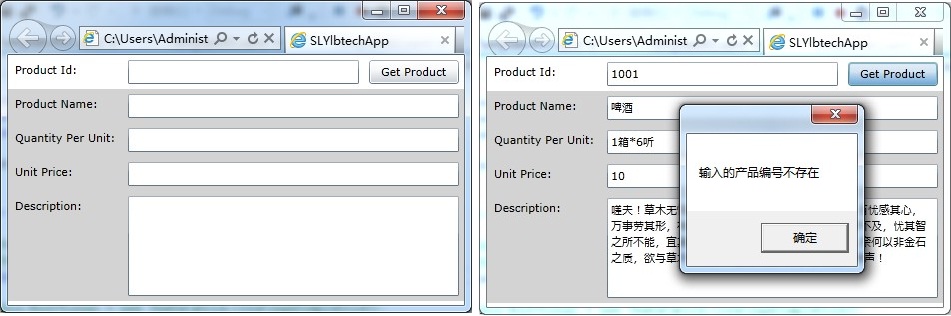
<Grid x:Name="LayoutRoot" Background="White">

    <Grid.RowDefinitions>

        <RowDefinition Height="Auto"></RowDefinition>

        <RowDefinition Height="Auto"></RowDefinition>

    </Grid.RowDefinitions>

    <Grid Grid.Row="0">

        <Grid.ColumnDefinitions>

            <ColumnDefinition Width="115"></ColumnDefinition>

            <ColumnDefinition Width="*"></ColumnDefinition>

            <ColumnDefinition Width="100"></ColumnDefinition>

        </Grid.ColumnDefinitions>

        <TextBlock Grid.Row="0" Grid.Column="0" Margin="7">Product Id:</TextBlock>

        <TextBox Grid.Row="0" Grid.Column="1" Margin="5" Name="txtProductId"></TextBox>

        <Button  Grid.Row="0" Grid.Column="2" Margin="5" Name="btnSearchProduct"

                    Content="Get Product" Click="btnSearchProduct_Click"></Button>

    </Grid>

    <Grid Grid.Row="1" x:Name="gridDetailProduct" Background="LightGray" >

        <Grid.RowDefinitions>

            <RowDefinition Height="Auto"></RowDefinition>

            <RowDefinition Height="Auto"></RowDefinition>

            <RowDefinition Height="Auto"></RowDefinition>

            <RowDefinition Height="Auto"></RowDefinition>

            <RowDefinition Height="Auto"></RowDefinition>

        </Grid.RowDefinitions>

        <Grid.ColumnDefinitions>

            <ColumnDefinition Width="115"></ColumnDefinition>

            <ColumnDefinition Width="*"></ColumnDefinition>

        </Grid.ColumnDefinitions>

        <TextBlock Grid.Row="0" Grid.Column="0" Margin="7">Product Name:</TextBlock>

        <TextBox Grid.Row="0" Grid.Column="1" Margin="5" Text="{Binding ProductName}"></TextBox>

        <TextBlock Grid.Row="1" Grid.Column="0" Margin="7">Quantity Per Unit:</TextBlock>

        <TextBox Grid.Row="1" Grid.Column="1" Margin="5" Text="{Binding QuantityPerUnit}"></TextBox>

        <TextBlock Grid.Row="2" Grid.Column="0" Margin="7">Unit Price:</TextBlock>

        <TextBox Grid.Row="2" Grid.Column="1" Margin="5" Text="{Binding UnitPrice}"></TextBox>

        <TextBlock Grid.Row="3" Grid.Column="0" Margin="7">Description:</TextBlock>

        <TextBox Grid.Row="3" Grid.Column="1" Grid.RowSpan="2" Margin="5" Height="100" Text="{Binding Description}" TextWrapping="Wrap" ></TextBox>

    </Grid>

</Grid>
2.3/3,
using System.Windows.Controls;

using System.Windows;

using SLYlbtechApp.Access;

namespace SLYlbtechApp.ABindingToDataObjects

{

    public partial class TemplateB1 : UserControl

    {

        public TemplateB1()

        {

            InitializeComponent();

        }

        //根据产品编号查找产品

        private void btnSearchProduct_Click(object sender, System.Windows.RoutedEventArgs e)

        {

            int id = ;

            if (int.TryParse(this.txtProductId.Text.Trim(), out id))

            {

                Product dal = Product.GetModel(id);

                if (dal == null)

                {

                    MessageBox.Show("输入的产品编号不存在");

                }

                else

                {

                    this.gridDetailProduct.DataContext = dal;

                }

            }

            else

            {

                MessageBox.Show("输入的产品编号错误");

            }

        }

    }

}
3,
| 1.C, Binding to a Collection of Objects(绑定一个对象集合)返回顶部 |
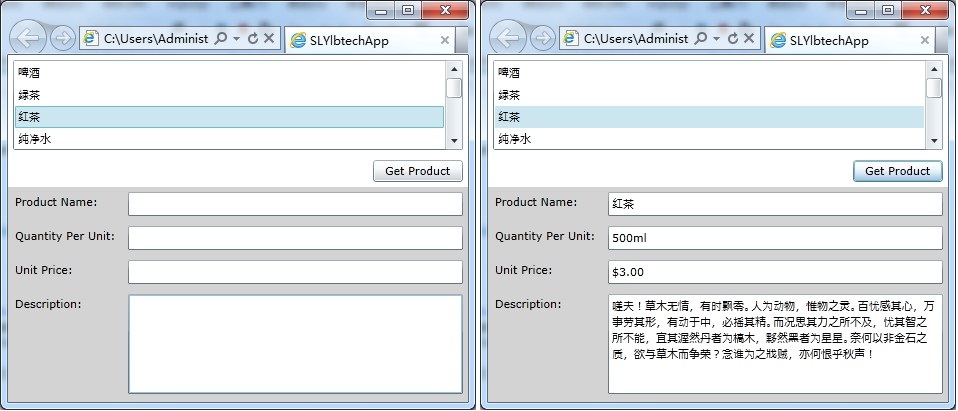
xmlns:local="clr-namespace:SLYlbtechApp.DataBinding"
2.2/3,
<UserControl.Resources>

    <local:PriceConverter x:Key="PriceConverter"></local:PriceConverter>

    <!--<local:ImagePathConverter x:Key="ImagePathConverter"></local:ImagePathConverter>-->

</UserControl.Resources>

    <Grid x:Name="LayoutRoot" Background="White">

    <Grid.RowDefinitions>

        <RowDefinition Height="Auto"></RowDefinition>

        <RowDefinition Height="Auto"></RowDefinition>

    </Grid.RowDefinitions>

    <Grid Grid.Row="0">

        <Grid.RowDefinitions>

            <RowDefinition Height="100"></RowDefinition>

            <RowDefinition Height="Auto"></RowDefinition>

        </Grid.RowDefinitions>

        <Grid.ColumnDefinitions>

            <ColumnDefinition Width="115"></ColumnDefinition>

            <ColumnDefinition Width="*"></ColumnDefinition>

            <ColumnDefinition Width="100"></ColumnDefinition>

        </Grid.ColumnDefinitions>

        <ListBox Grid.Row="0" Grid.ColumnSpan="3" Margin="5" Name="lstProduct" DisplayMemberPath="ProductName"></ListBox>

        <Button  Grid.Row="1" Grid.Column="2" Margin="5" Name="btnSearchProduct" Content="Get Product" Click="btnSearchProduct_Click"></Button>

    </Grid>

    <Grid Grid.Row="1" x:Name="gridDetailProduct" Background="LightGray" Height="800" >

        <Grid.RowDefinitions>

            <RowDefinition Height="Auto"></RowDefinition>

            <RowDefinition Height="Auto"></RowDefinition>

            <RowDefinition Height="Auto"></RowDefinition>

            <RowDefinition Height="Auto"></RowDefinition>

            <RowDefinition Height="Auto"></RowDefinition>

            <RowDefinition Height="Auto"></RowDefinition>

        </Grid.RowDefinitions>

        <Grid.ColumnDefinitions>

            <ColumnDefinition Width="115"></ColumnDefinition>

            <ColumnDefinition Width="*"></ColumnDefinition>

        </Grid.ColumnDefinitions>

        <TextBlock Grid.Row="0" Grid.Column="0" Margin="7">Product Name:</TextBlock>

        <TextBox Grid.Row="0" Grid.Column="1" Margin="5" Text="{Binding ProductName}"></TextBox>

        <TextBlock Grid.Row="1" Grid.Column="0" Margin="7">Quantity Per Unit:</TextBlock>

        <TextBox Grid.Row="1" Grid.Column="1" Margin="5" Text="{Binding QuantityPerUnit}"></TextBox>

        <TextBlock Grid.Row="2" Grid.Column="0" Margin="7">Unit Price:</TextBlock>

        <TextBox Grid.Row="2" Grid.Column="1" Margin="5" Text="{Binding UnitPrice,Converter={StaticResource PriceConverter}}"></TextBox>

        <TextBlock Grid.Row="3" Grid.Column="0" Margin="7">Description:</TextBlock>

        <TextBox Grid.Row="3" Grid.Column="1" Grid.RowSpan="2" Margin="5" Height="100" Text="{Binding Description}" TextWrapping="Wrap" ></TextBox>

        <Image Grid.Row="5" Grid.Column="1" Source="{Binding ProductImagePath}"  Height="100" Width="100" ></Image>

    </Grid>

</Grid>
2.3/3,
using System.Windows.Controls;

using System.Windows;

using SLYlbtechApp.Access;

namespace SLYlbtechApp.ABindingToDataObjects

{

    public partial class TemplateB2 : UserControl

    {

        public TemplateB2()

        {

            InitializeComponent();

            this.lstProduct.ItemsSource = Product.GetAll();

        }

        private void btnSearchProduct_Click(object sender, System.Windows.RoutedEventArgs e)

        {

            if (this.lstProduct.SelectedIndex == -)

            {

                MessageBox.Show("请选择列表框中的商品");

            }

            else

            {

                //方式一

                //Product dal = (Product)this.lstProduct.SelectedItem;

                //this.gridDetailProduct.DataContext = dal;

                //方式二

                this.gridDetailProduct.DataContext = this.lstProduct.SelectedItem;

            }

        }

    }

}
3,
3.A,ListBox 绑定
3.A.Code,
<ListBox Grid.Row="0" Grid.ColumnSpan="3" Margin="5" Name="lstProduct" DisplayMemberPath="ProductName"></ListBox>
3.A.Desc,
DisplayMemberPath[绑定集合里的属性名称]
3.B,产品价格格式转换
3.B.1/3,
xmlns:local="clr-namespace:SLYlbtechApp.DataBinding"
3.B.2/3,
<UserControl.Resources>

    <local:PriceConverter x:Key="PriceConverter"></local:PriceConverter>

</UserControl.Resources>
3.B.3/3,
<TextBox Grid.Row="2" Grid.Column="1" Margin="5" Text="{Binding UnitPrice,Converter={StaticResource PriceConverter}}"></TextBox>
4,
| 1.D,Binding to a Collection of Objects 2(绑定一个对象集合 2)返回顶部 |
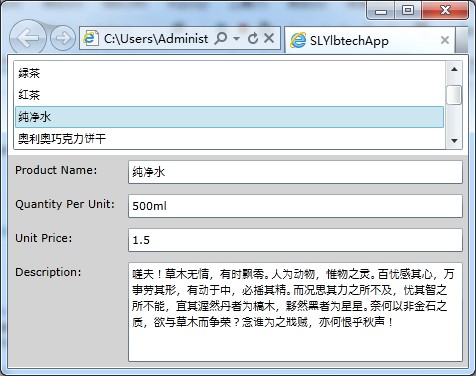
<Grid x:Name="LayoutRoot" Background="White">

    <Grid.RowDefinitions>

        <RowDefinition Height="Auto"></RowDefinition>

        <RowDefinition Height="Auto"></RowDefinition>

    </Grid.RowDefinitions>

    <Grid Grid.Row="0">

        <Grid.RowDefinitions>

            <RowDefinition Height="100"></RowDefinition>

        </Grid.RowDefinitions>

        <ListBox Grid.Row="0" Grid.ColumnSpan="3" Margin="5" Name="lstProduct" DisplayMemberPath="ProductName" SelectionChanged="lstProduct_SelectionChanged"></ListBox>

    </Grid>

    <Grid Grid.Row="1" x:Name="gridDetailProduct" Background="LightGray" >

        <Grid.RowDefinitions>

            <RowDefinition Height="Auto"></RowDefinition>

            <RowDefinition Height="Auto"></RowDefinition>

            <RowDefinition Height="Auto"></RowDefinition>

            <RowDefinition Height="Auto"></RowDefinition>

            <RowDefinition Height="Auto"></RowDefinition>

        </Grid.RowDefinitions>

        <Grid.ColumnDefinitions>

            <ColumnDefinition Width="115"></ColumnDefinition>

            <ColumnDefinition Width="*"></ColumnDefinition>

        </Grid.ColumnDefinitions>

        <TextBlock Grid.Row="0" Grid.Column="0" Margin="7">Product Name:</TextBlock>

        <TextBox Grid.Row="0" Grid.Column="1" Margin="5" Text="{Binding ProductName}"></TextBox>

        <TextBlock Grid.Row="1" Grid.Column="0" Margin="7">Quantity Per Unit:</TextBlock>

        <TextBox Grid.Row="1" Grid.Column="1" Margin="5" Text="{Binding QuantityPerUnit}"></TextBox>

        <TextBlock Grid.Row="2" Grid.Column="0" Margin="7">Unit Price:</TextBlock>

        <TextBox Grid.Row="2" Grid.Column="1" Margin="5" Text="{Binding UnitPrice}"></TextBox>

        <TextBlock Grid.Row="3" Grid.Column="0" Margin="7">Description:</TextBlock>

        <TextBox Grid.Row="3" Grid.Column="1" Grid.RowSpan="2" Margin="5" Height="100" Text="{Binding Description}" TextWrapping="Wrap" ></TextBox>

    </Grid>

</Grid>
2.3/3,
using System.Windows.Controls;

using SLYlbtechApp.Access;

namespace SLYlbtechApp.ABindingToDataObjects

{

    public partial class TemplateBb2 : UserControl

    {

        public TemplateBb2()

        {

            InitializeComponent();

            this.lstProduct.ItemsSource = Product.GetAll();

        }

        /// <summary>

        /// 列表框选项改变事件

        /// </summary>

        /// <param name="sender"></param>

        /// <param name="e"></param>

        private void lstProduct_SelectionChanged(object sender, SelectionChangedEventArgs e)

        {

            //方式一

            //Product dal = (Product)this.lstProduct.SelectedItem;

            //this.gridDetailProduct.DataContext = dal;

            //方式二

            this.gridDetailProduct.DataContext = this.lstProduct.SelectedItem;

        }

    }

}
3,
3.A, 同上文 D.3.A
| 1.E,返回顶部 |
 |
作者:ylbtech 出处:http://ylbtech.cnblogs.com/ 本文版权归作者和博客园共有,欢迎转载,但未经作者同意必须保留此段声明,且在文章页面明显位置给出原文连接,否则保留追究法律责任的权利。 |
SilverLight-DataBinding:二、Bingding to a Collection Objects(绑定一个集合对象)的更多相关文章
- SilverLight: 数据绑定(1)-绑定到数据对象
ylbtech-SilverLight-DataBinding: Binding to Data Objects(绑定到数据对象) 1.A, Building a Data Object(创建一个数 ...
- Silverlight DataBinding Converter:根据binding对象调整显示
Silverlight DataBinding Converter:根据binding对象调整显示 我希望写一系列关于Silverlight DataBinding的文章,分别讲解Silverligh ...
- JavaScript学习总结(二)——闭包、IIFE、apply、函数与对象
一.闭包(Closure) 1.1.闭包相关的问题 请在页面中放10个div,每个div中放入字母a-j,当点击每一个div时显示索引号,如第1个div显示0,第10个显示9:方法:找到所有的div, ...
- Java之Collection接口(单列集合根接口)
集合概述 集合到底是什么呢?集合:集合是java中提供的一种容器,可以用来存储多个数据 集合和数组既然都是容器,它们有啥区别呢? 区别1: 数组的长度是固定的. 集合的长度是可变的. 区别2: 数组 ...
- java集合类 collection接口,List集合
java集合类:collection接口,List集合 在java.util包中提供了一些集合类,集合类又被称为容器,常用的有List集合,Set集合,Map集合.下面将介绍collection接口和 ...
- JavaScript学习笔记(二)——闭包、IIFE、apply、函数与对象
一.闭包(Closure) 1.1.闭包相关的问题 请在页面中放10个div,每个div中放入字母a-j,当点击每一个div时显示索引号,如第1个div显示0,第10个显示9:方法:找到所有的div, ...
- Java collection 的一些介绍 集合
collections主要提供一些,排序的算法,随机的,反向的, collection 是容器的祖先接口 线性表,链表,哈希表是常用的数据结构,在进行Java开发时,JDK已经为我们提供了一系列相应 ...
- Qt信号槽机制的实现(面试的感悟,猜测每一个类保存的一个信号和槽的二维表,实际使用函数指针 元对象 还有类型安全的检查设定等等)
因为面试时问了我这道题,导致我想去了解信号槽到底是如何实现的,于是贴着顺序看了下源码,大致了解了整个框架.网上关于信号槽的文章也很多,但是大部分都是将如何应用的,这里我就写一下我所理解的如何实现吧, ...
- 第一百二十一节,JavaScript事件绑定及深入
JavaScript事件绑定及深入 学习要点: 1.传统事件绑定的问题 2.W3C事件处理函数 3.IE事件处理函数 4.事件对象的其他补充 事件绑定分为两种:一种是传统事件绑定(内联模型,脚本模型) ...
随机推荐
- nuc 第二届山西省大学生程序设计大赛 魔力手环
problem 很妙啊--发现状态转移矩阵每一行都可以由上一行平移得到,每次只算第一行然后平移,\(O(n^3)\) 就变成了 \(O(n^2)\). #include <iostream> ...
- day05_05 for循环、break语句
1.0 输入用户名,密码练习 _user = "alex" _passwd = "abc123" username = input("Username ...
- 命令行下修改postgres密码
1. 修改PostgreSQL数据库默认用户postgres的密码 PostgreSQL数据库创建一个postgres用户作为数据库的管理员,密码随机,所以需要修改密码,方式如下: 步骤一:登录Pos ...
- Python循环语句 if while for
流程控制: if 条件1: 缩进的代码块 (注意缩进4个空格) elif 条件2: 缩进的代码块 elif 条件3: 缩进的代码块 ...... else: 缩进的代码块 注意1:(相同的代码块儿,同 ...
- 安装anaconda并配置环境
安装anaconda的步骤 1.确定系统信息 uname -a 2.下载对应版本 3.sh 安装shell脚本 4.添加到对应路径 5.安装完anaconda之后,创建虚拟环境 conda creat ...
- 九度oj 1004
题目1004:Median 时间限制:1 秒 内存限制:32 兆 特殊判题:否 提交:17536 解决:4860 题目描述: Given an incre ...
- 【bzoj4785】[Zjoi2017]树状数组 线段树套线段树
题目描述 漆黑的晚上,九条可怜躺在床上辗转反侧.难以入眠的她想起了若干年前她的一次悲惨的OI 比赛经历.那是一道基础的树状数组题.给出一个长度为 n 的数组 A,初始值都为 0,接下来进行 m 次操作 ...
- 【bzoj3439】Kpm的MC密码 可持久化Trie树
题目描述 背景 想Kpm当年为了防止别人随便进入他的MC,给他的PC设了各种奇怪的密码和验证问题(不要问我他是怎么设的...),于是乎,他现在理所当然地忘记了密码,只能来解答那些神奇的身份验证问题了. ...
- 【Luogu】P3979遥远的国度(树链剖分)
题目链接 不会换根从暑假开始就困扰我了……拖到现在…… 会了还是很激动的. 换根操作事实上不需要(也不能)改树剖本来的dfs序……只是在query上动动手脚…… 设全树的集合为G,以root为根,u在 ...
- 【Luogu】P2774方格取数问题(最大点权独立集)
题目链接 不知道为啥坠大点权独立集的做法跟最大权闭合图差不多? qwq 放个链接 #include<cstdio> #include<cstring> #include< ...