
springboot与elasticsearch
1.安装elasticsearch
下载elasticsearch
docker pull registry.docker-cn.com/library/elasticsearch
运行elasticsearch
docker run -e ES_JAVA_OPTS="-Xms256m -Xmx256m" -p 9200:9200 -p 9300:9300 --name elasticsearch01 5acf0e8da90b

看到如下界面,则成功

2.数据模拟
2.1postman模拟发送数据
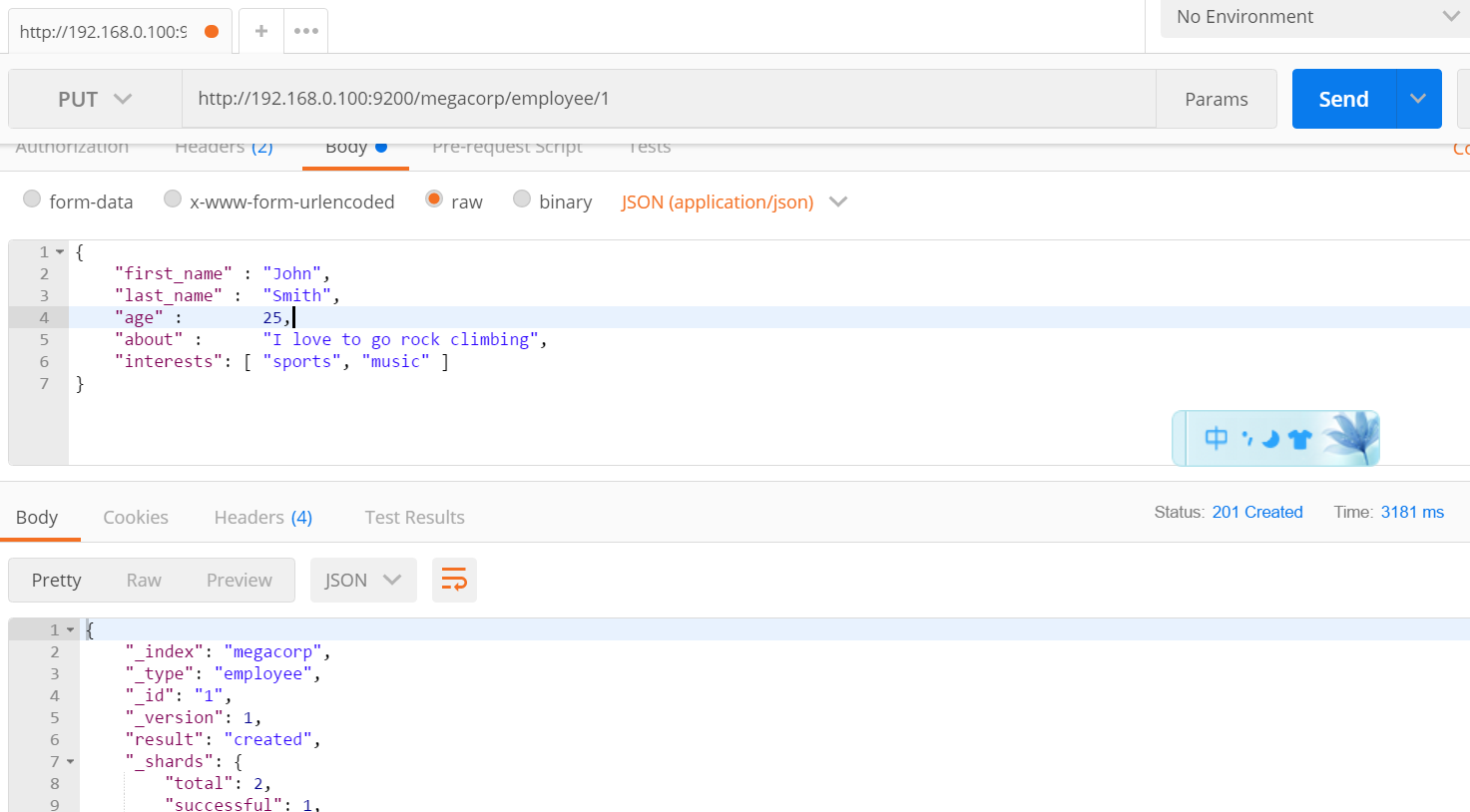
2.2postman模拟检索数据(get请求)
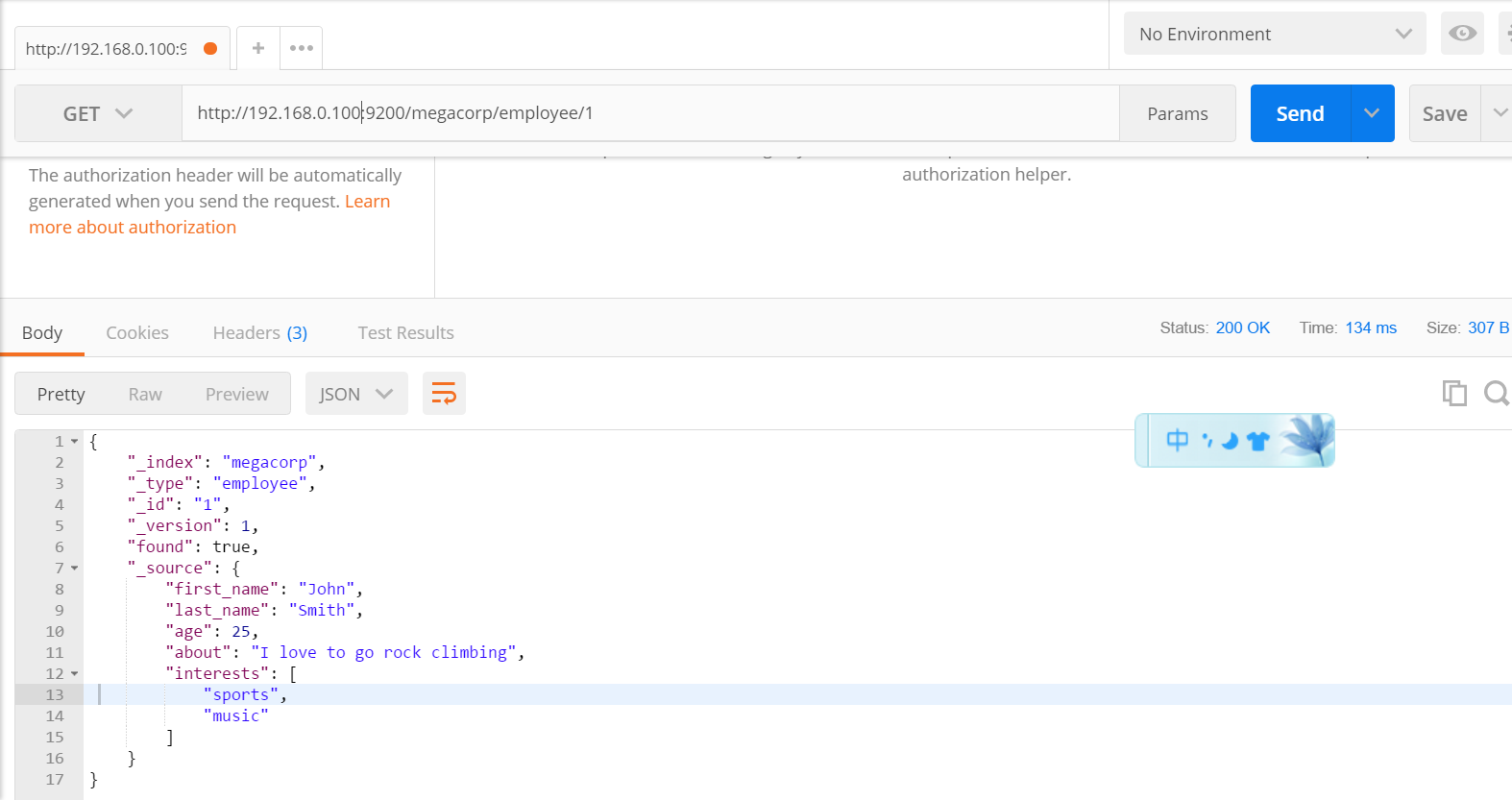
2.3此外,delete请求是删除元素,head请求用来检查是否存在
3.demo实现
3.1pom文件
<?xml version="1.0" encoding="UTF-8"?>

<project xmlns="http://maven.apache.org/POM/4.0.0" xmlns:xsi="http://www.w3.org/2001/XMLSchema-instance"

         xsi:schemaLocation="http://maven.apache.org/POM/4.0.0 http://maven.apache.org/xsd/maven-4.0.0.xsd">

    <modelVersion>4.0.0</modelVersion>

    <groupId>com.zy</groupId>

    <artifactId>spring-boot-elasticsearch-demo</artifactId>

    <version>0.0.1-SNAPSHOT</version>

    <packaging>jar</packaging>

    <name>spring-boot-elasticsearch-demo</name>

    <description>Demo project for Spring Boot</description>

    <parent>

        <groupId>org.springframework.boot</groupId>

        <artifactId>spring-boot-starter-parent</artifactId>

        <version>1.5.14.RELEASE</version>

        <relativePath/> <!-- lookup parent from repository -->

    </parent>

    <properties>

        <project.build.sourceEncoding>UTF-8</project.build.sourceEncoding>

        <project.reporting.outputEncoding>UTF-8</project.reporting.outputEncoding>

        <java.version>1.8</java.version>

    </properties>

    <dependencies>

        <!--SpringBoot默认使用SpringData ElasticSearch模块进行操作-->

        <dependency>

            <groupId>org.springframework.boot</groupId>

            <artifactId>spring-boot-starter-data-elasticsearch</artifactId>

        </dependency>

        <dependency>

            <groupId>io.searchbox</groupId>

            <artifactId>jest</artifactId>

            <version>5.3.3</version>

        </dependency>

        <dependency>

            <groupId>org.springframework.boot</groupId>

            <artifactId>spring-boot-starter-web</artifactId>

        </dependency>

        <dependency>

            <groupId>org.springframework.boot</groupId>

            <artifactId>spring-boot-starter-test</artifactId>

            <scope>test</scope>

        </dependency>

        <dependency>

            <groupId>org.projectlombok</groupId>

            <artifactId>lombok</artifactId>

            <version>1.16.20</version>

        </dependency>

        <!--

            解决java.lang.ClassNotFoundException: com.sun.jna.Native问题

        -->

        <dependency>

            <groupId>com.sun.jna</groupId>

            <artifactId>jna</artifactId>

            <version>3.0.9</version>

        </dependency>

    </dependencies>

    <build>

        <plugins>

            <plugin>

                <groupId>org.springframework.boot</groupId>

                <artifactId>spring-boot-maven-plugin</artifactId>

            </plugin>

        </plugins>

    </build>

</project>
3.2yml文件
spring:

  elasticsearch:

    jest:

      uris: http://192.168.0.100:9200
3.3实体类
package com.zy.model;

import io.searchbox.annotations.JestId;

import lombok.AllArgsConstructor;

import lombok.Builder;

import lombok.Data;

import lombok.NoArgsConstructor;

@Data

@NoArgsConstructor

@AllArgsConstructor

@Builder

public class Article {

    @JestId

    private Integer id;

    private String author;

    private String title;

    private String content;

}
3.4测试类
package com.zy;

import com.zy.mapper.BookMapper;

import com.zy.model.Article;

import io.searchbox.client.JestClient;

import io.searchbox.core.Index;

import io.searchbox.core.Search;

import io.searchbox.core.SearchResult;

import org.junit.Test;

import org.junit.runner.RunWith;

import org.springframework.beans.factory.annotation.Autowired;

import org.springframework.boot.test.context.SpringBootTest;

import org.springframework.test.context.junit4.SpringRunner;

import java.io.IOException;

@RunWith(SpringRunner.class)

@SpringBootTest

public class SpringBootElasticsearchDemoApplicationTests {

    @Autowired

    JestClient jestClient;

    @Autowired

    BookMapper bookMapper;

    @Test

    // 执行成功后的访问方式   http://192.168.0.100:9200/book/news/1

    public void contextLoads() {

        Article article = Article.builder()

                .id(1)

                .title("good news")

                .author("东野圭吾")

                .content("降价了")

                .build();

        // 构建索引

        Index index = new Index.Builder(article)

                .index("book")

                .type("news")

                .build();

        // 执行索引

        try {

            jestClient.execute(index);

        } catch (IOException e) {

            e.printStackTrace();

        }

    }

    //测试搜索

    @Test

    public void search(){

//查询表达式

        String json ="{\n" +

                "    \"query\" : {\n" +

                "        \"match\" : {\n" +

                "            \"content\" : \"了\"\n" +

                "        }\n" +

                "    }\n" +

                "}";

        //更多操作:https://github.com/searchbox-io/Jest/tree/master/jest

        //构建搜索功能

        Search search = new Search.Builder(json)

                .addIndex("book")

                .addType("news")

                .build();

        //执行

        try {

            SearchResult searchResult = jestClient.execute(search);

            System.out.println(searchResult.getJsonString());

        } catch (IOException e) {

            e.printStackTrace();

        }

    }

}
springboot与elasticsearch的更多相关文章
- SpringBoot整合ElasticSearch实现多版本的兼容
前言 在上一篇学习SpringBoot中,整合了Mybatis.Druid和PageHelper并实现了多数据源的操作.本篇主要是介绍和使用目前最火的搜索引擎ElastiSearch,并和Spring ...
- springboot集成elasticsearch
在基础阶段学习ES一般是首先是 安装ES后借助 Kibana 来进行CURD 了解ES的使用: 在进阶阶段可以需要学习ES的底层原理,如何通过Version来实现乐观锁保证ES不出问题等核心原理: 第 ...
- ElasticSearch(2)---SpringBoot整合ElasticSearch
SpringBoot整合ElasticSearch 一.基于spring-boot-starter-data-elasticsearch整合 开发环境:springboot版本:2.0.1,elast ...
- springboot整合elasticsearch入门例子
springboot整合elasticsearch入门例子 https://blog.csdn.net/tianyaleixiaowu/article/details/72833940 Elastic ...
- Springboot整合elasticsearch以及接口开发
Springboot整合elasticsearch以及接口开发 搭建elasticsearch集群 搭建过程略(我这里用的是elasticsearch5.5.2版本) 写入测试数据 新建索引book( ...
- SpringBoot整合Elasticsearch详细步骤以及代码示例(附源码)
准备工作 环境准备 JAVA版本 java version "1.8.0_121" Java(TM) SE Runtime Environment (build 1.8.0_121 ...
- Springboot整合Elasticsearch报错availableProcessors is already set to [4], rejecting [4]
Springboot整合Elasticsearch报错 今天使用SpringBoot整合Elasticsearch时候,相关的配置完成后,启动项目就报错了. nested exception is j ...
- Springboot整合ElasticSearch进行简单的测试及用Kibana进行查看
一.前言 搜索引擎还是在电商项目.百度.还有技术博客中广泛应用,使用最多的还是ElasticSearch,Solr在大数据量下检索性能不如ElasticSearch.今天和大家一起搭建一下,小编是看完 ...
- 😊SpringBoot 整合 Elasticsearch (超详细).md
SpringBoot 整合 Elasticsearch (超详细) 注意: 1.环境搭建 安装es Elasticsearch 6.4.3 下载链接 为了方便,环境使用Windows 配置 解压后配置 ...
- SpringBoot整合elasticsearch
在这一篇文章开始之前,你需要先安装一个ElasticSearch,如果你是mac或者linux可以参考https://www.jianshu.com/p/e47b451375ea,如果是windows ...
随机推荐
- python中os常用方法
python中OS常用方法 Python的标准库中的os模块包含普遍的操作系统功能.如果你希望你的程序能够与平台无关的话,这个模块是尤为重要的.即它允许一个程序在编写后不需要任何改动,也不会发生任何问 ...
- IO模式调查利器blkiomon介绍
本文链接地址: IO模式调查利器blkiomon介绍 blkiomon 是blktrace工具包带的一个方便用户了解IO情况的工具, 由于blktrace太专业,需要了解的IO协议栈的东西太多,blk ...
- Servlet、Servlet容器等内容讲解
转载自http://blog.csdn.net/iAm333 对于Servlet.Servlet容器以及一个Servlet容器-Tomcat这些概念讲解的挺清晰的,转载下 之前在开源中国看到一篇文章& ...
- 20165233 2017-2018-2 《Java程序设计》第八周学习总结
20165233 2017-2018-2 <Java程序设计>第八周学习总结 教材学习内容总结 基础:Java中的线程,Thread类与线程的创建 - 线程是比进程更小的单位. - JVM ...
- 25. instr用法
很多时候,我们要进行字符串匹配,在SQL语句中,我们通常使用like来达到我们搜索的目标.但经过实际测试发现,like的效率与instr函数差别相当大.下面是一些测试结果: select instr( ...
- JS实现让滚轮控制网页头部显示与隐藏
在很多网站中都有鼠标网上滚动头部就会滑出,继续往下滚动就会隐藏,下面看看实现方法 scroll(); function scroll(){// 入口方法 这个方法是获取事件的兼容,获取delta -- ...
- 前端-CSS-5-继承性&层叠性&权重比较
1.继承性 <style type="text/css"> .father{ font-size: 30px; background-color: green; } . ...
- fiddler 修改request请求
例:在request url后追加&test=1参数 在OnBeforeRequest函数中添加以下代码 if(oSession.uriContains("www.bing.com/ ...
- 从底层谈WebGIS 原理设计与实现(二):探究本质,WebGIS前端地图显示之地图比例尺换算原理
从底层谈WebGIS 原理设计与实现(二):探究本质,WebGIS前端地图显示之地图比例尺换算原理 作者:naaoveGI… 文章来源:http://www.cnblogs.com/naaove ...
- SRC是在本位置显示:source的缩写,源的意思 HREF是点击后连接的目标:HyperlinkReference,超链接引用
SRC是在本位置显示:source的缩写,源的意思HREF是点击后连接的目标:HyperlinkReference,超链接引用