
springboot与elasticsearch
1.安装elasticsearch
下载elasticsearch
docker pull registry.docker-cn.com/library/elasticsearch
运行elasticsearch
docker run -e ES_JAVA_OPTS="-Xms256m -Xmx256m" -p 9200:9200 -p 9300:9300 --name elasticsearch01 5acf0e8da90b

看到如下界面,则成功

2.数据模拟
2.1postman模拟发送数据
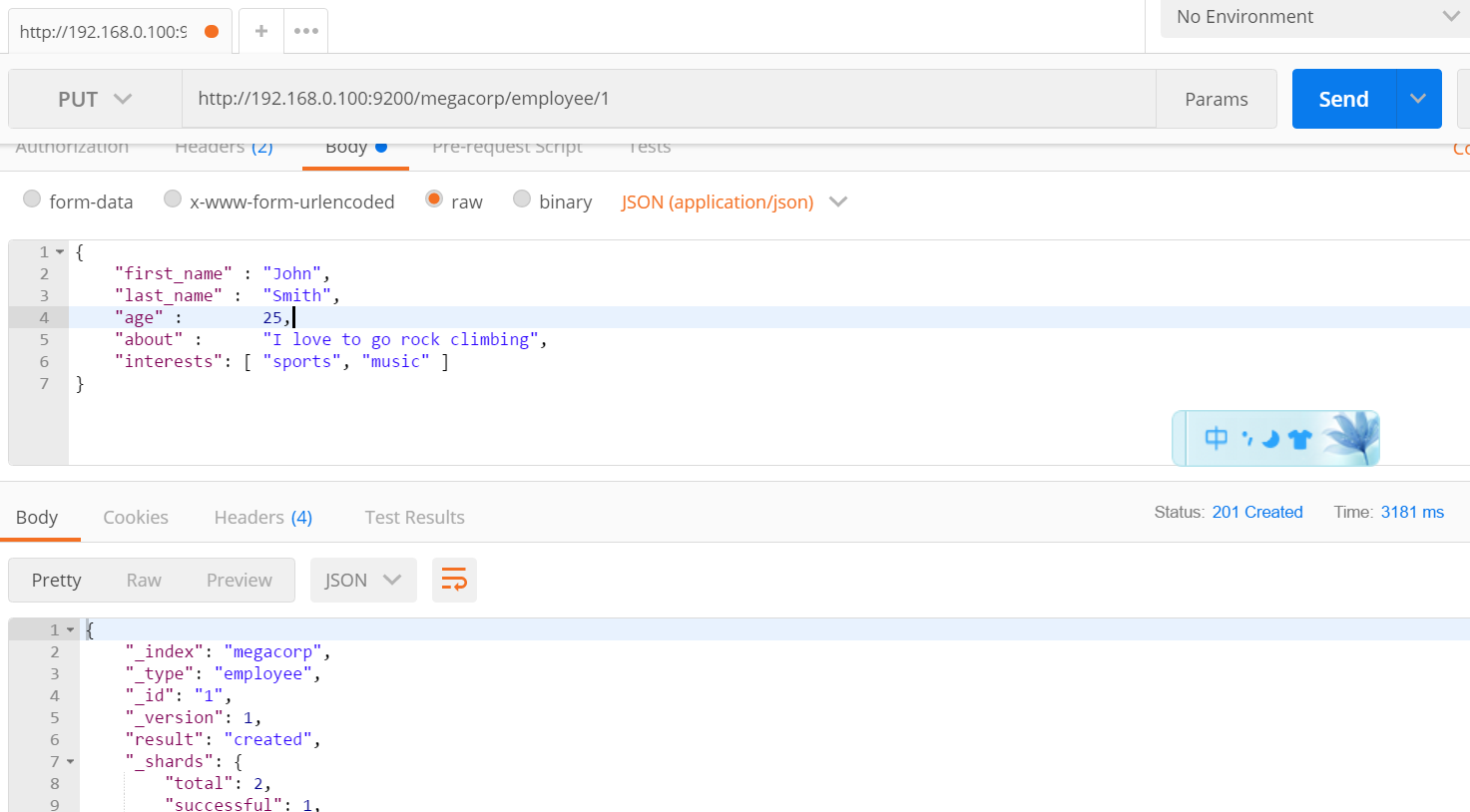
2.2postman模拟检索数据(get请求)
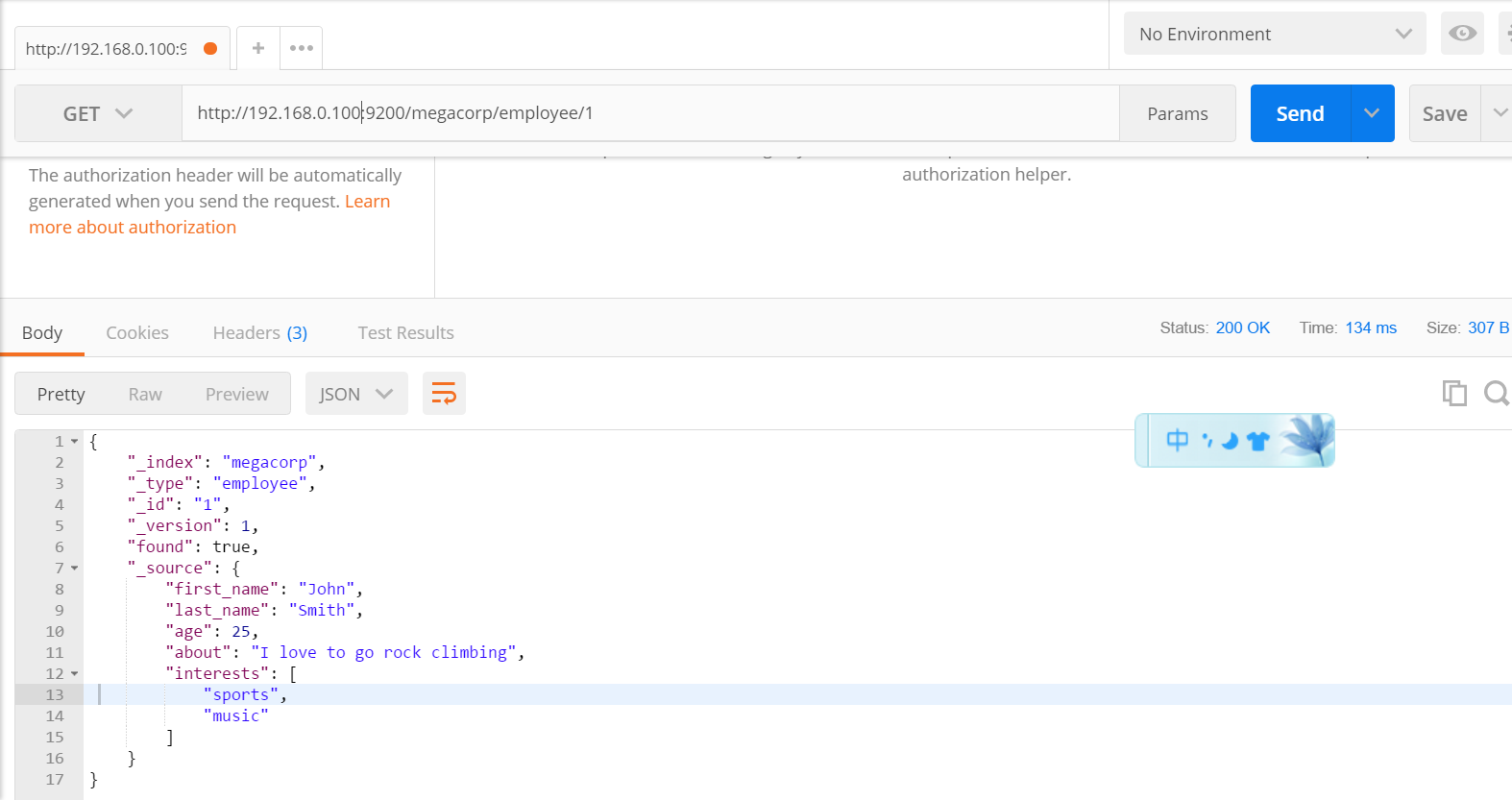
2.3此外,delete请求是删除元素,head请求用来检查是否存在
3.demo实现
3.1pom文件
<?xml version="1.0" encoding="UTF-8"?>

<project xmlns="http://maven.apache.org/POM/4.0.0" xmlns:xsi="http://www.w3.org/2001/XMLSchema-instance"

         xsi:schemaLocation="http://maven.apache.org/POM/4.0.0 http://maven.apache.org/xsd/maven-4.0.0.xsd">

    <modelVersion>4.0.0</modelVersion>

    <groupId>com.zy</groupId>

    <artifactId>spring-boot-elasticsearch-demo</artifactId>

    <version>0.0.1-SNAPSHOT</version>

    <packaging>jar</packaging>

    <name>spring-boot-elasticsearch-demo</name>

    <description>Demo project for Spring Boot</description>

    <parent>

        <groupId>org.springframework.boot</groupId>

        <artifactId>spring-boot-starter-parent</artifactId>

        <version>1.5.14.RELEASE</version>

        <relativePath/> <!-- lookup parent from repository -->

    </parent>

    <properties>

        <project.build.sourceEncoding>UTF-8</project.build.sourceEncoding>

        <project.reporting.outputEncoding>UTF-8</project.reporting.outputEncoding>

        <java.version>1.8</java.version>

    </properties>

    <dependencies>

        <!--SpringBoot默认使用SpringData ElasticSearch模块进行操作-->

        <dependency>

            <groupId>org.springframework.boot</groupId>

            <artifactId>spring-boot-starter-data-elasticsearch</artifactId>

        </dependency>

        <dependency>

            <groupId>io.searchbox</groupId>

            <artifactId>jest</artifactId>

            <version>5.3.3</version>

        </dependency>

        <dependency>

            <groupId>org.springframework.boot</groupId>

            <artifactId>spring-boot-starter-web</artifactId>

        </dependency>

        <dependency>

            <groupId>org.springframework.boot</groupId>

            <artifactId>spring-boot-starter-test</artifactId>

            <scope>test</scope>

        </dependency>

        <dependency>

            <groupId>org.projectlombok</groupId>

            <artifactId>lombok</artifactId>

            <version>1.16.20</version>

        </dependency>

        <!--

            解决java.lang.ClassNotFoundException: com.sun.jna.Native问题

        -->

        <dependency>

            <groupId>com.sun.jna</groupId>

            <artifactId>jna</artifactId>

            <version>3.0.9</version>

        </dependency>

    </dependencies>

    <build>

        <plugins>

            <plugin>

                <groupId>org.springframework.boot</groupId>

                <artifactId>spring-boot-maven-plugin</artifactId>

            </plugin>

        </plugins>

    </build>

</project>
3.2yml文件
spring:

  elasticsearch:

    jest:

      uris: http://192.168.0.100:9200
3.3实体类
package com.zy.model;

import io.searchbox.annotations.JestId;

import lombok.AllArgsConstructor;

import lombok.Builder;

import lombok.Data;

import lombok.NoArgsConstructor;

@Data

@NoArgsConstructor

@AllArgsConstructor

@Builder

public class Article {

    @JestId

    private Integer id;

    private String author;

    private String title;

    private String content;

}
3.4测试类
package com.zy;

import com.zy.mapper.BookMapper;

import com.zy.model.Article;

import io.searchbox.client.JestClient;

import io.searchbox.core.Index;

import io.searchbox.core.Search;

import io.searchbox.core.SearchResult;

import org.junit.Test;

import org.junit.runner.RunWith;

import org.springframework.beans.factory.annotation.Autowired;

import org.springframework.boot.test.context.SpringBootTest;

import org.springframework.test.context.junit4.SpringRunner;

import java.io.IOException;

@RunWith(SpringRunner.class)

@SpringBootTest

public class SpringBootElasticsearchDemoApplicationTests {

    @Autowired

    JestClient jestClient;

    @Autowired

    BookMapper bookMapper;

    @Test

    // 执行成功后的访问方式   http://192.168.0.100:9200/book/news/1

    public void contextLoads() {

        Article article = Article.builder()

                .id(1)

                .title("good news")

                .author("东野圭吾")

                .content("降价了")

                .build();

        // 构建索引

        Index index = new Index.Builder(article)

                .index("book")

                .type("news")

                .build();

        // 执行索引

        try {

            jestClient.execute(index);

        } catch (IOException e) {

            e.printStackTrace();

        }

    }

    //测试搜索

    @Test

    public void search(){

//查询表达式

        String json ="{\n" +

                "    \"query\" : {\n" +

                "        \"match\" : {\n" +

                "            \"content\" : \"了\"\n" +

                "        }\n" +

                "    }\n" +

                "}";

        //更多操作:https://github.com/searchbox-io/Jest/tree/master/jest

        //构建搜索功能

        Search search = new Search.Builder(json)

                .addIndex("book")

                .addType("news")

                .build();

        //执行

        try {

            SearchResult searchResult = jestClient.execute(search);

            System.out.println(searchResult.getJsonString());

        } catch (IOException e) {

            e.printStackTrace();

        }

    }

}
springboot与elasticsearch的更多相关文章
- SpringBoot整合ElasticSearch实现多版本的兼容
前言 在上一篇学习SpringBoot中,整合了Mybatis.Druid和PageHelper并实现了多数据源的操作.本篇主要是介绍和使用目前最火的搜索引擎ElastiSearch,并和Spring ...
- springboot集成elasticsearch
在基础阶段学习ES一般是首先是 安装ES后借助 Kibana 来进行CURD 了解ES的使用: 在进阶阶段可以需要学习ES的底层原理,如何通过Version来实现乐观锁保证ES不出问题等核心原理: 第 ...
- ElasticSearch(2)---SpringBoot整合ElasticSearch
SpringBoot整合ElasticSearch 一.基于spring-boot-starter-data-elasticsearch整合 开发环境:springboot版本:2.0.1,elast ...
- springboot整合elasticsearch入门例子
springboot整合elasticsearch入门例子 https://blog.csdn.net/tianyaleixiaowu/article/details/72833940 Elastic ...
- Springboot整合elasticsearch以及接口开发
Springboot整合elasticsearch以及接口开发 搭建elasticsearch集群 搭建过程略(我这里用的是elasticsearch5.5.2版本) 写入测试数据 新建索引book( ...
- SpringBoot整合Elasticsearch详细步骤以及代码示例(附源码)
准备工作 环境准备 JAVA版本 java version "1.8.0_121" Java(TM) SE Runtime Environment (build 1.8.0_121 ...
- Springboot整合Elasticsearch报错availableProcessors is already set to [4], rejecting [4]
Springboot整合Elasticsearch报错 今天使用SpringBoot整合Elasticsearch时候,相关的配置完成后,启动项目就报错了. nested exception is j ...
- Springboot整合ElasticSearch进行简单的测试及用Kibana进行查看
一.前言 搜索引擎还是在电商项目.百度.还有技术博客中广泛应用,使用最多的还是ElasticSearch,Solr在大数据量下检索性能不如ElasticSearch.今天和大家一起搭建一下,小编是看完 ...
- 😊SpringBoot 整合 Elasticsearch (超详细).md
SpringBoot 整合 Elasticsearch (超详细) 注意: 1.环境搭建 安装es Elasticsearch 6.4.3 下载链接 为了方便,环境使用Windows 配置 解压后配置 ...
- SpringBoot整合elasticsearch
在这一篇文章开始之前,你需要先安装一个ElasticSearch,如果你是mac或者linux可以参考https://www.jianshu.com/p/e47b451375ea,如果是windows ...
随机推荐
- 3dsMax模型转UE4
转自:http://blog.csdn.net/qq_24835213/article/details/68063344 一.模型设置: 1.将Vary材质转成标准材质 2.将模型减面 3.加一套UV ...
- Lua语言中的__index,__newindex,rawget和rawset
转自:http://blog.csdn.net/wangbin_jxust/article/details/12108189 在谈及Lua中的__index,__newindex,rawget和raw ...
- nginx配置详解(转)
Nginx 配置文件详解 user nginx ; #用户 worker_processes 8; #工作进程,根据硬件调整,大于等于cpu核数 error_log logs/nginx_error. ...
- [Flutter] Windows平台Flutter开发环境搭建(Andorid Studio)
前两天网友在群里说起了Flutter,就了解了一下,在手机上跑了它的demo,直接就被打动了. 虽然网上有很多教程,但真正开始的时候,还是会碰到很多坑.下面详细的讲解Flutter + Android ...
- License分类 + 引入开源软件时License的注意事项
License分类 GPL: linux.openJDK,openJFX,mysql 融合感染,单独子模块不感染(自己的模块与引入模块的通信方式是socket) openJDK(GNU General ...
- HTML5 Canvas ( 径向渐变, 升级版的星空 ) fillStyle, createRadialGradient
<!DOCTYPE html> <html> <head> <meta charset="UTF-8"> <title> ...
- 13.小结Action
转自:https://wenku.baidu.com/view/84fa86ae360cba1aa911da02.html 在struts2中一个普通的java类只要有public String ex ...
- RAD 10 C++Builder的bug
C++Builder的bug 修改一行代码,F9会报错.要clear工程重新完整编译才可以. 新建空白工程是好的. restart computer ok!!! 2)fdquery like this ...
- .NET MVC 两种视图引擎(Razor、Aspx)
ASPX 优点: 通过上面小小的对比,不难看出,与ASP.NET MVC紧密集成,对于以往ASP.NET开发人员有更好体验.其实它还有其他几优点: ●智能感应 ...
- Nginx 错误汇总
1. Upstream timed out (110: Connection timed out) while reading response header from upstream 这种情况主要 ...