
Android4.0新控件
谷歌在推出Android4.0的同时推出了一些新控件,Android4.0中最常用的新控件有下面5种。 
1. Switch的使用
Switch顾名思义,就是开关的意思,有开和关两种状态。
当Switch处于关闭状态时: 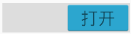
当Switch处于打开状态时: 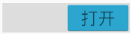
怎么在定义xml中定义Switch
    <Switch

    android:id="@+id/_switch"

    android:layout_width="match_parent"

    android:layout_height="wrap_content"

    android:textOff="关闭"

    android:textOn="打开" />
android:textOff属性表示Switch关闭时显示的文本android:textOn属性表示Switch打开时显示的文本
    mSwitch= (Switch) findViewById(R.id._switch);

    mSwitch.setOnCheckedChangeListener(new CompoundButton.OnCheckedChangeListener() {

        @Override

        public void onCheckedChanged(CompoundButton buttonView, boolean isChecked) {

            if(isChecked){

                Log.i("Switch","打开Switch");

            }else{

                Log.i("Switch","关闭Switch");

            }

        }

    });
2. Space的使用
Space顾名思义是空间的意思,表示该控件占据一定的空间,但是却不显示任何东西。
怎么使用Space
    <android.support.v4.widget.Space

    android:layout_width="match_parent"

    android:layout_height="60dp" />
3. GridLayout的使用
GridLayout是指网格布局,GridLayout是为了弥补TableLayout的一些不足而推出来的。
- TableLayout不能同时在水平和垂直两个方向上对齐,因为TableLayout继承LinearLayout。
- TableLayout中的元素不能跨行或者跨列,因为TableLayout不能明确指出占多少行和多少列。
GridLayout中元素常用的属性
- android:layout_row : 固定显示在第几行。
- android:layout_column : 固定显示在第几列
- android:layout_rowSpan : 跨几行
- android:layout_columnSpan: 跨几列
怎么使用GridLayout
 <GridLayout

    android:id="@+id/grid_layout"

    android:layout_width="match_parent"

    android:layout_height="wrap_content"

    android:columnCount="2"

    android:rowCount="2">

    <Button android:text="打开PopupMenu"

        android:onClick="openPopupMenu"/>

    <Button android:text="TextureView不旋转"

        android:onClick="rotate0"/>

    <Button android:text="TextureView旋转45度"

        android:onClick="rotate45"/>

    <Button android:text="TextureView旋转90度"

        android:onClick="rotate90"/>

</GridLayout>
4. PopupMenu的使用
PopupMenu顾名思义是弹出菜单,它可以在一个控件的下面显示弹出菜单。
在xml中定义弹出菜单
在menu资源目录下面新建一个菜单的xml文件
<menu xmlns:android="http://schemas.android.com/apk/res/android"

xmlns:tools="http://schemas.android.com/tools">

<item android:title="Switch" />

<item android:title="Space" />

<item android:title="GridLayout" />

<item android:title="PopupMenu" />

<item android:title="TextureView" />

</menu>
怎么显示PopupMenu
public void openPopupMenu(View view){

    //popupMenu显示在view下面

    PopupMenu popupMenu=new PopupMenu(this,view);

    //从xml文件中加载菜单到popupMenu中

    popupMenu.inflate(R.menu.popup_menu);

    //显示  popupMenu

    popupMenu.show();

}
5. TextureView的使用
TextureView是SurfaceView的补充,它不像SurfaceView一样创建特殊的窗口,它创建一个常规的View,TextureView可以设置移动,旋转,动画等。
一个Textureview可以用来显示内容流。这样的内容流可以是视频或OpenGL场景。内容流可以来自于应用程序的进程以及远程进程。Textureview只能用于硬件加速的窗口。当渲染软件,Textureview什么都不会画。
怎么使用TextureView
使用Textureview很简单:你需要做的就是得到它的SurfaceTexture。然后,SurfaceTexture可用于呈现内容。
下面的示例演示如何渲染相机预览到Textureview:
因为使用了相机,所以要在添加AndroidManifest.xml 文件中添加对应的权限 <uses-permission android:name="android.permission.CAMERA"/>
public class MainActivity extends AppCompatActivity implements TextureView.SurfaceTextureListener{private TextureView mTexture;

    private Camera mCamera;

    @Overrideprotected void onCreate(Bundle savedInstanceState) {

        super.onCreate(savedInstanceState);

        setContentView(R.layout.activity_main);

        mTexture= (TextureView) findViewById(R.id.texture_view);

        //为mTexture设置表面结构监听器

        mTexture.setSurfaceTextureListener(this);

    }

    /**

     * TextureView的SurfaceTexture准备开始用

     */@Overridepublic void onSurfaceTextureAvailable(SurfaceTexture surface, int width, int height) {

        mCamera = Camera.open();

        try {

            //设置mCamera的表面结构为surface

            mCamera.setPreviewTexture(surface);

            //启动相机预览

            mCamera.startPreview();

            //设置mTexture透明度

            mTexture.setAlpha(1.0f);

            //设置mTexture旋转角度

            mTexture.setRotation(90.0f);

        } catch (IOException ioe) {

            // Something bad happened

        }

    }

    /**

     * SurfaceTexture的缓存大小改变了

     */@Overridepublic void onSurfaceTextureSizeChanged(SurfaceTexture surface, int width, int height) {

    }

    /**

     * SurfaceTexture销毁了

     */@Overridepublic boolean onSurfaceTextureDestroyed(SurfaceTexture surface) {

        mCamera.stopPreview();

        mCamera.release();

        return true;

    }

    /**

     * SurfaceTexture更新了

     */@Overridepublic void onSurfaceTextureUpdated(SurfaceTexture surface) {

    }

}
xml文件中TextureView是这样定义的
    <TextureView

android:id="@+id/texture_view"android:layout_width="match_parent"android:layout_height="match_parent"> </TextureView>注意:TextureView设置旋转90度才是我们的正常视角。

Android4.0新控件的更多相关文章
- 一个Activity掌握Android4.0新控件 (转)
原文地址:http://blog.csdn.net/lavor_zl/article/details/51261380 谷歌在推出Android4.0的同时推出了一些新控件,Android4.0中最常 ...
- 一个Activity掌握Android5.0新控件 (转)
原文地址:http://blog.csdn.net/lavor_zl/article/details/51279386 谷歌在推出Android5.0的同时推出了一些新控件,Android5.0中最常 ...
- Android 5.0新控件——FloatingActionButton(悬浮按钮)
Android 5.0新控件--FloatingActionButton(悬浮按钮) FloatingActionButton是5.0以后的新控件,一个悬浮按钮,之所以叫做悬浮按钮,主要是因为自带阴影 ...
- 【Android】Anroid5.0+新控件---酷炫标题栏的简单学习
Android5.0+推出的新控件感觉特别酷,最近想模仿大神做个看图App出来,所以先把这些新控件用熟悉了. 新控件的介绍.使用等等网上相应的文章已经特别多了,题主也没那能力去写篇详解出来,本篇随笔记 ...
- Android5.0新控件CardView的介绍和使用
CardView也是5.0的新控件,这控件其实就是一个卡片啦,当然我们自己也完全可以定义这样一个卡片,从现在的微博等社App中可以看到各式各样的自定义卡片,所以这个控件意义不是很大.suppor ...
- Android5.0新控件
谷歌在推出Android5.0的同时推出了一些新控件,Android5.0中最常用的新控件有下面5种. 1. CardView(卡片视图) CardView顾名思义是卡片视图,它继承FrameLay ...
- Android 5.0新控件——TextInputLayout
Android 5.0(M)新控件--TextInputLayout 介绍之前,先直观的看一下效果 TextInputLayout其实是一个容器,他继承自LinearLayout,该容器是作用于Tex ...
- Android4.0 -- UI控件之 Menu 菜单的的使用(三)
上一讲 [Android 开发]:UI控件之 Menu 菜单的的使用(二) 我们讲解了创建上下文菜单的第一种使用方式:Creating a floating context menu [创建悬浮的上下 ...
- Android4.0 -- UI控件之 Menu 菜单的的使用(二)
上一讲我们讲解了android中在代码或者xml文件中定义菜单,这一讲我们继续来讲解一下定义菜单的其他方式:创建上下文的菜单.查看API文档 Menus :Creating Contextual Me ...
随机推荐
- (4程序框架)从零开始的嵌入式图像图像处理(PI+QT+OpenCV)实战演练
从零开始的嵌入式图像图像处理(PI+QT+OpenCV)实战演练 1综述http://www.cnblogs.com/jsxyhelu/p/7907241.html2环境架设http://www.cn ...
- 利用TortoiseGit对Coding项目进行版本管理
Git配置: 1),首先去Git官网下载最新的Git,https://git-for-windows.github.io/ 2),下载对应的版本,然后一路next点击安装. Git与Coding联通 ...
- botzone Tetris2
为了证明窝最近没有颓废 (并且为了多骗点访问量 游戏链接:https://botzone.org/game/Tetris2 大概就是先写个估价,然后剪剪枝搜它4步. #include<iostr ...
- 51Nod 1277 字符串中的最大值(KMP,裸题)
1277 字符串中的最大值 题目来源: Codility 基准时间限制:1 秒 空间限制:131072 KB 分值: 80 难度:5级算法题 一个字符串的前缀是指包含该字符第一个字母的连续子串,例如: ...
- linux基本命令学习01
=============================================================================Unix/Linux最主要的应用领域是基础服务 ...
- Windows系统下文件的概念及c语言对其的基本操作(甲)
文件概念
- flume1.8 Sinks类型介绍(三)
1. Flume Sinks 1.1 HDFS Sink 该sink把events写进Hadoop分布式文件系统(HDFS).它目前支持创建文本和序列文件.它支持在两种文件类型压缩.文件可以基于数据的 ...
- Spring框架学习笔记(3)——配置bean
1.属性注入 (1)根据setter方法属性注入,这里使用的是property标签.需要bean属性提供对应的setter方法,比如笔记(1)里的 HelloWorld使用的就是这种方法. <! ...
- UEP-find查询
实体类: @Entity @Table(name = "xxxxx") public class WzInitializeStoreInfo extends EntityBean{ ...
- Eclipse安装JD-Eclipse反编译插件成功看源码
Eclipse安装JD-Eclipse反编译插件 转载 2017年12月24日 15:19:27 http://heavengate.blog.163.com/blog/static/202381 ...