
微服务SpringCloud之熔断监控Hystrix Dashboard和Turbine
Hystrix-dashboard是一款针对Hystrix进行实时监控的工具,通过Hystrix Dashboard我们可以在直观地看到各Hystrix Command的请求响应时间, 请求成功率等数据。但是只使用Hystrix Dashboard的话, 你只能看到单个应用内的服务信息, 这明显不够. 我们需要一个工具能让我们汇总系统内多个服务的数据并显示到Hystrix Dashboard上, 这个工具就是Turbine.用数据、图表展示更加直观,让数据说话,一图顶千言。
一、Hystrix Dashboard
1.引入依赖
在EurekaConsumer项目中引入Hystrix Dashboard也比较容易,只需在pom.xml中引入依赖,主要引入spring-cloud-starter-netflix-hystrix、spring-cloud-starter-netflix-hystrix-dashboard、spring-boot-starter-actuator。
<?xml version="1.0" encoding="UTF-8"?>

<project xmlns="http://maven.apache.org/POM/4.0.0" xmlns:xsi="http://www.w3.org/2001/XMLSchema-instance"

    xsi:schemaLocation="http://maven.apache.org/POM/4.0.0 http://maven.apache.org/xsd/maven-4.0.0.xsd">

    <modelVersion>4.0.0</modelVersion>

    <parent>

        <groupId>org.springframework.boot</groupId>

        <artifactId>spring-boot-starter-parent</artifactId>

        <version>2.1.6.RELEASE</version>

        <relativePath/> <!-- lookup parent from repository -->

    </parent>

    <groupId>com.example</groupId>

    <artifactId>EurekaConsumer</artifactId>

    <version>0.0.1-SNAPSHOT</version>

    <name>EurekaConsumer</name>

    <description>Demo project for Spring Boot</description>

    <properties>

        <java.version>1.8</java.version>

        <spring-cloud.version>Greenwich.SR1</spring-cloud.version>

    </properties>

    <dependencies>

        <dependency>

            <groupId>org.springframework.boot</groupId>

            <artifactId>spring-boot-starter-web</artifactId>

        </dependency>

        <dependency>

            <groupId>org.springframework.cloud</groupId>

            <artifactId>spring-cloud-starter-netflix-eureka-client</artifactId>

        </dependency>

        <dependency>

            <groupId>org.springframework.cloud</groupId>

            <artifactId>spring-cloud-starter-openfeign</artifactId>

        </dependency>

        <!-- https://mvnrepository.com/artifact/org.springframework.cloud/spring-cloud-openfeign-core -->

        <dependency>

            <groupId>org.springframework.cloud</groupId>

            <artifactId>spring-cloud-openfeign-core</artifactId>

            <version>2.1.2.RELEASE</version>

        </dependency>

        <!-- https://mvnrepository.com/artifact/org.springframework.cloud/spring-cloud-starter-netflix-hystrix -->

        <dependency>

            <groupId>org.springframework.cloud</groupId>

            <artifactId>spring-cloud-starter-netflix-hystrix</artifactId>

            <version>2.1.2.RELEASE</version>

        </dependency>

        <!-- https://mvnrepository.com/artifact/org.springframework.cloud/spring-cloud-starter-netflix-hystrix-dashboard -->

        <dependency>

            <groupId>org.springframework.cloud</groupId>

            <artifactId>spring-cloud-starter-netflix-hystrix-dashboard</artifactId>

            <version>2.1.2.RELEASE</version>

        </dependency>

        <!-- https://mvnrepository.com/artifact/org.springframework.boot/spring-boot-starter-actuator -->

        <dependency>

            <groupId>org.springframework.boot</groupId>

            <artifactId>spring-boot-starter-actuator</artifactId>

            <version>2.1.6.RELEASE</version>

        </dependency>

        <dependency>

            <groupId>org.springframework.boot</groupId>

            <artifactId>spring-boot-starter-test</artifactId>

            <scope>test</scope>

        </dependency>

    </dependencies>

    <dependencyManagement>

        <dependencies>

            <dependency>

                <groupId>org.springframework.cloud</groupId>

                <artifactId>spring-cloud-dependencies</artifactId>

                <version>${spring-cloud.version}</version>

                <type>pom</type>

                <scope>import</scope>

            </dependency>

        </dependencies>

    </dependencyManagement>

    <build>

        <plugins>

            <plugin>

                <groupId>org.springframework.boot</groupId>

                <artifactId>spring-boot-maven-plugin</artifactId>

            </plugin>

        </plugins>

    </build>

    <packaging>war</packaging>

</project>
2.启用@EnableHystrixDashboard、@EnableCircuitBreaker
在main方法类中增加注解@EnableHystrixDashboard、@EnableCircuitBreaker,如果只是添加注解还是不够的,运行的时候会报404的错误,还需要在EurekaConsumerApplication类中增加ServletRegistrationBean,设置映射的url。
package com.example.demo;

import org.springframework.boot.SpringApplication;

import org.springframework.boot.autoconfigure.SpringBootApplication;

import org.springframework.boot.web.servlet.ServletRegistrationBean;

import org.springframework.cloud.client.circuitbreaker.EnableCircuitBreaker;

import org.springframework.cloud.client.discovery.EnableDiscoveryClient;

import org.springframework.cloud.netflix.hystrix.dashboard.EnableHystrixDashboard;

import org.springframework.cloud.openfeign.EnableFeignClients;

import org.springframework.context.annotation.Bean;

import com.netflix.hystrix.contrib.metrics.eventstream.HystrixMetricsStreamServlet;

@SpringBootApplication

@EnableDiscoveryClient

@EnableFeignClients

@EnableHystrixDashboard

@EnableCircuitBreaker

public class EurekaConsumerApplication {

    public static void main(String[] args) {

        SpringApplication.run(EurekaConsumerApplication.class, args);

    }

      @Bean

      public ServletRegistrationBean getServlet() {

        HystrixMetricsStreamServlet streamServlet = new HystrixMetricsStreamServlet();

        ServletRegistrationBean registrationBean = new ServletRegistrationBean(streamServlet);

        registrationBean.setLoadOnStartup(1);

        registrationBean.addUrlMappings("/hystrix.stream");

        registrationBean.setName("HystrixMetricsStreamServlet");

        return registrationBean;

      }

}
3.输入http://localhost:9001/hystrix时,会显示如下页面
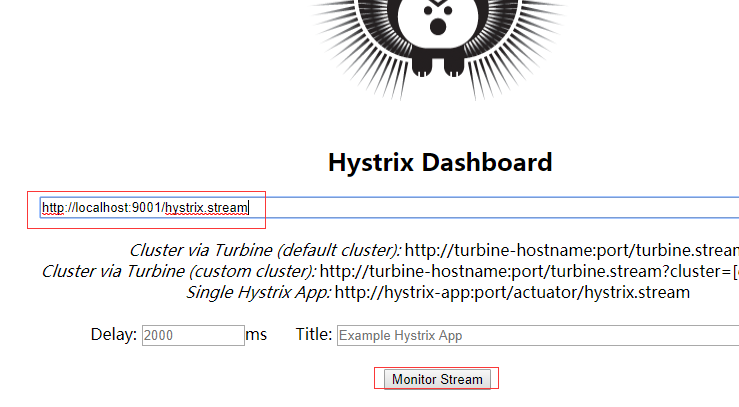
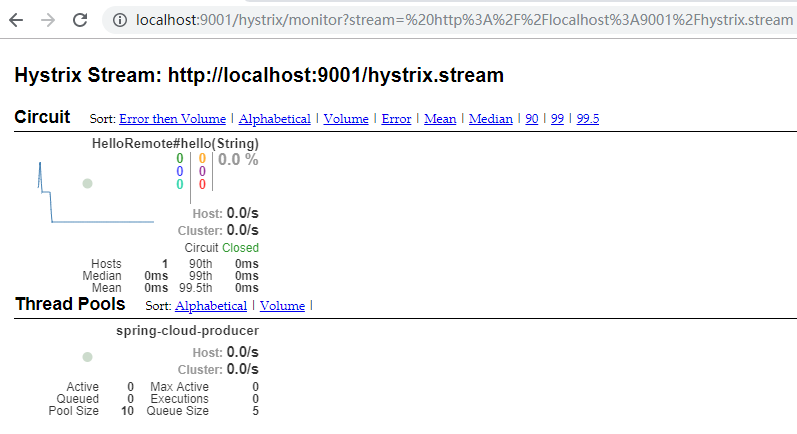
在上面的页面输入http://localhost:9001/hystrix.stream,点击Monitor Stream,然后请求http://localhost:9001/hello?name=cuiyw,就会在点击页面弹出的新页面中看到监控。
二、Turbine
在复杂的分布式系统中,相同服务的节点经常需要部署上百甚至上千个,很多时候,运维人员希望能够把相同服务的节点状态以一个整体集群的形式展现出来,这样可以更好的把握整个系统的状态。 为此,Netflix提供了一个开源项目(Turbine)来提供把多个hystrix.stream的内容聚合为一个数据源供Dashboard展示。
1.引入依赖
这里新建了HystrixTurbine项目,在项目中主要引入spring-cloud-starter-netflix-hystrix-dashboard、spring-cloud-starter-netflix-turbine、spring-boot-starter-actuator、spring-cloud-starter-netflix-turbine-stream。
<?xml version="1.0" encoding="UTF-8"?>

<project xmlns="http://maven.apache.org/POM/4.0.0" xmlns:xsi="http://www.w3.org/2001/XMLSchema-instance"

    xsi:schemaLocation="http://maven.apache.org/POM/4.0.0 http://maven.apache.org/xsd/maven-4.0.0.xsd">

    <modelVersion>4.0.0</modelVersion>

    <parent>

        <groupId>org.springframework.boot</groupId>

        <artifactId>spring-boot-starter-parent</artifactId>

        <version>2.1.6.RELEASE</version>

        <relativePath/> <!-- lookup parent from repository -->

    </parent>

    <groupId>com.example</groupId>

    <artifactId>HystrixTurbine</artifactId>

    <version>0.0.1-SNAPSHOT</version>

    <name>HystrixTurbine</name>

    <description>Demo project for Spring Boot</description>

    <properties>

        <java.version>1.8</java.version>

        <spring-cloud.version>Greenwich.SR2</spring-cloud.version>

    </properties>

    <dependencies>

        <dependency>

            <groupId>org.springframework.cloud</groupId>

            <artifactId>spring-cloud-starter-netflix-hystrix-dashboard</artifactId>

        </dependency>

        <dependency>

            <groupId>org.springframework.cloud</groupId>

            <artifactId>spring-cloud-starter-netflix-turbine</artifactId>

        </dependency>

        <dependency>

            <groupId>org.springframework.boot</groupId>

            <artifactId>spring-boot-starter-test</artifactId>

            <scope>test</scope>

        </dependency>

        <!-- https://mvnrepository.com/artifact/org.springframework.boot/spring-boot-starter-actuator -->

         <dependency>

            <groupId>org.springframework.boot</groupId>

            <artifactId>spring-boot-starter-actuator</artifactId>

            <version>2.1.6.RELEASE</version>

        </dependency>

                <!-- https://mvnrepository.com/artifact/org.springframework.cloud/spring-cloud-starter-netflix-turbine-stream -->

         <dependency>

            <groupId>org.springframework.cloud</groupId>

            <artifactId>spring-cloud-starter-netflix-turbine-stream</artifactId>

            <version>2.0.1.RELEASE</version>

        </dependency>

    </dependencies>

    <dependencyManagement>

        <dependencies>

            <dependency>

                <groupId>org.springframework.cloud</groupId>

                <artifactId>spring-cloud-dependencies</artifactId>

                <version>${spring-cloud.version}</version>

                <type>pom</type>

                <scope>import</scope>

            </dependency>

        </dependencies>

    </dependencyManagement>

    <build>

        <plugins>

            <plugin>

                <groupId>org.springframework.boot</groupId>

                <artifactId>spring-boot-maven-plugin</artifactId>

            </plugin>

        </plugins>

    </build>

    <packaging>war</packaging>

</project>
2.设置配置文件
spring.application.name=hystrix-dashboard-turbine

server.port=8002

turbine.appConfig=spring-cloud-consumerA,spring-cloud-consumerB

turbine.aggregator.clusterConfig= default

turbine.clusterNameExpression= new String("default")

eureka.client.serviceUrl.defaultZone=http://localhost:8088/eureka/

spring.main.allow-bean-definition-overriding=true

turbine.instanceUrlSuffix.default =hystrix.stream
turbine.appConfig :配置Eureka中的serviceId列表,表明监控哪些服务
turbine.aggregator.clusterConfig :指定聚合哪些集群,多个使用”,”分割,默认为default。可使用http://.../turbine.stream?cluster={clusterConfig之一}访问
turbine.clusterNameExpression : 1. clusterNameExpression指定集群名称,默认表达式appName;此时:turbine.aggregator.clusterConfig需要配置想要监控的应用名称;2. 当clusterNameExpression: default时,turbine.aggregator.clusterConfig可以不写,因为默认就是default;3. 当clusterNameExpression: metadata[‘cluster’]时,假设想要监控的应用配置了eureka.instance.metadata-map.cluster: ABC,则需要配置,同时turbine.aggregator.clusterConfig: ABC
3.设置@EnableHystrixDashboard、@EnableTurbineStream、@EnableTurbine
package com.example.demo;

import org.springframework.boot.SpringApplication;

import org.springframework.boot.autoconfigure.SpringBootApplication;

import org.springframework.cloud.netflix.hystrix.dashboard.EnableHystrixDashboard;

import org.springframework.cloud.netflix.turbine.EnableTurbine;

import org.springframework.cloud.netflix.turbine.stream.EnableTurbineStream;

@SpringBootApplication

@EnableHystrixDashboard

@EnableTurbineStream

@EnableTurbine

public class HystrixTurbineApplication {

    public static void main(String[] args) {

        SpringApplication.run(HystrixTurbineApplication.class, args);

    }

}
4.测试
分别启动EurekaServer、EurekaClient,分别修改EurekaConsumer,设置端口9001、9002,以及对应的spring.application.name为spring-cloud-consumerA、spring-cloud-consumerB,并启动,最后启动HystrixTurbine。
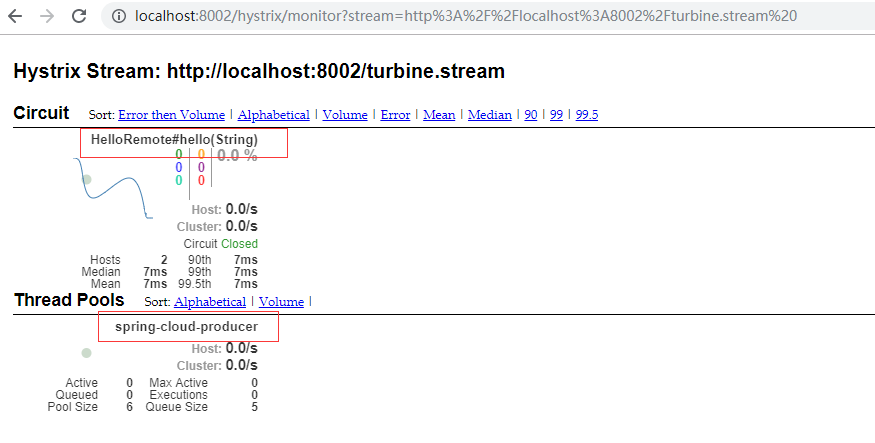
在浏览器中输入http://localhost:8002/hystrix,在出现的页面中输入http://localhost:8002/turbine.stream ,点击Monitor Stream,在浏览器中分别输入http://localhost:9002/hello?name=cuiyw、http://localhost:9001/hello?name=cuiyw,之后可以观察监控页面。由于这里只有一个接口一个生产者,所以只显示了一个。
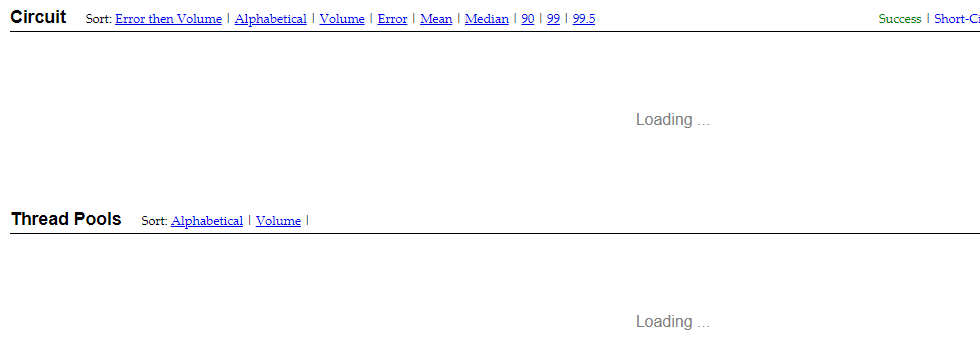
这里还有一个要注意的,由于未在配置文件中设置turbine.instanceUrlSuffix.default =hystrix.stream,导致打开监控页面时一直在loading。日志报com.netflix.turbine.monitor.instance.InstanceMonitor$MisconfiguredHostException: [{"timestamp":"2019-07-21T14:05:10.222+0000","status":404,"error":"Not Found","message":"No message available","path":"/actuator/hystrix.stream"}]错误。
微服务SpringCloud之熔断监控Hystrix Dashboard和Turbine的更多相关文章
- 跟我学SpringCloud | 第五篇:熔断监控Hystrix Dashboard和Turbine
SpringCloud系列教程 | 第五篇:熔断监控Hystrix Dashboard和Turbine Springboot: 2.1.6.RELEASE SpringCloud: Greenwich ...
- springcloud(五):熔断监控Hystrix Dashboard和Turbine
Hystrix-dashboard是一款针对Hystrix进行实时监控的工具,通过Hystrix Dashboard我们可以在直观地看到各Hystrix Command的请求响应时间, 请求成功率等数 ...
- spring cloud(五)熔断监控Hystrix Dashboard和Turbine
Hystrix-dashboard是一款针对Hystrix进行实时监控的工具,通过Hystrix Dashboard我们可以在直观地看到各Hystrix Command的请求响应时间, 请求成功率等数 ...
- Spring Cloud(五):熔断监控Hystrix Dashboard和Turbine
Hystrix-dashboard是一款针对Hystrix进行实时监控的工具,通过Hystrix Dashboard我们可以在直观地看到各Hystrix Command的请求响应时间, 请求成功率等数 ...
- spring cloud深入学习(六)-----熔断监控Hystrix Dashboard和Turbine
Hystrix-dashboard是一款针对Hystrix进行实时监控的工具,通过Hystrix Dashboard我们可以在直观地看到各Hystrix Command的请求响应时间, 请求成功率等数 ...
- spring cloud熔断监控Hystrix Dashboard和Turbine
参考: http://blog.csdn.net/ityouknow/article/details/72625646 完整pom <?xml version="1.0" e ...
- spring-cloud:熔断监控Hystrix Dashboard和Turbine的示例
1.运行环境 开发工具:intellij idea JDK版本:1.8 项目管理工具:Maven 4.0.0 2.GITHUB地址 https://github.com/nbfujx/springCl ...
- Spring Cloud 入门教程(八): 断路器指标数据监控Hystrix Dashboard 和 Turbine
1. Hystrix Dashboard (断路器:hystrix 仪表盘) Hystrix一个很重要的功能是,可以通过HystrixCommand收集相关数据指标. Hystrix Dashboa ...
- springcloud(十):熔断监控Hystrix Dashboard
申明: 这里比较坑爹,大家写的时候要小心,这里和springboot的版本有关系哈,我使用的是2.0 版本,要么调频为1.5 版本,要么使用其他方式 解决错误,我选择了还是用2.0 ...
随机推荐
- 改善C#程序的建议8:避免锁定不恰当的同步对象
原文:改善C#程序的建议8:避免锁定不恰当的同步对象 在C#中让线程同步的另一种编码方式就是使用线程锁.所谓线程锁,就是锁住一个资源,使得应用程序只能在此刻有一个线程访问该资源.可以用下面这句不是那么 ...
- seq2seq和Transformer
简单而言,seq2seq由两个RNN组成,一个是编码器(encoder),一个是解码器(decoder).以MT为例,将源语言"我爱中国"译为"I love China& ...
- 11g Oracle导出表 默认不导出数据为空的表解决
11g oracle导出表时会默认不导出数据为空 1.Oracle11g默认对空表不分配segment,故使用exp导出Oracle11g数据库时,空表不会导出. 2.设置deferred_segm ...
- Qt5.4.2Mingw编译配置opencv2.4.9
1 下载所需工具 (1)qt-opensource-windows-x86-mingw491_opengl-5.4.2.exe 842M 下载地址https://download.qt.io/arc ...
- Boyer-Moore字符串查找算法的实现
前段时间在园子里看到一篇讲Boyer-Moore算法原理的文章http://kb.cnblogs.com/page/176945/,写的很详细,于是在这里自己写个C语言的实现,权当是练手吧. 基本思路 ...
- Redis EXISTS命令耗时过长case排查
一.背景 redis慢日志分析平台上线后,随便看了一下,发现onestore使用的缓存集群,存在大量的EXISTS命令慢查询的情况: 平均每个EXISTS命令需要13ms,最大耗时近20ms.这个结果 ...
- SQL SERVER 之快照复制,事务复制,合并复制
一.环境要求及说明 1.快照复制和事务复制是单向的(2005及以后的版本中加入了订阅端可更新的事务复制). 2.合并复制是双向的. 3.快照复制对表结构没有要求. 4.事务复制要求表有主键. 5.合并 ...
- 从0到1构建网易云信IM私有化
本文来源于MOT技术管理课堂杭州站演讲实录,全文 2410 字,阅读约需 5分钟.网易云信资深研发工程师张翱从私有化面临的问题及需求说起,分享了网易云信IM私有化的解决方案和具体实践. 想要阅读更多技 ...
- 全网唯一的纯前端实现的canvas支持多图压缩并打包下载的工具
技术栈: canvas jszip.js(网页端压缩解压缩插件JSZIP库) FileSaver.js(文件保存到本地库) 直接解读源码: <div class="cont" ...
- 【分页工具-spring boot】Mybatis PageHelper 集成Spring boot
官方文档:https://github.com/pagehelper/pagehelper-spring-boot 1.引入包,测试过以下版本兼容性还是比较好的 <!--Mybatis-Spri ...