
day_5.14 py 飞机大战Demo
飞机未完,继续做 2018-5-14 21:05:45 明天继续


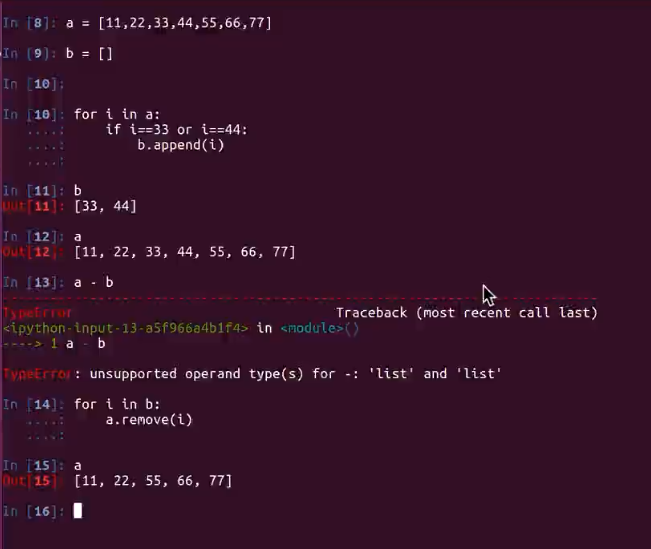
循环里面的坑;
删除列表元素后循环了打印的不一样,主要是比如相邻的删除了,33,44 删除33 循环一次后44跑到33位置, 试一下就知道了dd
 #!/usr/bin/env/python

 #-*-coding:utf-8-*-

 '''

 2018-5-13 19:53:46 完善成功

 一个打飞机的游戏

 其实就是面向对象那个

 有个主方法. 然后有飞机然后又子弹,逐步的迭代

 2018-5-14 18:40:15

 继续开干

 '''

 import pygame

 import time

 from pygame.locals import *

 import random

 class EnemyPlane(object):

     '''敌机的类'''

     def __init__(self,screen_temp):

         self.x=0

         self.y=0

         self.screen =screen_temp

         self.image =pygame.image.load("./feiji/enemy0.png")

         self.bullet_list = [] #储存发射出去子弹对象引用

         self.direction ="right" #用来存储飞机默认的显式方向

     def display(self):

         self.screen.blit(self.image,(self.x,self.y))

         for bullet in self.bullet_list:

             bullet.display()

             bullet.move()

     def move(self):

         if self.direction =="right":

             self.x+= 10

         elif self.direction =="left":

             self.x -= 10

         if self.x>480-50:

             self.direction ="left"

         elif self.x<0:

             self.direction ="right"

     def fire(self):

         random_num = random.randint(1,100)

         if random_num ==8 or random_num ==20:

             self.bullet_list.append(EnemyBullet(self.screen,self.x,self.y))

 class HeroPlane(object):

     '''玩家飞机'''

     def __init__(self,screen_temp):

         self.x=210

         self.y=700

         self.screen =screen_temp

         self.image =pygame.image.load("./feiji/hero1.png")

         self.bullet_list = [] #储存发射出去子弹对象引用

     def display(self):

         self.screen.blit(self.image,(self.x,self.y))

         for bullet in self.bullet_list:

          bullet.display()

          bullet.move()

          if bullet.judge(): #判断子弹是否越界

              self.bullet_list.remove(bullet)

     def move_left(self):

         self.x -=10

     def move_right(self):

         self.x +=10

     def fire(self):

         self.bullet_list.append(Bullet(self.screen,self.x,self.y))

 class Bullet(object):

     def __init__(self,screen_temp,x,y):

         self.x=x+40

         self.y=y-20

         self.screen =screen_temp

         self.image =pygame.image.load("./feiji/bullet.png")

     def display(self):

         self.screen.blit(self.image,(self.x,self.y))

     def move(self):

         self.y-=20

     def judge(self): #判断是否越界

         if self.y <0:

             return True

         else:

             return False

 class EnemyBullet(object):

     def __init__(self,screen_temp,x,y):

         self.x=x+25

         self.y=y+40

         self.screen =screen_temp

         self.image =pygame.image.load("./feiji/bullet1.png")

     def display(self):

         self.screen.blit(self.image,(self.x,self.y))

     def move(self):

         self.y+=10

     def judge(self):

         if self.y >852:

             return True

         else:

             return False

 def key_control(hero_temp):

     # 获取事件,比如按键等

     for event in pygame.event.get():

         # 判断是否是点击了退出按钮

         if event.type == QUIT:

             print("exit")

             exit()

         # 判断是否是按下了键

         elif event.type == KEYDOWN:

             # 检测按键是否是a或者left

             if event.key == K_a or event.key == K_LEFT:

                 print('left')

                 hero_temp.move_left()

             # 检测按键是否是d或者right

             elif event.key == K_d or event.key == K_RIGHT:

                 print('right')

                 hero_temp.move_right()

             # 检测按键是否是空格键

             elif event.key == K_SPACE:

                 print('space')

                 hero_temp.fire()

 def main():

     #1.创建一个窗口

     screen = pygame.display.set_mode((480,852),0,32)

     #2. 创建一个背景图片

     background = pygame.image.load("./feiji/background.png")

     #3 创建一个飞机图片

     hero = HeroPlane(screen)

     #4.创建一个敌机

     enemy = EnemyPlane(screen)

     while True:

         screen.blit(background,(0,0))

         hero.display()

         enemy.display()

         enemy.move()#调用敌机的移动方法

         enemy.fire()#敌机开火

         pygame.display.update()

         key_control(hero)

         time.sleep(0.1)

 if __name__ =="__main__":

     main()
day_5.14 py 飞机大战Demo的更多相关文章
- Html飞机大战(四):状态的切换(界面加载类的编辑)
好家伙,接着写 既然我们涉及到状态了,那么我们也会涉及到状态的切换 那么我们怎样切换状态呢? 想象一下,如果我玩的游戏暂停了,那么我们肯定是通过点击或者按下某个按键来让游戏继续 这里我们选 ...
- [U3D Demo] 手机飞机大战
游戏截图 使用插件 DOTween NGUI 游戏介绍 游戏使用C#开发,素材是<全民飞机大战>中提取出来的,该游戏最早是去年由Flash Air+Starling开发的Demo,后来我修 ...
- 微信小游戏 demo 飞机大战 代码分析(四)(enemy.js, bullet.js, index.js)
微信小游戏 demo 飞机大战 代码分析(四)(enemy.js, bullet.js, index.js) 微信小游戏 demo 飞机大战 代码分析(一)(main.js) 微信小游戏 demo 飞 ...
- 微信小游戏 demo 飞机大战 代码分析 (三)(spirit.js, animation.js)
微信小游戏 demo 飞机大战 代码分析(三)(spirit.js, animation.js) 微信小游戏 demo 飞机大战 代码分析(一)(main.js) 微信小游戏 demo 飞机大战 代码 ...
- 微信小游戏 demo 飞机大战 代码分析 (二)(databus.js)
微信小游戏 demo 飞机大战 代码分析(二)(databus.js) 微信小游戏 demo 飞机大战 代码分析(一)(main.js) 微信小游戏 demo 飞机大战 代码分析(三)(spirit. ...
- 微信小游戏 demo 飞机大战 代码分析 (一)(game.js, main.js)
微信小游戏 demo 飞机大战 代码分析(一)(main.js) 微信小游戏 demo 飞机大战 代码分析(二)(databus.js) 微信小游戏 demo 飞机大战 代码分析(三)(spirit. ...
- 微信demo小游戏:飞机大战从无到有
微信demo游戏飞机大战从无到有 现在创建新项目会默认给飞机大战的demo,这里给大家从基础开始讲解游戏的从无到有是怎么实现的. 具体实现步骤: 创建背景图->背景图运动起来->创建飞机并 ...
- day_5.17 飞机大战
ps:2018-7-24 20:58:11 重新整理这个飞机大战源码,我虽然这个时候没看源码,但是知道思路的话用其他语言还是可以写出来的! ''' 2018-5-13 19:53:46 完善成功 一个 ...
- 飞机大战-面向对象-pygame
飞机大战 最近学习了python的面向对象,对面向对象的理解不是很深刻. 面向对象是数据和函数的'打包整理',将相关数据和处理数据的方法集中在一个地方,方便使用和管理. 本着学习的目的,在网上找了这个 ...
随机推荐
- Altium Designer 13 安装完整元件库
Altium Designer更新的非常快,都快赶上chrome了,13出来没多久14又出来了,之前一直用AD9.4,算是10之前的最后一个版本,也是很经典的一个版本.安装新版本后看到在目录结构上有些 ...
- 常用CTPN、CRNN文本检测识别框架
一.SWT识别: yestinsong/Text-Detection( Text Detection System with MSER , SWT and Text Verification(fft ...
- Spark GraphX实例(3)
7. 图的聚合操作 图的聚合操作主要的方法有: (1) Graph.mapReduceTriplets():该方法有一个mapFunc和一个reduceFunc,mapFunc对图中的每一个EdgeT ...
- 【MySQL】玩转触发器、监听器
1.触发器是一个特殊的存储过程,不同的是存储过程要用CALL来调用,而触发器不需要使用CALL. 创建触发器 语法如下: CREATE TRIGGER trigger_name trigger_tim ...
- MFC总结之CListCtrl用法及技巧
复制于:http://www.cnblogs.com/lidabo/archive/2012/08/23/2652796.html 1.基本操作 分别从下面四点来介绍CListCtrl的基本操作: ① ...
- 空间谱专题13:联合解算DOA(ML/AP)
其中作者:桂. 时间:2017-10-16 07:51:40 链接:http://www.cnblogs.com/xingshansi/p/7675380.html 前言 主要记录二维测向中,分别利 ...
- java多线程状态
造成线程进入阻塞状态的情况大致可分为: 1.调用sleep()方法 2.调用阻塞式IO方法 3. 4.等待通知 5.调用suspend(),程序挂起.
- .NET开发微信公众号之创建自定义菜单
一.简介 微信公众平台服务号以及之前成功申请内测资格的订阅号都具有自定义菜单的功能.开发者可利用该功能为公众账号的会话界面底部增加自定义菜单,用户点击菜单中的选项,可以调出相应的回复信息或网页链接.自 ...
- 【原】使用Tkinter绘制GUI并结合Matplotlib实现交互式绘图
在数据分析的过程中,往往需要对所建立的模型进行可视化,并调整其中的某些参数. 通常情况下,在Python中可以通过Matplotlib来进行绘制图像.然而该绘制过程是静态的,也就是每次调整完参数需要重 ...
- Java编程的逻辑 (81) - 并发同步协作工具
本系列文章经补充和完善,已修订整理成书<Java编程的逻辑>,由机械工业出版社华章分社出版,于2018年1月上市热销,读者好评如潮!各大网店和书店有售,欢迎购买,京东自营链接:http: ...