
Entity Framework Tutorial Basics(17):DBSet Class
DBSet Class
DBSet class represents an entity set that is used for create, read, update, and delete operations. A generic version of DBSet (DbSet<TEntity>) can be used when the type of entity is not known at build time.
You can get the reference of DBSet by using DBContext, eg. dbcontext.Students, dbcontext.Standards, or any other entity set. DbContext class includes DbSet as shown below:
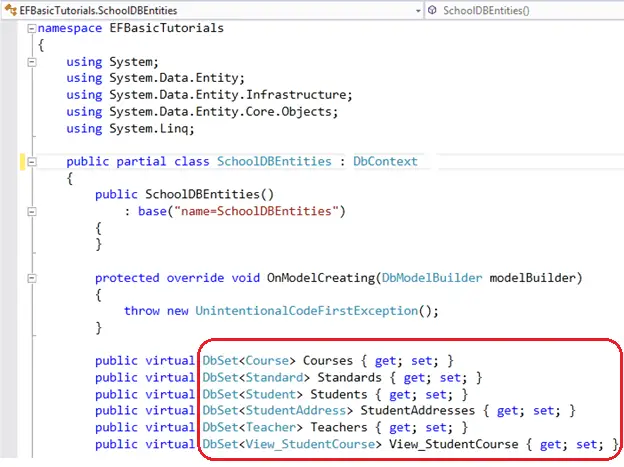
Some of the important methods of DBSet class are shown in the table below::
| Method Name | Return Type | Description |
|---|---|---|
| Add | Added entity type | Adds the given entity to the context the Added state. When the changes are being saved, the entities in the Added states are inserted into the database. After the changes are saved, the object state changes to Unchanged.
Example: |
| AsNoTracking<Entity> | DBQuery<Entity> | Returns a new query where the entities returned will not be cached in the DbContext. (Inherited from DbQuery.)
Entities returned as AsNoTracking, will not be tracked by DBContext. This will be significant performance boost for read only entities. Example: |
| Attach(Entity) | Entity which was passed as parameter | Attaches the given entity to the context in the Unchanged state
Example: |
| Create | Entity | Creates a new instance of an entity for the type of this set. This instance is not added or attached to the set. The instance returned will be a proxy if the underlying context is configured to create proxies and the entity type meets the requirements for creating a proxy.
Example: |
| Find(int) | Entity type | Uses the primary key value to attempt to find an entity tracked by the context. If the entity is not in the context then a query will be executed and evaluated against the data in the data source, and null is returned if the entity is not found in the context or in the data source. Note that the Find also returns entities that have been added to the context but have not yet been saved to the database.
Example: |
| Include | DBQuery | Returns the included non generic LINQ to Entities query against a DbContext. (Inherited from DbQuery)
Example: |
| Remove | Removed entity | Marks the given entity as Deleted. When the changes are saved, the entity is deleted from the database. The entity must exist in the context in some other state before this method is called.
Example: |
| SqlQuery | DBSqlQuery | Creates a raw SQL query that will return entities in this set. By default, the entities returned are tracked by the context; this can be changed by calling AsNoTracking on theDbSqlQuery<TEntity> returned from this method.
Example: |
Visit MSND for more information on DBSet class.
Entity Framework Tutorial Basics(17):DBSet Class的更多相关文章
- Entity Framework Tutorial Basics(1):Introduction
以下系列文章为Entity Framework Turial Basics系列 http://www.entityframeworktutorial.net/EntityFramework5/enti ...
- Entity Framework Tutorial Basics(4):Setup Entity Framework Environment
Setup Entity Framework Environment: Entity Framework 5.0 API was distributed in two places, in NuGet ...
- Entity Framework Tutorial Basics(43):Download Sample Project
Download Sample Project: Download sample project for basic Entity Framework tutorials. Sample projec ...
- Entity Framework Tutorial Basics(42):Colored Entity
Colored Entity in Entity Framework 5.0 You can change the color of an entity in the designer so that ...
- Entity Framework Tutorial Basics(41):Multiple Diagrams
Multiple Diagrams in Entity Framework 5.0 Visual Studio 2012 provides a facility to split the design ...
- Entity Framework Tutorial Basics(37):Lazy Loading
Lazy Loading: One of the important functions of Entity Framework is lazy loading. Lazy loading means ...
- Entity Framework Tutorial Basics(36):Eager Loading
Eager Loading: Eager loading is the process whereby a query for one type of entity also loads relate ...
- Entity Framework Tutorial Basics(34):Table-Valued Function
Table-Valued Function in Entity Framework 5.0 Entity Framework 5.0 supports Table-valued functions o ...
- Entity Framework Tutorial Basics(33):Spatial Data type support in Entity Framework 5.0
Spatial Data type support in Entity Framework 5.0 MS SQL Server 2008 introduced two spatial data typ ...
随机推荐
- android sdk国内服务器下载
推荐使用国内东软的服务器下载android sdk相关: 如果是android sdk manager: HTTP Proxy Server : mirrors.neusoft.edu.cn HTTP ...
- 使用kaptcha验证码组件操作演示
1.创建一个Maven项目 2.在pom.xml中引入相关依赖 <project xmlns="http://maven.apache.org/POM/4.0.0" xmln ...
- .NET MVC 异步提交和返回参数
一.后台页面中的接收方法和返回写法 Jsonresult意味着返回值是json格式,也可以是string或者int等其他类型. Httppost代表只接受Post方法. Mvc中返回Jsonresul ...
- JvisualVm添加远程监控
一.Weblogic远程监控 1.首先需要在远程的weblogic的域下面,找到/bin/ setDomainEnv.sh ,需要在此文件下加入如下内容: -Dcom.sun.management.j ...
- 第一章计算机网络和因特网-day02
1.互联网中的时延:处理时延.排队时延.传输时延.传播时延. 处理时延:检查分组首部和决定该分组导向何处的时间. 排队时延:分组在链路上等待传输的时延. 传输时延:分组经过路由器与交换机的过程的时延. ...
- Zabbix配置微信报警通知
Zabbix告警可以通过邮件,微信,电话,短信等方式发送告警消息. 电话和短信需要向运营商购买相应的网关,需要付费: 邮件和微信是免费的,可以根据业务需要选择相应的告警模式 Zabbix版本:3.2 ...
- set和get的用法
import { Map} from 'immutable'; let a = Map({ select: 'users', filter: Map({ name: 'Cam' }) }) let b ...
- python3 之logging模块
logging.getLogger(name=None)Return a logger with the specified name or, if name is None, return a lo ...
- 通过Python查看Azure VM的状态
Azure的管理平台采用Restful API的方式实现管理.比如获取VM的管理API的各种操作的文档请参考: https://docs.microsoft.com/en-us/rest/api/co ...
- Linux驱动多线程 - 互斥量
1.内核多线程相关内容 1.1 头文件#include <linux/kthread.h> 1.2 定义/初始化变量 struct mutex SPI_work; /*定义互斥体*/ mu ...