
canvas:飞机大战
最开始我们要初始化信息,我们有五个状态,游戏封面,加载状态,运行状态,游戏暂停,游戏结束
我们还需要得分score,生命life
var START = 1;//初始状态

var LOADING = 2;//加载状态

var RUNNING = 3;//游戏运行状态

var WAIT = 4;//游戏暂停状态

var GAMEOVER = 5;//游戏结束状态

var state = START;//初始状态

var score = 0;//游戏得分

var life = 5;//我方飞机的生命值
1.游戏开始界面
我们创建一个背景的构造函数,为了制造背景的动态效果,我们创建两张背景
第一张图片的位置为(0,0)
第二张图片我们放在第一张图片的上面,
当第一张图片运动到最底下时,然后把第一张图片放在第二张图片的上面
当第二张图片运动到最底下时,然后把第二张图片放在第一张图片的上面
var bg = new Image();//创建一个图片对象

bg.src = "img/background.png";

var BG = {

    imgs:bg,

    width:480,

    height:850

}

//创建一个背景的构造函数

//为了制造背景的动态效果,我们创建两张背景

function Bg(config){

    this.imgs = config.imgs;

    this.width = config.width;

    this.height = config.height;

    this.x1 = 0;

    this.y1 = 0;

    this.x2 = 0;

    this.y2 = -this.height;

    //绘制图片的方法

    this.paint = function(){

        ctx.drawImage(this.imgs,this.x1,this.y1);

        ctx.drawImage(this.imgs,this.x2,this.y2);

    }

    //运动方法

    this.step = function(){

        this.y1++;

        this.y2++;

        if (this.y1 == this.height) { //当第一张图片运动到最底下时,

            this.y1 = - this.height;//然后把第一张图片放在第二张图片的上面

        }

        if (this.y2 == this.height) {//当第二张图片运动到最底下时,

            this.y2 = -this.height;//然后把第二张图片放在第一张图片的上面

        }

    }

}

//创建背景对象

var sky = new Bg(BG);

//创建logo

var logo = new Image();

logo.src = "img/start.png";
效果如下:

2.游戏加载界面
首先我们定义一个数组存储图片,数组里的每位元素都创建一个image对象,原因是怕canvas加载太快,图片资源没有获取到,导致画布上面没有东西
通过数组的索引值的改变来让图片好像运动起来;
还要给画布加一个点击事件,必须是开始的状态才能跳转到游戏加载状态
//2.游戏加载界面

var loadings = [];//定义一个数组存储图片

loadings[0] = new Image();

loadings[0].src = "img/game_loading1.png";

loadings[1] = new Image();

loadings[1].src = "img/game_loading2.png";

loadings[2] = new Image();

loadings[2].src = "img/game_loading3.png";

loadings[3] = new Image();

loadings[3].src = "img/game_loading4.png";

//加载过程图片的数据

var LOADINGS = {

    imgs:loadings,

    length:loadings.length,

    width:186,

    height:38

}

//加载运动图片的构造函数

function Loading(config){

    this.imgs = config.imgs;

    this.length = config.length;

    this.width = config.width;

    this.height = config.height;

    this.startindex = 0;//定义一个访问数组中图片的索引

    this.x1 = 0;

    this.y1 = HEIGHT - this.height;

    this.time = 0;

    this.paint = function(){

        ctx.drawImage(this.imgs[this.startindex],this.x1,this.y1)

    }

    this.step = function(){

        this.time++;//因为定时器设置的时间太短了,所以定义了一个时间来进行缓冲

        if (this.time%3==0) {

            this.startindex++;

        }

        if (this.startindex == this.length) {

            state = RUNNING;//当所有图片展示完成,进入下一个状态

        }

    }

}

//运动图片对象

var loading = new Loading(LOADINGS);

//给画布添加点击事件

ocanvas.onclick = function(){

    if (state == START) {

        state = LOADING;

    }

}
效果图如下:
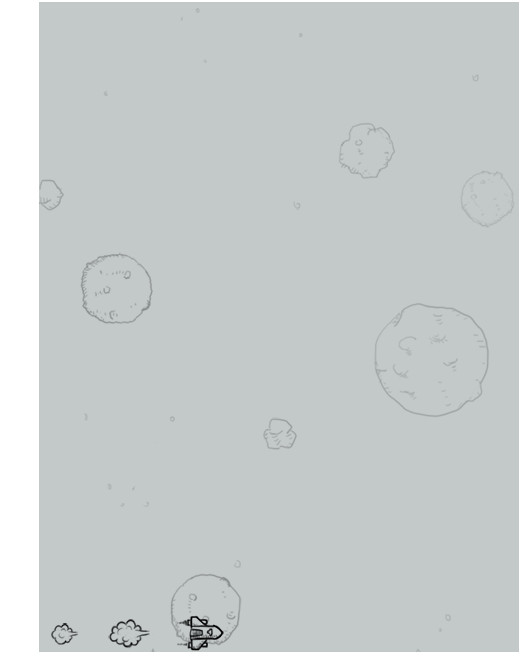
3.我方飞机
依旧创建一个数组来存储图片,创建一个我方飞机的构造函数
Hero构造函数多出了几个属性,判断是否被撞击和是否被撞击完毕
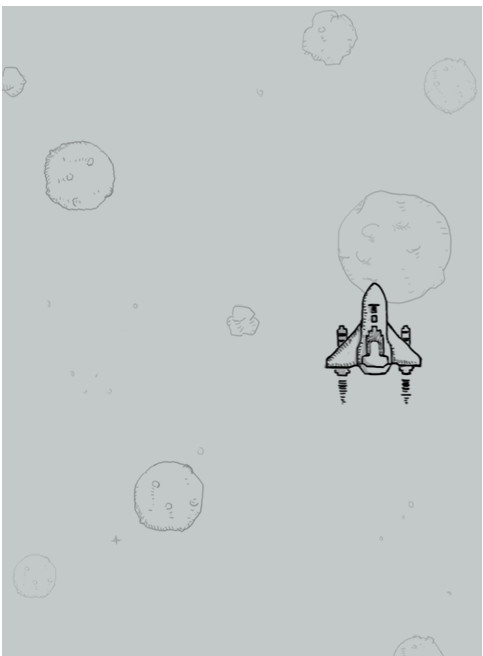
我方飞机会随着鼠标运动,所以给画布添加一个鼠标移动的事件,为了使鼠标在我方飞机图片的正中央,还需要减去我方飞机图片的宽高各一半
其射击函数其实就是生成多个子弹对象
//3.我方飞机

var heros = [];

heros[0] = new Image();

heros[0].src = "img/hero1.png";

heros[1] = new Image();

heros[1].src = "img/hero2.png";

heros[2] = new Image();

heros[2].src = "img/hero_blowup_n1.png";

heros[3] = new Image();

heros[3].src = "img/hero_blowup_n2.png";

heros[4] = new Image();

heros[4].src = "img/hero_blowup_n3.png";

heros[5] = new Image();

heros[5].src = "img/hero_blowup_n4.png";

var HEROS = {

    imgs:heros,

    length:heros.length,

    width:99,

    height:124

}

function Hero(config){

     this.imgs = config.imgs;

     this.length = config.length;

     this.width = config.width;

     this.height = config.height;

     this.startindex = 0;

     this.x1 = WIDTH/2 - this.height/2;

     this.y1 = HEIGHT - 150;

     this.down = false;//是否被撞击

     this.time = 0;

     this.bang = function(){

         this.down = true;

     }

     this.paint = function(){

         ctx.drawImage(this.imgs[this.startindex],this.x1,this.y1);

     }

     this.step = function(){

         if (!this.down) {//

             if (this.startindex == 0) {

                 this.startindex = 1;

             } else{

                 this.startindex = 0;

             }

         } else{

             this.startindex++;

             if (this.startindex == this.length) {

                 life--;

                 if (life <= 0) {

                     state = GAMEOVER;

                     this.startindex = this.length - 1;

                 }else{

                     hero = new Hero(HEROS);

                 }

             }

         }

     }

     this.shoot = function(){//就是生成多个子弹对象

         this.time++;

         if (this.time%3==0) {

             bullet.push(new Bullet(BULLETS));

         }

     }

}

var hero = new Hero(HEROS);

ocanvas.onmousemove = function(event){

    var event = event||window.event;

    var x = event.offsetX;

    var y = event.offsetY;

    if (state == RUNNING) {

        hero.x1 = x - hero.width/2;

        hero.y1 = y - hero.height/2;

    }

}
效果图如下:
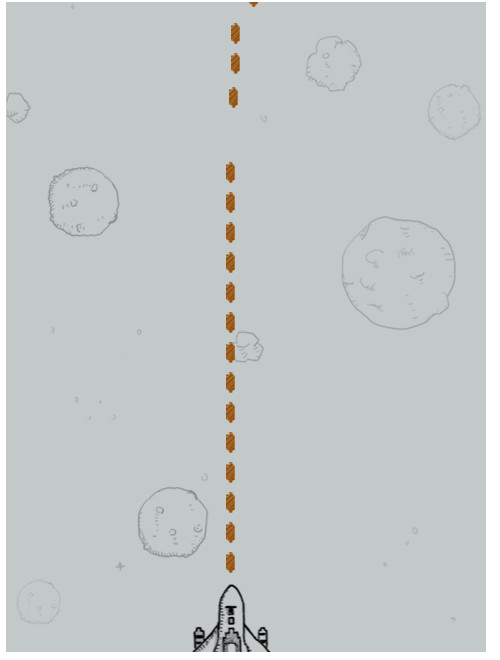
3.子弹
子弹重新定义一个对象,然后在我方飞机定义一个射击函数,用来生成子弹的对象。
如果子弹对象撞击到别的东西或者运动出画布会自动消失,子弹对象通过遍历调用自身显示,运动功能。
直接在全局定义函数,遍历调用子弹自己本身。
//4.我方子弹

var bullets = [];

bullets[0] = new Image();

bullets[0].src = "img/bullet1.png";

var BULLETS = {

    imgs:bullets,

    length:bullets.length,

    width:9,

    height:21

}

function Bullet(config){

    this.imgs = config.imgs;

    this.length = config.length;

    this.width = config.width;

    this.height = config.height;

    this.x1 = hero.x1 + hero.width/2 - this.width/2;

    this.y1 = hero.y1 - this.height-10;

    this.startindex = 0;

    this.down = false;

    this.paint = function(){

        ctx.drawImage(this.imgs[this.startindex],this.x1,this.y1);

    }

    this.step = function(){

        this.y1-=10;

    }

    this.bang = function(){

        this.down = true;

    }

}

var bullet = [];

function bulletPaint(){

    for (var i=0;i<bullet.length;i++) {

        bullet[i].paint();

    }

}

function bulletStep(){

    for (var i=0;i<bullet.length;i++) {

        bullet[i].step();

    }

}

function bulletDown(){

    for (var i=0;i<bullet.length;i++) {

        if (bullet[i].down == true||bullet[i].y1<-bullet[i].height) {

            bullet.splice(i,1);

        }

    }

}
4.敌方飞机(重难点)
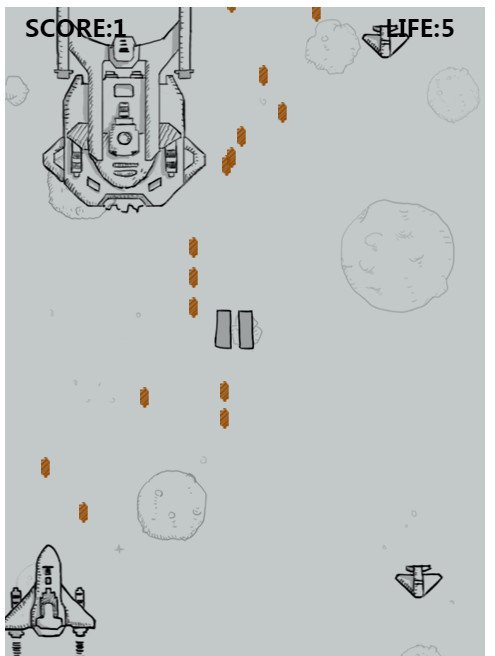
首先敌方飞机的种类就有三种,所以敌方飞机对象要多加一个type属性,这样才能区别对待
然后大飞机还有动画,所以又加了一个frame属性,
比较重要的大概就是碰撞检测和碰撞之后的处理,
碰撞检测:
有参数,因为我们有可能是我放飞机和敌方飞机相撞,有可能是子弹与地方飞机相撞
function Enemy(config){

    this.imgs = config.imgs,

    this.length = config.length;

    this.width = config.width;

    this.height = config.height;

    this.type = config.type;

    this.life = config.life;

    this.score = config.score;

    this.frame = config.frame;

    this.startindex = 0;

    this.x1 = Math.random()*(WIDTH-this.width);

    this.y1 = -this.height;

    this.down = false;//是否被撞击

    this.cancel = false;//确定当前动画是否播放完

    this.paint = function(){

        ctx.drawImage(this.imgs[this.startindex],this.x1,this.y1);

    }

    this.step = function(){

        if (!this.down) {

            this.startindex++;

            this.startindex = this.startindex % this.frame;

            this.y1+=10;

            if (this.y1+this.height>HEIGHT) {//当敌方飞机到达画布底部,还没有被击败,游戏将中止

                state = GAMEOVER;

            }

        } else{

            this.startindex++;

            if (this.startindex == this.length) {

                this.cancel = true;

                this.startindex = this.length - 1;

            }

        }

    }

    this.bang = function(){

        this.life--;//当前飞机的生命值减少

        if (this.life == 0) {

            this.down = true;

            score += this.score;

        }

    }

    this.checkHit = function(obj){

        return this.x1<obj.x1+obj.width&&this.x1+this.width>obj.x1&&this.y1<obj.y1+obj.height&&this.y1+this.height>obj.y1;

    }

}

var enemies = [];
碰撞函数:
敌方飞机和子弹碰撞时,子弹会有一个循环,看看你撞的是页面中哪一个子弹
function checkHitBoth(){//碰撞处理函数

    for (var i= 0;i<enemies.length;i++) {

        //hero和敌方飞机碰撞

        if(enemies[i].checkHit(hero)){//调用敌方飞机的碰撞检测函数

            enemies[i].bang();

            hero.bang();

        }

        //子弹和敌方飞机碰撞

        for(var j = 0;j<bullet.length;j++){

            if(enemies[i].checkHit(bullet[j])){//调用敌方飞机的碰撞检测函数

                enemies[i].bang();

                bullet[j].bang();

            }

        }

    }

}
敌方飞机的创建:
function enemiesCreate(){

    var ran = Math.floor(Math.random()*100);

    if (ran<=5) {

        enemies.push(new Enemy(ENEMY1));

    }else if (ran == 6) {

        enemies.push(new Enemy(ENEMY2));

    }else if (ran == 7) {

        if (enemies[0]) {//判断敌方飞机数组是否有东西

            if (enemies[0].type!=3) {//为了保证画布里只显示一张大飞机,判断敌方飞机数组的第0位是否是大飞机

                enemies.splice(0,0,new Enemy(ENEMY3));//插在数组的最前面,是的数组的第一位是大飞机

            }

        }

    }

}
效果图如下:
5.游戏暂停
当鼠标移出画布时,和当前游戏状态处于运行状态,游戏状态才能转换到暂停状态
当鼠标移入画布时,当前游戏状态处于暂停状态,游戏状态才能转换到游戏运行状态
var pause = new Image();

pause.src = "img/game_pause_nor.png";

ocanvas.onmouseover = function(){

    if (state == WAIT) {

        state = RUNNING;

    }

}

ocanvas.onmouseout = function(){

    if (state == RUNNING) {

        state = WAIT;

    }

}
完整代码:
<!DOCTYPE html>
<html>
<head>
<meta charset="utf-8" />
<title></title>
<style type="text/css">
div{
margin: 0 auto;
text-align: center;
}
</style>
</head>
<body>
<div>
<canvas id="" width="480" height="650"></canvas>
</div>
<script type="text/javascript">
var ocanvas = document.getElementsByTagName("canvas")[0];
var ctx = ocanvas.getContext("2d"); var START = 1;//初始状态
var LOADING = 2;//加载状态
var RUNNING = 3;//游戏运行状态
var WAIT = 4;//游戏暂停状态
var GAMEOVER = 5;//游戏结束状态 var WIDTH = 480;
var HEIGHT = 650; var state = START;//初始状态 var score = 0;//游戏得分 var life = 5;//我方飞机的生命值 //1.游戏开始界面
var bg = new Image();//创建一个图片对象
bg.src = "img/background.png"; var BG = {
imgs:bg,
width:480,
height:850
}
//创建一个背景的构造函数
//为了制造背景的动态效果,我们创建两张背景
function Bg(config){
this.imgs = config.imgs;
this.width = config.width;
this.height = config.height; this.x1 = 0;
this.y1 = 0;
this.x2 = 0;
this.y2 = -this.height; //绘制图片的方法
this.paint = function(){
ctx.drawImage(this.imgs,this.x1,this.y1);
ctx.drawImage(this.imgs,this.x2,this.y2);
} //运动方法
this.step = function(){
this.y1++;
this.y2++;
if (this.y1 == this.height) { //当第一张图片运动到最底下时,
this.y1 = - this.height;//然后把第一张图片放在第二张图片的上面
}
if (this.y2 == this.height) {//当第二张图片运动到最底下时,
this.y2 = -this.height;//然后把第二张图片放在第一张图片的上面
}
}
} //创建背景对象
var sky = new Bg(BG); //创建logo
var logo = new Image();
logo.src = "img/start.png"; //2.游戏加载界面
var loadings = [];//定义一个数组存储图片
loadings[0] = new Image();
loadings[0].src = "img/game_loading1.png";
loadings[1] = new Image();
loadings[1].src = "img/game_loading2.png";
loadings[2] = new Image();
loadings[2].src = "img/game_loading3.png";
loadings[3] = new Image();
loadings[3].src = "img/game_loading4.png"; //加载过程图片的数据
var LOADINGS = {
imgs:loadings,
length:loadings.length,
width:186,
height:38
} //加载运动图片的构造函数
function Loading(config){
this.imgs = config.imgs;
this.length = config.length;
this.width = config.width;
this.height = config.height;
this.startindex = 0;//定义一个访问数组中图片的索引
this.x1 = 0;
this.y1 = HEIGHT - this.height;
this.time = 0; this.paint = function(){
ctx.drawImage(this.imgs[this.startindex],this.x1,this.y1)
} this.step = function(){
this.time++;//因为定时器设置的时间太短了,所以定义了一个时间来进行缓冲
if (this.time%3==0) {
this.startindex++;
}
if (this.startindex == this.length) {
state = RUNNING;//当所有图片展示完成,进入下一个状态
}
}
} //运动图片对象
var loading = new Loading(LOADINGS); //给画布添加点击事件
ocanvas.onclick = function(){
if (state == START) {
state = LOADING;
}
} //3.我方飞机
var heros = [];
heros[0] = new Image();
heros[0].src = "img/hero1.png";
heros[1] = new Image();
heros[1].src = "img/hero2.png";
heros[2] = new Image();
heros[2].src = "img/hero_blowup_n1.png";
heros[3] = new Image();
heros[3].src = "img/hero_blowup_n2.png";
heros[4] = new Image();
heros[4].src = "img/hero_blowup_n3.png";
heros[5] = new Image();
heros[5].src = "img/hero_blowup_n4.png"; var HEROS = {
imgs:heros,
length:heros.length,
width:99,
height:124
} function Hero(config){
this.imgs = config.imgs;
this.length = config.length;
this.width = config.width;
this.height = config.height;
this.startindex = 0;
this.x1 = WIDTH/2 - this.height/2;
this.y1 = HEIGHT - 150;
this.down = false;//是否被撞击
this.time = 0;
this.bang = function(){
this.down = true;
}
this.paint = function(){
ctx.drawImage(this.imgs[this.startindex],this.x1,this.y1);
}
this.step = function(){
if (!this.down) {//判断是否撞击
if (this.startindex == 0) {
this.startindex = 1;
} else{
this.startindex = 0;
}
} else{//被撞了
this.startindex++;
if (this.startindex == this.length) {
life--;//生命值减一
if (life <= 0) {//当生命值小于等于0时
state = GAMEOVER;
this.startindex = this.length - 1;//定格在最后一刻
}else{
hero = new Hero(HEROS);//如果生命值不为0,
}
} }
}
this.shoot = function(){//就是生成多个子弹对象
this.time++;
if (this.time%3==0) {
bullet.push(new Bullet(BULLETS));
} }
}
var hero = new Hero(HEROS);
ocanvas.onmousemove = function(event){
var event = event||window.event;
var x = event.offsetX;
var y = event.offsetY;
if (state == RUNNING) {
hero.x1 = x - hero.width/2;
hero.y1 = y - hero.height/2;
} } //4.我方子弹
var bullets = [];
bullets[0] = new Image();
bullets[0].src = "img/bullet1.png"; var BULLETS = {
imgs:bullets,
length:bullets.length,
width:9,
height:21
} function Bullet(config){
this.imgs = config.imgs;
this.length = config.length;
this.width = config.width;
this.height = config.height;
this.x1 = hero.x1 + hero.width/2 - this.width/2;
this.y1 = hero.y1 - this.height-10;
this.startindex = 0;
this.down = false; this.paint = function(){
ctx.drawImage(this.imgs[this.startindex],this.x1,this.y1);
}
this.step = function(){
this.y1-=10;
}
this.bang = function(){
this.down = true;
}
}
var bullet = [];
function bulletPaint(){
for (var i=0;i<bullet.length;i++) {
bullet[i].paint();
}
}
function bulletStep(){
for (var i=0;i<bullet.length;i++) {
bullet[i].step();
}
}
function bulletDown(){
for (var i=0;i<bullet.length;i++) {
if (bullet[i].down == true||bullet[i].y1<-bullet[i].height) {
bullet.splice(i,1);
}
}
} var enemy1 = [];//小飞机
enemy1[0] = new Image();
enemy1[0].src = "img/enemy1.png";
enemy1[1] = new Image();
enemy1[1].src = "img/enemy1_down1.png";
enemy1[2] = new Image();
enemy1[2].src = "img/enemy1_down2.png";
enemy1[3] = new Image();
enemy1[3].src = "img/enemy1_down3.png";
enemy1[4] = new Image();
enemy1[4].src = "img/enemy1_down4.png";
var enemy2 = [];//中飞机
enemy2[0] = new Image();
enemy2[0].src = "img/enemy2.png";
enemy2[1] = new Image();
enemy2[1].src = "img/enemy2_down1.png";
enemy2[2] = new Image();
enemy2[2].src = "img/enemy2_down2.png";
enemy2[3] = new Image();
enemy2[3].src = "img/enemy2_down3.png";
enemy2[4] = new Image();
enemy2[4].src = "img/enemy2_down4.png";
var enemy3 = [];//大飞机
enemy3[0] = new Image();
enemy3[0].src = "img/enemy3_n1.png";
enemy3[1] = new Image();
enemy3[1].src = "img/enemy3_n2.png";
enemy3[2] = new Image();
enemy3[2].src = "img/enemy3_down1.png";
enemy3[3] = new Image();
enemy3[3].src = "img/enemy3_down2.png";
enemy3[4] = new Image();
enemy3[4].src = "img/enemy3_down3.png";
enemy3[5] = new Image();
enemy3[5].src = "img/enemy3_down4.png";
enemy3[6] = new Image();
enemy3[6].src = "img/enemy3_down5.png";
enemy3[7] = new Image();
enemy3[7].src = "img/enemy3_down6.png"; var ENEMY1 = {
imgs : enemy1,
length : enemy1.length,
width : 57,
height : 51,
type : 1,
life : 1,
score : 1,
frame : 1
}
var ENEMY2 = {
imgs : enemy2,
length : enemy2.length,
width : 69,
height : 95,
type : 2,
life : 3,
score : 3,
frame : 1
}
var ENEMY3 = {
imgs : enemy3,
length : enemy3.length,
width : 165,
height : 261,
type : 3,
life : 10,
score : 10,
frame : 2
}
function Enemy(config){
this.imgs = config.imgs,
this.length = config.length;
this.width = config.width;
this.height = config.height;
this.type = config.type;
this.life = config.life;
this.score = config.score;
this.frame = config.frame;
this.startindex = 0;
this.x1 = Math.random()*(WIDTH-this.width);
this.y1 = -this.height;
this.down = false;//是否被撞击
this.cancel = false;//确定当前动画是否播放完
this.paint = function(){
ctx.drawImage(this.imgs[this.startindex],this.x1,this.y1);
}
this.step = function(){
if (!this.down) {
this.startindex++;
this.startindex = this.startindex % this.frame;
this.y1+=10;
if (this.y1+this.height>HEIGHT) {//当敌方飞机到达画布底部,还没有被击败,游戏将中止
state = GAMEOVER;
}
} else{
this.startindex++;
if (this.startindex == this.length) {
this.cancel = true;
this.startindex = this.length - 1;
}
}
}
this.bang = function(){
this.life--;//当前飞机的生命值减少
if (this.life == 0) {
this.down = true;
score += this.score;
}
}
this.checkHit = function(obj){
return this.x1<obj.x1+obj.width&&this.x1+this.width>obj.x1&&this.y1<obj.y1+obj.height&&this.y1+this.height>obj.y1;
}
}
var enemies = [];
function enemiesCreate(){
var ran = Math.floor(Math.random()*100);
if (ran<=5) {
enemies.push(new Enemy(ENEMY1));
}else if (ran == 6) {
enemies.push(new Enemy(ENEMY2));
}else if (ran == 7) {
if (enemies[0]) {//判断敌方飞机数组是否有东西
if (enemies[0].type!=3) {//为了保证画布里只显示一张大飞机,判断敌方飞机数组的第0位是否是大飞机
enemies.splice(0,0,new Enemy(ENEMY3));//插在数组的最前面,是的数组的第一位是大飞机
}
}
}
}
function enemiesPaint(){
for (var i = 0;i<enemies.length;i++) {
enemies[i].paint();
}
}
function enemiesStep(){
for (var i = 0;i<enemies.length;i++) {
enemies[i].step();
}
}
function enemiesDel(){
for (var i = 0;i<enemies.length;i++) {
if (enemies[i].cancel||enemies[i].y1>HEIGHT) {
enemies.splice(i,1);//删除当前元素
} }
}
function checkHitBoth(){//碰撞处理函数
for (var i= 0;i<enemies.length;i++) {
//hero和敌方飞机碰撞
if(enemies[i].checkHit(hero)){//调用敌方飞机的碰撞检测函数
enemies[i].bang();
hero.bang();
}
//子弹和敌方飞机碰撞
for(var j = 0;j<bullet.length;j++){
if(enemies[i].checkHit(bullet[j])){//调用敌方飞机的碰撞检测函数
enemies[i].bang();
bullet[j].bang();
}
}
}
}
var pause = new Image();
pause.src = "img/game_pause_nor.png";
ocanvas.onmouseover = function(){
if (state == WAIT) {
state = RUNNING;
}
}
ocanvas.onmouseout = function(){
if (state == RUNNING) {
state = WAIT;
}
}
function paintText(){
ctx.font = "bold 24px 微软雅黑";
ctx.fillText("SCORE:"+score,20,30);
ctx.fillText("LIFE:"+life,380,30);
}
function paintGameover(){
ctx.font = "bold 36px 微软雅黑";
ctx.fillText("GAMEOVER",150,300);
}
setInterval(function(){
sky.paint();
sky.step();
if (state == START) {//当游戏状态为开始状态时
ctx.drawImage(logo,40,0);
}else if (state == LOADING) {
loading.paint();
loading.step();
}else if (state == RUNNING) {
hero.paint();//我方飞机绘制
hero.step();//我方飞机运动
hero.shoot();//我方飞机射击子弹
bulletPaint();//遍历子弹,让所有子弹显示
bulletStep();//遍历子弹,让子弹运动
bulletDown();//遍历子弹,击中飞机的子弹或者画布外的子弹自己销毁 enemiesCreate()//创建敌方飞机
enemiesPaint();//遍历敌方飞机数组让敌方飞机显示
enemiesStep();//遍历敌方飞机让所有飞机运动
enemiesDel();//销毁符合条件的敌方飞机
checkHitBoth();
paintText();//绘制得分和生命值
}else if (state == WAIT) {//保存当前运动状态
hero.paint();
bulletPaint();
enemiesPaint();
ctx.drawImage(pause,200,300);
paintText();
}else if (state == GAMEOVER) {
paintText();
paintGameover();
} },100) </script>
</body>
</html>
canvas:飞机大战的更多相关文章
- Canvas:飞机大战 -- 游戏制作
Canvas:飞机大战 最开始我们要初始化信息,我们有五个状态:游戏封面,加载状态,运行状态,游戏暂停,游戏结束. 我们还需要 得分--score,生命--life. var START = 1;/ ...
- web版canvas做飞机大战游戏 总结
唠唠:两天的时间跟着做了个飞机大战的游戏,感觉做游戏挺好的.说是用html5做,发现全都是js.说js里一切皆为对象,写的最多的还是函数,都是函数调用.对这两天的代码做个总结,希望路过的大神指点一下, ...
- canvas绘制“飞机大战”小游戏,真香!
canvas是ArkUI开发框架里的画布组件,常用于自定义绘制图形.因为其轻量.灵活.高效等优点,被广泛应用于UI界面开发中. 本期,我们将为大家介绍canvas组件的使用. 一.canvas介绍 1 ...
- 微信小游戏 demo 飞机大战 代码分析(四)(enemy.js, bullet.js, index.js)
微信小游戏 demo 飞机大战 代码分析(四)(enemy.js, bullet.js, index.js) 微信小游戏 demo 飞机大战 代码分析(一)(main.js) 微信小游戏 demo 飞 ...
- 微信小游戏 demo 飞机大战 代码分析 (三)(spirit.js, animation.js)
微信小游戏 demo 飞机大战 代码分析(三)(spirit.js, animation.js) 微信小游戏 demo 飞机大战 代码分析(一)(main.js) 微信小游戏 demo 飞机大战 代码 ...
- 微信小游戏 demo 飞机大战 代码分析 (一)(game.js, main.js)
微信小游戏 demo 飞机大战 代码分析(一)(main.js) 微信小游戏 demo 飞机大战 代码分析(二)(databus.js) 微信小游戏 demo 飞机大战 代码分析(三)(spirit. ...
- android:怎样用一天时间,写出“飞机大战”这种游戏!(无框架-SurfaceView绘制)
序言作为一个android开发人员,时常想开发一个小游戏娱乐一下大家,今天就说说,我是怎么样一天写出一个简单的"飞机大战"的. 体验地址:http://www.wandoujia. ...
- 【Web前端Talk】无聊吗?写个【飞机大战】来玩吧(上篇)
01前言介绍 微信小游戏是基于微信客户端的游戏,它即点即玩,无需下载安装,体验轻便,可以和微信内的好友一起玩,比如PK.围观等,享受小游戏带来的乐趣.那如何开发一款属于自己的小游戏呢? 源码地址: h ...
- Html飞机大战(四):状态的切换(界面加载类的编辑)
好家伙,接着写 既然我们涉及到状态了,那么我们也会涉及到状态的切换 那么我们怎样切换状态呢? 想象一下,如果我玩的游戏暂停了,那么我们肯定是通过点击或者按下某个按键来让游戏继续 这里我们选 ...
- Html飞机大战(一):绘制动态背景
好家伙,飞机大战终于开始弄了 这会有很多很多复杂的东西,但是我们总要从最简单,和最基础的部分开始, 我们先从背景开始弄吧! 1.绘制静态背景 这里我们会用到canvas <!DOCTYPE ...
随机推荐
- Effective C++ 条款13
以对象管理资源 资源的种类非常多,动态分配的内存.文件描写叙述器.相互排斥锁.图像界面中画刷.数据库连接.网络socket等. 资源通常是有限的.当你不用时,必须释放.不然就会造成资源浪费.更严重的情 ...
- Flex之登录界面
制作登录框界面 环境搭建:MyEclipse 6.5+Flex Builder 3 Plug-in <?xml version="1.0" encoding="ut ...
- ES6学习笔记(十)代理器Proxy
Java可以使用面向切面(AOP)的方法来实现某些统一的操作,比如某个操作的前置通知,后置通知等等,这种操作非常方便,其本质便是动态代理,JS的代理Proxy代理该如何使用呢? 某位大神的实现如下: ...
- Hi3531D搭建环境时,出现的问题
1.展开SDK包得时候,运行./sdk.unpack得时候出现: 原因:ubuntu14.04中默认得是dash,要将dash改成bash. 解决方法:sudo ln -fs /bin/bash /b ...
- 保留原先小程序名称 更改微信小程序主体
首先给小程序开发者普及一些官方消息: 1.目前官方是不允许修改已经认证的小程序主体信息!(公众号可以修改) 2.小程序与公众号的名称是全平台唯一,即如果小程序叫‘ABC’其他小程序和公众号就不能存在‘ ...
- 洛谷 P3670 [USACO17OPEN]Bovine Genomics S奶牛基因组(银)
P3670 [USACO17OPEN]Bovine Genomics S奶牛基因组(银) 题目描述 Farmer John owns NN cows with spots and NN cows wi ...
- valgrind的说明使用和原理
编译 #gcc -g -o test test.c 内存检查#valgrind --tool=memcheck --leak-check=yes --show-reachable=yes ./test ...
- [Python] Finding the most common elements in an iterable
>>> import collections >>> # Tally occurrences of words in a list >>> cnt ...
- 程序猿的量化交易之路(13)--Cointrader类图(1)
转载须注明出处:http://blog.csdn.net/minimicall? viewmode=contents, htpp://cloudtrader.top 今天開始正式切入到Cointrad ...
- vue绑定内联样式
v-bind:style 的对象语法十分直观--看着非常像 CSS ,其实它是一个 JavaScript 对象. CSS 属性名可以用驼峰式(camelCase)或短横分隔命名(kebab-case) ...