
js 飞机大战
完整文件及代码可以在网盘下载,下载链接为:https://pan.baidu.com/s/1hs7sBUs 密码: d83x
飞机大战css定义:
<style>

#container{

width:320px;

height:568px;

background: url(images/start.png);

margin:20px auto;

position: relative;

overflow: hidden;

}

#container input{

width:120px;

height: 38px;

background: #ff6600;

border:;

color:#fff;

font-size:14px;

font-family: 微软雅黑;

position: absolute;

left: 100px;

bottom:50px;

}

#enddiv{

position: absolute;

top: 210px;

left: 75px;

border: 1px solid gray;

border-radius: 5px;

text-align: center;

background-color:#d7ddde;

display: none;

z-index:;

}

.plantext{

width: 160px;

height: 30px;

line-height: 30px;

font-size: 16px;

font-weight: bold;

}

#enddiv div{

width: 160px;

height: 50px;

}

#enddiv div button{

margin-top:10px ;

width: 90px;

height: 30px;

border: 1px solid gray;

border-radius: 30px;

}

#scoretext{

margin:;

font-family: arial;

font-size:12px;

font-weight: bold;

color:#ff6600;

position: absolute;

left: 4px;

top: 4px;

z-index:;

}

</style>
飞机大战: HTML代码如下:
  <div id="container">

        <p id="scoretext"></p>

        <div id="enddiv">

            <p class="plantext">游戏结束</p>

            <div><button onclick="restartGame()" id="restart">继续</button></div>

        </div>

        <input type="button" value="开始游戏" id="startBtn">

    </div>
飞机大战 : 调用js
//中大型飞机射击次数未实现,gameover未实现

        function startGame(container){

            var startBtn = document.getElementById("startBtn");

            startBtn.onclick = function(){

                container.style.background = "url(images/background_1.png)";

                this.style.display = "none";

                bgMove(container);

                var score = 0;

                var myplan = new MyPlan(120,480,container);

                var middleEnemy = new MiddleEnemy(container,myplan.bullets,myplan,score); //中型飞机对象实例

                var maxEnemy = new MaxEnemy(container,myplan.bullets,myplan,score);//大型飞机对象实例

                var enemy = new Enemy(container,myplan.bullets,myplan,middleEnemy,maxEnemy,score);

                enemy.init();

            }

        }

        var speed = 0;

        function bgMove(container){

            setInterval(function(){

                speed++;

                container.style.backgroundPosition = "0 " + speed + "px";

                if(speed > 568){

                    speed = 0;

                }

            },15);

        }

        function gameOver(){

            var enddiv = document.getElementById("enddiv");

            var restart = document.getElementById("restart");

            enddiv.style.display = "block";

            restart.onclick = function(){

                location.reload();

            }

        }

        var score = 0;

        function getScore(num){

            var scoretext = document.getElementById("scoretext");

            score += num;

            scoretext.innerHTML = score + "分";

        }

        onload = function(){

            var container = document.getElementById("container");

            startGame(container);

        }
飞机大战: 我方飞机创建:
Array.prototype.remove = function(value){

    for(var i = 0; i < this.length; i++){

        if(this[i] == value){

            this.splice(i,1);

        }

    }

}

function MyPlan(x , y , container){

    this.x = x;

    this.y = y;

    this.img = "images/my.gif";

    this.container = container;

    this.bullets = [];

    this.createTimer;

    this.init();

}

MyPlan.prototype = {

    init:function(){

        this.create();

        this.planMove();

        this.bullets.push(this.plan);

        var that = this;

        this.createTimer = setInterval(function(){

            that.createBullets();

        },200);

        this.createBullets();

    },

    planMove:function(){

        var that = this;

        this.container.onmousemove = function(e){

            e = e || event;

            var maxLeft = that.container.offsetWidth - that.plan.offsetWidth;

            var maxTop = that.container.offsetHeight - that.plan.offsetHeight;

            var planX = Math.max(Math.min(e.clientX - that.container.offsetLeft - that.plan.offsetWidth / 2,maxLeft),0);

            var planY = Math.max(Math.min(e.clientY - that.container.offsetTop - that.plan.offsetHeight / 2,maxTop),0);

            that.plan.style.left = planX + "px";

            that.plan.style.top = planY + "px";

        }

    },

    create:function(){

        this.plan = document.createElement("img");

        this.plan.src = this.img;

        this.plan.style.cssText = "position:absolute; top:" + this.y + "px; left:" + this.x + "px;";

        this.container.appendChild(this.plan);

    },

    createBullets:function(){

        this.bull = document.createElement("img");

        this.bull.src = "images/bullet1.png";

        var bullX = this.plan.offsetLeft + this.plan.offsetWidth / 2 - 6 / 2;

        var bullY = this.plan.offsetTop - 14;

        this.bull.style.cssText = "position:absolute; top:" + bullY + "px; left:" + bullX + "px;";

        this.container.appendChild(this.bull);

        this.bullets.push(this.bull);

        var bull = this.bull; //不能用that = this 对象冒充 闭包问题

        var container = this.container;

        var bullets = this.bullets;

        this.bull.timer = setInterval(function(){

            bull.style.top = bull.offsetTop - 3 + "px";

            if(bull.offsetTop <= -14){

                bullets.remove(bull);

                container.removeChild(bull);

                clearInterval(bull.timer);

            }

        },8);

    }

}
飞机大战: 敌方基本飞机创建:
function Enemy(container,bullets,myplan,middleEnemy,maxEnemy,score){

    this.container = container;

    this.img = "images/enemy1_fly_1.png";

    this.createTime = 600; //创建敌机的间隔时间

    this.bullets = bullets;

    this.dieImg = "images/enemy1_fly_3.gif";

    this.width = 34; //敌机的宽度

    this.height = 24;    //敌机的高度

    this.myplan = myplan;

    this.count = 1; //小型敌机创建个数

    this.dieCount = 1; //敌机消灭需子弹打击次数

    this.middleEnemy = middleEnemy;

    this.maxEnemy = maxEnemy;

    this.score = score;

}

Enemy.prototype = {

    init:function(){

        var that = this;

        var middleEnemy = this.middleEnemy;

        var maxEnemy = this.maxEnemy;

        var count = 0;

        setInterval(function(){

            that.create();

            count++;

            if(count % 5 == 0){

                middleEnemy.create();

            }

            if(count % 30 == 0){

                maxEnemy.create();

                count = 1;

            }

        },this.createTime);

    },

    create:function(){

        this.enemy = document.createElement("img");

        this.enemy.src = this.img;

        var enemyX = Math.random() * (this.container.offsetWidth - this.width);

        var enemyY = -1 * this.height;

        this.enemy.style.cssText = "position:absolute; left:" + enemyX + "px; top:" + enemyY + "px;";

        this.container.appendChild(this.enemy);

        var enemy = this.enemy;

        this.data_hitCount = 0;

        var container = this.container;

        var bullets = this.bullets;

        var dieImg = this.dieImg;

        var myplan = this.myplan;

        var plan = this.myplan.plan;

        var createBullets = this.myplan.createBullets;

        var dieCount = this.dieCount;

        var isremove = true; //是否可以移除敌机

        var score = this.score;

        var that = this;

        this.enemy.timer = setInterval(function(){

            enemy.style.top = enemy.offsetTop + 3 + "px";

            for(var i = 0; i < bullets.length; i++){

                if(bullets[i].offsetLeft + bullets[i].offsetWidth > enemy.offsetLeft && bullets[i].offsetLeft < enemy.offsetLeft + enemy.offsetWidth){

                    if(bullets[i].offsetTop + bullets[i].offsetHeight > enemy.offsetTop && bullets[i].offsetTop < enemy.offsetTop + enemy.offsetHeight && isremove){

                        if(i == 0){

                            plan.src = "images/myover.gif";

                            container.onmousemove = null;

                            clearInterval(myplan.createTimer);

                            gameOver();

                        }

                        else{

                            container.removeChild(bullets[i]);

                            bullets.remove(bullets[i]);

                            that.data_hitCount++;

                            if(that.data_hitCount == dieCount){

                                isremove = false;

                                enemy.src = dieImg;

                                getScore(dieCount);

                                setTimeout(function(){

                                    container.removeChild(enemy);

                                },300);

                            }

                        }

                    }

                }

            }

            if(enemy.offsetTop >= container.offsetHeight){

                container.removeChild(enemy);

                clearInterval(enemy.timer);

            }

        },30);

    }

}
飞机大战: 其他敌机创建:
function MiddleEnemy(container,bullets,myplan,score){

    Enemy.call(this,container,bullets,myplan,score);

    this.img = "images/enemy2_fly_1.png";

    this.dieImg = "images/enemy2_fly_3.gif";

    this.width = 46;  //敌机的宽度

    this.height = 60; //敌机的高度

    this.dieCount = 5;

}

MiddleEnemy.prototype = Enemy.prototype;

function MaxEnemy(container,bullets,myplan,score){

    Enemy.call(this,container,bullets,myplan,score);

    this.img = "images/enemy3_fly_1.png";

    this.dieImg = "images/enemy3_fly_3.gif";

    this.width = 110; //敌机的宽度

    this.height = 164; //敌机的高度

    this.dieCount = 10;

}

MaxEnemy.prototype = Enemy.prototype;
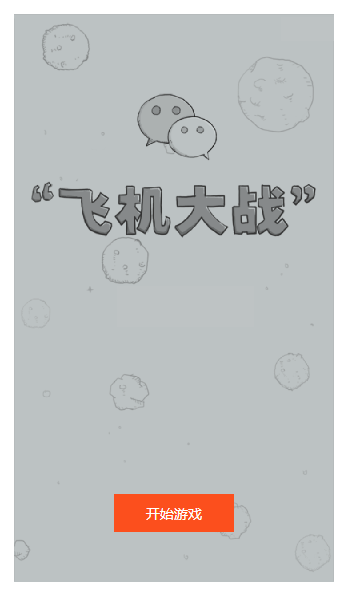
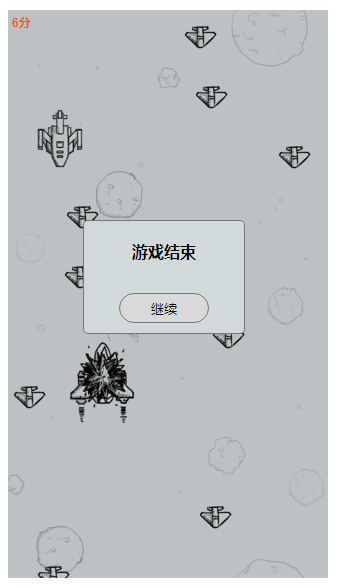
效果图如图所示:
js 飞机大战的更多相关文章
- JS+html实现简单的飞机大战
摘要:通过原生的js+html实现简单的飞机大战小游戏效果,如图所示: 实现代码如下: 1.自己的飞机实现 飞机html: <!DOCTYPE html> <html lang=&q ...
- 微信小游戏 demo 飞机大战 代码分析(四)(enemy.js, bullet.js, index.js)
微信小游戏 demo 飞机大战 代码分析(四)(enemy.js, bullet.js, index.js) 微信小游戏 demo 飞机大战 代码分析(一)(main.js) 微信小游戏 demo 飞 ...
- 微信小游戏 demo 飞机大战 代码分析 (三)(spirit.js, animation.js)
微信小游戏 demo 飞机大战 代码分析(三)(spirit.js, animation.js) 微信小游戏 demo 飞机大战 代码分析(一)(main.js) 微信小游戏 demo 飞机大战 代码 ...
- 微信小游戏 demo 飞机大战 代码分析 (二)(databus.js)
微信小游戏 demo 飞机大战 代码分析(二)(databus.js) 微信小游戏 demo 飞机大战 代码分析(一)(main.js) 微信小游戏 demo 飞机大战 代码分析(三)(spirit. ...
- 微信小游戏 demo 飞机大战 代码分析 (一)(game.js, main.js)
微信小游戏 demo 飞机大战 代码分析(一)(main.js) 微信小游戏 demo 飞机大战 代码分析(二)(databus.js) 微信小游戏 demo 飞机大战 代码分析(三)(spirit. ...
- JS 实现飞机大战
这是JS版本的飞机大战,和C#版本的思路相同,就是语言上有差别,用来巩固知识.可以将代码直接引入到HTML中就可以看到效果 //编写背景对象 function Background(width,hei ...
- js实例--飞机大战
<!DOCTYPE html> <html> <head> <meta charset="utf-8"/> <title> ...
- [知了堂学习笔记]_纯JS制作《飞机大战》游戏_第1讲(实现思路与游戏界面的实现)
整体效果展示: 一.实现思路 如图,这是我完成该项目的一个逻辑图,也是一个功能模块完成的顺序图. 游戏界面的完成 英雄飞机对象实现,在实现发射子弹方法过程中,又引出了子弹对象并实现.在此时,英雄飞机能 ...
- 用Javascript模拟微信飞机大战游戏
最近微信的飞机大战非常流行,下载量非常高. 利用JS进行模拟制作了一个简单的飞机大战[此源码有很多地方可以进行重构和优化] [此游戏中没有使用HTML5 任何浏览器都可以运行]. 效果图: 原理:利用 ...
随机推荐
- html/JS onload的详解
等待页面都加载完后再执行 <!DOCTYPE html><html lang="en"><head> <meta charset=&quo ...
- Grid标签计算结果集中的合计行
方法一: var detailT= grid.gettable("11"); var r=detailT.rows.length; detailT.rows[r-1].cells[ ...
- 键盘录入(Java)
键盘录入(Java): 1.导包 格式 import java.util.Scanner; 位置 在class上面 2.创建键盘录入对象 格式 Scanner sc = new Scanner(Sys ...
- csharp: using using System.Web.Script.Serialization read json
using System; using System.Data; using System.Configuration; using System.Collections; using System. ...
- Bzoj1498&1416: [NOI2006]神奇的口袋
什么鬼双倍经验题??? Sol 考虑在第\(k\)次摸到\(y\)的概率 如果上次摸到\(y\),目前有\(sum\)个球,\(y\)有\(a[y]\)个,那么概率就是\(\frac{a[y]+d}{ ...
- Python基础-socket编程
一.网络编程 自从互联网诞生以来,现在基本上所有的程序都是网络程序,很少有单机版的程序了. 计算机网络就是把各个计算机连接到一起,让网络中的计算机可以互相通信.网络编程就是如何在程序中实现两台计算机的 ...
- 解决 spring cloud 项目的 com.netflix.hystrix.contrib.javanica.aop.aspectj.HystrixCommandAspect 错误信息
在项目中引入:引入hystrix依赖,如下 <dependency> <groupId>org.springframework.cloud</groupId> &l ...
- Linux符设备驱动编程
加入内核源码树外 ① 建立两个文件scull.c,scull.h,以及Makefile文件 Makefile文件 ② 用make进行编译,生成scull.ko驱动程序模块 ③ 把scull.ko模块加 ...
- 《Visual C++ 2010入门教程》系列一:关于Visual Studio、VC和C++的那些事
原文:http://www.cnblogs.com/Mrt-02/archive/2011/07/24/2115606.html 作者:董波 日期:2010.6.15 写在前面 在我还在上学的时候,我 ...
- PHP中empty、isset和is_null的使用区别
关于PHP中empty().isset() 和 is_null() 这三个函数的区别,之前记得专门总结过,上次又被问到,网上已经很多,就用几个例子来说明: 测试用例选取: <?php $a;$b ...