
c语言数字图像处理(一):bmp图片格式及灰度图片转换
本篇文章首先介绍了bmp图片格式,主要参考wiki上的内容,包括bmp文件的存储方式,对于一些常见的bmp文件格式都给了例子,并且对8位 16位RGB555 16位RGB565格式的bmp文件进行了简单分析,最后的代码可以将8位,16位,24位,32位色彩深度的bmp文件转化位8位灰度图片,用作后续文章中算法的测试图片。
Bmp file structure

Bitmap file header
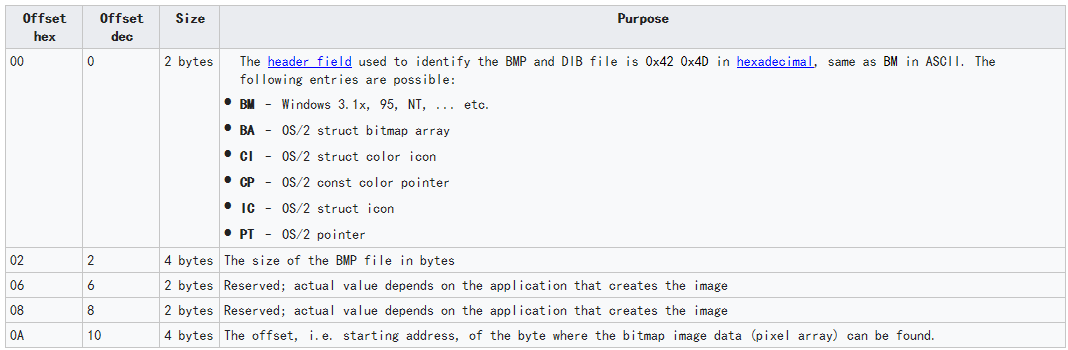
DIB header (bitmap information header)

compression method

色彩深度 1bpp = 1位色彩深度,存储一个像素点使用1位,可以表示两种颜色
bpp <= 8 必须有调色板(color table)
bpp = 1 调色板 2 * 4 字节
bpp = 4 调色板 16 * 4 字节
bpp = 8 调色板 256 * 4 字节
In most cases, each entry in the color table occupies 4 bytes, in the order blue, green, red, 0x00 (see below for exceptions).The color table is a block of bytes (a table) listing the colors used by the image. Each pixel in an indexed color image is described by a number of bits (1, 4, or 8) which is an index of a single color described by this table. The purpose of the color palette in indexed color bitmaps is to inform the application about the actual color that each of these index values corresponds to. The purpose of the color table in non-indexed (non-palettized) bitmaps is to list the colors used by the bitmap for the purposes of optimization on devices with limited color display capability and to facilitate future conversion to different pixel formats and paletization.
<https://en.wikipedia.org/wiki/BMP_file_format>
调色板数据格式 [blue][green][red][alpha = 0x00]
位图格式分析
1bpp(单色位图)
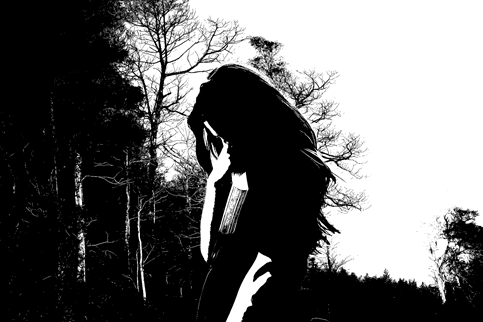
4bpp(16色位图)
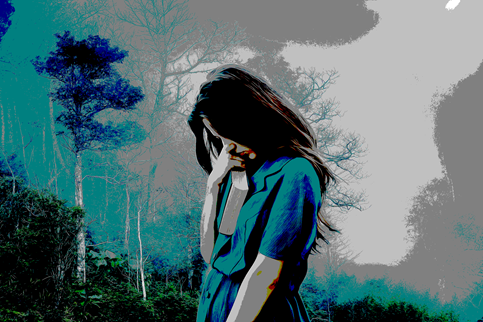
8bpp(256色位图)

bmp头文件和DIB头

0x00000436 位图数据偏移1078字节 调色板1078 - 54 = 1024字节 调色板为256个数据的数组,每个数组4字节
54字节之后的内容为调色板,1078字节之后的内容为位图数据
调色板数据为这副图片中用到的所有颜色数据,位图数据块的内容为调色板数据的索引
16bpp(RGB555 无压缩compression = BI_RGB,无调色板,无掩码bitmask)



二进制文件为
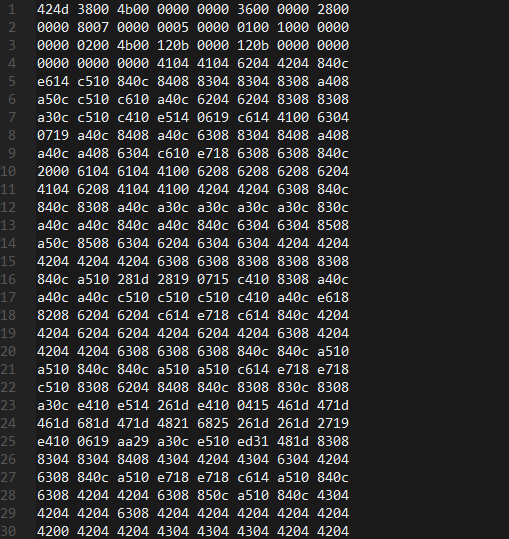
Bmp头文件
0x424d bmp文件开头
0x004b0038 bmp文件大小 为4915256字节
四个字节保留位
0x00000036 位图数据地址偏移 54字节
DIB头
0x00000028 DIB头大小 40字节
0x00000780 宽度1920像素
0x00000500 高度1280像素(有符号整数,若<0,解析图片时上下翻转)
0x0001 调色板的数量1
0x0010 每个像素点的位数 16位
0x00000000 压缩方式,无压缩
0x004b0002 像素数据大小 4915202 = 4915256 - 54
0x00000b12 横向分辨率每米2834像素
0x00000b12 纵向分辨率
0x00000000 调色板颜色数
0x00000000 重要颜色数
其余为位图数据
16bpp(RGB565 压缩方式BI_BITFIELDS 无调色板 有附加掩码位bitmask)

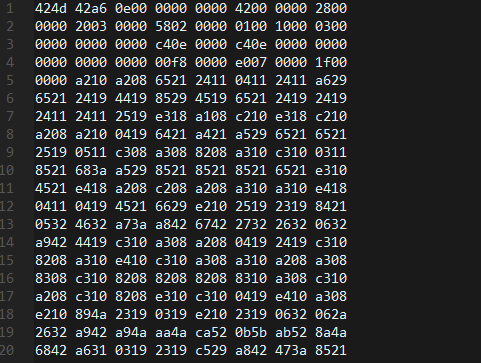
0x00000042 位图数据偏移66字节 存在66 - 54 = 12字节的附加掩码位
0x00000003 压缩方式BI_BITFIELDS
0x0000f800[R] 附加掩码位,读取一个像素之后,可以分别用掩码“与”上像素值,
0x000007e0[G] 从而提取出想要的颜色分量
0x0000001f[B] 例如 像素值 & 0xf800 为红色分量的值
66字节以后为位图数据
算法实现
8位色彩深度转灰度图片
 void bpp82grayscale(long height, long width, FILE* fp, short** the_image, int pad,

                     const char* file_name, struct bitmapheader* bmheader)

 {

     union colortable_union* colortable = NULL;

     unsigned char pixel_index;

     printf("bpp8\n");

     colortable = read_allocate_colortable(file_name, bmheader);

     for(int i=; i<height; i++){

         for(int j=; j<width; j++){

             fread(&pixel_index, , , fp);

             // printf("%u\n", pixel_index);

             the_image[i][j] = ((colortable[pixel_index].colortable.red) +

                                (colortable[pixel_index].colortable.blue) +

                                (colortable[pixel_index].colortable.green)) / ;

         }  /* ends loop over j */

         if(pad != ){

             fseek(fp, pad, SEEK_CUR);

         }  /* ends if pad 1= 0 */

     }  /* ends loop over i */

     free_colortable(colortable);

 }
rgb565转灰度图
 void rgb5652grayscale(long height, long width, FILE* fp, short** the_image, int pad)

 {

     union rgb565_union pixel;

     printf("rgb565\n");

     for(int i=; i<height; i++){

         for(int j=; j<width; j++){

             fread(&pixel, , , fp);

             the_image[i][j] = ((pixel.rgb565_struct.red<<) +

                                (pixel.rgb565_struct.green<<) +

                                (pixel.rgb565_struct.blue<<)) / ;

         }  /* ends loop over j */

         if(pad != ){

             fseek(fp, pad, SEEK_CUR);

         }  /* ends if pad 1= 0 */

     }  /* ends loop over i */

 }
rgb555转灰度图
 void rgb5552grayscale(long height, long width, FILE* fp, short** the_image, int pad)

 {

     union rgb555_union pixel;

     printf("rgb555\n");

     for(int i=; i<height; i++){

         for(int j=; j<width; j++){

             fread(&pixel, , , fp);

             the_image[i][j] = ((pixel.rgb555_struct.red<<) +

                                (pixel.rgb555_struct.green<<) +

                                (pixel.rgb555_struct.blue<<)) / ;

         }  /* ends loop over j */

         if(pad != ){

             fseek(fp, pad, SEEK_CUR);

         }  /* ends if pad 1= 0 */

     }  /* ends loop over i */

 }
24位色彩深度转灰度图
 void bpp242grayscale(long height, long width, FILE* fp, short** the_image, int pad)

 {

     union bpp24_union pixel;

     printf("bpp24\n");

     for(int i=; i<height; i++){

         for(int j=; j<width; j++){

             fread(&pixel, , , fp);

             the_image[i][j] = ((pixel.bpp24_struct.red) +

                                (pixel.bpp24_struct.green) +

                                (pixel.bpp24_struct.blue)) / ;

         }  /* ends loop over j */

         if(pad != ){

             fseek(fp, pad, SEEK_CUR);

         }  /* ends if pad 1= 0 */

     }  /* ends loop over i */

 }
32位色彩深度转灰度图
 void bpp322grayscale(long height, long width, FILE* fp, short** the_image, int pad)

 {

     union bpp32_union pixel;

     printf("bpp32\n");

     for(int i=; i<height; i++){

         for(int j=; j<width; j++){

             fread(&pixel, , , fp);

             the_image[i][j] = ((pixel.bpp32_struct.red) +

                                (pixel.bpp32_struct.green) +

                                (pixel.bpp32_struct.blue)) / ;

         }  /* ends loop over j */

         if(pad != ){

             fseek(fp, pad, SEEK_CUR);

         }  /* ends if pad 1= 0 */

     }  /* ends loop over i */

 }
c语言数字图像处理(一):bmp图片格式及灰度图片转换的更多相关文章
- c语言数字图像处理(三):仿射变换
仿射变换及坐标变换公式 几何变换改进图像中像素间的空间关系.这些变换通常称为橡皮模变换,因为它们可看成是在一块橡皮模上印刷一幅图像,然后根据预定的一组规则拉伸该薄膜.在数字图像处理中,几何变换由两个基 ...
- c语言数字图像处理(四):灰度变换
灰度变换 灰度变换函数 s = T(r) 其中r为输入图像在(x, y)点处的灰度值,s为输出图像在(x, y)点处的灰度值 灰度变换的作用 上图所示的两幅T(s)函数的图像曲线,第一幅图可以增强 ...
- 【原创】区分png图片格式和apng图片格式的解决办法
最近公司有个项目,要抓取客户微信公众号的文章,以及文章内容中的图片,并且在图片加上客户自己的水印.我们使用阿里云OSS存储图片和加水印,发现真心好用,提升了我们的开发效率,阿里云现在是越来越强大了.. ...
- c# winform 把彩色图片转换为灰色的图片,变灰,灰度图片,速度很快,safe,unsafe
把彩色图片转换为灰色的图片,直接用.net接口遍历每个像素点转换的效率非常低,800K的图片65万像素我的电脑要用5分钟,而用了unsafe,速度提高了几千倍,同样的图片只用了0.几秒 附一个常用的遍 ...
- c语言数字图像处理(二):图片放大与缩小-双线性内插法
图像内插 假设一幅大小为500 * 500的图像扩大1.5倍到750 * 750,创建一个750 * 750 的网格,使其与原图像间隔相同,然后缩小至原图大小,在原图中寻找最接近的像素(或周围的像素) ...
- 【数字图像处理】使用kmeans算法对TrueColor图片进行优化
实验的主要内容是将truecolor的图片通过一个优化算法得到其256色的最优表示.本实验采用kmean做算法对像素的色彩进行聚类的计算,分类得到一个色彩数为256的CodeBook,和一个包含有Co ...
- c语言数字图像处理(九):边缘检测
背景知识 边缘像素是图像中灰度突变的像素,而边缘是连接边缘像素的集合.边缘检测是设计用来检测边缘像素的局部图像处理方法. 孤立点检测 使用<https://www.cnblogs.com/Gol ...
- c语言数字图像处理(五):空间滤波
空间滤波原理 使用大小为m*n的滤波器对大小为M*N的图像进行线性空间滤波,将滤波器模板乘以图像中对应灰度值,相加得模板中心灰度值 a = (m-1)/2, b = (n-1)/2 若f(x+s, y ...
- c语言数字图像处理(十):阈值处理
定义 全局阈值处理 假设某一副灰度图有如下的直方图,该图像由暗色背景下的较亮物体组成,从背景中提取这一物体时,将阈值T作为分割点,分割后的图像g(x, y)由下述公式给出,称为全局阈值处理 多阈值处理 ...
随机推荐
- SpringBoot_Mybatis_Maven_BootStrap
需要eclipse 配置maven 未完,待续 链接:https://pan.baidu.com/s/1vej2zEdJmKeMUJD9S1B5MA 密码:y5j9
- python Anaconda
转载自 https://blog.csdn.net/program_developer/article/details/79677557 目录: Anaconda是什么? 如何安装? 如何管理包? ...
- COM动态添加删除成员,类似JavaScript中调用的对象
在JavaScript中调用对象时,可动态添加删除成员如: var obj=new Object; obj.member1='aaaaa'; obj.fun1=function() { alert(' ...
- 使用C#删除一个字符串数组中的空字符串
C#中要如何才能删除一个字符串数组中的空字符串呢?随着微软对C#不断发展和更新,C#中对于数组操作的方式也变得越来越多样化.以往要实现过滤数组中的空字符串,都是需要实行循环的方式来排除和过滤.C#3. ...
- [ML学习笔记] XGBoost算法
[ML学习笔记] XGBoost算法 回归树 决策树可用于分类和回归,分类的结果是离散值(类别),回归的结果是连续值(数值),但本质都是特征(feature)到结果/标签(label)之间的映射. 这 ...
- java几个easy出错的小程序
把基本知识过了一遍,发现了几个自己easy 出错的小程序,记录下来.. .. 1.关于try-catch异常 2,JAVA中的自省机制 3.有继承关系的类中静态函数 1,关于try-catch异常 p ...
- Drupal使用
首先到https://www.drupal.org/download去下载Drupal 更好的办法是使用composer,这个先放着,了解后再添加 然后将解压后的文件夹整个复制到设置的部署路径下,因为 ...
- oracle kill 锁
select object_name as 对象名称,s.sid,s.serial#,p.spid as 系统进程号 from v$locked_object l , dba_objects o , ...
- pycham database查看db.sqlites文件 无内容解决方法
初学django,使用pycharm IDE的时候,通过使用默认的sqlites数据库,执行问makemigration 和migrate操作之后,控制台正常输出类似如下结果,按照道理应该生成了数据表 ...
- Linux 4.18内核系列已过时
的Linux内核维护者Greg Kroah-Hartman宣布Linux 4.18内核系列的生命周期结束,敦促用户尽快将他们的发行版升级到更新的内核. Linux 4.18内核由Linux Liny ...