
Getting the pixel coordinates of text or ticks in matplotlib
The exact pixel coordinates of title, labels, legends or ticks are important information for the training data of deep learning.
import numpy as np

import matplotlib.pyplot as plt

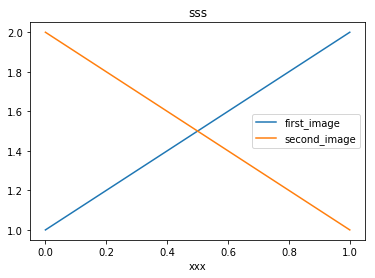
plt.plot([1,2],label="first_image")

plt.plot([2,1],label="second_image")

leg = plt.legend()

tit = plt.title("sss")

xla = plt.xlabel("xxx")

plt.gcf().canvas.draw()

ticks = [t for t in plt.gca().get_xticklabels()]

print(tit.get_text(),str(tit.get_window_extent()))    # return the context and pixel coordinates of 'tit'

print(np.array(tit.get_window_extent()))

print(xla.get_text(),str(xla.get_window_extent()))

for i, t in enumerate(ticks):

    print ("Label "+str(i)+", data: "+t.get_text()+str(t.get_window_extent()))

print ("Legend location: "+str(leg.get_window_extent()))

for i, l in enumerate(leg.texts):

    print ("Label "+str(i)+", data: "+l.get_text()+str(l.get_window_extent()))

    pass

#plt.savefig("test.png")

plt.show()
sss Bbox(x0=211.8375, y0=256.44, x1=230.9625, y1=269.44)

[[ 211.8375  256.44  ]

 [ 230.9625  269.44  ]]

xxx Bbox(x0=212.5875, y0=5.0, x1=230.2125, y1=15.0)

Label 0, data: Bbox(x0=69.21818181818182, y0=29.0, x1=69.21818181818182, y1=29.0)

Label 1, data: 0.0Bbox(x0=61.21818181818182, y0=19.0, x1=77.21818181818182, y1=29.0)

Label 2, data: 0.2Bbox(x0=122.0909090909091, y0=19.0, x1=138.0909090909091, y1=29.0)

Label 3, data: 0.4Bbox(x0=182.9636363636364, y0=19.0, x1=198.9636363636364, y1=29.0)

Label 4, data: 0.6Bbox(x0=243.83636363636367, y0=19.0, x1=259.83636363636367, y1=29.0)

Label 5, data: 0.8Bbox(x0=304.70909090909095, y0=19.0, x1=320.70909090909095, y1=29.0)

Label 6, data: 1.0Bbox(x0=365.5818181818182, y0=19.0, x1=381.5818181818182, y1=29.0)

Label 7, data: Bbox(x0=69.21818181818182, y0=29.0, x1=69.21818181818182, y1=29.0)

Legend location: Bbox(x0=276.05, y0=127.31375, x1=383.8, y1=162.12625)

Label 0, data: first_imageBbox(x0=308.05, y0=147.22, x1=363.925, y1=158.12625)

Label 1, data: second_imageBbox(x0=308.05, y0=131.31375, x1=379.8, y1=142.22)
reference:
1. https://matplotlib.org/api/text_api.html#matplotlib.text.Annotation.get_window_extent
2. https://matplotlib.org/api/transformations.html#matplotlib.transforms.Bbox
Getting the pixel coordinates of text or ticks in matplotlib的更多相关文章
- UnderStand Perspective Rasterization, SV_POSITION(gl_FragCoord) to Pixel, SV mean Systems Value
Shader "UnderStandPRR" { Properties { _MainTex ("Texture", 2D) = "white&quo ...
- Unity UGUI图文混排(五) -- 一张图集对应多个Text
继上一篇说的更新了一张图集对应多个Text的功能,为了节省资源嘛 这里,但是也没有舍弃之前的一个Text一个图集,因为我感觉应该两个都有用,于是我重新写了一个脚本 1.其实大体跟前面的都没变,解析标签 ...
- 【论文速读】Chuhui Xue_ECCV2018_Accurate Scene Text Detection through Border Semantics Awareness and Bootstrapping
Chuhui Xue_ECCV2018_Accurate Scene Text Detection through Border Semantics Awareness and Bootstrappi ...
- [UGUI]图文混排(二):Text源码分析
UGUI源码: https://bitbucket.org/Unity-Technologies/ui/downloads/?tab=tags 首先下载一份UGUI源码,这里我下载的版本是5.3.2f ...
- Quartz2D Text
[Quartz2D Text] Quartz 2D provides a limited, low-level interface for drawing text encoded in the Ma ...
- 使用Python一步一步地来进行数据分析总结
原文链接:Step by step approach to perform data analysis using Python译文链接:使用Python一步一步地来进行数据分析--By Michae ...
- 数据可视化(4)--jqplot
本来打算继续研究Google Charts,但上头下了指示让看jqplot,无奈,只好先将Google Charts放一放,不过真心觉得Google Charts不错,现在先开始jqplot. jqP ...
- 扩展卡尔曼滤波(MRPT)
EKF relies on a linearisation of the evolution and observation functions which are good approximatio ...
- 烟大 Contest1024 - 《挑战编程》第一章:入门 Problem E: Graphical Editor(模拟控制台命令形式修改图形)
Problem E: Graphical Editor Time Limit: 1 Sec Memory Limit: 64 MBSubmit: 2 Solved: 2[Submit][Statu ...
随机推荐
- webpack运行常见错误归纳
今天在运行项目的时候,又遇到坑了,在公司运行的好好的项目,到我自己电脑上就报错,提示跨域,想了好久都不明白为啥,webpack配置文件里的ip地址我也改成与本地ip对应的,百思不得其解,在寻求别人帮助 ...
- HTML 5 video 视频标签全属性详解
http://www.cnblogs.com/kiter/archive/2013/02/25/2932157.html 现在如果要在页面中使用video标签,需要考虑三种情况,支持Ogg Theor ...
- javascript中window.location.search的用法和作用。
用该属性获取页面 URL 地址: window.location 对象所包含的属性 属性 描述 hash 从井号 (#) 开始的 URL(锚) host 主机名和当前 URL 的端口号 hostnam ...
- <%=pageCount %>
<%=pageCount %>,这里是指获取页面控件的值.
- Java Draw
简单绘画 直线 矩形 圆 根据矩阵画图 package com.zhoudm; import java.awt.*; import javax.swing.*; public class Draw e ...
- List Set Map 的区别 用法以及特点(转载)
List,Set,Map是否继承自Collection接口? 答:List,Set是,Map不是. Collection是最基本的集合接口,一个Collection代表一组Object,即Colle ...
- Azure CLI对ASM,ARM资源的基本操作
本文主要介绍Windows Azure CLI对ASM及ARM资源的基本操作 1.在windows的CMD或Powershell环境下,输入命令:azure,可以查看到当前操作的模式为ASM还是ARM ...
- [Git] git log命令
这是git的新系列,不常用的命令和其参数比较容易记不住,干脆将常用的记录下来,日后查查方便也是好的,一篇文章一个git命令,长短根据命令有所不同. git log命令主要用于查看提交历史,同时根据添加 ...
- 一个使用物理引擎的WebGL3D场景
这是一个类似第三人称射击游戏(TPS)的3D场景,可以通过https://ljzc002.github.io/FPS2/index.html访问.场景运行效果如下图: 场景环境由一个天空盒和一个地面网 ...
- linkin大话面向对象--属性详解
成员变量和局部变量 成员变量: 1.在一个类中,任何方法之外定义的变量: 2.从面向对象的思想来说我们又把实例变量看成一个类的属性. 3.实例变量在没有符初值时系统会自动帮我们做初始化 ...