
Getting the pixel coordinates of text or ticks in matplotlib
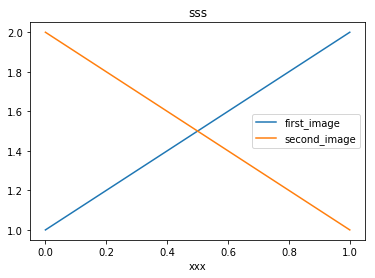
The exact pixel coordinates of title, labels, legends or ticks are important information for the training data of deep learning.
import numpy as np

import matplotlib.pyplot as plt

plt.plot([1,2],label="first_image")

plt.plot([2,1],label="second_image")

leg = plt.legend()

tit = plt.title("sss")

xla = plt.xlabel("xxx")

plt.gcf().canvas.draw()

ticks = [t for t in plt.gca().get_xticklabels()]

print(tit.get_text(),str(tit.get_window_extent()))    # return the context and pixel coordinates of 'tit'

print(np.array(tit.get_window_extent()))

print(xla.get_text(),str(xla.get_window_extent()))

for i, t in enumerate(ticks):

    print ("Label "+str(i)+", data: "+t.get_text()+str(t.get_window_extent()))

print ("Legend location: "+str(leg.get_window_extent()))

for i, l in enumerate(leg.texts):

    print ("Label "+str(i)+", data: "+l.get_text()+str(l.get_window_extent()))

    pass

#plt.savefig("test.png")

plt.show()
sss Bbox(x0=211.8375, y0=256.44, x1=230.9625, y1=269.44)

[[ 211.8375  256.44  ]

 [ 230.9625  269.44  ]]

xxx Bbox(x0=212.5875, y0=5.0, x1=230.2125, y1=15.0)

Label 0, data: Bbox(x0=69.21818181818182, y0=29.0, x1=69.21818181818182, y1=29.0)

Label 1, data: 0.0Bbox(x0=61.21818181818182, y0=19.0, x1=77.21818181818182, y1=29.0)

Label 2, data: 0.2Bbox(x0=122.0909090909091, y0=19.0, x1=138.0909090909091, y1=29.0)

Label 3, data: 0.4Bbox(x0=182.9636363636364, y0=19.0, x1=198.9636363636364, y1=29.0)

Label 4, data: 0.6Bbox(x0=243.83636363636367, y0=19.0, x1=259.83636363636367, y1=29.0)

Label 5, data: 0.8Bbox(x0=304.70909090909095, y0=19.0, x1=320.70909090909095, y1=29.0)

Label 6, data: 1.0Bbox(x0=365.5818181818182, y0=19.0, x1=381.5818181818182, y1=29.0)

Label 7, data: Bbox(x0=69.21818181818182, y0=29.0, x1=69.21818181818182, y1=29.0)

Legend location: Bbox(x0=276.05, y0=127.31375, x1=383.8, y1=162.12625)

Label 0, data: first_imageBbox(x0=308.05, y0=147.22, x1=363.925, y1=158.12625)

Label 1, data: second_imageBbox(x0=308.05, y0=131.31375, x1=379.8, y1=142.22)
reference:
1. https://matplotlib.org/api/text_api.html#matplotlib.text.Annotation.get_window_extent
2. https://matplotlib.org/api/transformations.html#matplotlib.transforms.Bbox
Getting the pixel coordinates of text or ticks in matplotlib的更多相关文章
- UnderStand Perspective Rasterization, SV_POSITION(gl_FragCoord) to Pixel, SV mean Systems Value
Shader "UnderStandPRR" { Properties { _MainTex ("Texture", 2D) = "white&quo ...
- Unity UGUI图文混排(五) -- 一张图集对应多个Text
继上一篇说的更新了一张图集对应多个Text的功能,为了节省资源嘛 这里,但是也没有舍弃之前的一个Text一个图集,因为我感觉应该两个都有用,于是我重新写了一个脚本 1.其实大体跟前面的都没变,解析标签 ...
- 【论文速读】Chuhui Xue_ECCV2018_Accurate Scene Text Detection through Border Semantics Awareness and Bootstrapping
Chuhui Xue_ECCV2018_Accurate Scene Text Detection through Border Semantics Awareness and Bootstrappi ...
- [UGUI]图文混排(二):Text源码分析
UGUI源码: https://bitbucket.org/Unity-Technologies/ui/downloads/?tab=tags 首先下载一份UGUI源码,这里我下载的版本是5.3.2f ...
- Quartz2D Text
[Quartz2D Text] Quartz 2D provides a limited, low-level interface for drawing text encoded in the Ma ...
- 使用Python一步一步地来进行数据分析总结
原文链接:Step by step approach to perform data analysis using Python译文链接:使用Python一步一步地来进行数据分析--By Michae ...
- 数据可视化(4)--jqplot
本来打算继续研究Google Charts,但上头下了指示让看jqplot,无奈,只好先将Google Charts放一放,不过真心觉得Google Charts不错,现在先开始jqplot. jqP ...
- 扩展卡尔曼滤波(MRPT)
EKF relies on a linearisation of the evolution and observation functions which are good approximatio ...
- 烟大 Contest1024 - 《挑战编程》第一章:入门 Problem E: Graphical Editor(模拟控制台命令形式修改图形)
Problem E: Graphical Editor Time Limit: 1 Sec Memory Limit: 64 MBSubmit: 2 Solved: 2[Submit][Statu ...
随机推荐
- jvm内存模型-回收算法-和内存分配以及jdk、jre、jvm是什么关系(阿里,美团,京东面试题)
1.什么是jvm?(1)jvm是一种用于计算设备的规范,它是一个虚构出来的机器,是通过在实际的计算机上仿真模拟各种功能实现的.(2)jvm包含一套字节码指令集,一组寄存器,一个栈,一个垃圾回收堆和一个 ...
- vue实现侧边栏手风琴效果
模板 代码如下 html <template> <div class="header"> <ul> <!-- 循环数据在点击调用chang ...
- 在Vue项目使用quill-editor带样式编辑器(更改插入图片和视频)
vue-quill-editor默认插入图片是直接将图片转为base64再放入内容中,如果图片比较大的话,富文本的内容就会很大. 插入视频是直接弹框输入URL地址,某些需求下我们需要让用户去本地选择自 ...
- dedecms后台系统基本参数标题
1,站点设置 2,核心设置 3,附件设置 4,会员设置 6,性能选项 7,其它选项 8,模块设置 在E:\wamp\www\dededln\back\inc\configgroup.txt
- 织梦dede在首页调用留言本
织梦dedecms在首页调用留言本 . {dede:loop table=dede_guestbook sort=dtime row=10 titlelen=36 typeid=40 if=ische ...
- Mac OS启动服务优化高级篇
一.Mac下的启动服务主要三个可配置的地方 1.系统偏好设置->帐户->登陆项 2./System/Library/StartupItems 和 /Library/StartupItems ...
- vue不是内部或外部命令,配置一个Path系统变量就可以解决
作为一个vue小白,最近为vue安装真是操碎了心.无论怎么查找网上的教程,还是解决不了"vue不是内部或外部的命令"诸如此类的问题.好在功夫不负有心人,终于在多次的试验下,成功解决 ...
- django 编程小结
1.增删改查 add obj = Obj(atr=atr..) obj.save() update: __dict__ 遍历 del: 根据id列表删除 query: 首次查询: 直接跳转至页面,前端 ...
- C# winform页面可视化设计打开失败,提示未能加载程序集或他的一个依赖项,dll错误
这种情况发生在最初项目是x86属性,改成x64后,一些原来dll,页面没有及时更新,导致页面找不到dll, 最简单的解决方式,把项目属性改成AnyCpu,重新编译下,就可以打开可视化设计窗口了.
- java二维码生成技术
自从微信扫描出世,二维码扫描逐渐已经成为一种主流的信息传递和交换方式.下面就介绍一下我学习到的这种二维码生成方式.预计再过不久身份证户口本等都会使用二维码识别了,今天就做一个实验案例: 二维码主要实现 ...