
python 可视化 词云图
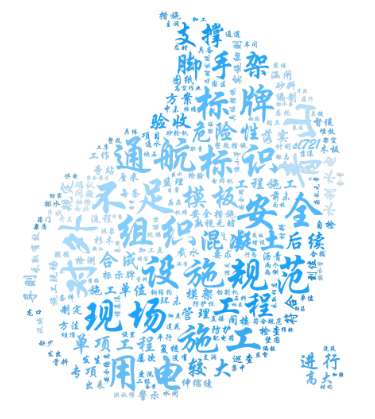
我的代码:
# -*- coding: utf-8 -*-

from pandas import read_csv

import numpy as np

from sklearn.datasets.base import Bunch

import pickle  # 导入cPickle包并且取一个别名pickle #持久化类

from sklearn.feature_extraction.text import TfidfVectorizer

import jieba

import operator  # 排序用

from sklearn import metrics

from sklearn.externals import joblib

import xlwt

#导入wordcloud模块和matplotlib模块

import wordcloud

import matplotlib.pyplot as plt

from scipy.misc import imread

'''读取停用词'''

def _readfile(path):

    with open(path, "rb") as fp:

        content = fp.read()

    return content

''' 读取bunch对象'''

def _readbunchobj(path):

    with open(path, "rb") as file_obj:

        bunch = pickle.load(file_obj)

    return bunch

'''写入bunch对象'''

def _writebunchobj(path, bunchobj):

    with open(path, "wb") as file_obj:

        pickle.dump(bunchobj, file_obj)

def buildtestbunch(bunch_path, art_test):

    bunch = Bunch(contents=[])#label=[],

# =============================================================================

#     for item1 in testlabel:

#         bunch.label.append(item1)

# =============================================================================

    # testContentdatasave=[] #存储所有训练和测试数据的分词

    for item2 in art_test:

        item2 = str(item2)

        item2 = item2.replace("\r\n", "")

        item2 = item2.replace(" ", "")

        content_seg = jieba.cut(item2)

        save2 = ''

        for item3 in content_seg:

            if len(item3) > 1 and item3 != '\r\n':

                # testContentdatasave.append(item3)

                save2 = save2 + "," + item3

        bunch.contents.append(save2)

    with open(bunch_path, "wb") as file_obj:

        pickle.dump(bunch, file_obj)

    print("构建测试数据文本对象结束!!!")

def vector_space(stopword_path, bunch_path, space_path):

    stpwrdlst = _readfile(stopword_path).splitlines()  # 读取停用词

    bunch = _readbunchobj(bunch_path)  # 导入分词后的词向量bunch对象

    # 构建tf-idf词向量空间对象

    tfidfspace = Bunch(label=bunch.label, tdm=[], vocabulary={})

    # 权重矩阵tdm,其中,权重矩阵是一个二维矩阵,tdm[i][j]表示,第j个词(即词典中的序号)在第i个类别中的IF-IDF值

    # 使用TfidVectorizer初始化向量空间模型

    vectorizer = TfidfVectorizer(stop_words=stpwrdlst, sublinear_tf=True, max_df=0.5, min_df=0.0001, use_idf=True,

                                 max_features=15000)

    # print(vectorizer)

    # 文本转为词频矩阵,单独保存字典文件

    tfidfspace.tdm = vectorizer.fit_transform(bunch.contents)

    tfidfspace.vocabulary = vectorizer.vocabulary_

    # 创建词袋的持久化

    _writebunchobj(space_path, tfidfspace)

    print("if-idf词向量空间实例创建成功!!!")

def testvector_space(stopword_path, bunch_path, space_path, train_tfidf_path):

    stpwrdlst = _readfile(stopword_path).splitlines()  # 把停用词变成列表

    bunch = _readbunchobj(bunch_path)

    tfidfspace = Bunch(tdm=[], vocabulary={})#label=bunch.label,

    # 导入训练集的TF-IDF词向量空间  ★★

    trainbunch = _readbunchobj(train_tfidf_path)

    tfidfspace.vocabulary = trainbunch.vocabulary

    vectorizer= TfidfVectorizer(stop_words=stpwrdlst, sublinear_tf=True, max_df=0.7, vocabulary=trainbunch.vocabulary,

                                 min_df=0.001)

    tfidfspace.tdm = vectorizer.fit_transform(bunch.contents)

    _writebunchobj(space_path, tfidfspace)

    print("if-idf词向量空间实例创建成功!!!")

if __name__=="__main__":

    Sdata = []

    art = []

    '''============================先导入数据=================================='''

    file_test = 'F:/goverment/text analyse/type_in.csv'

    dataset = read_csv(file_test)

    Sdata = dataset.values[:, :]

    Sdata=Sdata.tolist()

    for line in Sdata:

        art.append(line[1])#line[1]为文本

    print(len(Sdata))

    '''==========================================================tf-idf对Bar进行文本特征提取============================================================================'''

    # 导入分词后的词向量bunch对象

    test_bunch_path = "F:/goverment/text analyse/trainbunch.bat"

    test_space_path = "F:/goverment/text analyse/traintfdifspace.dat"

    stopword_path = "F:/goverment/text analyse/hlt_stop_words.txt"

    '''============================================================tf-idf对Sart进行文本特征提取=============================================================================='''

    buildtestbunch(test_bunch_path, art)

    testvector_space(stopword_path, test_bunch_path, test_space_path, test_space_path)

    test_set = _readbunchobj(test_space_path)

    '''测试数据'''

    #获取已知 id 找 文本

    txtcut=[] #存放所有词

    dic={}

    for i in test_set.vocabulary.keys():

        txtcut.append(i)

        dic[test_set.vocabulary[i]]=i

    #print(dic)

    #print(test_set.tdm)

    #print(test_set.tdm[0])

    #print(dir(test_set))

    #print(test_set.vocabulary)

    #print(dir(test_set.tdm))

    #print(Sdata)

    #print(nonzero[1])

    '''final里放的是不超过15的词'''

    #print(Sdata)

    final=[]

    for k in range(len(Sdata)):#遍历每一条文本

        nonzero=test_set.tdm[k].nonzero()

        ls=[]

        ls.append(Sdata[k][0])

        num=0

        for i in range(len(nonzero[1])):

            num=num+1

            b=test_set.tdm[k, nonzero[1][i]]*100 #test_set.tdm[k, nonzero[1][i]]是第k条文本中,第i个权重非零的词权重

            a= dic[nonzero[1][i]] +"  "+str(round(b,2))+"%"

            ls.append(a)

            if num==15:

                break

        final.append(ls)

    '''画词云图'''

    fig = plt.figure(figsize = (15,15))

    cloud = wordcloud.WordCloud(font_path='STXINGKA.TTF',mask=imread('water3.png'),mode='RGBA',

                                background_color=None).generate(' '.join(txtcut))

    img = imread('water3.png')

    cloud_colors = wordcloud.ImageColorGenerator(np.array(img))

    cloud.recolor(color_func=cloud_colors)

    plt.imshow(cloud)

    plt.axis('off')

    plt.savefig('watercloud3.png',dpi=400)

    plt.show()

    myexcel = xlwt.Workbook()

    sheet = myexcel.add_sheet("sheet1")

    si=-1

    sj=-1

    for line in final:

        si=si+1

        sj=-1

        for i in line:

            sj=sj+1

            sheet.write(si,sj,str(i))

    myexcel.save("各条分词.xls")

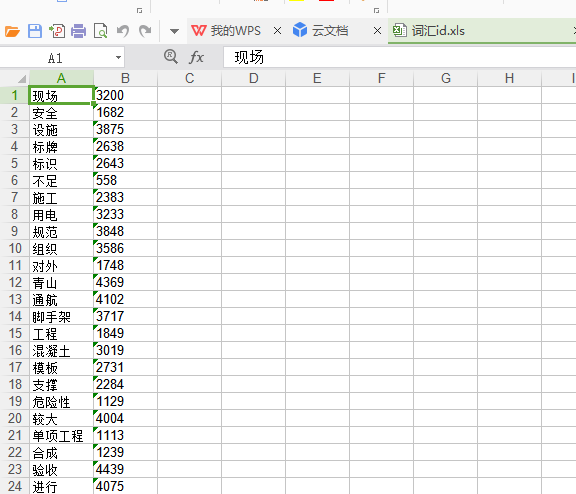
    #把id存好

    myexcel = xlwt.Workbook()

    sheet = myexcel.add_sheet("sheet2")

    p=0

    for i in test_set.vocabulary.keys():

        sheet.write(p,0,i)

        print(i)

        sheet.write(p,1,str(test_set.vocabulary[i]))

        p=p+1

    myexcel.save("词汇id.xls")
各条分词:
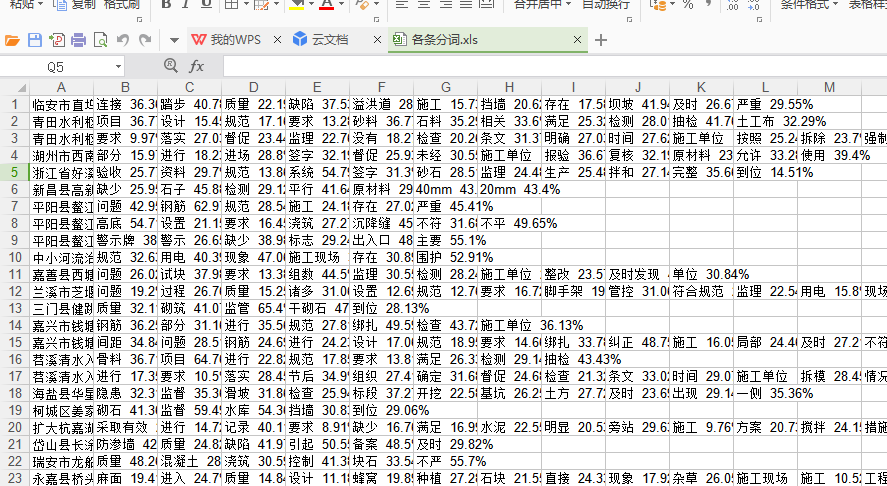
词汇id:
python 可视化 词云图的更多相关文章
- python 数据分析--词云图,图形可视化美国竞选辩论
这篇博客从用python实现分析数据的一个完整过程.以下着重几个python的moudle的运用"pandas",""wordcloud"," ...
- python爬虫+词云图,爬取网易云音乐评论
又到了清明时节,用python爬取了网易云音乐<清明雨上>的评论,统计词频和绘制词云图,记录过程中遇到一些问题 爬取网易云音乐的评论 一开始是按照常规思路,分析网页ajax的传参情况.看到 ...
- python 绘制词云图
1. 先下载并安装nltk包,准备一张简单的图片存入代码所在文件目录,搜集英文停用词表 import nltk nltk.download() 2. 绘制词云图 import re import nu ...
- python 做词云图
#导入需要模块 import jieba import numpy as np import matplotlib.pyplot as plt from PIL import Image from w ...
- python词云图与中文分词
2019-12-12中文文本分词和词云图具体功能介绍与学习代码: import jiebaa="由于中文文本的单词不是通过空格或者标点符号来进行分割"#jieba.lcut()s是 ...
- (数据科学学习手札71)在Python中制作个性化词云图
本文对应脚本及数据已上传至我的Github仓库https://github.com/CNFeffery/DataScienceStudyNotes 一.简介 词云图是文本挖掘中用来表征词频的数据可视化 ...
- python 爬取豆瓣电影短评并wordcloud生成词云图
最近学到数据可视化到了词云图,正好学到爬虫,各种爬网站 [实验名称] 爬取豆瓣电影<千与千寻>的评论并生成词云 1. 利用爬虫获得电影评论的文本数据 2. 处理文本数据生成词云图 第一步, ...
- 用Python制作酷炫词云图,原来这么简单!
一.简介词云图是文本挖掘中用来表征词频的数据可视化图像,通过它可以很直观地展现文本数据中地高频词:! 图1 词云图示例 在Python中有很多可视化框架可以用来制作词云图,如pyecharts,但这些 ...
- 特朗普退出《巴黎协定》:python词云图舆情分析
1 前言 2017年6月1日,美国特朗普总统正式宣布美国退出<巴黎协定>.宣布退出<巴黎协定>后,特朗普似乎成了“全球公敌”. 特斯拉总裁马斯克宣布退出总统顾问团队 迪士尼董事 ...
随机推荐
- JavaScript获取输入框内容
html: <input name="money" type="number" placeholder="税前工资"><b ...
- php多站点配置以及Forbidden You don't have permission to access / on this server问题解决
php多站点配置以及Forbidden You don't have permission to access / on this server问题解决 一.总结 一句话总结:我的问题是php的版本问 ...
- EBS 定义并发参数常用值集
1.ORG_ID 2.DATE 3.YES_NO
- 使用POI设置导出的EXCEL锁定指定的单元格
注:要锁定单元格需先为此表单设置保护密码,设置之后此表单默认为所有单元格锁定,可使用setLocked(false)为指定单元格设置不锁定. sheet.protectSheet("&quo ...
- 99. Recover Binary Search Tree -- 找到二叉排序树中交换过位置的两个节点
Two elements of a binary search tree (BST) are swapped by mistake. Recover the tree without changing ...
- 解决PCI Geomatica 无法卸载的问题
之前安装过PCI Geomatica 2016,非正常卸载,应该有一定残留,但我已经尽可能将注册表中包含PCI.Geomatica.Geomatics等关键字的条目删除干净了. 在重新安装新版本201 ...
- 安装MySQL后要做的事
安装MySQL后要修改的配置 [mysql] default-character-set=utf8 [mysqld] # 关闭域名反解 skip_name_resolve # 每表一个独立的表空间文件 ...
- timer Compliant Controller project (4)layout and gerber, paning
1 LAYOUT 2 Gerber 3 CAM350-Paining
- Ubuntu系统配置apt-get软件更新源
从别人那摘录的Ubuntu源,测的很好用 # 电子科技大学 (教育网) deb http://ubuntu.uestc.edu.cn/ubuntu/ oneiric main restricted u ...
- CI框架------codeIgniter
之前学习了thinkphp,学完之后印象不太深刻,在网上询问了一下,他们都说多学几个框架,以后可以自己写框架. 于是自己就放下thinkphp,下定决心再学一个,于是又从网上看了几个框架,综合比较了一 ...