
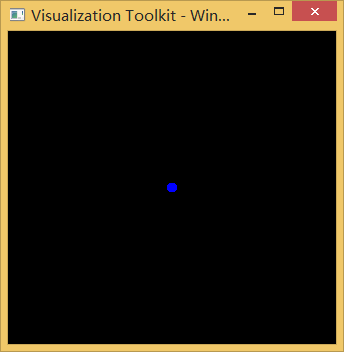
VTK初学一,a_Vertex图形点的绘制
系统:Win8.1
QT版本:2.4.2,Mingw
VTK版本:6.3
2. main.cpp
#ifndef INITIAL_OPENGL
#define INITIAL_OPENGL
#include <vtkAutoInit.h>
VTK_MODULE_INIT(vtkRenderingOpenGL)
VTK_MODULE_INIT(vtkInteractionStyle)
#endif
#include <iostream>
using namespace std;
#include "vtkPolyDataMapper.h"
#include "vtkWin32OpenGLRenderWindow.h"
#include "vtkRenderWindow.h"
#include "vtkRenderWindowInteractor.h"
#include "vtkRenderer.h"
#include "vtkPoints.h"
#include "vtkWin32RenderWindowInteractor.h"
#include "vtkProperty.h"
#include "vtkFloatArray.h"
#include "vtkPolyData.h"
#include "vtkDataSetMapper.h"
#include "vtkActor2D.h"
#include "vtkContourFilter.h"
#include "vtkContourValues.h"
#include "vtkUnstructuredGrid.h"
#include "vtkPointData.h"
#include "vtkVertex.h"
#include "vtkInteractorStyleTrackballCamera.h"
void myShow(vtkSmartPointer<vtkUnstructuredGrid> aGrid);
int main()
{
// create a scene with one of each cell type
//Vertex
vtkPoints *vertexPoints=vtkPoints::New();
vertexPoints-> SetNumberOfPoints (1);
vertexPoints-> InsertPoint( 0, 0, 0, 0);
vtkFloatArray *vertexScalars=vtkFloatArray::New();
vertexScalars-> SetNumberOfTuples (1);
vertexScalars-> InsertValue (0, 1);
vtkVertex *aVertex=vtkVertex::New();
aVertex-> GetPointIds()-> SetId (0, 0);
vtkUnstructuredGrid *aVertexGrid=vtkUnstructuredGrid::New();
aVertexGrid-> Allocate (1, 1);
aVertexGrid-> InsertNextCell (aVertex-> GetCellType(), aVertex ->GetPointIds());
aVertexGrid ->SetPoints (vertexPoints);
aVertexGrid-> GetPointData() ->SetScalars (vertexScalars);
myShow(aVertexGrid);
return 0;
}
void myShow(vtkSmartPointer<vtkUnstructuredGrid> aGrid)
{
//设置映射器
vtkSmartPointer<vtkDataSetMapper> aMapper=vtkSmartPointer<vtkDataSetMapper>::New();
aMapper->SetInputData(aGrid);
aMapper->ScalarVisibilityOn();
vtkSmartPointer<vtkActor> anActor=vtkSmartPointer<vtkActor>::New();
anActor->SetMapper(aMapper);
anActor->GetProperty()->SetRepresentationToPoints();
// anActor->GetProperty()->SetRepresentationToWireframe();
anActor->GetProperty()->SetDiffuseColor(1,0,0);
// anActor->GetProperty()->SetLineWidth(5);
// anActor->GetProperty()->SetEdgeColor(1,0,0);
anActor->GetProperty()->SetPointSize(10);
//创建显示窗口
vtkSmartPointer<vtkRenderer> ren1=vtkSmartPointer<vtkRenderer>::New();
vtkSmartPointer<vtkRenderWindow> renWin=vtkSmartPointer<vtkRenderWindow>::New();
ren1->AddActor(anActor);
renWin->AddRenderer(ren1);
vtkSmartPointer<vtkRenderWindowInteractor> iren=vtkSmartPointer<vtkRenderWindowInteractor>::New();
vtkSmartPointer<vtkInteractorStyleTrackballCamera> style=vtkSmartPointer<vtkInteractorStyleTrackballCamera>::New();
iren->SetInteractorStyle(style);
iren->SetRenderWindow(renWin);
renWin->SetSize(700,700);
ren1->ResetCamera();
renWin->Render();
iren->Start();
}
VTK初学一,a_Vertex图形点的绘制的更多相关文章
- VTK初学一,e_Triangle三角形的绘制
#ifndef INITIAL_OPENGL #define INITIAL_OPENGL #include <vtkAutoInit.h> VTK_MODULE_INIT(vtkRend ...
- 借助Photoshop,Illustrator等设计软件进行WPF图形图像的绘制
原文:借助Photoshop,Illustrator等设计软件进行WPF图形图像的绘制 本文所示例子是借助第三方设计软件,制作复杂的矢量图形,转成与XAML酷似的SVG,再转换成xaml而实现的. 这 ...
- VTK初学一,b_PolyVertex多个图形点的绘制
#ifndef INITIAL_OPENGL #define INITIAL_OPENGL #include <vtkAutoInit.h> VTK_MODULE_INIT(vtkRend ...
- VTK初学一,c_Line_CellArray线段的CellArray绘制
VTK窗口默认坐标方向: #ifndef INITIAL_OPENGL #define INITIAL_OPENGL #include <vtkAutoInit.h> VTK_MODULE ...
- VTK初学一,b_PolyVertex_CellArray多个点的绘制
#ifndef INITIAL_OPENGL #define INITIAL_OPENGL #include <vtkAutoInit.h> VTK_MODULE_INIT(vtkRend ...
- VTK初学一,e_Triangle_CellArray三角形的另一种方法绘制
#ifndef INITIAL_OPENGL #define INITIAL_OPENGL #include <vtkAutoInit.h> VTK_MODULE_INIT(vtkRend ...
- Matlab绘图基础——利用axes(坐标系图形对象)绘制重叠图像 及 一图多轴(一幅图绘制多个坐标轴)
描述 axes在当前窗口中创建一个包含默认属性坐标系 axes('PropertyName',propertyvalue,...)创建坐标系时,同时指定它的一些属性,没有指定的使用DefaultAxe ...
- VTK初学一,比较常见的错误2
我的开发环境: 系统:win8.1 QT:5.4.2MinGW版 VTK:6.3 按照教程生成一个球体显示在,Qt的QVTKWidget控件中,出现如下ERROR: ERROR: In D:\VTK6 ...
- SVG关注复杂图形的网页绘制技术
SVG 是使用 XML 来描述二维图形和绘图程序的语言. 学习之前应具备的基础知识: 继续学习之前,你应该对以下内容有基本的了解: HTML XML 基础 如果希望首先学习这些内容,请在本站的首页选择 ...
随机推荐
- struts2 CVE-2012-0838 S2-007 Remote Code Execution && Hotfix
catalog . Description . Effected Scope . Exploit Analysis . Principle Of Vulnerability . Patch Fix 1 ...
- 安装PhantomJS
安装步骤 # 安装依赖软件 yum -y install wget fontconfig # 下载PhantomJS wget -P /tmp/ https://bitbucket.org/ariya ...
- 【转】IPtables学习笔记
写在前面,大家测试玩iptables时要记得自己配置了那些东西,测试完成后记得删除啊,博主忘了删除一个input REJECT链的一条记录,后续测试搭建了apache服务器,始终无法访问,最后抓包发现 ...
- 日志模块logging使用心得
在应用程序使用中,日志输出对应用维护人员.开发人员判断程序的问题起重要作用. 那么在python中如何定义程序的日志输出? 推荐使用日志模块logging 需求:实现日志内容输出在文件中和控制器中 i ...
- JavaScript中的变量及数据类型
转自:http://blog.csdn.net/mygis2005/article/details/7375419 JavaScript是一种弱类型的语言,变量名.操作符和方法名都区分大小写. 1.变 ...
- SSH和SSM项目的打通各个页面的方式
SSH项目: 这里采用的action的形式: 即在表现层为页面在action中配置一个返回值,然后在Struts.xml的配置文件中进行配置. SSM项目中,SpringMVC中利用注解来配置每个页面 ...
- redis常用配置
daemonize yes #是否以后台进程运行,默认为no pidfile /var/run/redis.pid #如以后台进程运行,则需指定一个pid,默认为/var/run/redis.pid ...
- spark 加载文件
spark 加载文件 textFile的参数是一个path,这个path可以是: 1. 一个文件路径,这时候只装载指定的文件 2. 一个目录路径,这时候只装载指定目录下面的所有文件(不包括子目录下面的 ...
- Win10微软官方最终正式版ISO镜像文件
Win10微软官方最终正式版ISO镜像文件 据说Windows 10是微软发布的最后一个Windows版本,下一代Windows将作为Update形式出现.Windows 10将发布7个发行版本,分别 ...
- scrapy2_初窥Scrapy
递归知识:oop,xpath,jsp,items,pipline等专业网络知识,初级水平并不是很scrapy,可以从简单模块自己写. 初窥Scrapy Scrapy是一个为了爬取网站数据,提取结构性数 ...