
Spring-Boot-应用可视化监控

图文简介
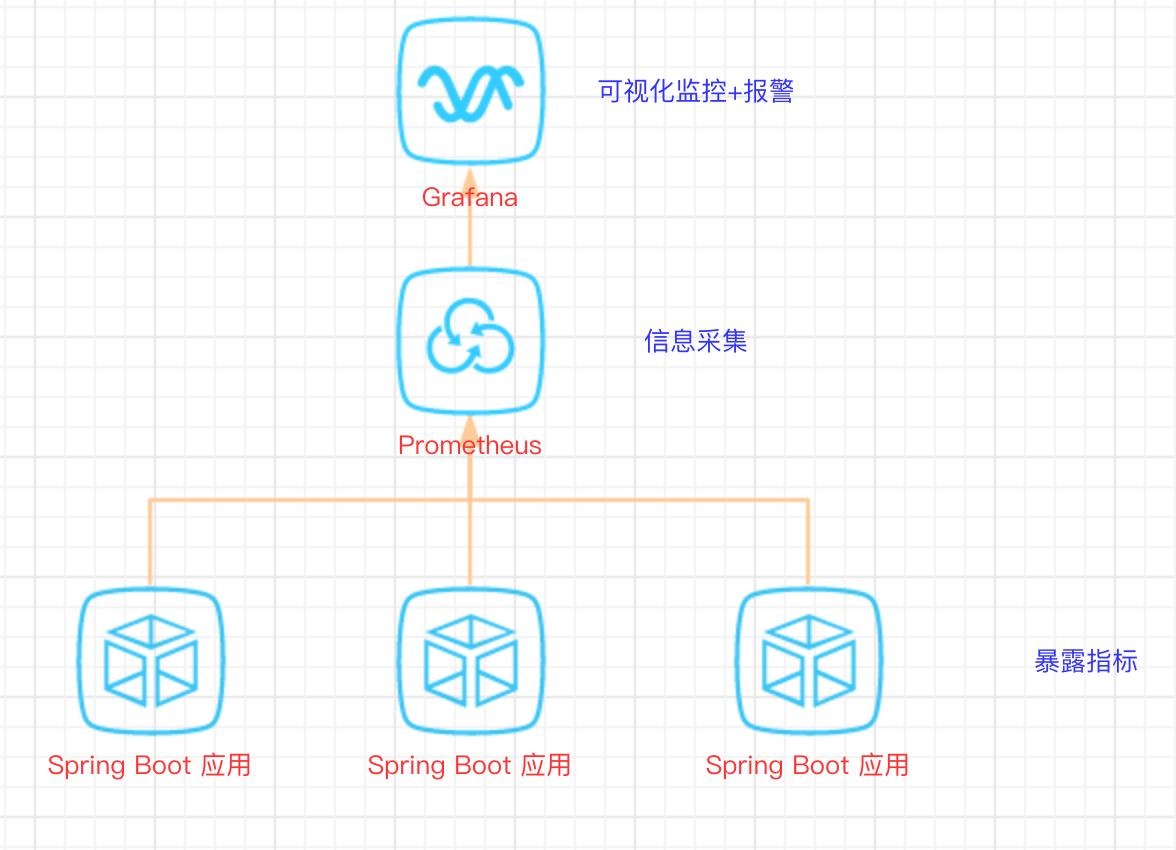
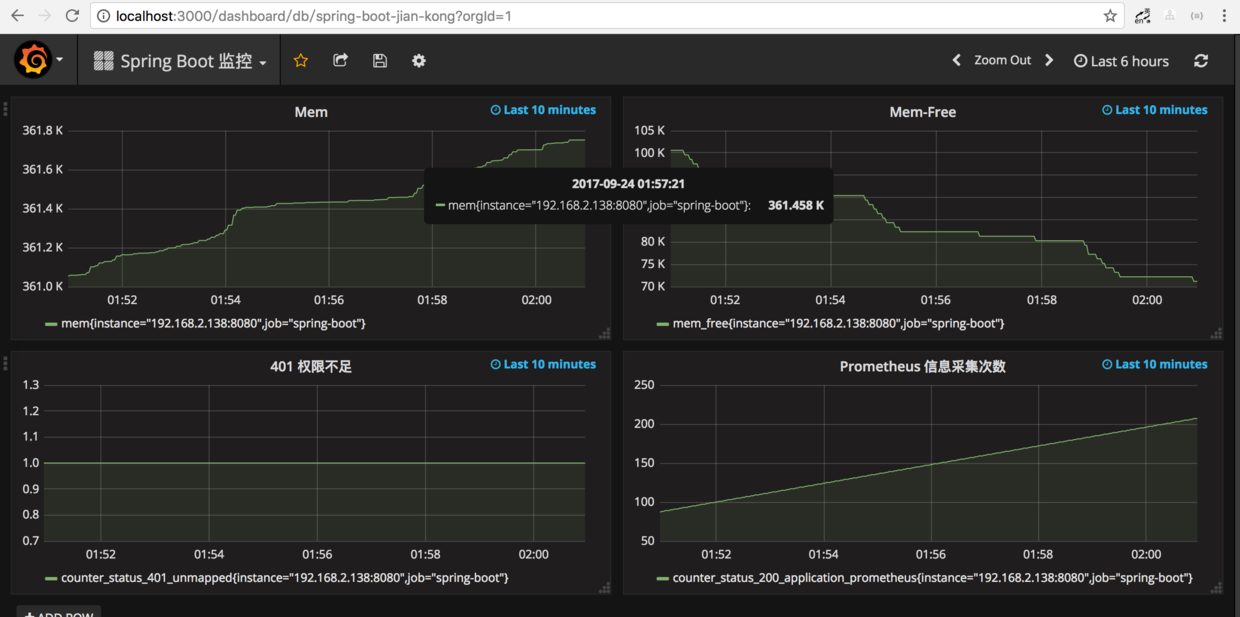
快速开始
1、Spring Boot 应用暴露监控指标【版本 1.5.7.RELEASE】
首先,添加依赖如下依赖:
        <dependency>

            <groupId>org.springframework.boot</groupId>

            <artifactId>spring-boot-starter-actuator</artifactId>

        </dependency>

        <dependency>

            <groupId>io.prometheus</groupId>

            <artifactId>simpleclient_spring_boot</artifactId>

            <version>0.0.26</version>

        </dependency>
然后,在启动类 Application.java 添加如下注解:
@SpringBootApplication

@EnablePrometheusEndpoint

@EnableSpringBootMetricsCollector

public class Application {

    public static void main(String[] args) {

        SpringApplication.run(Application.class, args);

    }

}
最后,配置默认的登录账号和密码,在 application.yml 中:
security:

  user:

    name: user

    password: pwd
提示:不建议配置
management.security.enabled: false
启动应用程序后,会看到如下一系列的 Mappings
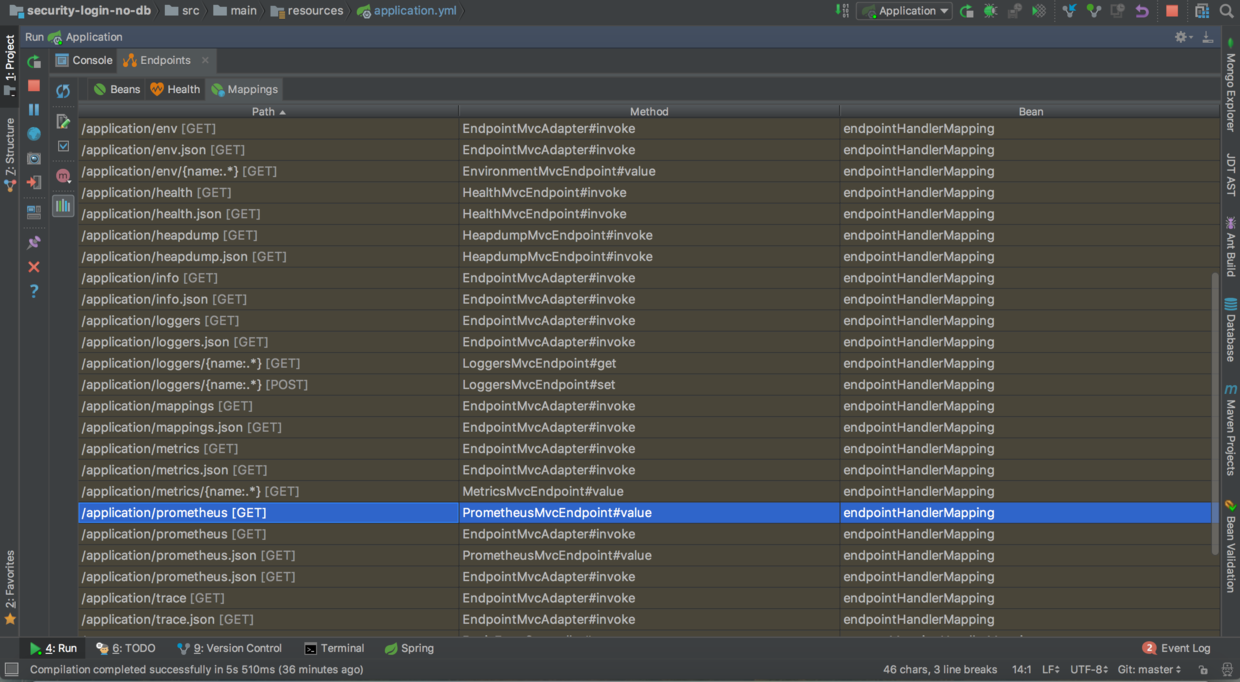
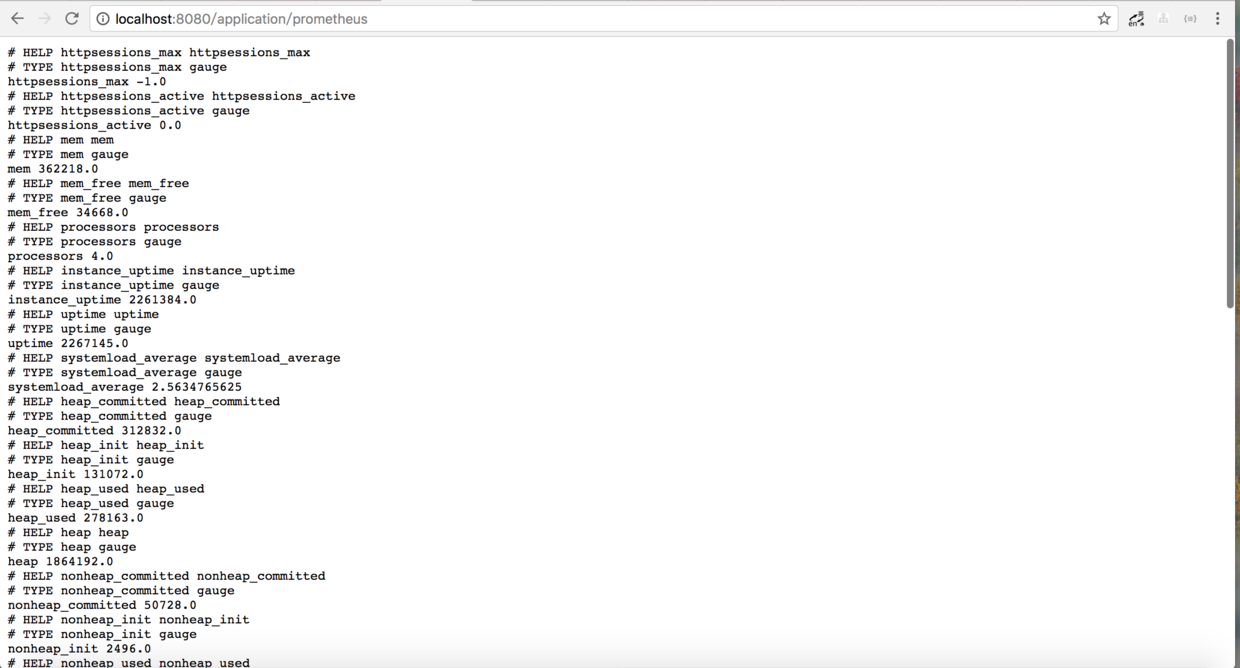
利用账号密码访问 http://localhost:8080/application/prometheus ,可以看到 Prometheus 格式的指标数据
2、Prometheus 采集 Spring Boot 指标数据
首先,获取 Prometheus 的 Docker 镜像:
$ docker pull prom/prometheus
然后,编写配置文件 prometheus.yml :
global:

  scrape_interval: 10s

  scrape_timeout: 10s

  evaluation_interval: 10m

scrape_configs:

  - job_name: spring-boot

    scrape_interval: 5s

    scrape_timeout: 5s

    metrics_path: /application/prometheus

    scheme: http

    basic_auth:

      username: user

      password: pwd

    static_configs:

      - targets:

        - 127.0.0.1:8080  #此处填写 Spring Boot 应用的 IP + 端口号
接着,启动 Prometheus :
$ docker run -d \

--name prometheus \

-p 9090:9090 \

-m 500M \

-v "$(pwd)/prometheus.yml":/prometheus.yml \

-v "$(pwd)/data":/data \

prom/prometheus \

-config.file=/prometheus.yml \

-log.level=info
最后,访问 http://localhost:9090/targets , 检查 Spring Boot 采集状态是否正常。

3、Grafana 可视化监控数据
首先,获取 Grafana 的 Docker 镜像:
$ docker pull grafana/grafana
然后,启动 Grafana:
$ docker run --name grafana -d -p 3000:3000 grafana/grafana
接着,访问 http://localhost:3000/ 配置 Prometheus 数据源:
Grafana 登录账号 admin 密码 admin
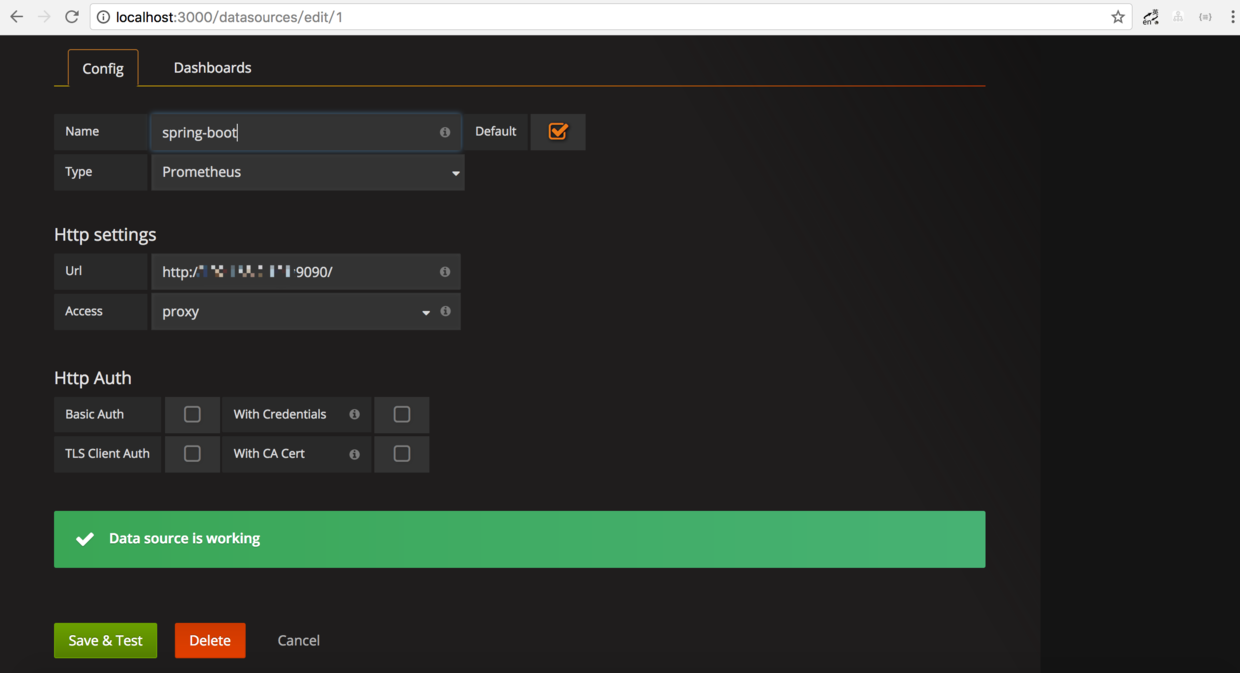
最后,配置单个指标的可视化监控面板:
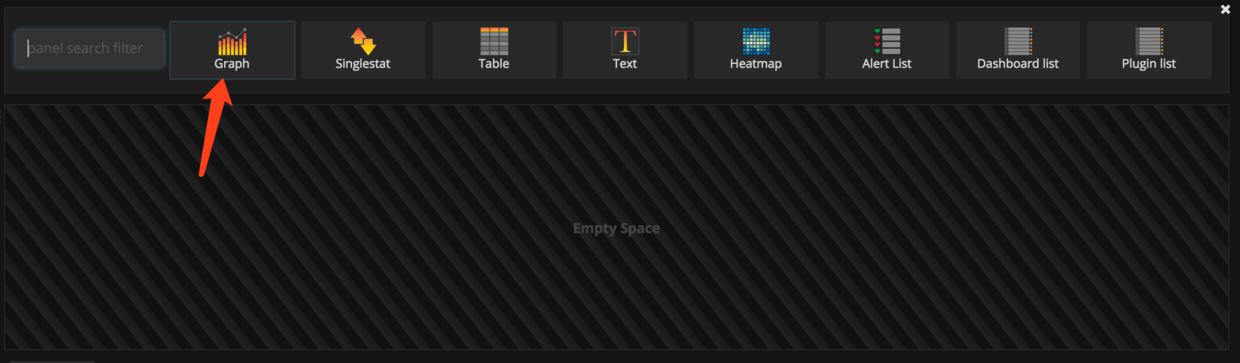
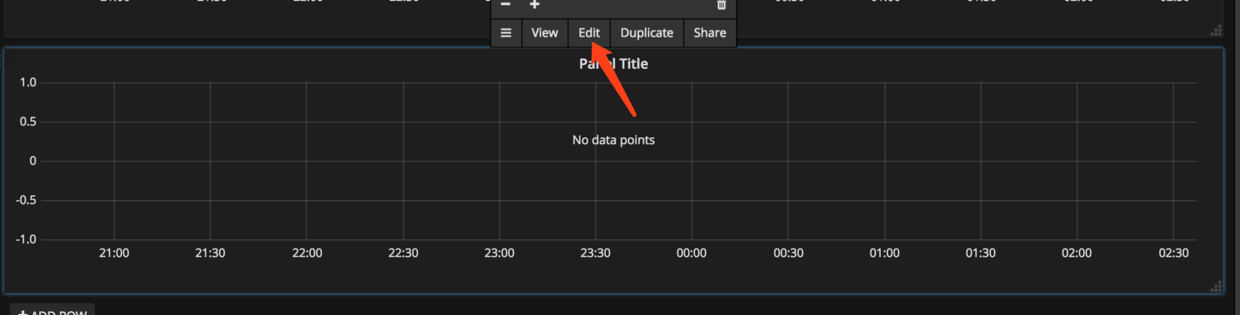
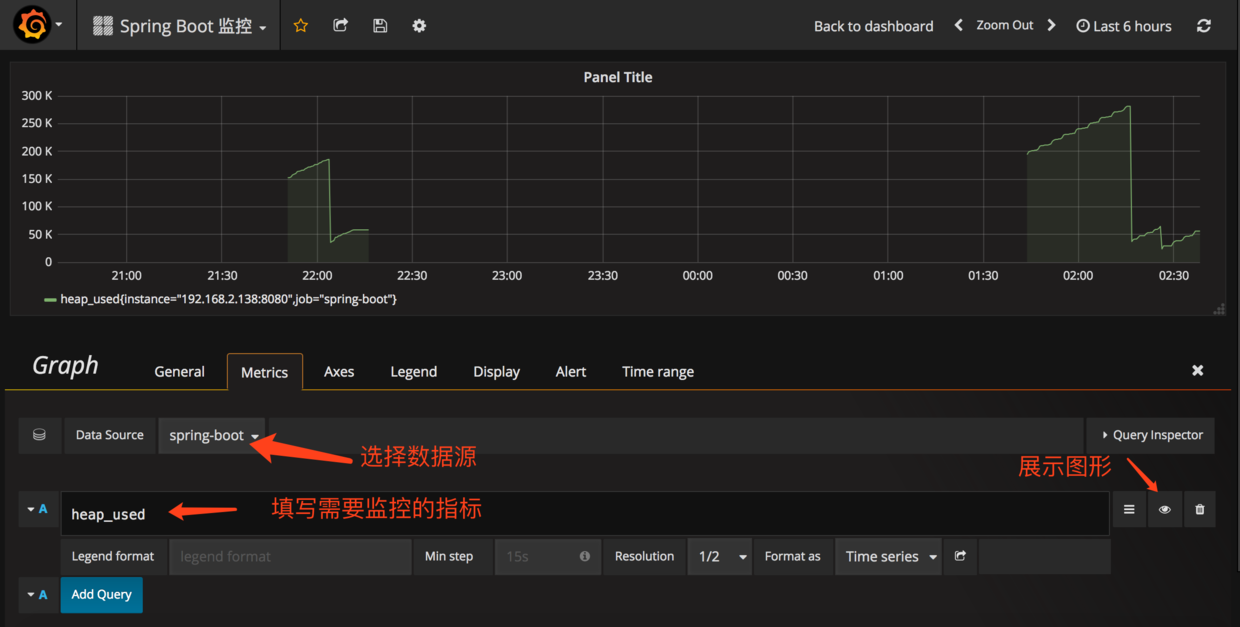
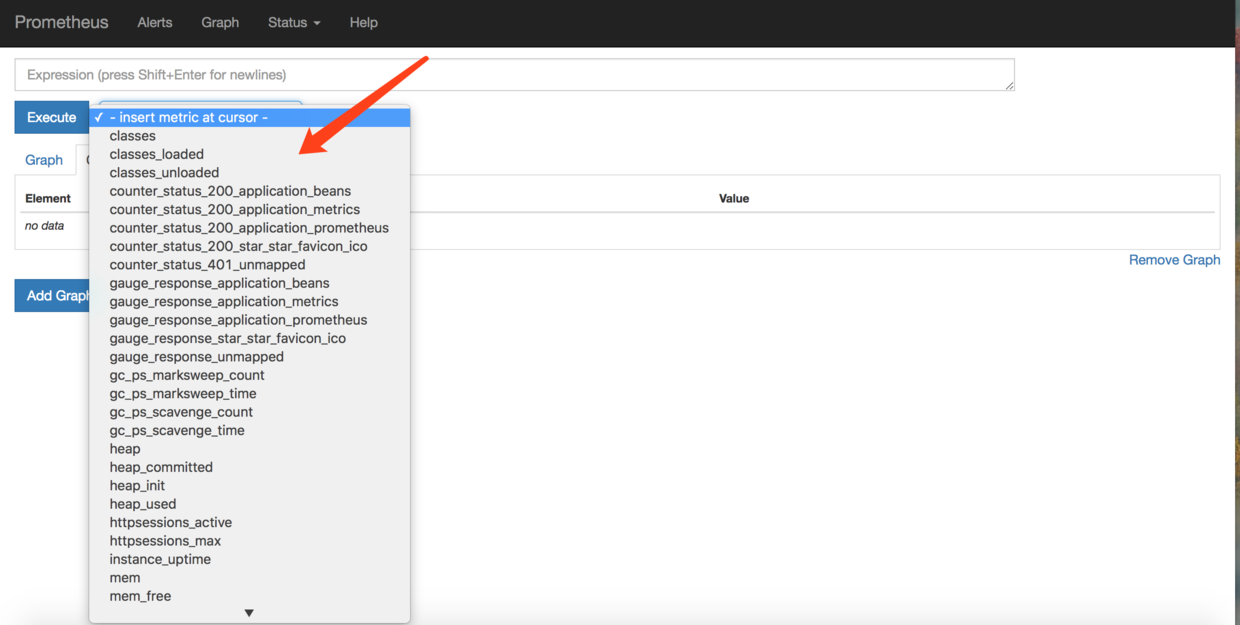
提示,此处不能任意填写,只能填已有的指标点,具体的可以在 Prometheus 的首页看到,即 http://localhost:9090/graph
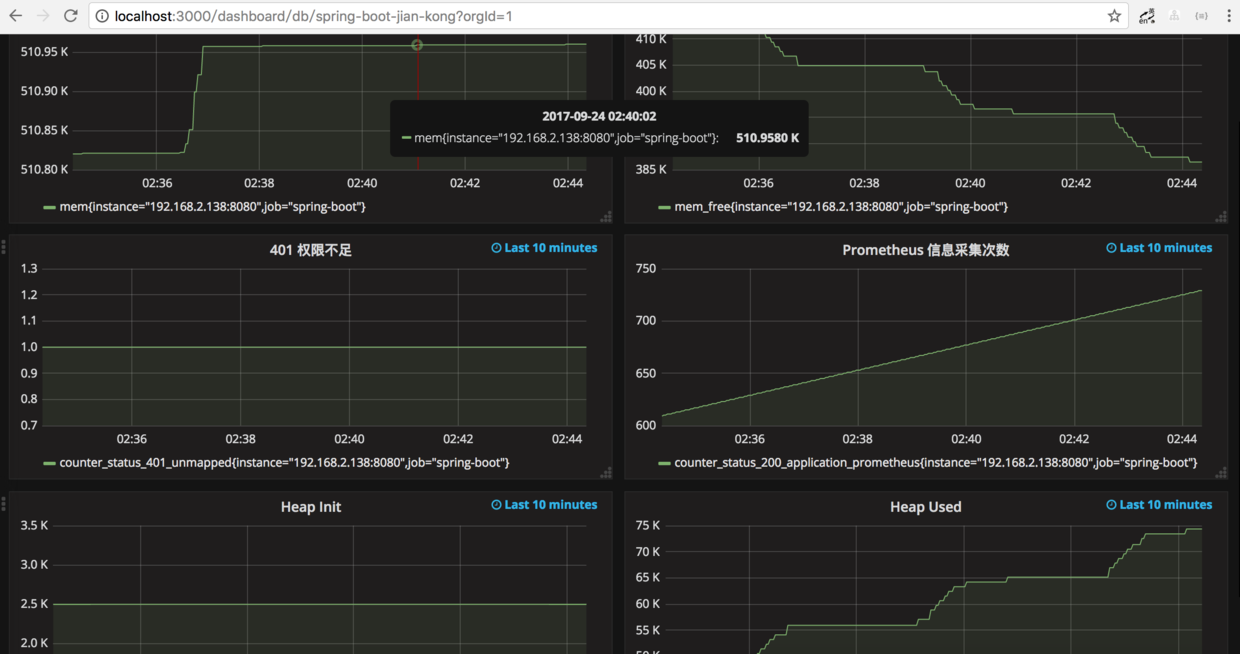
多配置几个指标之后,即可有如下效果:
参考文档
文末福利
Java 资料大全 链接:https://pan.baidu.com/s/1pUCCPstPnlGDCljtBVUsXQ 密码:b2xc
更多资料: 2020 年 精选阿里 Java、架构、微服务精选资料等,加 v ❤ :qwerdd111
转载,请保留原文地址,谢谢 ~
Spring-Boot-应用可视化监控的更多相关文章
- 微服务监控之三:Prometheus + Grafana Spring Boot 应用可视化监控
一.Springboot增加Prometheus 1.Spring Boot 应用暴露监控指标,添加如下依赖 <dependency> <groupId>org.springf ...
- 拒绝黑盒应用-Spring Boot 应用可视化监控
图文简介 逻辑关系 效果演示 快速开始 1.Spring Boot 应用暴露监控指标[版本 1.5.7.RELEASE] 首先,添加依赖如下依赖: <dependency> <gro ...
- (转)Spring Boot(二十):使用 spring-boot-admin 对 Spring Boot 服务进行监控
http://www.ityouknow.com/springboot/2018/02/11/spring-boot-admin.html 上一篇文章<Spring Boot(十九):使用 Sp ...
- Spring Boot Admin2.X监控的服务context-path问题
在使用Spring Boot Admin进行监控时,如果被监控的服务没有加context-path的话是不会有任何问题的,一旦服务加了context-path的配置,监控就会失败. 下图是正常情况的显 ...
- Spring Boot 2.x监控数据可视化(Actuator + Prometheus + Grafana手把手)
TIPS 本文基于Spring Boot 2.1.4,理论支持Spring Boot 2.x所有版本 众所周知,Spring Boot有个子项目Spring Boot Actuator,它为应用提供了 ...
- Spring Cloud第十三篇 | Spring Boot Admin服务监控
本文是Spring Cloud专栏的第十三篇文章,了解前十二篇文章内容有助于更好的理解本文: Spring Cloud第一篇 | Spring Cloud前言及其常用组件介绍概览 Spring Clo ...
- spring boot/cloud 应用监控
应用的监控功能,对于分布式系统非常重要.如果把分布式系统比作整个社会系统.那么各个服务对应社会中具体服务机构,比如银行.学校.超市等,那么监控就类似于警察局和医院,所以其重要性显而易见.这里说的,监控 ...
- spring Boot 学习(八、Spring Boot与与监控管理)
一.监控管理通过引入spring-boot-starter-actuator,可以使用Spring Boot为我们提供的准 生产环境下的应用监控和管理功能.我们可以通过HTTP,JMX,SSH协议来进 ...
- Spring Boot配置druid监控页功能
1.导入坐标 <?xml version="1.0" encoding="UTF-8"?> <project xmlns="http ...
- 基于spring boot admin 做监控的一些问题记录
问题一 各个健康节点权限问题 解决方式 加入权限模块 <dependency> <groupId>org.springframework.boot</groupId> ...
随机推荐
- sin之舞---蓝桥杯练习
问题描述 最近FJ为他的奶牛们开设了数学分析课,FJ知道若要学好这门课,必须有一个好的三角函数基本功.所以他准备和奶牛们做一个“Sine之舞”的游戏,寓教于乐,提高奶牛们的计算能力. 不妨设 An=s ...
- Dcoker 部署Tomcat+redis+war
1.首先安装redis docker run –name my-redis -d redis 2.安装tomcat并启动 docker run -p 8383:8383 –name tomcat -v ...
- cas sso单点登录 登录过程和登出过程原理说明
CAS大体原理我就不说了,网上一大把,不过具体交互流程没说清楚,所以有这篇文章,如果有错误,请多多指教 登录过程 用户第一次访问一个CAS 服务的客户web 应用时(访问URL :http://192 ...
- 《运筹学基础及应用》习题1.3(b)
习题1.3(b):分别用图解法和单纯形法求解下述线性规划问题,并对照指出单纯形表中的各基可行解分别对应图解法中可行域的哪一顶点.$\max z=2x_1+x_2$,$$s.t.\begin{cases ...
- 吴裕雄--天生自然python学习笔记:pandas模块强大的数据处理套件
用 Python 进行数据分析处理,其中最炫酷的就属 Pa ndas 套件了 . 比如,如果我 们通过 Requests 及 Beautifulsoup 来抓取网页中的表格数据 , 需要进行较复 杂的 ...
- SQL语句:把Excel文件中数据导入SQL数据库中的方法
1.从Excel文件中,导入数据到SQL数据库情况一.如果接受数据导入的表不存在 select * into jd$ from OPENROWSET('MICROSOFT.JET.OLEDB.4.0' ...
- mysql索引详细介绍
博客: https://blog.csdn.net/tongdanping/article/details/79878302#%E4%B8%89%E3%80%81%E7%B4%A2%E5%BC%95% ...
- 关于虚拟机VMware Tools安装中出现的无法自动安装VMCI驱动程序的问题
问题 解决方法 根据配置文件信息找到所在的虚拟机位置 找到后缀名为vmx的文件,右键打开方式中选择使用记事本打开 选择左上角编辑中的查找功能输入图中的查找内容后,点击查找下一个 将其原先的TRUE值改 ...
- vue使用日记
使用vue-cli生成单页应用框架, npm run serve之后即可开始修改src目录下面的js css文件(index.html可以保持不动), 自动热部署 , 前端框架就已经搭起来了. web ...
- JavaScript学习总结(八)正则表达式
转自:http://segmentfault.com/a/1190000000699097 基本概念 正则表达式是一种文本模式,包括普通字符(例如,a 到 z 之间的字母)和特殊字符(称为“元字符”) ...