
【转】WPF中Binding的技巧(一)
WPF中Binding的技巧(一)
在WPF应用的开发过程中Binding是一个非常重要的部分。
在实际开发过程中Binding的不同种写法达到的效果相同但事实是存在很大区别的。
这里将实际中碰到过的问题做下汇总记录和理解。
1. source = {binding} 和source = {binding RelativeSource={RelativeSource self},Path=DataContext}效果相同
理解:{binding} 不设定明确的绑定的source,这样binding就去从本控件类为开始根据可视树的层次结构自下而上查找不为空的Datacontext属性的值。
{binding RelativeSource={RelativeSource self},Path=DataContext}中RelativeSource self的含义为绑定的source为控件自身,这样binding 就绑定了自身控件的Datacontext。
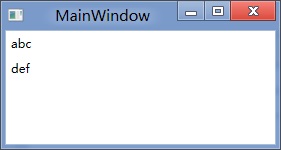
效果:
<StackPanel DataContext="abc">
<Label Content="{Binding}"></Label>
<Label Content="{Binding RelativeSource={RelativeSource Self},Path=DataContext}"></Label>
</StackPanel>

<StackPanel DataContext="abc">
<Label Content="{Binding}"></Label>
<Label DataContext="def" Content="{Binding RelativeSource={RelativeSource Self},Path=DataContext}"></Label>
</StackPanel>
2.在Template的Trigger中改变Template中某个样式控件的属性
<Style TargetType="{x:Type Button}">
<Setter Property="Template">
<Setter.Value>
<ControlTemplate TargetType="{x:Type Button}">
<Border>
<Label x:Name="PART_Label" Content="{TemplateBinding ContentA}" />
</Border>
<ControlTemplate.Triggers>
<Trigger Property="IsChecked" Value="True">
注: <Setter TargetName="PART_Label" Property="Content" Value="{Binding Path=ContentB, RelativeSource={RelativeSource TemplatedParent}}" />
</Trigger>
</ControlTemplate.Triggers>
</ControlTemplate>
</Setter.Value>
</Setter>
</Style>
当然把注:的这句改成<Setter TargetName="PART_Label" Property="Content" Value="{Binding Path=ContentB, RelativeSource={RelativeSource AncestorType={x:Type Button}}}">效果一样。
先写到这,下篇继续关注Binding中ElementName,RelativeSource,Source的相同点和区别。
转载时,请注明本文来源:www.cnblogs.com/tmywu
作者: 淘米部落
mail:tommywu23@126.com
【转】WPF中Binding的技巧(一)的更多相关文章
- [转]WPF中Binding的技巧
在WPF应用的开发过程中Binding是一个非常重要的部分. 在实际开发过程中Binding的不同种写法达到的效果相同但事实是存在很大区别的. 这里将实际中碰到过的问题做下汇总记录和理解. 1. so ...
- WPF中Binding使用StringFormat格式化字符串方法
原文:WPF中Binding使用StringFormat格式化字符串方法 货币格式 <TextBlock Text="{Binding Price, StringFormat={}{0 ...
- 整理:WPF中Binding的几种写法
原文:整理:WPF中Binding的几种写法 目的:整理WPF中Bind的写法 <!--绑定到DataContext--> <Button Content="{Bindin ...
- WPF之Binding深入探讨
原文:http://blog.csdn.net/fwj380891124/article/details/8107646 1,Data Binding在WPF中的地位 程序的本质是数据+算法.数据会在 ...
- WPF的Binding功能解析
1,Data Binding在WPF中的地位 程序的本质是数据+算法.数据会在存储.逻辑和界面三层之间流通,所以站在数据的角度上来看,这三层都很重要.但算法在3层中的分布是不均匀的,对于一个3层结构的 ...
- WPF之Binding的使用
引出: 在WPF中Binding可以比作数据的桥梁,桥梁的两端分别是Binding的源(Source)和目标(Target).一般情况下,Binding源是逻辑层对象,Binding目标是UI层的控件 ...
- WPF之Binding深入探讨--Darren
1,Data Binding在WPF中的地位 程序的本质是数据+算法.数据会在存储.逻辑和界面三层之间流通,所以站在数据的角度上来看,这三层都很重要.但算法在3层中的分布是不均匀的,对于一个3层结构的 ...
- 深入浅出WPF之Binding的使用(一)
在WPF中Binding可以比作数据的桥梁,桥梁的两端分别是Binding的源(Source)和目标(Target).一般情况下,Binding源是逻辑层对象,Binding目标是UI层的控件对象:这 ...
- WPF之Binding【转】
WPF之Binding[转] 看到WPF如此之炫,也想用用,可是一点也不会呀. 从需求谈起吧: 首先可能要做一个很炫的界面.见MaterialDesignInXAMLToolKit. 那,最主要的呢, ...
随机推荐
- Error: no `server' JVM at...解决办法 【转】
出现问题:用java -jar XXX.jar -server -Xms900m -Xmx900m 提示错误Error: no `server' JVM at `C:\Program Files\Ja ...
- How does CCFileUTils::fullPathForFilename work
OverView The purpose of this document is show you how does function CCFileUtils::fullPathForFilename ...
- Eclipse的LogCat总是自动清空怎么办?
我们经常会遇到这样一种情况,由于Log太多,导致我们的LogCat总是被自动清空,该怎么办?错误信息看不到,How to do? 其实,我们通过adb shell来解决这个问题. 1.配置环境变量 环 ...
- Java开发之I/O读取文件实例详解
在java开发或者android开发中,读取文件是不可避免的,以下对java开发中读取文件做了归纳和详解: 1.按字节读取文件内容2.按字符读取文件内容3.按行读取文件内容 4.随机读取文件内容 pa ...
- JavaScript跨域解决办法
在找到跨域解决办法之前,我们要先弄清楚一些基本概念 什么是跨域? 什么是“同源策略”? 跨文档消息通信 & 跨域请求数据 主域相同而子域不同 不同域名的跨域访问 什么是跨域? 简单地理解就是因 ...
- Netbeans7.0完美中文+Consolas字体显示配置(亲测可用)
最近把开发环境从Eclipse迁移到了Netbeans上面.因为Netbeans已经相当优秀,速度快功能也不必Eclipse差,但是一只有 一个问题一直让我对eclipse非常纠结:如果把字体选择为C ...
- My97DatePicker 没有权限问题
引自:http://blog.sina.com.cn/s/blog_4b7809800100wkv4.html 今天遇到了My97DatePicker在不同IE版本中使用时有时出现没有权限错误的问题, ...
- ABI Management
官方文档:https://developer.android.com/ndk/guides/abis.html?hl=is 关于支持指令集,在上表官方文档都表达清楚了.我们认为避免多个指令集浪费资源. ...
- 学会用Reflector调试我们的MVC框架代码
我们知道,现在能调试.net程序通常有两个,第一个是ILSpy,还是一个是Reflector,这两个小反编译软件算是我们研究底层代码中所拥有的一把 锋利小尖刀~~~,比如你看到的ILSpy这样的界面图 ...
- .NET Entity Framework入门简介及简单操作
Entity Framework是微软借鉴ORM思想开发自己的一个ORM框架. ORM就是将数据库表与实体对象(相当于三层中的Model类)相互映射的一种思想. 最大的优点就是非常方便的跨数据库平台. ...