
prometheus+grafana监控mysql
prometheus+grafana监控mysql
1、安装配置MySQL官方的 Yum Repository(有mysql只需设置监控账号即可)
[root@localhost ~]# wget -i -c http://dev.mysql.com/get/mysql57-community-release-el7-10.noarch.rpm[root@localhost ~]# yum -y install mysql57-community-release-el7-10.noarch.rpm[root@localhost ~]# yum -y install mysql-community-server
若安装失败可能和原有的mysql有冲突,卸载原有mysql:
yum remove mariadb-config-3:10.1.20-2.el7.x86_64
[root@localhost ~]# systemctl start mysqld.service[root@localhost ~]# systemctl status mysqld.service

此时MySQL已经开始正常运行,不过要想进入MySQL还得先找出此时root用户的密码,通过如下命令可以在日志文件中找出密码:
[root@localhost ~]# grep "password" /var/log/mysqld.log

如下命令进入数据库:
[root@localhost ~]#mysql -uroot -p输入初始密码,此时不能做任何事情,因为MySQL默认必须修改密码之后才能操作数据库:(这里有个问题,新密码设置的时候如果设置的过于简单会报错:)mysql> ALTER USER 'root'@'localhost' IDENTIFIED BY 'new password';mysql设置监控账号(要设置远程可连接)
CREATE USER 'exporter'@'localhost' IDENTIFIED BY 'password' WITH MAX_USER_CONNECTIONS 3;
GRANT PROCESS, REPLICATION CLIENT, SELECT ON *.* TO 'exporter'@'localhost';
flush privileges;
下面是我设置的远程连接步骤,请参考:
 1.登录MySQL
mysql -uroot -proot
2.进入数据库
use mysql;
3.查看是否有user表
show tables;
4.更改lost字段值
update user set host='%' where host = 'localhost';
5.刷新
flush privileges;
6.查看
select host,user from user;
2、mysql_exporter安装设置
wget https://github.com/prometheus/mysqld_exporter/releases/download/v0.10.0/mysqld_exporter-0.10.0.linux-amd64.tar.gz
tar -zxvf mysqld_exporter-0.11.0.linux-amd64.tar.gz

在安装包解压目录新增配置.my.cnf文件如下: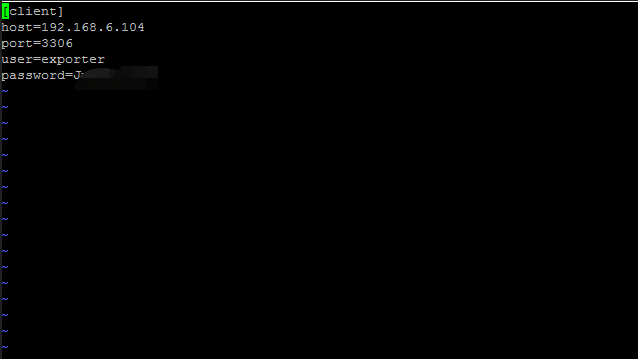
启动
./mysqld_exporter --config.my-cnf=./.my.cnf &
注意:
需要保持9104端口局域网可以访问
3、prometheus配置(安装prometheus的机器)
prometheus配置如下:
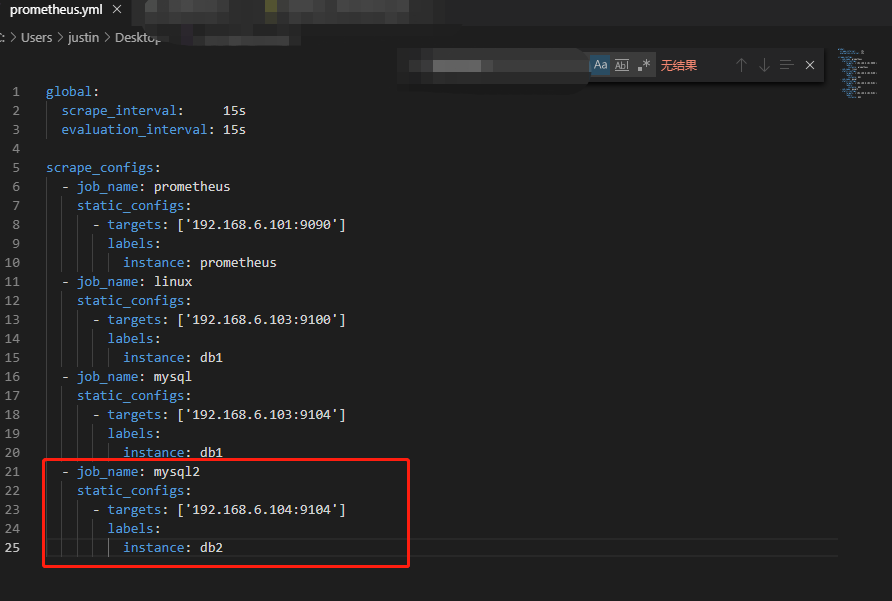
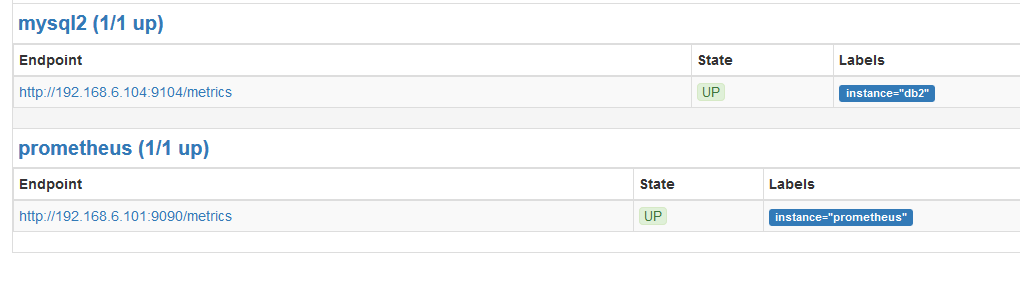
4、grafana操作(安装grafana的机器)
Mysql主题下载地址:https://raw.githubusercontent.com/percona/grafana-dashboards/master/dashboards/MySQL_Overview.json
其他主题下载地址:https://github.com/percona/grafana-dashboards
下载好主题后进行主题导入即可。

prometheus+grafana监控mysql的更多相关文章
- [转帖]安装prometheus+grafana监控mysql redis kubernetes等
安装prometheus+grafana监控mysql redis kubernetes等 https://www.cnblogs.com/sfnz/p/6566951.html plug 的模式进行 ...
- 使用Prometheus+Grafana监控MySQL实践
一.介绍Prometheus Prometheus(普罗米修斯)是一套开源的监控&报警&时间序列数据库的组合,起始是由SoundCloud公司开发的.随着发展,越来越多公司和组织接受采 ...
- Prometheus+Grafana监控MySQL、Redis数据库
俗话说,没有监控的系统就是在裸奔,好的监控就是运维人员的第三只手,第三只眼.本文将使用prometheus及Grafana搭建一套监控系统来监控主机及数据库(MySQL.Redis). 1. 安装G ...
- Prometheus + Grafana 监控(mysql 和redis)
1.监控MySQL(mysqld-exporter) https://github.com/prometheus/mysqld_exporter/releases/download/v0.11.0/m ...
- prometheus+grafana监控mysql最佳实践
导航 前言 环境准备 安装Docker 安装prometheus 安装mysqld_exporter prometheus采集数据 安装grafana grafana配置数据源 感谢您的阅读,预计阅读 ...
- 技术分享 | Prometheus+Grafana监控MySQL浅析
GreatSQL社区原创内容未经授权不得随意使用,转载请联系小编并注明来源. 简介 Prometheus 一套开源的监控&报警&时间序列数据库的组合,通常 Kubernetes 中都会 ...
- 安装prometheus+grafana监控mysql redis kubernetes等
1.prometheus安装 wget https://github.com/prometheus/prometheus/releases/download/v1.5.2/prometheus-1.5 ...
- cAdvisor+Prometheus+Grafana监控docker
cAdvisor+Prometheus+Grafana监控docker 一.cAdvisor(需要监控的主机都要安装) 官方地址:https://github.com/google/cadvisor ...
- [转帖]Prometheus+Grafana监控Kubernetes
原博客的位置: https://blog.csdn.net/shenhonglei1234/article/details/80503353 感谢原作者 这里记录一下自己试验过程中遇到的问题: . 自 ...
随机推荐
- 《Glibc内存管理》笔记DAY4
目录 分箱式内存管理 Small bins Large bins 内容来源 分箱式内存管理 对于空闲的 chunk,ptmalloc 采用分箱式内存管理方式,根据空闲 chunk 的大小和处于的状 ...
- Go 与 JSON
Go 中通过标准库encoding/json.encoding.xml.encoding/asn1和其他库对 JSON.XML.ASN.1 和其他类型的标准的编码和解码提供了良好的支持,这里对使用最多 ...
- 在phpstorm中如何对比文件呢?
有两种方法: 在phpstorm中左侧的资源管理器中,按住键盘上的CTRL键,然后鼠标右键,点击菜单中的"Compare Tow Files",就可以了,如下图 在phpstorm ...
- Swift_IOS之UIActivityIndicatorView加载齿轮控件
// // ViewController.swift // helloIOS // // Created by loaderman on 2019/1/25. // Copyright © 2019年 ...
- EasyUI实现图片的上传后与其他文本框的提交以及DataGrid中图片的展示
图片即文件,在jsp中文件上传很简单,一个type为file的input,一个form指定enctype为multipart/form-data,通过post提交到后台利用apache的commons ...
- 使用Lock对象实现同步效果
Lock是一个接口,为了使用一个Lock对象,需要用到 Lock lock = new ReentrantLock(); 与 synchronized (someObject) 类似的,loc ...
- 123457---com.twoapp.shuXueYouXi---小学数学口算
com.twoapp.shuXueYouXi---小学数学口算
- python基础之知识补充-作用域、特殊语法
python作用域 无函数的作用域 在python中没有块级作用域 什么叫块级作用域呢?先来看个例子: if 1 == 1: name= 'alex' print(name) 运行结果为alex 在j ...
- 利用python批量修改word文件名的方法示例
利用python批量修改word文件名的方法示例 最近不小心把硬盘给格式化了,由于当时的文件没有备份,所以一下所有的文件都没有了,于是只能采取补救措施,用文件恢复软件恢复了一部分的数据出来,但是恢复完 ...
- 蒙特卡罗方法计算pi
import scala.math.random object LocalPi { def main(args: Array[String]) { var count = 0 for (i <- ...